
Introduction
Thank you for choosing the Cantonape 5000W Power Inverter. This device converts 12V DC power from your vehicle battery or solar system into 110V/120V AC household power, allowing you to operate various electronic devices and appliances on the go or during power outages. This manual provides essential information for safe and efficient operation, installation, and maintenance of your inverter.

Image: The Cantonape 5000W Power Inverter in use, powering a coffee maker and charging a smartphone, demonstrating its wide range of compatibility.
Safety Instructions
Please read all safety warnings and instructions carefully before using the inverter to prevent injury or damage to the unit and connected devices. Keep this manual for future reference.
- Ventilation: Ensure adequate ventilation around the inverter. Do not block cooling vents.
- Environment: Operate the inverter in a dry, cool, and well-ventilated area. Avoid direct sunlight, heat sources, and moisture.
- Flammable Materials: Do not operate the inverter near flammable liquids, gases, or materials.
- Electrical Connections: Always connect the inverter to a 12V DC power source. Ensure correct polarity (positive to positive, negative to negative). Incorrect connections can cause severe damage.
- Grounding: The inverter should be properly grounded.
- Load Capacity: Do not exceed the inverter's continuous power rating (5000W) or surge power rating (10000W). Overloading can cause damage and trigger protection modes.
- Children: Keep the inverter out of reach of children.
- Maintenance: Do not attempt to disassemble or modify the inverter. Refer all servicing to qualified personnel.
Package Contents
Verify that all items are present in your package:
- Cantonape 5000W Power Inverter
- Battery Cables (Red for Positive, Black for Negative)
- Remote Controller
- Instruction Manual (This document)
Product Features and Components
Familiarize yourself with the various parts of your Cantonape Power Inverter:
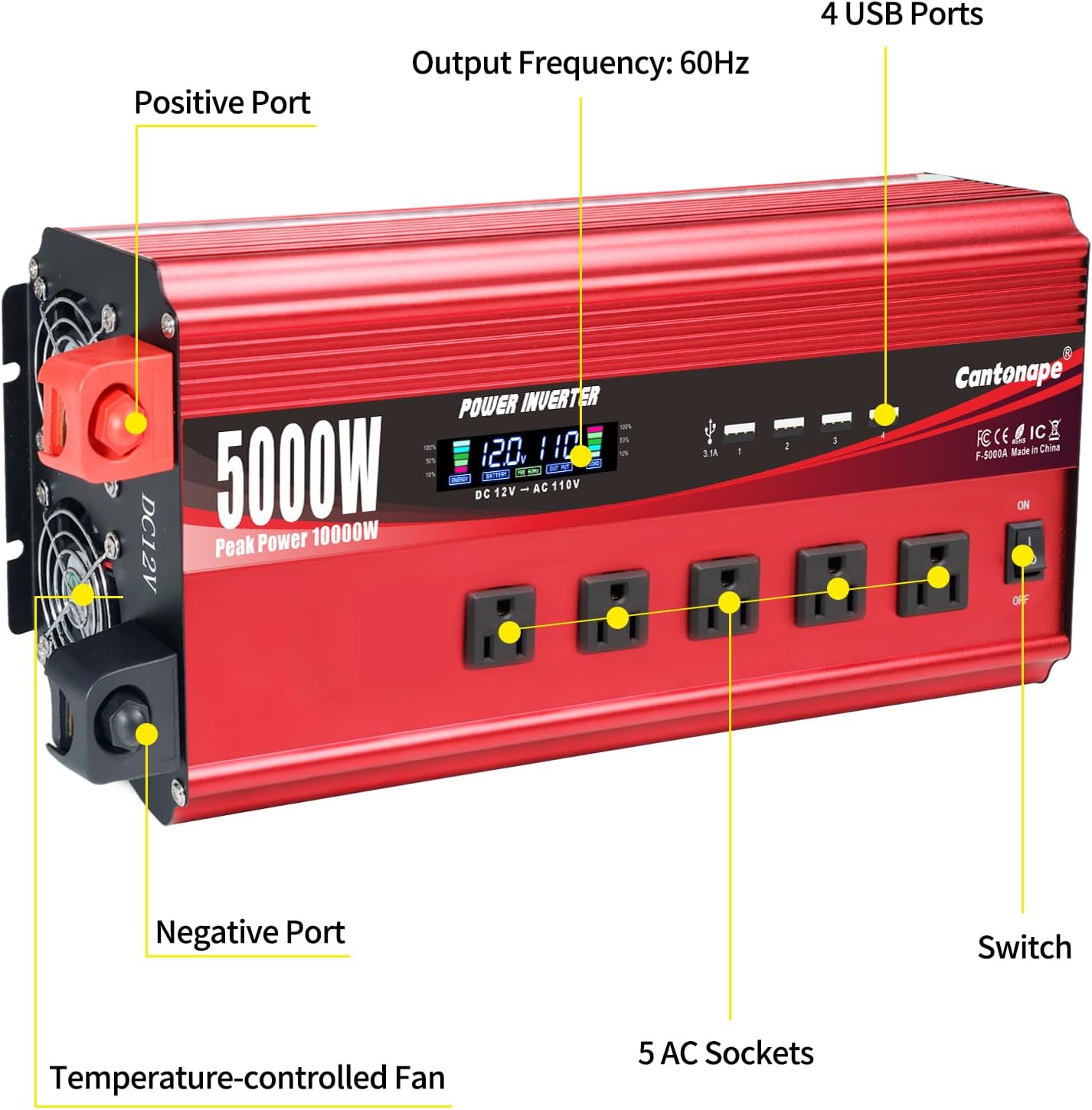
Image: Labeled diagram of the Cantonape 5000W Power Inverter highlighting its key components.
- DC Input Terminals: Red for positive (+), Black for negative (-). Connect to your 12V DC battery.
- AC Outlets: Five (5) 110V/120V AC outlets for connecting standard appliances.
- USB Ports: Four (4) 3.1A USB ports for charging mobile devices.
- LCD Display: Provides real-time information on input/output voltage, battery capacity, load capacity, and output frequency. Also displays error codes.
- Power Switch: ON/OFF button for the inverter.
- Temperature-Controlled Cooling Fan: Automatically activates to prevent overheating.
- Remote Control Port: For connecting the included remote controller.

Image: The Cantonape 5000W Power Inverter shown with its wireless remote control, which allows for convenient operation from a distance of up to 160 feet without obstruction.
Setup Instructions
Follow these steps to properly set up your power inverter:
- Choose a Location: Select a dry, cool, and well-ventilated area for the inverter. Ensure there is sufficient space around the unit for airflow.
- Connect Battery Cables:
- Connect the red battery cable to the positive (+) terminal of your 12V DC battery.
- Connect the other end of the red cable to the positive (+) terminal on the inverter.
- Connect the black battery cable to the negative (-) terminal of your 12V DC battery.
- Connect the other end of the black cable to the negative (-) terminal on the inverter.
Important: Ensure all connections are tight and secure to prevent loose connections, which can cause overheating or damage.
- Grounding: Connect the inverter's grounding terminal to a proper earth ground or vehicle chassis ground.
- Remote Control (Optional): If desired, plug the remote control cable into the designated port on the inverter.
Operating Instructions
Once the inverter is properly set up, follow these steps for operation:
- Power On: Press the ON/OFF switch on the inverter or use the remote controller to turn the unit on. The LCD display will illuminate.
- Monitor LCD Display: The intelligent LCD display provides crucial operational information:

Image: Detailed view of the inverter's LCD display, indicating various parameters like battery capacity, voltage, frequency, output, and load.
- Battery Capacity: Shows the remaining charge of your 12V battery.
- Battery Voltage: Displays the input voltage from the battery.
- Output Frequency: Indicates the AC output frequency (60Hz).
- Output Voltage: Shows the AC output voltage (110V/120V).
- Load Capacity: Displays the current power draw of connected devices.
- Connect Devices: Plug your AC appliances into the 5 AC outlets or USB devices into the 4 USB ports. Ensure the total wattage of all connected devices does not exceed 5000W.
- Power Off: When finished, turn off all connected appliances, then press the ON/OFF switch on the inverter or use the remote controller to power down the unit.
Maintenance
Regular maintenance ensures optimal performance and longevity of your inverter:
- Cleaning: Periodically clean the exterior of the inverter with a dry, soft cloth. Ensure cooling vents are free from dust and debris. Do not use liquid cleaners.
- Connections: Regularly check battery cable connections to ensure they remain tight and free from corrosion.
- Storage: If storing the inverter for an extended period, disconnect it from the battery and store it in a cool, dry place.
- Battery Health: Ensure your 12V battery is well-maintained and charged to prolong its life and the inverter's efficiency.
Troubleshooting
The intelligent LCD display will show error codes if an abnormal condition occurs. Refer to the table below for common error codes and their solutions:

Image: The inverter's LCD display showing an error code, with a comprehensive guide to understanding and resolving common issues.
| Error Code | Description | Possible Solution |
|---|---|---|
| E-1 | Low Voltage Protection | Recharge or replace the 12V battery. Check battery connections. |
| E-2 | High Voltage Protection | Check the input voltage from the battery. Ensure it does not exceed 15V. |
| E-3 | Overtemperature Protection | Reduce the load, ensure proper ventilation, and allow the inverter to cool down. Clean cooling vents if blocked. |
| E-4 | Overload Protection | Reduce the total wattage of connected appliances. Ensure the load does not exceed 5000W continuous power. |
| E-5 | Short Circuit Protection | Disconnect all AC and USB devices. Check for any short circuits in connected cables or appliances. |
| E-6 | Repeated Faults Shutdown, Restart Required | This indicates multiple protection triggers. Address the underlying issue (e.g., overload, low voltage) and then restart the inverter by cycling the power switch or disconnecting/reconnecting the battery. |
Specifications
| Feature | Specification |
|---|---|
| Brand | Cantonape |
| Model Name | F-5000A |
| Model Number | 5000W-12V |
| Input Voltage | 12 Volts (DC) |
| Output Voltage | 110-120 Volts (AC) |
| Continuous Output Power | 5000 Watts |
| Peak Output Power | 10000 Watts |
| Electrical Output Waveform | Modified Sine Wave |
| Frequency | 60 Hz |
| Conversion Efficiency | > 90% |
| AC Outlets | 5 |
| USB Ports | 4 x 3.1A |
| Display Type | LCD |
| Item Dimensions (L x W x H) | 15.04" x 6.3" x 3.94" |
| Color | Red |
| Protection Features | Overload, Short Circuit, Overheat, Reverse Polarity, Under/Over Voltage |
Warranty and Support
The Cantonape 5000W Power Inverter comes with a 12-month warranty from the date of purchase. This warranty covers manufacturing defects and workmanship under normal use.
For technical support, warranty claims, or any questions regarding your product, please contact the seller or Cantonape customer service through the platform where you purchased the item. Please have your model number (5000W-12V) and purchase details ready when contacting support.