
1. Important Safety Information
Please read all instructions carefully before assembly and use. Retain this manual for future reference.
- Always follow the assembly instructions carefully.
- Keep electrical components away from water or damp environments.
- Do not use the vanity if the power cord or any electrical component is damaged.
- Unplug the vanity from the power source when not in use or when cleaning.
- Ensure all connections are secure before use.
2. Package Contents
Verify that all components are present before beginning assembly. If any parts are missing or damaged, please contact customer support.
- Vanity Desk Components
- LED Mirror with integrated lighting
- Padded Stool
- Assembly Hardware (screws, dowels, etc.)
- Assembly Tools (e.g., Allen wrench)
- Power Cord

Figure 2.1: Labeled diagram of vanity desk components.
3. Setup and Assembly
Assembly is required for this vanity desk. The estimated assembly time is 60-90 minutes. All necessary tools, hardware, and clear step-by-step illustrated instructions are included in the package.
- Unpack all components and verify against the package contents list.
- Follow the provided step-by-step illustrated instructions to assemble the vanity desk frame.
- Attach the LED mirror unit to the desk frame as indicated in the instructions.
- Assemble the padded stool.
- Ensure all screws and fasteners are tightened securely. Do not overtighten.
- Place the vanity desk on a flat, stable surface.
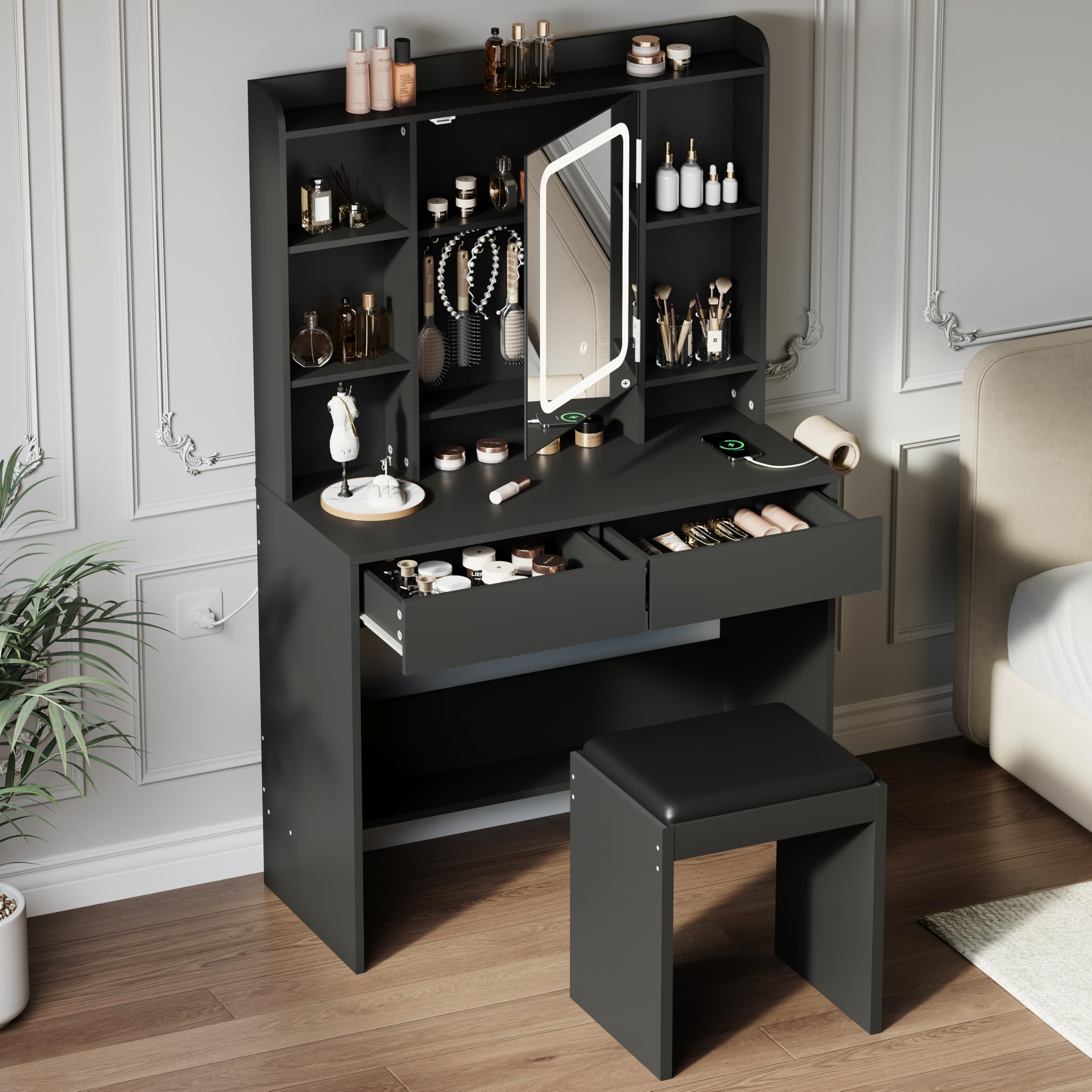
Figure 3.1: Fully assembled vanity desk.
4. Operating Instructions
4.1 LED Mirror Lighting
The integrated LED mirror features adjustable lighting modes and brightness.
- Power On/Off: Lightly touch the designated touch screen button on the mirror to turn the lights on or off.
- Change Lighting Mode: Short press the touch screen button to cycle through the 3 adjustable lighting modes: Cold White, Warm White, and Warm Yellow.
- Adjust Brightness: Long press the touch screen button to adjust the brightness level. Release when the desired brightness is achieved.

Figure 4.1: LED mirror with 3 lighting modes and adjustable brightness.
4.2 Built-in Charging Station
The vanity desk includes a built-in power strip for convenience.
- Connect the vanity's main power cord to a standard wall outlet.
- Use the 2 AC Outlets (125V/12A) to power hair tools or other small appliances.
- Use the USB Port (5V/2A) and Type-C Port to charge mobile devices.

Figure 4.2: Built-in charging station and hair dryer rack.
4.3 Storage Features
The vanity desk offers various storage options to keep your items organized.
- Flip-Open Mirror with Hidden Storage: The mirror swings open up to 70 degrees to reveal hidden storage space behind it, ideal for jewelry or smaller accessories.
- Deep Drawers: Two deep drawers provide ample space for cosmetics, brushes, and other essentials.
- Open Side Shelves: Four open shelves on either side of the mirror offer easy access and display for frequently used items.
- Hair Dryer Rack: An integrated rack on the side of the desk keeps your hair dryer conveniently accessible.

Figure 4.3: Hidden storage behind the flip-open mirror.
5. Maintenance
Proper care will ensure the longevity of your vanity desk.
- Cleaning: Wipe surfaces with a soft, damp cloth. Avoid abrasive cleaners or harsh chemicals that may damage the finish.
- Electrical Components: Always unplug the vanity before cleaning any electrical parts or the mirror. Use a dry cloth for the mirror and light components.
- Spills: Immediately wipe up any spills to prevent damage to the wood finish.
- Inspection: Periodically check all screws and connections to ensure they remain tight. Retighten if necessary.
6. Troubleshooting
If you encounter issues with your vanity desk, refer to the following common solutions:
- Lights Not Working:
- Ensure the vanity is properly plugged into a working power outlet.
- Check if the power outlet itself is functional (test with another device).
- Verify that the touch sensor on the mirror is clean and unobstructed.
- USB/AC Outlets Not Providing Power:
- Confirm the vanity is plugged in and the main power is on.
- Test with different devices to rule out device-specific issues.
- Desk Wobbles:
- Ensure the vanity is placed on a level surface.
- Check and tighten all assembly screws and fasteners.
If the problem persists, please contact customer support for further assistance.
7. Specifications
| Feature | Specification |
|---|---|
| Model Number | ssssxPTG_3358JLDM |
| Dimensions (W x D x H) | 35.43" x 15.75" x 57.09" (90cm x 40cm x 145cm) |
| Material | MDF Wood |
| Color | Black |
| Item Weight | 72.8 lbs (33 kg) |
| Number of Drawers | 2 |
| Mirror Lighting | LED, 3 Color Modes (Cold White, Warm White, Warm Yellow), Adjustable Brightness |
| Power Outlets | 2 x 125V/12A AC Outlets |
| USB Ports | 1 x 5V/2A USB Port, 1 x Type-C Port |
| Power Cord Length | 4.9 Feet |
| Weight Capacity (Desktop) | 50 lbs |
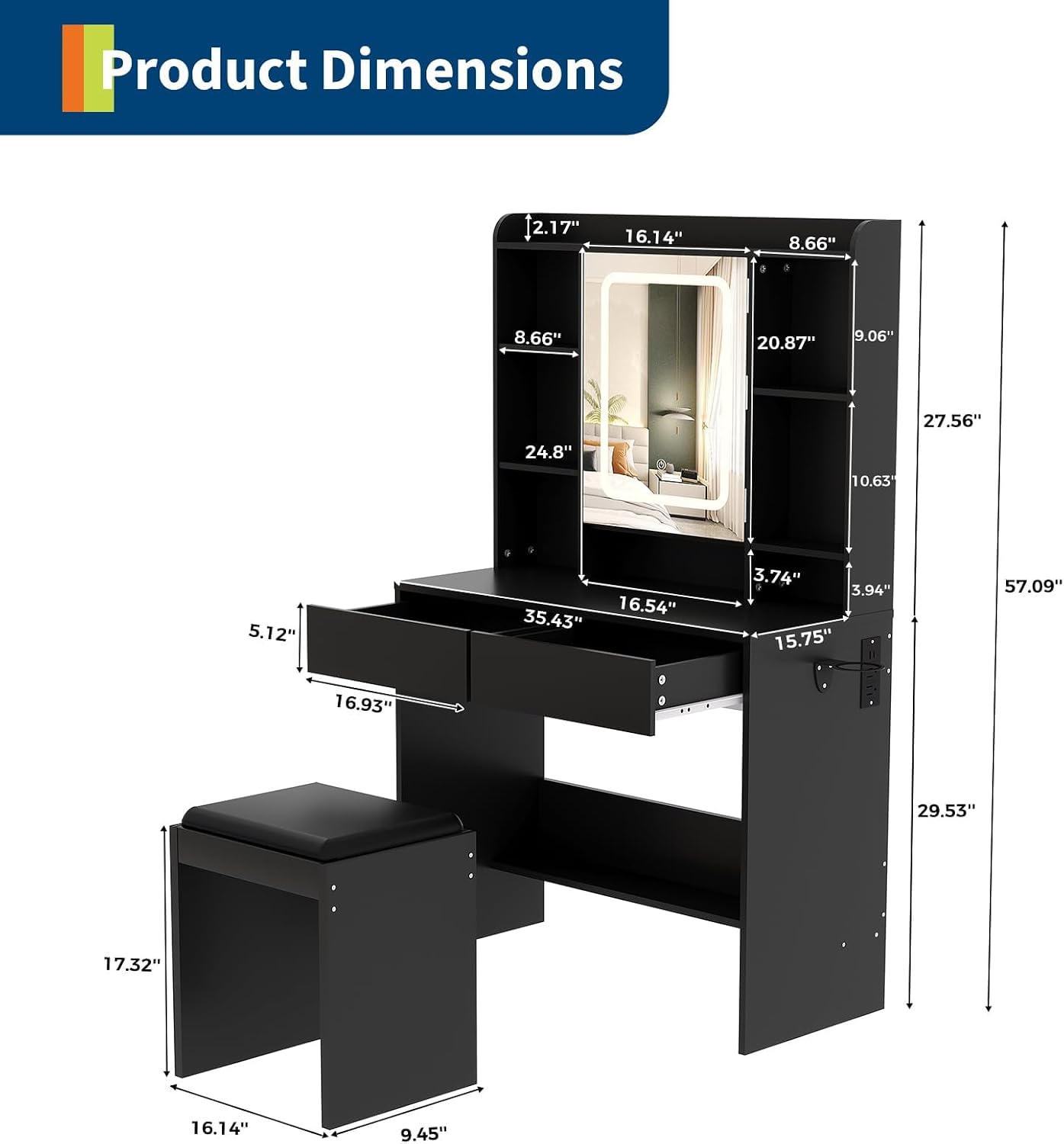
Figure 7.1: Product Dimensions.
8. Warranty Information
Specific warranty details are not provided in the product information. Please refer to the seller's or manufacturer's website for current warranty terms and conditions, or contact customer support for more information.
9. Customer Support
For any product or assembly questions, please contact our dedicated customer support team. Refer to your purchase documentation or the seller's platform for contact details.