
1. Introduction
Thank you for choosing the ECOVACS DEEBOT T80S OMNI Robot Vacuum and Mop. This advanced cleaning system is designed to provide comprehensive and automated floor care for your home. It combines powerful vacuuming with efficient mopping, featuring the innovative OZMO ROLLER 2.0 system and a fully automated OMNI Station for minimal maintenance.
This manual provides essential information for the safe operation, maintenance, and troubleshooting of your DEEBOT T80S OMNI. Please read it thoroughly before use and keep it for future reference.

Image 1.1: The ECOVACS DEEBOT T80S OMNI Robot Vacuum and Mop with its OMNI Station.
2. Important Safety Instructions
Before operating your DEEBOT T80S OMNI, please review and follow these safety precautions:
- Read all instructions carefully before use.
- Keep the robot and its accessories away from children and pets.
- Do not operate the robot in wet environments or near flammable materials.
- Ensure the charging station is placed on a level surface against a wall, with adequate clear space around it.
- Remove any loose cables, small objects, or fragile items from the floor before cleaning to prevent entanglement or damage.
- Do not use the robot to pick up large debris, sharp objects, or liquids.
- Only use the original power adapter and charging station provided by ECOVACS.
- Do not attempt to repair or modify the robot yourself. Contact authorized service personnel for assistance.
3. Package Contents
Verify that all components are present in the package:
- ECOVACS DEEBOT T80S OMNI Robot
- OMNI All-in-One Station
- Power Cord
- Side Brushes (2 pairs)
- OZMO ROLLER 2.0 Mopping Pad
- Dust Bag (pre-installed in OMNI Station)
- Cleaning Tool
- User Manual and Quick Start Guide
4. Product Overview
4.1 DEEBOT Robot
The DEEBOT T80S OMNI features a compact design with advanced sensors for navigation and obstacle avoidance. Key components include:
- LDS Laser Distance Sensor: For precise mapping and navigation.
- Control Button: For starting/pausing cleaning.
- Front Bumper: With anti-collision sensors.
- Side Brushes: For edge and corner cleaning.
- Main Brush: For deep vacuuming.
- OZMO ROLLER 2.0 Mopping System: For effective floor scrubbing.
- Driving Wheels: For movement across various surfaces.
- Charging Contacts: For automatic recharging at the OMNI Station.
4.2 OMNI All-in-One Station
The OMNI Station serves as the DEEBOT's home base, providing automatic dust emptying, mop washing, and hot air drying.
- Clean Water Tank: Holds fresh water for mop washing.
- Dirty Water Tank: Collects used water after mop washing.
- Dust Bag Compartment: Houses the disposable dust bag for automatic emptying.
- Mop Washing Tray: Where the OZMO ROLLER 2.0 mop is cleaned.
- Charging Contacts: Connects with the DEEBOT for recharging.
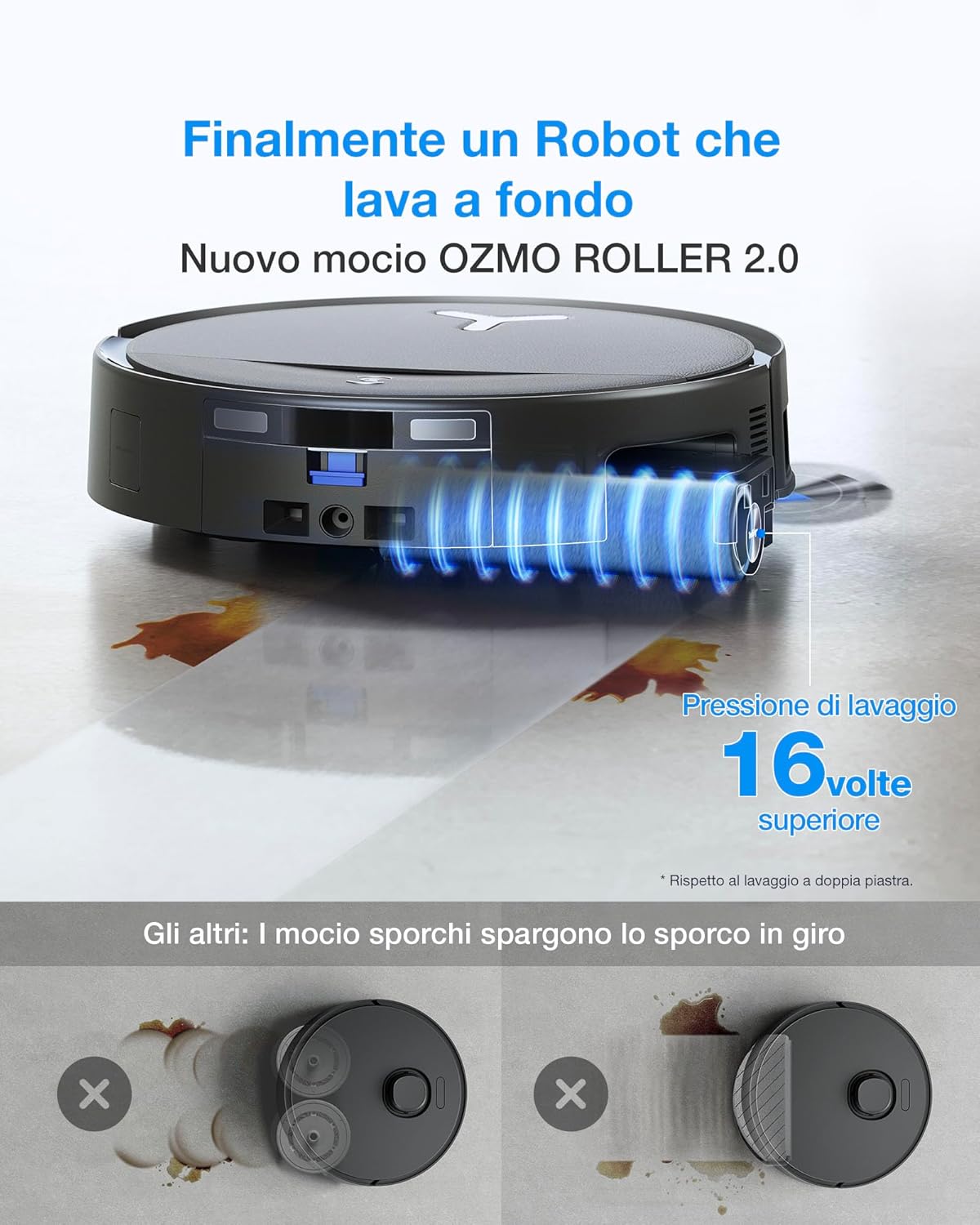
Image 4.1: The DEEBOT T80S OMNI robot positioned with its OMNI Station.
5. Setup and Initial Use
5.1 Unpacking and Station Placement
- Carefully remove all components from the packaging.
- Choose a suitable location for the OMNI Station. Ensure it is placed against a wall on a hard, level surface, with at least 0.5 meters (1.6 ft) clear space on both sides and 1.5 meters (4.9 ft) in front.
- Connect the power cord to the OMNI Station and plug it into a power outlet.

Image 5.1: Visual guide for initial setup and station placement.
5.2 Initial Charging
Place the DEEBOT onto the OMNI Station. Ensure the charging contacts align. The robot will begin charging automatically. For first-time use, fully charge the DEEBOT before operation.
5.3 App Download and Connection
- Download the ECOVACS HOME app from your mobile device's app store.
- Follow the in-app instructions to create an account and add your DEEBOT T80S OMNI.
- Connect the DEEBOT to your home Wi-Fi network as prompted by the app.
5.4 First Mapping
After successful app connection, initiate a full cleaning cycle or a mapping run through the app. The DEEBOT will create a detailed map of your home, which is crucial for efficient cleaning and advanced features.
6. Operation
6.1 Starting and Stopping Cleaning
- Start: Press the Auto Mode button on the DEEBOT or use the ECOVACS HOME app to start a cleaning cycle.
- Pause: Press the Auto Mode button again or use the app to pause cleaning.
- Return to Station: Press and hold the Auto Mode button for 3 seconds or use the app to send the DEEBOT back to the OMNI Station.
6.2 Cleaning Modes
The ECOVACS HOME app allows you to select various cleaning modes:
- Auto Cleaning: The DEEBOT cleans your entire home automatically.
- Area Cleaning: Select specific rooms or areas on the map for cleaning.
- Custom Cleaning: Draw a custom area on the map for the DEEBOT to clean.
- Spot Cleaning: Direct the DEEBOT to clean a concentrated area for stubborn stains.

Image 6.1: The DEEBOT T80S OMNI in spot cleaning mode, targeting a specific area.
6.3 OZMO ROLLER 2.0 Mopping System
The OZMO ROLLER 2.0 system provides deep scrubbing with 3,800 Pa pressure and 220 movements per minute. Ensure the clean water tank in the OMNI Station is filled before mopping. The system automatically washes the mop during and after cleaning.
6.4 Triple Intelligent Lift System
The DEEBOT T80S OMNI intelligently adapts to different floor conditions:
- Carpet Detection: The mop automatically lifts when a carpet is detected to prevent wetting.
- Liquid Spills: Side and main brushes lift to prevent spreading dirty water, focusing on targeted cleaning.
- Large Debris: Side brush lifts to avoid scattering debris when suction intensifies.

Image 6.2: The DEEBOT T80S OMNI demonstrating its mop lifting capability on carpet.

Image 6.3: Illustrations of the Triple Intelligent Lift System adapting to different cleaning scenarios.
6.5 AIVI 3D 3.0 Navigation and Obstacle Avoidance
The AIVI 3D 3.0 technology allows the DEEBOT to detect and map obstacles in real-time, navigating around furniture, cables, and everyday objects without getting stuck. This ensures comprehensive coverage and uninterrupted cleaning.

Image 6.4: The DEEBOT T80S OMNI intelligently navigating around obstacles.
6.6 Edge Cleaning with TruEdge 3.0
The TruEdge 3.0 system extends the cleaning roller by 1.5 cm and uses soft rubber wheels to clean along edges, ensuring thorough cleaning along walls and in corners.

Image 6.5: The DEEBOT T80S OMNI performing edge cleaning.
7. Maintenance
Regular maintenance ensures optimal performance and extends the lifespan of your DEEBOT T80S OMNI.
7.1 OMNI Station Maintenance
- Automatic Dust Emptying: The OMNI Station automatically empties the DEEBOT's dustbin into a sealed dust bag, providing up to 90 days of hands-free dust disposal. Replace the dust bag when full.
- Mop Washing and Drying: The station washes the OZMO ROLLER 2.0 mop with temperature-controlled water (40-75°C) and then dries it with 45°C hot air to prevent odors.
- Water Tanks: Regularly empty the dirty water tank and refill the clean water tank.
- Mop Washing Tray: The mop washing tray is designed for 150 days of maintenance-free use, requiring only 1-2 simple cleanings per year.

Image 7.1: The OMNI Station showing its clean and dirty water tanks.

Image 7.2: Overview of the OMNI Station's automated maintenance capabilities.
7.2 DEEBOT Robot Maintenance
- ZeroTangle 3.0 Brushes: The anti-tangle spiral side brush and main brush with a cyclonic system guide hair directly into the suction path, significantly reducing tangles. Periodically check and clean the brushes.
- Filters: Clean or replace the HEPA filter regularly to maintain suction performance.
- Sensors: Wipe all sensors (anti-drop, anti-collision, LDS) with a dry cloth to ensure accurate navigation.
- OZMO ROLLER 2.0 Mop: While the station cleans it, occasionally remove and rinse the roller under running water for thorough cleaning.

Image 7.3: Detail of the ZeroTangle 3.0 side and main brushes designed to prevent hair entanglement.
8. Troubleshooting
If you encounter issues with your DEEBOT T80S OMNI, refer to the following common problems and solutions:
| Problem | Possible Cause | Solution |
|---|---|---|
| DEEBOT does not start or respond. | Low battery; Power switch off; Robot stuck. | Ensure DEEBOT is charged; Turn on power switch; Clear any obstructions. |
| Poor cleaning performance. | Full dustbin/dust bag; Clogged brushes/filters; Dirty sensors. | Empty dustbin/replace dust bag; Clean brushes and filters; Wipe sensors. |
| DEEBOT gets stuck frequently. | Loose cables; Small objects on floor; Complex environment. | Clear floor of obstacles; Use virtual boundaries in app for problem areas. |
| Mopping function not working or leaving streaks. | Empty clean water tank; Full dirty water tank; Clogged mop roller; Incorrect detergent. | Refill clean water tank; Empty dirty water tank; Clean mop roller; Use only ECOVACS approved cleaning solution. |
| Robot cancels cleaning or behaves erratically. | Sensor obstruction; Software glitch; Pet interference. | Clean all sensors; Restart the robot; Ensure pets are not interfering with cleaning path. |
9. Specifications
| Feature | Detail |
|---|---|
| Brand | ECOVACS |
| Model Name | T80S OMNI BLACK |
| Recommended Surfaces | Multi-surface |
| Special Features | Auto Mop Washing, Intelligent Mop Lifting, Enhanced All-in-One OMNI Station, TruEdge 3D Edge Sensor |
| Color | Black |
| Control Type | App Control |
| Filter Type | HEPA |
| Battery Cell Composition | Lithium Ion |
| Water Tank Capacity | 350 ml |
| Power Source | Battery Powered |
| Batteries Included | Yes |
| Form Factor | Round |
| Indoor/Outdoor Use | Indoor |
| Number of Power Levels | 2 |
| Product Dimensions (LxWxH) | 35.3L x 35.1W x 9.8H cm |
| Item Weight | 3.8 Kilograms |
10. Warranty and Support
The ECOVACS DEEBOT T80S OMNI comes with a 2-year manufacturer's warranty.
For technical support, warranty claims, or further assistance, please contact ECOVACS customer service through their official website or the ECOVACS HOME app. Ensure you have your product model number and purchase information ready.
You can find more information and support resources on the official ECOVACS website: www.ecovacs.com


