
Introduction
Thank you for purchasing the coioc S18 Portable Bluetooth Speaker. This manual provides essential information for setting up, operating, and maintaining your speaker. Please read it thoroughly before use to ensure optimal performance and longevity of your device.
Package Contents
Please check the box for the following items:
- coioc S18 Portable Bluetooth Speaker
- USB-C Charging Cable
- 3.5mm AUX Audio Cable
- Wrist Strap
- User Manual
Product Overview
The coioc S18 features a compact design with intuitive controls and multiple connectivity options.
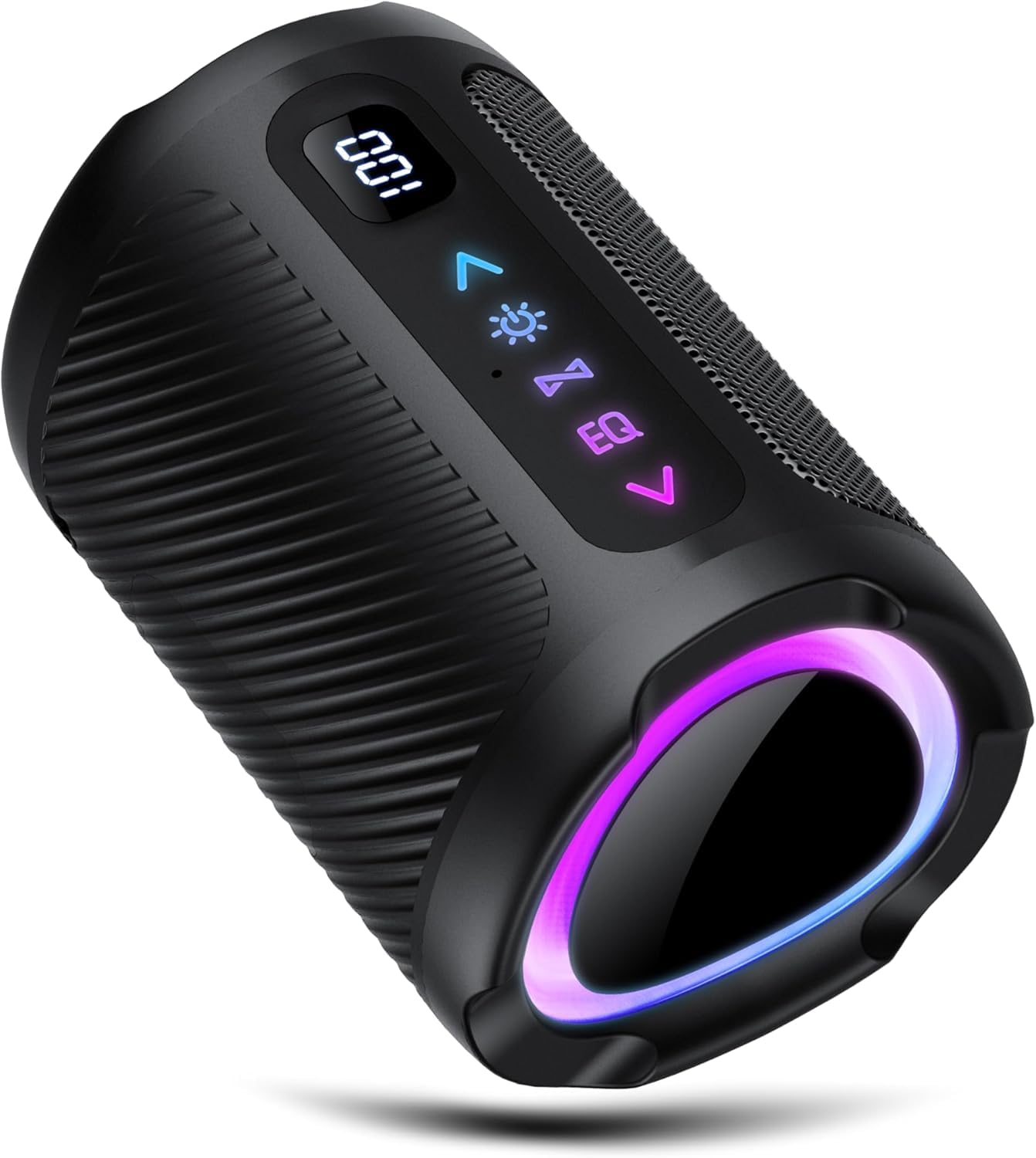
Image: Front view of the coioc S18 Portable Bluetooth Speaker. It shows the matte black finish, the control panel with buttons on the top surface, and a small LED display.
Key Features:
- Control Panel: Located on the top surface, featuring physical buttons for power, volume, play/pause, track control, EQ modes, LED light control, and call management.
- LED Display: A small display on the front indicates battery status and current operating mode.
- Ports: A rubber protective cover on the back conceals the USB-C charging port, TF (MicroSD) card slot, and 3.5mm AUX input.
- Passive Radiators: Two passive radiators are located on the sides, contributing to enhanced bass response. These may illuminate with RGB lighting.
- Stability: Two rubber feet on the base ensure stability on flat surfaces.
Setup
1. Charging the Speaker
Before first use, fully charge the speaker. Connect the provided USB-C charging cable to the speaker's USB-C port and the other end to a compatible USB power adapter (not included) or a computer's USB port. The LED display will indicate charging status.
2. Power On/Off
- To power on: Press and hold the Power button (●) for approximately 3 seconds. You will hear an audible prompt, and the LED display will light up.
- To power off: Press and hold the Power button (●) for approximately 3 seconds. You will hear an audible prompt, and the LED display will turn off.
3. Bluetooth Pairing
- Ensure the speaker is powered on and in Bluetooth pairing mode. The LED display will show "BT" and the side passive radiators may pulse with light.
- On your smartphone, tablet, or other Bluetooth-enabled device, go to the Bluetooth settings.
- Search for available devices and select "S18" from the list.
- Once connected, the speaker will emit a confirmation sound, and the LED display will indicate a successful connection.
4. True Wireless Stereo (TWS) Pairing
TWS allows you to connect two coioc S18 speakers for a stereo sound experience.
- Ensure both S18 speakers are powered on and not connected to any other Bluetooth device.
- On one of the speakers (this will be the primary speaker), press and hold the TWS button (often indicated by two interlocking circles or a similar icon) for a few seconds.
- The speakers will attempt to pair with each other. Once successfully paired, you will hear a confirmation sound.
- Now, connect your Bluetooth device to the primary speaker as described in step 3 (Bluetooth Pairing). Both speakers will play audio in stereo.
5. AUX Mode
To use the speaker with a non-Bluetooth device, connect the provided 3.5mm AUX audio cable to the speaker's AUX input and to the audio output of your device. The speaker will automatically switch to AUX mode, or you may need to press the Mode button to select it.
6. TF Card Mode
Insert a TF (MicroSD) card loaded with MP3 audio files into the TF card slot. The speaker will automatically detect the card and begin playing music, or you may need to press the Mode button to select TF card mode.
Operating Instructions
Basic Controls:
- Play/Pause: Press the Play/Pause button (►▮▮) to play or pause audio.
- Volume Up/Next Track: Short press the Volume Up button (+) to increase volume. Long press to skip to the next track.
- Volume Down/Previous Track: Short press the Volume Down button (-) to decrease volume. Long press to go to the previous track.
- Mode Button: Press the Mode button (often labeled "M") to switch between Bluetooth, AUX, and TF Card modes.
Call Management:
- Answer Call: When a call comes in, press the Play/Pause button (►▮▮) to answer.
- End Call: During a call, press the Play/Pause button (►▮▮) to end the call.
- Reject Call: When a call comes in, press and hold the Play/Pause button (►▮▮) to reject the call.
Equalizer (EQ) Modes:
The speaker offers different EQ modes to optimize sound for various content. Press the EQ button (if available, or a dedicated button) to cycle through modes such as "Normal" and "Vocals".
LED Light Control:
The speaker features integrated LED lighting. Press the Light button (if available, or a dedicated button) to change light patterns or to turn the lights off to conserve battery.
Maintenance
- Cleaning: Use a soft, dry cloth to clean the speaker. Do not use abrasive cleaners, alcohol, or chemical solvents, as these may damage the surface.
- Water Resistance: The speaker is waterproof. However, ensure the rubber protective bung covering the ports is securely closed to maintain water resistance. Do not submerge the speaker for extended periods.
- Storage: Store the speaker in a cool, dry place away from direct sunlight and extreme temperatures.
- Battery Care: To prolong battery life, avoid fully discharging the speaker frequently. If storing for a long period, charge the battery to about 50% every few months.
Troubleshooting
| Problem | Solution |
|---|---|
| Speaker does not power on. | Ensure the speaker is charged. Connect it to a power source using the USB-C cable. |
| Cannot pair via Bluetooth. |
|
| No sound or low volume. |
|
| TWS pairing fails. |
|
Specifications
| Brand | coioc |
| Model Name | S18 |
| Color | Matte Black |
| Connectivity Technology | Bluetooth |
| Speaker Maximum Output Power | 30 Watt |
| Audio Output Mode | Stereo |
| Mounting Type | Tabletop |
| Speaker Type | Portable Speaker |
| Recommended Uses | For home, party, outdoor |
| Compatible Devices | Smartphone, Tablet, TV |
| Waterproof | Yes |
| Product Dimensions (D x W x H) | 5 cm x 5 cm x 5 cm |
| Control Method | Physical Buttons, App (limited functionality via app) |
Warranty and Support
Specific warranty details and support contact information are not provided in this manual. Please refer to the product packaging or the retailer's website for warranty claims and customer support inquiries.