
OYLUS OAS-01
OYLUS 18000 BTU Mini Split AC/Heating System - Model OAS-01 User Manual
Brand: OYLUS | Model: OAS-01
Introduction
This manual provides detailed instructions for the installation, operation, and maintenance of your OYLUS 18000 BTU Mini Split AC/Heating System, Model OAS-01. Designed for efficient cooling and heating, this system offers year-round comfort. Please read this manual thoroughly before installation and use to ensure proper function and safety.
Safety Information
Important: Always follow local electrical codes and regulations. Installation should be performed by qualified personnel. Disconnect power before servicing.
- Ensure proper grounding to prevent electrical shock.
- Do not block air inlets or outlets of either unit.
- Keep the outdoor unit clear of plants and obstructions (at least 3 feet).
- Handle refrigerant pipes carefully to avoid damage and leaks.
- Verify correct voltage and use appropriate circuit breakers and wiring.
- Do not attempt repairs beyond the scope of this manual. Contact qualified service personnel.
Package Contents
Your OYLUS Mini Split AC/Heating System package includes the following components. Please verify all items are present upon delivery.
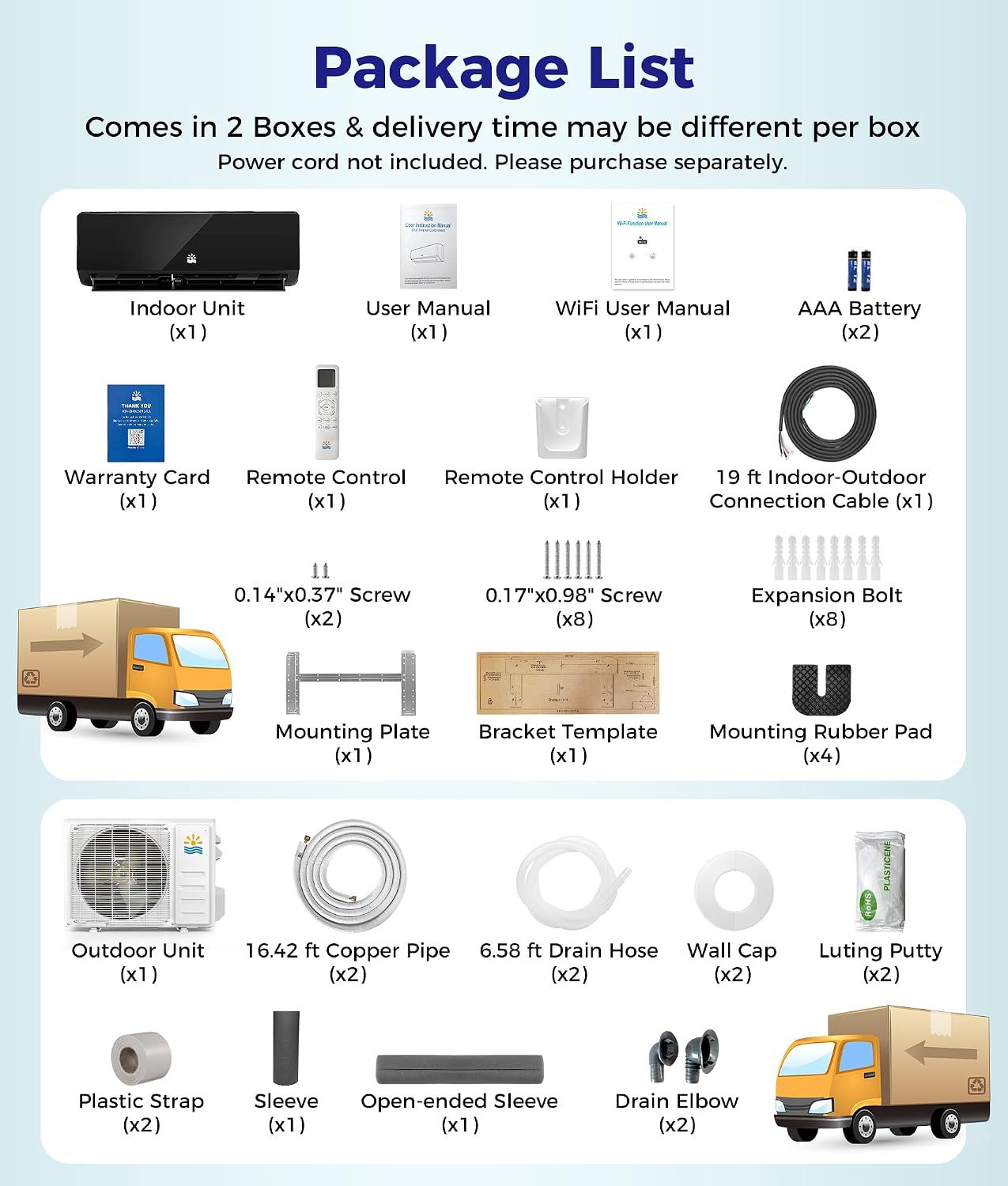
Image: Detailed view of all components included in the OYLUS Mini Split AC/Heating System package, showing indoor unit, outdoor unit, user manuals, remote control, mounting hardware, copper pipes, drain hose, wall cap, luting putty, plastic straps, sleeves, and drain elbows.
- Indoor Unit (x1)
- Outdoor Unit (x1)
- User Manual (x1)
- WiFi User Manual (x1)
- AAA Battery (x2)
- Warranty Card (x1)
- Remote Control (x1)
- Remote Control Holder (x1)
- Screws (various sizes)
- Expansion Bolts (x8)
- Mounting Plate (x1)
- Bracket Template (x1)
- Mounting Rubber Pad (x4)
- 19 ft Indoor-Outdoor Connection Cable (x1)
- 16.42 ft Copper Pipe (x2)
- 6.58 ft Drain Hose (x2)
- Wall Cap (x2)
- Luting Putty (x2)
- Plastic Strap (x2)
- Sleeve (x1)
- Open-ended Sleeve (x1)
- Drain Elbow (x2)
Note: Power cord not included. Please purchase separately.
Setup and Installation
Proper installation is crucial for optimal performance and longevity of your mini split system. Refer to the dedicated WiFi User Manual for smart control setup.
1. Unit Placement
- Indoor Unit: Mount at least 6 inches below the ceiling for proper airflow. Ensure the wall is sturdy enough to support the unit's weight without vibration. Keep inlet and outlet clear of obstructions.
- Outdoor Unit: Space away from the wall. Ensure no plants or objects are within 3 feet of the appliance to allow for proper air circulation. The outdoor unit must be within 10 feet of the indoor unit for the pre-charged pipes.

Image: Illustration demonstrating recommended clearances for both indoor and outdoor mini split units to ensure optimal performance and airflow.
2. Refrigerant Pipes and Line Set
- Handle refrigerant pipes with care. Bend them slowly to avoid damage. Damaged pipes can lead to leaks and reduced efficiency.
- After installing the indoor unit, ensure the line set is angled downward and the drain pipe is pointed straight down. This allows proper liquid flow and prevents leaks.

Image: Visual guide for correctly bundling and angling the refrigerant line set and drain pipe to ensure efficient operation and prevent water accumulation.
3. Vacuuming the Refrigerant Circuit
Vacuuming the lines is a critical step to remove air and moisture, ensuring maximum efficiency. Vacuum for at least 15 minutes per line set. For multi-zone systems, vacuum each line set separately for varying amounts of time depending on length. Use a micron gauge to reach 500 microns, or a manifold gauge aiming for -30 PSI.
If the line set exceeds 25 feet, additional refrigerant may need to be added by a qualified technician.
Video: "5 Urgent Steps Need to Know Before Installing Della Mini Split" - This video provides a general overview of critical installation steps, including vacuuming the refrigerant circuit, which is essential for proper function and efficiency of mini split systems.
4. Electrical Connection
Ensure safe electrical connection. Verify your home's voltage (110V or 220V) and select the appropriate size and quality wire for the mini split system. Ensure all wiring is UL listed for safety.
The OYLUS OAS-01 model operates on 230 Volts.
Operating Instructions
Your OYLUS Mini Split system offers multiple functions and smart controls for optimal comfort.
Modes of Operation:
- Cooling: Provides powerful cooling with a one-touch TURBO mode for rapid temperature reduction.
- Heating: Offers reliable heating, even in cold climates down to -13°F. Features an 8°C low-temperature heating mode.
- Dehumidifying: Reduces humidity levels for a more comfortable environment.
- Fan Mode: Circulates air without heating or cooling. Features 8 fan speeds and 4D auto-swing for even airflow.
Smart Features:
- WiFi Control: Control your system anytime, anywhere using the built-in WiFi connectivity via your smartphone. Adjust temperature, switch modes, and set timers.
- I-Feel Temperature Sensing: The remote control senses the temperature around you and adjusts the unit for personalized comfort.
- Sleep Mode: Operates at a whisper-quiet 32 dB for undisturbed sleep.
- 24-Hour Timer: Program the unit to turn on or off at specific times.
- Child Lock: Prevents unintended changes to settings.
- Closable Display: For minimal light disturbance.
- Anti-Direct Airflow: Gently distributes air to prevent uncomfortable drafts.

Image: The OYLUS Mini Split AC unit operating in a bedroom, illustrating its quiet operation and sleep mode features for undisturbed rest.
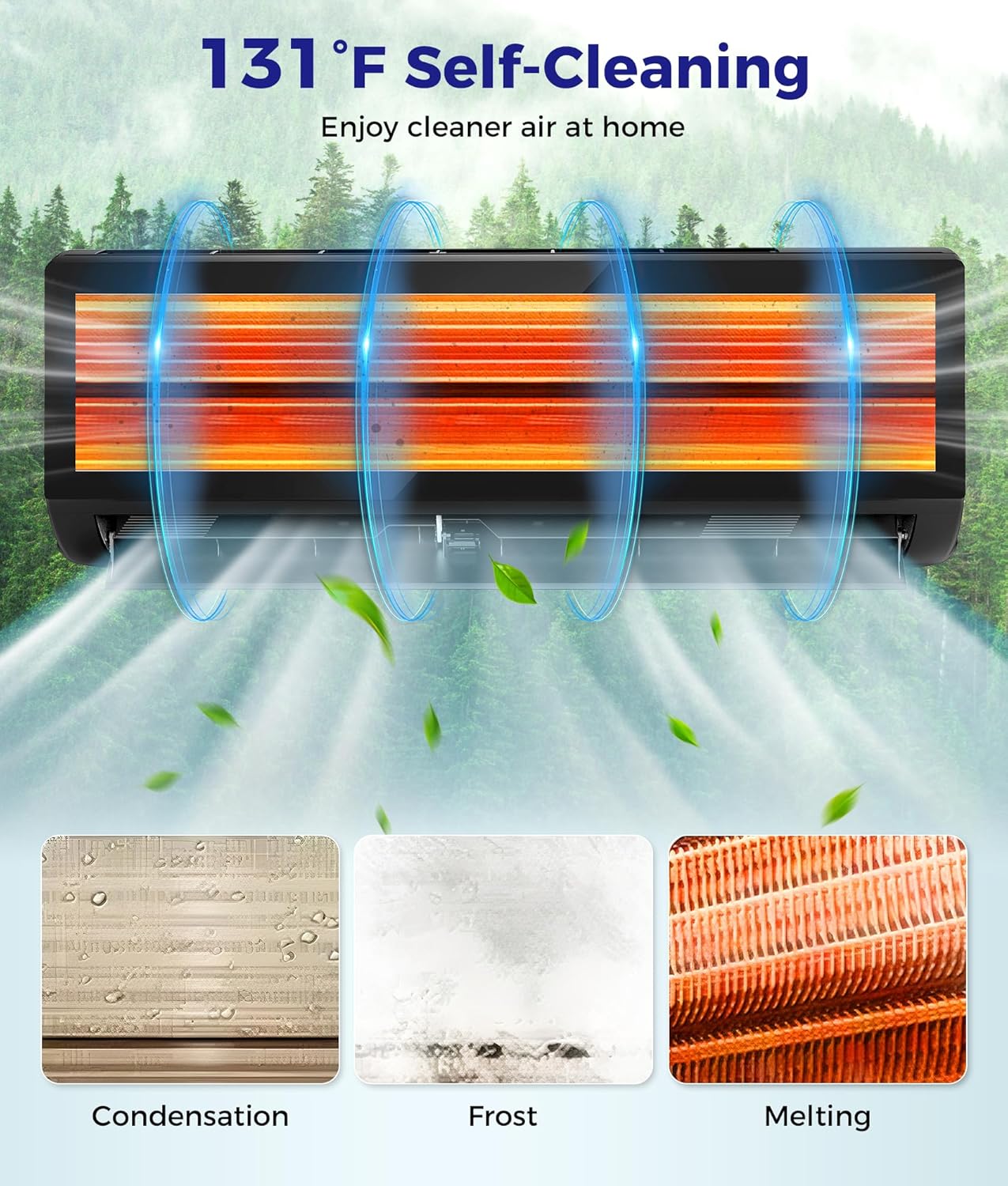
Image: A smartphone screen showing the SmartLife-SmartHome app interface, used for remote control and management of the OYLUS Mini Split AC/Heating System.
Maintenance
Regular maintenance ensures optimal performance and cleaner air.
- Self-Cleaning Function: The unit features a 133°F high-temperature self-cleaning function to remove dust and buildup, ensuring fresh indoor air.
- Removable & Washable Filter: The air filter is easily removable and washable for long-lasting performance and cleaner airflow.

Image: An animated diagram showing the internal self-cleaning process of the mini split unit, highlighting the removal of condensation, frost, and melting for improved air quality.
Troubleshooting
If you encounter issues, refer to the WiFi User Manual for a comprehensive troubleshooting guide. Below is a common alert:
- Refrigerant Leak Detection: The system is equipped with real-time alerts for refrigerant leaks, indicated by an "E4" error code on the indoor unit display. If this occurs, contact qualified service personnel immediately.

Image: A visual representation of the refrigerant leak detection feature, showing an alert on both the indoor and outdoor units, with an 'E4' code displayed on the indoor unit.
Specifications
| Feature | Specification |
|---|---|
| Brand | OYLUS |
| Model Number | OAS-01 |
| Cooling Power | 18000 British Thermal Units |
| Heating Capacity | 19000 BTU |
| Seasonal Energy Efficiency Ratio (SEER2) | 21.0 |
| Heating Seasonal Performance Factor (HSPF2) | 8.5 |
| Voltage | 230 Volts |
| Power Source | Corded Electric |
| Suitable Area | Up to 1250 Sq.Ft |
| Operating Mode | Cooling, Heating, Dehumidifying, Fan |
| Controller Type | App Control, Remote Control |
| Refrigerant | R454B (Eco-friendly) |
| Minimum Operating Temperature (Heating) | -13°F |
| Maximum Operating Temperature (Cooling) | 122°F |
| Noise Level (Sleep Mode) | 32 dB |

Image: A detailed diagram outlining the dimensions and key technical specifications of both the indoor and outdoor units of the OYLUS Mini Split AC/Heating System.
Warranty and Support
OYLUS is committed to providing quality products and customer satisfaction. Your product comes with a warranty as detailed in the included Warranty Card. For any questions, technical support, or warranty claims, please refer to the contact information provided in your Warranty Card or the official OYLUS website.
The brand's mission is to bring smart and easy-to-use appliances into your home to make everyday life simpler and more enjoyable, building a future where comfort and ease are just a button away.
Ask a question about this manual
Ask about setup, troubleshooting, compatibility, parts, safety, or missing instructions. Manuals+ will review the question and use this page’s manual context to help answer it.