
1. Product Overview
The Devoko Ergonomic Gaming Chair is designed for comfort and support during extended periods of use, whether for gaming or work. It features a combination of soft suede and carbon fiber leather, high-density molded foam, and a stable metal base. Key ergonomic features include adjustable headrest and lumbar cushions, and multi-directional 3D armrests.

Image 1: Devoko Ergonomic Gaming Chair (Cinnamon Brown Suede)
2. Safety Information
Warning: This product requires assembly. Follow the provided assembly instructions carefully to prevent injury or product damage. Ensure all screws and bolts are tightened securely before use. Do not stand on the chair. Do not use the chair if any parts are missing or damaged. Keep small parts away from children.
3. Assembly Instructions
Please refer to the detailed assembly diagrams included in your product packaging for step-by-step instructions. The general assembly process involves:
- Attach the casters to the star base.
- Insert the gas lift cylinder into the star base.
- Attach the seat mechanism to the bottom of the seat cushion.
- Connect the backrest to the seat cushion using the side brackets.
- Place the assembled seat and backrest onto the gas lift cylinder.
- Attach the 3D armrests to the chair.
- Install the headrest and lumbar support cushions.
Ensure all connections are secure before using the chair.
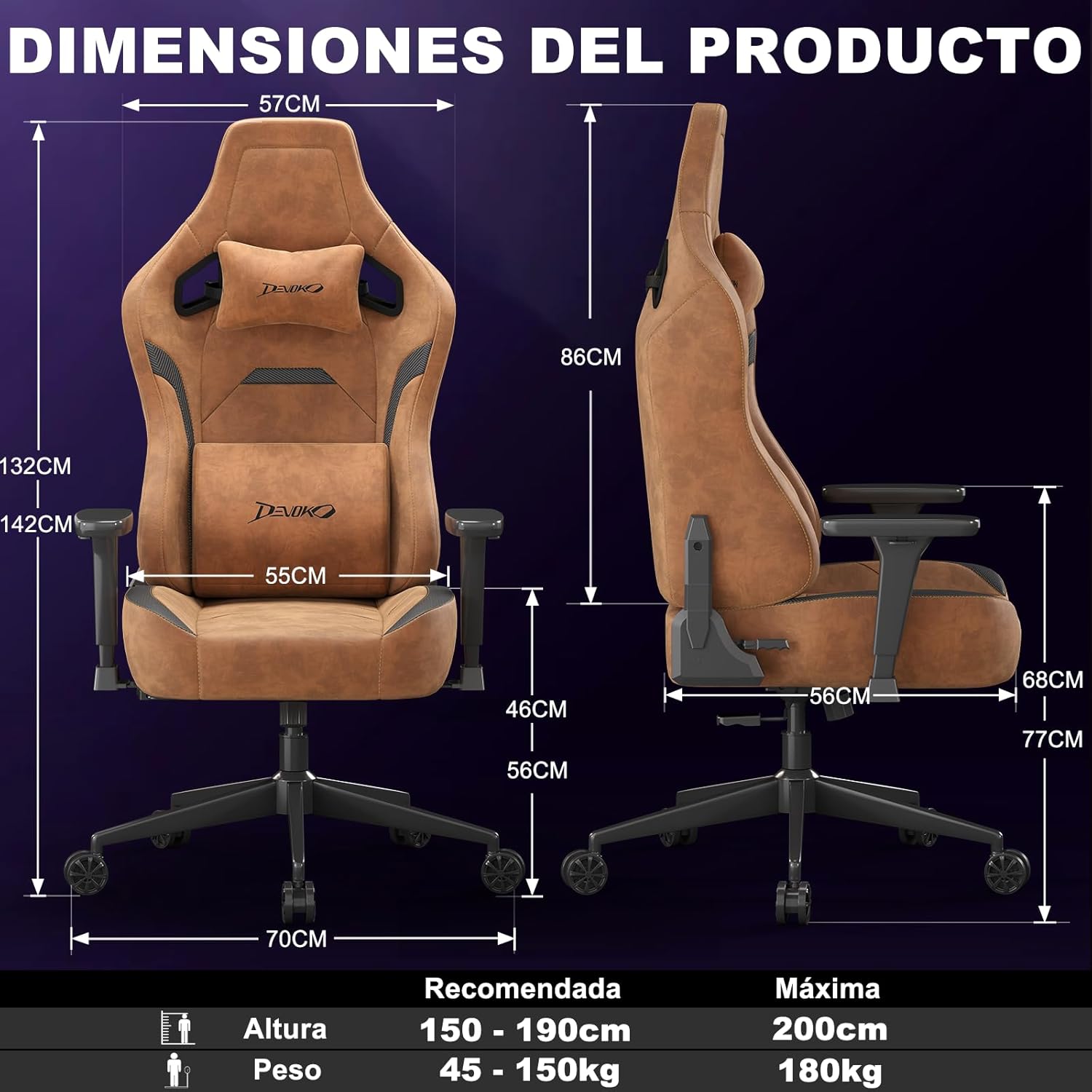
Image 2: Product Dimensions and Recommended Usage. Consult your physical manual for detailed assembly diagrams.
4. Operating Instructions (Adjustments)
The Devoko Gaming Chair offers multiple adjustment options for personalized comfort:
- Chair Height Adjustment: Use the lever located under the seat on the right side to adjust the chair's height. Pull the lever up to raise or lower the seat. Release the lever to lock the height. The chair offers approximately 10 cm of height adjustment.
- Backrest Recline: Pull the lever on the right side of the seat to recline the backrest. Lean back to your desired angle (from 90° to 135°) and release the lever to lock it in place.
- 3D Armrest Adjustment: The armrests can be adjusted in three dimensions:
- Height: Press the button on the side of the armrest and move it up or down.
- Rotation: Rotate the armrest pad left or right.
- Forward/Backward: Slide the armrest pad forward or backward.
- Lumbar and Headrest Cushions: The included lumbar and headrest cushions are adjustable and removable. Position them to provide optimal support for your lower back and neck.
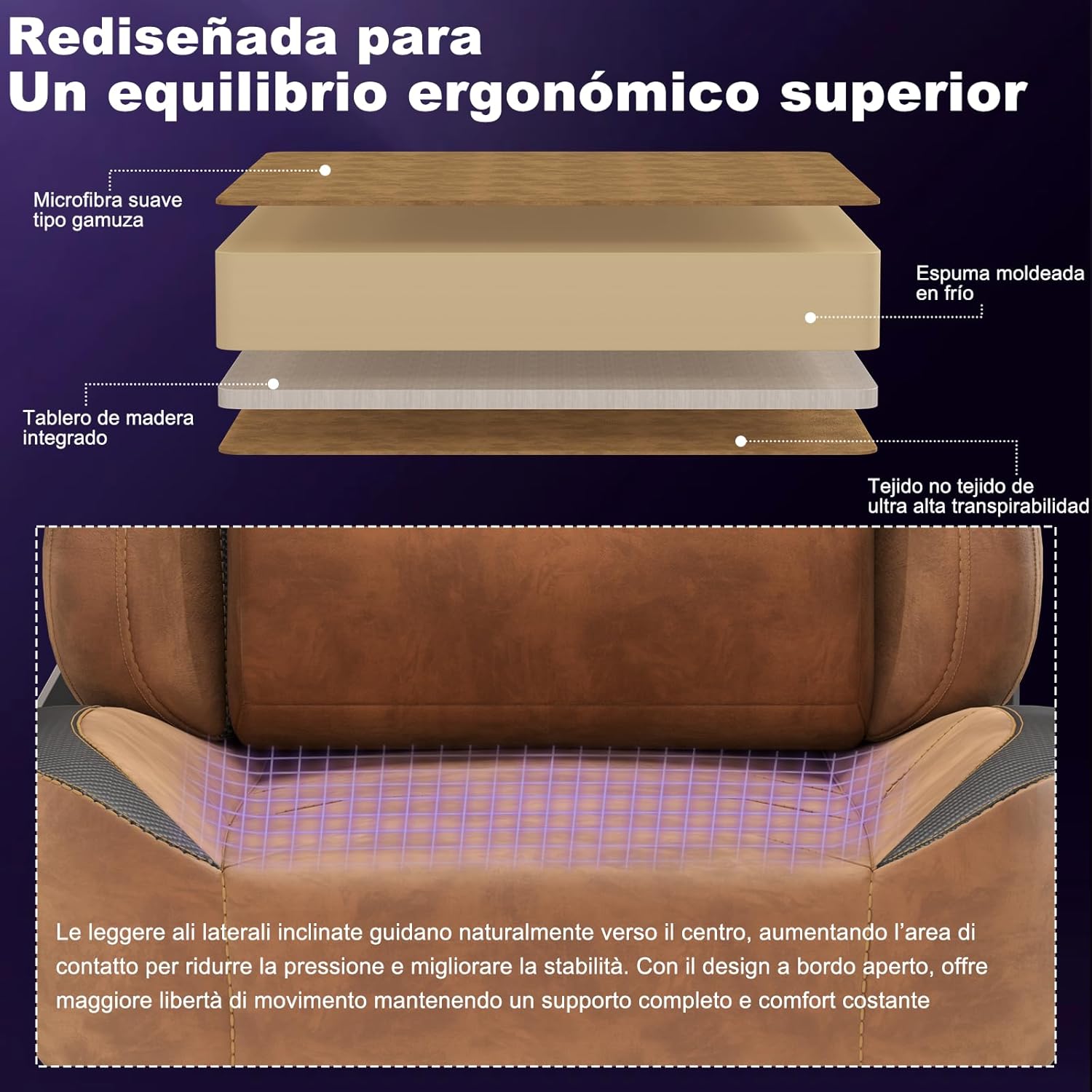
Image 3: Backrest Recline Functionality.

Image 4: 3D Armrest Adjustments.

Image 5: Adaptive Lumbar and Headrest Support.
Instructional Videos:
Video 1: Demonstrates the chair's ergonomic features, including armrest adjustments, reclining, and overall comfort.
Video 2: Highlights the high-density foam, 3D armrests, adjustable lumbar and headrest, and recline function in a gaming setup.
5. Maintenance
To ensure the longevity and appearance of your Devoko Gaming Chair:
- Cleaning: Wipe the chair with a damp cloth for general cleaning. For tougher stains on the suede and carbon fiber leather, use a mild upholstery cleaner and test on an inconspicuous area first. Avoid harsh chemicals.
- Inspection: Periodically check all screws and bolts to ensure they are tight. Re-tighten if necessary.
- Avoid Direct Sunlight: Prolonged exposure to direct sunlight can cause fading and material degradation.
6. Troubleshooting
If you encounter any issues with your Devoko Gaming Chair, consider the following common solutions:
- Chair Sinks or Does Not Adjust Height: Ensure the height adjustment lever is fully engaged. If the issue persists, the gas lift cylinder may need replacement.
- Chair Wobbles: Check that all screws and bolts connecting the seat, backrest, and base are securely tightened. Ensure the casters are properly inserted into the star base.
- Armrests Are Loose: Tighten the screws securing the armrests to the chair.
- Squeaking Noises: Apply a small amount of silicone lubricant to moving parts or connection points if squeaking occurs.
For further assistance, please contact Devoko customer support.
7. Specifications
| Brand: | Devoko |
| Model: | B0GBTDBJFW |
| Color: | Cinnamon Brown |
| Material: | Suede, Carbon Fiber Leather, Iron Frame |
| Product Dimensions (L x W x H): | 70 x 70 x 142 cm |
| Product Weight: | 21 kg |
| Special Features: | Adjustable Height, Ergonomic Design, Reclinable (90°-135°), 3D Adjustable Armrests, Back Support |
| Backrest Style: | Ergonomic High Backrest |
| Recommended Height: | 150 - 190 cm |
| Recommended Weight: | 45 - 150 kg |
| Maximum Weight Capacity: | 180 kg |
8. Warranty and Support
For warranty information and customer support, please refer to the documentation included with your purchase or visit the official Devoko website. If you have any questions or require assistance, please contact Devoko customer service directly.
Return Policy: This product can be returned within 30 days for a refund or replacement, as per the seller's policy.


