
1. Introduction
Thank you for choosing the SEPOX Grey Bluetooth Smart Gate Lock, Model DS-50S. This smart lock offers multiple access methods including IC card, passcode, mechanical key, and Bluetooth app control, designed for robust outdoor use on fences, gates, and garage doors. This manual provides essential information for the proper installation, operation, and maintenance of your new smart lock to ensure optimal performance and security.
2. Safety Information
- Read all instructions carefully before installation and use.
- Do not attempt to disassemble or repair the lock yourself. Contact qualified personnel for service.
- Use only specified CR123A batteries. Do not mix old and new batteries or different types of batteries.
- Keep mechanical keys in a secure location away from the lock.
- Regularly check the lock for any signs of damage or wear.
- Ensure passcodes are strong and not easily guessable. Change them periodically.
3. Package Contents
Please verify that all the following components are included in your package:
- SEPOX Smart Gate Lock (Front and Rear Panels)
- Door Bolt / Latch Mechanism
- Mechanical Keys
- IC Cards (Fobs)
- Mounting Hardware (Screws, Spindles)
- Installation Template
- User Manual

Image: Overview of the SEPOX Smart Gate Lock and its main components.
4. Product Overview
The SEPOX DS-50S Smart Gate Lock is engineered for robust outdoor security, offering multiple convenient access methods and durable construction.
Key Features:
- 4-in-1 Unlocking: IC card, passcode, mechanical key, and TUYA Bluetooth app.
- TUYA Bluetooth APP Control: Manage temporary/permanent passcodes, admin access, view entry logs, and receive low battery alerts.
- Durable Construction: Made from high-strength aluminum alloy and steel with an electroplated coating for corrosion resistance, rust-proofing, and shock resistance.
- Weatherproof Design: IP65 waterproof rating, sun resistant, and rust-proof. Operates in temperatures from -4°F to 131°F (-20°C to 55°C).
- Wide Compatibility: Fits most standard gates and garage doors with an adjustable lock bolt.

Image: Illustration of the lock's universal design, suitable for both metal fence doors and wooden doors, with dimensions for compatibility.

Image: Details on the high-strength aluminum alloy and steel construction, highlighting waterproof, sun-resistant, and rust-proof properties, along with tempered glass keypad screen.

Image: Illustration of the multiple unlocking methods available for the lock, including password, fob card, remote app, physical key, Bluetooth app, and NFC.
Video: An overview demonstrating the smart guarding and effortless usage of the SEPOX Smart Gate Lock.
5. Setup and Installation
5.1. Before Installation
- Ensure your gate or door thickness is compatible with the lock's adjustable bolt (typically 1.38" - 2.17" or 35-55mm).
- Gather necessary tools: drill, screwdriver, measuring tape, pencil.
- Install 2 x CR123A lithium batteries (not included) into the inner panel of the lock. Ensure correct polarity.

Image: The lock's inner panel showing the battery compartment for 2 x CR123A batteries, along with the wide temperature range specification.
5.2. Installation Steps
Follow the detailed instructions provided with the physical installation template. A general overview is provided below:
- Prepare the Door/Gate: Use the provided template to mark and drill the necessary holes on your gate or door.
- Install the Door Bolt: Insert the door bolt mechanism into the edge of the door.
- Mount Outer Panel: Attach the outer lock panel, ensuring the spindle aligns correctly with the bolt.
- Mount Inner Panel: Connect the inner lock panel to the outer panel using the provided screws and spindles. Ensure cables are properly connected if applicable.
- Install Latch Plate: Secure the latch plate to the door frame, aligning it with the door bolt.
- Test Operation: Verify that the lock operates smoothly with a mechanical key and by manually turning the knob.
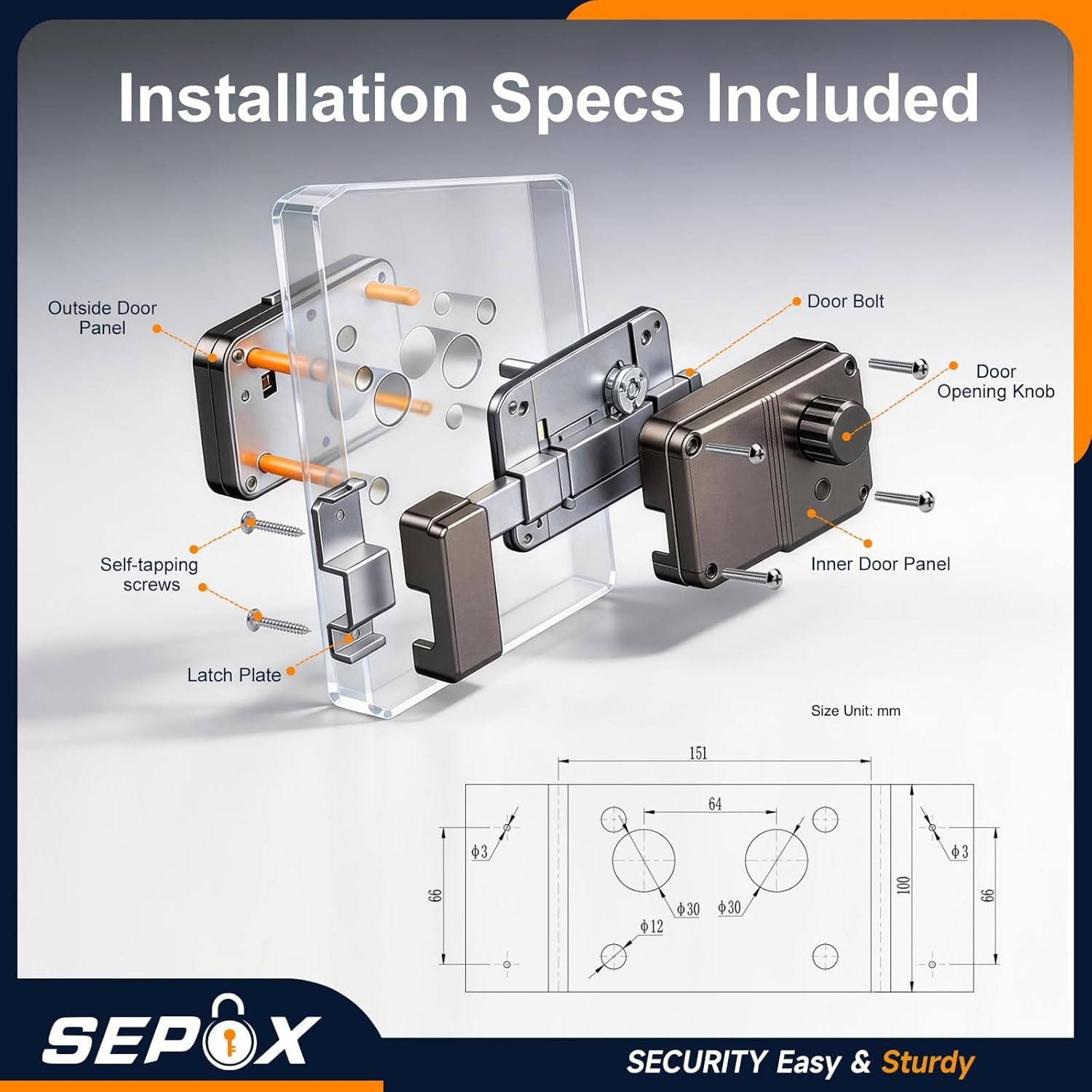
Image: Exploded diagram showing the components and their assembly for installation, including outside door panel, door bolt, door opening knob, inner door panel, self-tapping screws, and latch plate.
5.3. App Connection
To utilize Bluetooth features, download the TUYA app from your smartphone's app store and follow the in-app instructions to pair your lock.
Video: Instructions on how to connect and use the TUYA app with the SEPOX Smart Gate Lock.
6. Operating Instructions
The SEPOX Smart Gate Lock offers multiple ways to unlock and manage access.
6.1. Unlocking Methods
- Passcode: Enter your programmed passcode on the keypad, then turn the knob to unlock.
- IC Card (Fob): Present a registered IC card to the designated area on the lock, then turn the knob to unlock.
- Mechanical Key: Insert the physical key into the keyhole and turn to unlock. This is a backup method.
- Bluetooth App: Open the TUYA app on your smartphone, ensure Bluetooth is enabled, and tap the unlock icon. Then turn the knob to unlock.
Note: After successful authentication (passcode, IC card, or app), you must manually turn the knob to engage or disengage the deadbolt.

Image: Illustration of remote setting for virtual temporary passcodes and access record query via the TUYA app.
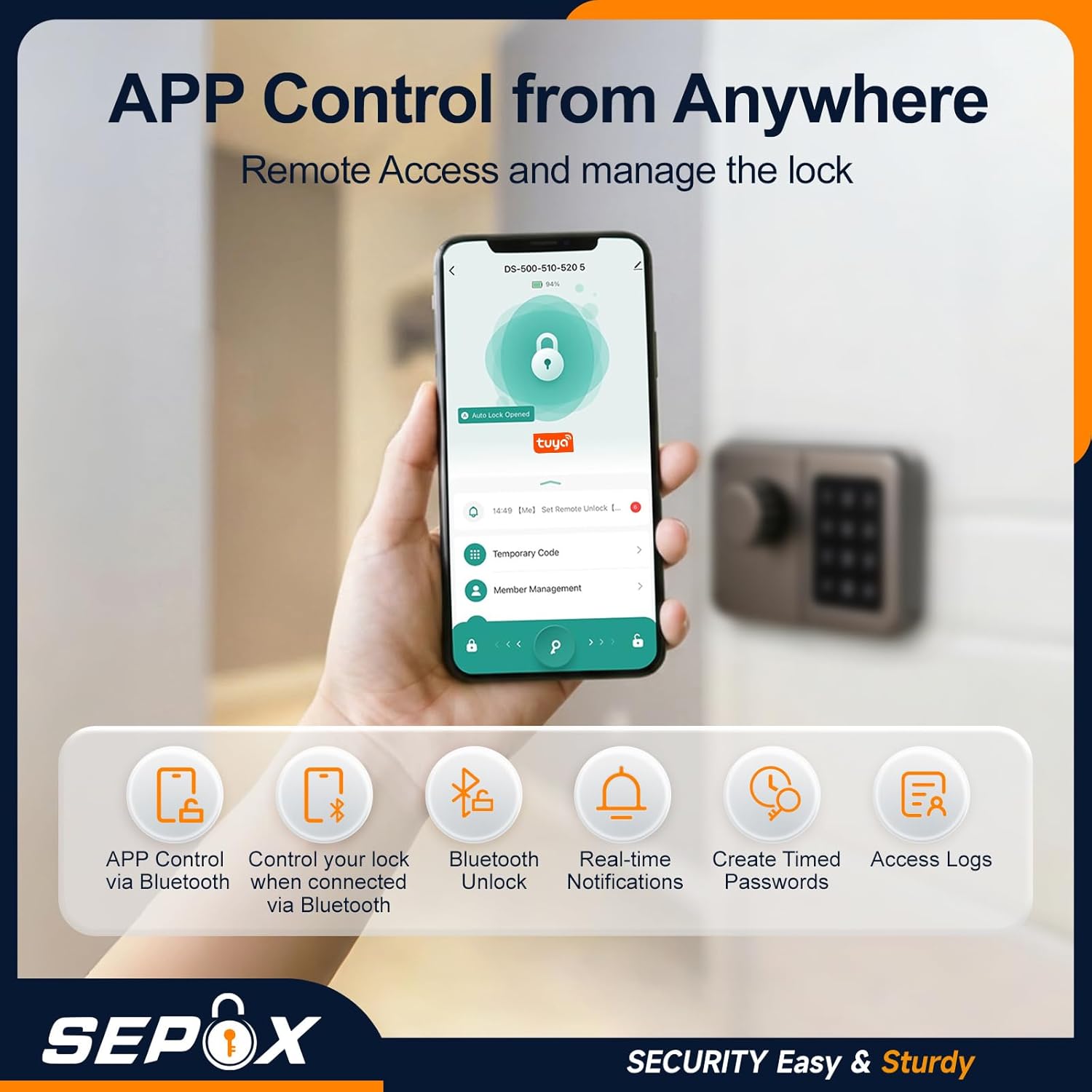
Image: Display of the TUYA app interface for controlling the lock, showing features like temporary code, member management, Bluetooth unlock, real-time notifications, timed passwords, and access logs.
6.2. App Management Features
The TUYA app provides comprehensive control over your lock:
- User Management: Add or remove users, assign unique passcodes or IC cards.
- Temporary Passcodes: Generate time-limited or one-time passcodes for guests or service providers.
- Access Logs: View a history of who accessed the lock and when.
- Low Battery Alerts: Receive notifications when battery levels are low, prompting replacement.
- Admin Management: Designate administrators with full control over lock settings.
7. Maintenance
7.1. Battery Replacement
The lock requires 2 x CR123A lithium batteries. When you receive a low battery alert via the app or on the lock itself, replace both batteries promptly. Battery life is estimated up to 2 years with average use (10 times a day).
- Remove the inner panel cover.
- Carefully remove the old batteries.
- Insert new CR123A batteries, ensuring correct polarity (+/-).
- Replace the inner panel cover.
7.2. Cleaning
Wipe the lock's exterior with a soft, damp cloth. Avoid using abrasive cleaners or solvents, as these can damage the finish and electronic components.
7.3. General Inspection
Periodically check all mounting screws and the latch mechanism for tightness and smooth operation. Ensure no debris obstructs the bolt or keypad.
8. Troubleshooting
| Problem | Possible Cause | Solution |
|---|---|---|
| Lock does not respond to keypad/IC card. | Low batteries; incorrect passcode/IC card; keypad malfunction. | Replace batteries. Verify passcode/IC card. Use mechanical key as backup. Contact support if issue persists. |
| Bluetooth app cannot connect to the lock. | Bluetooth disabled on phone; lock too far from phone; app not paired correctly; temporary app glitch. | Ensure Bluetooth is on and phone is close to the lock. Re-pair the lock in the app. Restart the app or phone. |
| Lock does not unlock after entering valid code/card/app command. | Knob not turned manually; mechanical obstruction; internal mechanism issue. | Remember to turn the knob after successful authentication. Check for physical obstructions. Use mechanical key. |
| Low battery alert. | Batteries are running low. | Replace both CR123A batteries immediately. |
| Lock is difficult to install or does not fit. | Incompatible door/gate thickness; incorrect drilling. | Verify door/gate dimensions against specifications. Review installation template and steps carefully. Consult a professional if needed. |
9. Specifications
| Feature | Detail |
|---|---|
| Model Number | DS-50S |
| Brand | SEPOX |
| Lock Type | Keypad, Smart Lock |
| Unlocking Methods | IC Card, Passcode, Mechanical Key, Bluetooth App |
| Material | Alloy Steel |
| Color | Gray |
| Dimensions (L x W x H) | 4.72 x 2.56 x 5.91 inches (12 x 6.5 x 15 cm) |
| Item Weight | 1400 g |
| Connectivity | Bluetooth |
| Power Supply | 2 x CR123A Lithium Batteries (not included) |
| Battery Life | Up to 2 years (based on 10 uses/day) |
| Operating Temperature | -4°F to 131°F (-20°C to 55°C) |
| Waterproof Rating | IP65 |
| Special Feature | Auto-Lock |
10. Warranty and Support
10.1. Warranty Information
The SEPOX Grey Bluetooth Smart Gate Lock, Model DS-50S, comes with a manufacturer's warranty. For specific warranty terms and conditions, please refer to the warranty card included in your product packaging or visit the official SEPOX website. The EU spare part availability duration is 2 years.
10.2. Customer Support
If you encounter any issues or have questions regarding your SEPOX Smart Gate Lock, please contact SEPOX customer support. You can typically find contact information on the official SEPOX website or through your retailer.
- Online Support: Visit the official SEPOX website for FAQs, troubleshooting guides, and contact forms.
- Email Support: Refer to your product documentation for the customer service email address.