
1. Introduction
This manual provides essential instructions for the safe and efficient operation, maintenance, and troubleshooting of your Ryobi ONE+ PCL001 18-Volt High Pressure Cordless Digital Power Inflator. Please read this manual thoroughly before using the product and retain it for future reference.
The Ryobi ONE+ PCL001 is designed for inflating various items such as car, bike, and sports tires, offering portability and convenience with its cordless design and digital pressure gauge.
Safety Information:
- Always wear eye protection when operating power tools.
- Ensure the work area is clean and well-lit.
- Do not operate the inflator in explosive atmospheres, such as in the presence of flammable liquids, gases, or dust.
- Keep children and bystanders away while operating the inflator.
- Do not overinflate items. Always refer to the manufacturer's recommended pressure.
2. Package Contents
Verify that all items listed below are included in your package. If any parts are missing or damaged, please contact customer support.
- Ryobi ONE+ PCL001 Digital Power Inflator
- 2.0 Ah Lithium-Ion Battery
- Battery Charger
- Sports Needle
- Presta Valve Adaptor
- Pinch Valve Adaptor
- Operator's Manuals
Note: Additional bonus accessories such as a tire pressure gauge, cleaning gel, key chain, tape measure, pencils, and markers may be included depending on the specific bundle purchased.
3. Setup
3.1 Charging and Installing the Battery
- Connect the battery charger to a standard electrical outlet.
- Slide the 2.0 Ah Lithium-Ion Battery onto the charger. Ensure it clicks into place. The charger indicator light will show the charging status.
- Once fully charged, remove the battery from the charger.
- Align the charged battery with the battery port on the base of the inflator. Slide the battery into place until it locks securely.
3.2 Connecting the Hose and Accessories
The inflator features a 24-inch extended reach hose for convenient use. On-board accessory storage is provided for the included adaptors.
- The main hose is permanently attached to the inflator.
- For standard Schrader valves (common on car tires), the hose's quick-connect chuck can be directly attached.
- For Presta valves (common on some bike tires), screw the Presta Valve Adaptor onto the valve stem, then attach the inflator hose.
- For sports balls, screw the Sports Needle onto the hose chuck.
- For pinch valves (e.g., some inflatable toys), use the Pinch Valve Adaptor.
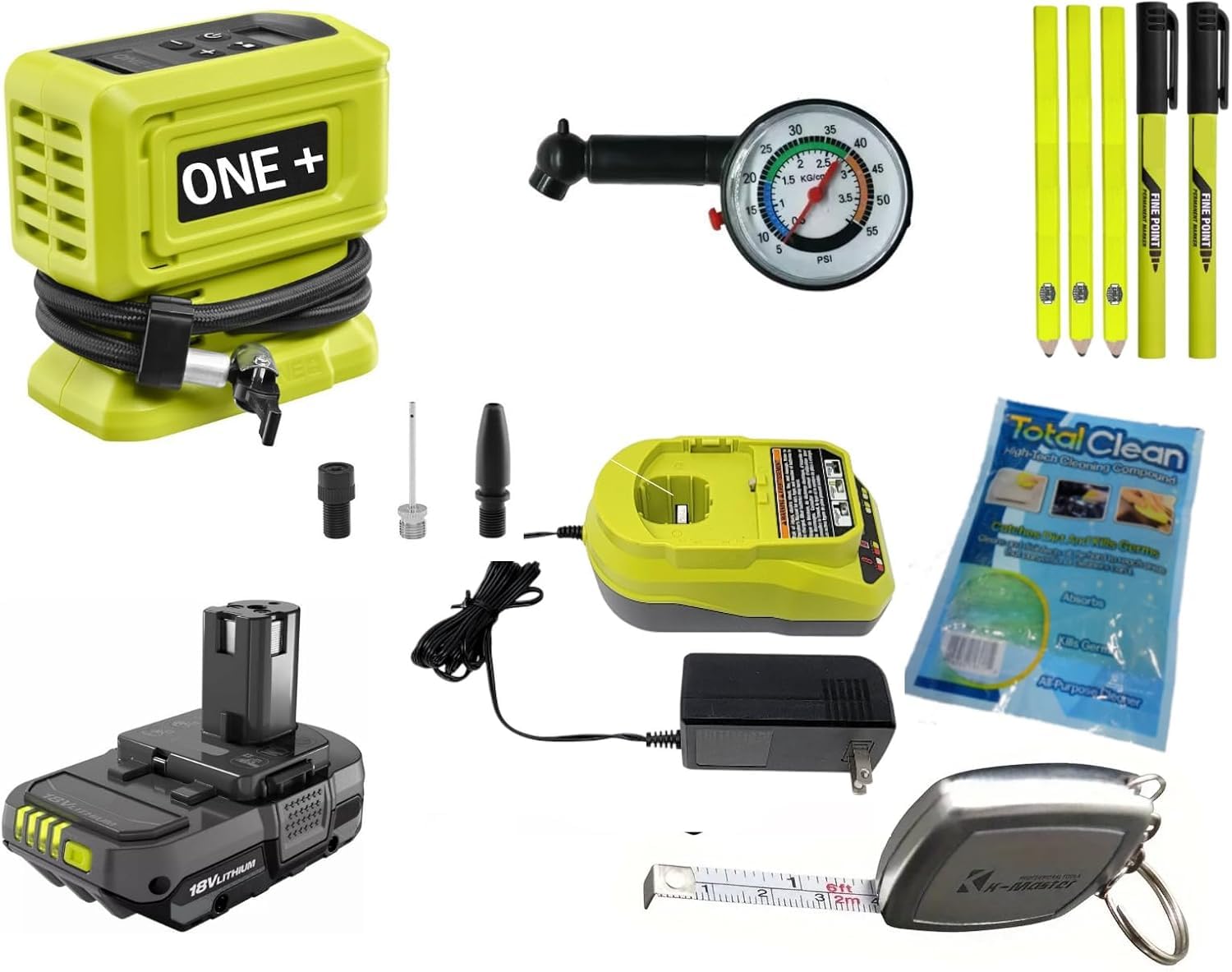
Image: The Ryobi ONE+ PCL001 Digital Power Inflator with its battery installed and hose connected, demonstrating its compact design and readiness for inflation tasks.
4. Operating Instructions
4.1 Powering On and Setting Pressure
- Ensure the battery is securely installed.
- Press the Power button (
 ) to turn on the inflator. The digital display will illuminate.
 - Use the + and - buttons to set the desired pressure (PSI). The inflator can reach up to 160 PSI.
- The display will show the current pressure of the connected item once the hose is attached.
4.2 Inflating an Item
- Attach the appropriate hose chuck or adaptor firmly to the item's valve stem. Ensure a tight seal to prevent air leakage.
- Once connected, the digital display will show the current pressure of the item.
- Press the Start button (
 ) to begin inflation.
 - The inflator will automatically shut off once the preset pressure is reached.
- To manually stop inflation, press the Stop button (
 ) or the Power button.
 - Carefully disconnect the hose from the valve stem.
Video: Demonstration of using the Ryobi Inflator to fill a tire to 35 PSI. This video illustrates the connection process, setting the desired pressure, and the automatic inflation cycle.
5. Maintenance
5.1 Cleaning
- Always remove the battery before cleaning.
- Wipe the exterior of the inflator with a clean, damp cloth. Do not use harsh chemicals or abrasive cleaners.
- Keep the air vents clear of dust and debris to ensure proper cooling.
5.2 Storage
- Store the inflator in a dry, cool place, away from direct sunlight and extreme temperatures.
- Ensure the hose and accessories are neatly stored in their designated on-board compartments.
- For long-term storage, remove the battery from the inflator.
5.3 Battery Care
- Charge the battery fully before first use.
- Do not store batteries in a discharged state for extended periods. Recharge them periodically.
- Protect batteries from impact and extreme temperatures.
6. Troubleshooting
Refer to the following table for common issues and their solutions.
| Problem | Possible Cause | Solution |
|---|---|---|
| Inflator does not turn on. | Battery not charged or improperly installed. | Ensure battery is fully charged and securely seated. |
| Inflator runs but no air is dispensed. | Hose or adaptor not properly connected; valve stem blocked. | Check all connections for a tight seal. Inspect valve stem for obstructions. |
| Inaccurate pressure reading. | Loose connection to valve stem. | Ensure the hose chuck is firmly attached to the valve stem. |
| Inflator stops before reaching set pressure. | Battery charge is low. | Recharge the battery. |
7. Specifications
- Model Number: PCL001
- Voltage: 18 Volts (ONE+ System)
- Maximum Pressure: 160 PSI
- Hose Length: 24 inches (2 feet)
- Power Source: Battery Powered
- Noise Level: 44 Decibels
- Item Weight: 4 Pounds (without battery)
- Color: Green
- Material Type: Plastic
- Features: Digital Pressure Gauge, Auto Shut-Off, On-board Accessory Storage
8. Warranty and Support
8.1 Manufacturer's Warranty
This Ryobi ONE+ PCL001 Digital Power Inflator is covered by a 3-year manufacturer's warranty. This warranty typically covers defects in materials and workmanship under normal use. Please refer to the warranty card included with your product for full terms and conditions, including specific coverage details and exclusions.
8.2 Customer Support
For technical assistance, warranty claims, or to order replacement parts, please contact Ryobi customer support. Contact information can usually be found on the product packaging, the official Ryobi website, or the warranty card.
When contacting support, please have your product model number (PCL001) and serial number (if applicable) ready.


