Norelco S591/94

Philips Norelco Shaver 500 Series S591/94 User Manual

Model: S591/94

Introduction

This manual provides essential information for the safe and effective use of your Philips Norelco Shaver 500 Series, Model S591/94. Please read these instructions carefully before using the appliance and retain them for future reference.
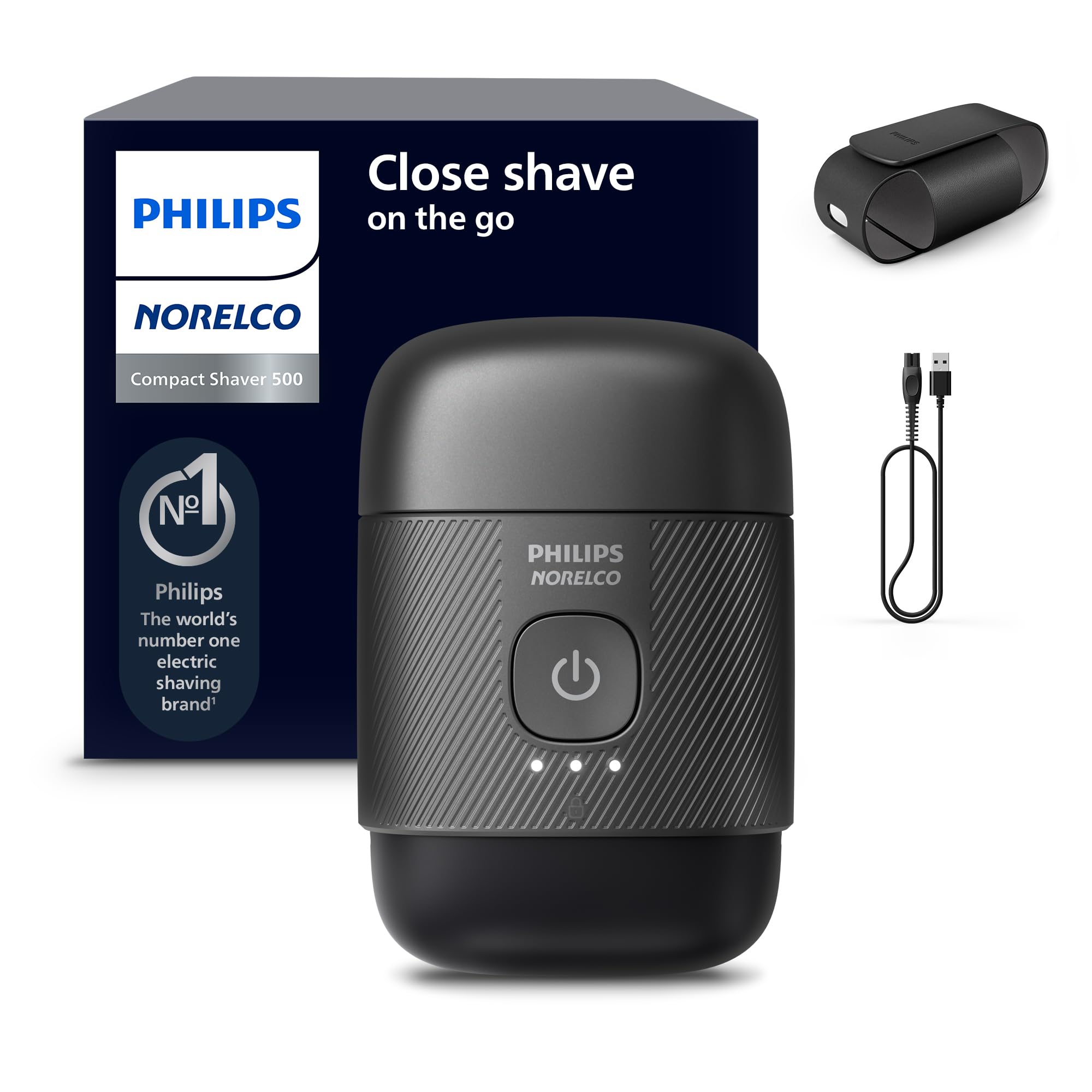
Philips Norelco Shaver 500 Series S591/94

Image: Philips Norelco Shaver 500 Series S591/94, a compact electric shaver.

Important Safety Information

Warning: To reduce the risk of electric shock, personal injury, or damage to the appliance, always follow basic safety precautions.

  • Do not use the shaver near water while charging.
  • Ensure the appliance is fully dry before connecting it to power for charging.
  • Keep the appliance away from children.
  • Do not disassemble or attempt to repair the shaver yourself. Contact authorized service personnel.
  • Only use the provided USB-A cable for charging. A power adapter is not included.

What's in the Box

Your Philips Norelco Shaver 500 Series package includes the following items:

  • 1x Shaver 500 Series (Model S591/94)
  • 1x Travel Pouch
  • 1x USB-A Cable (power adapter not included)
  • 1x Magnetic Cap
Contents of Philips Norelco Shaver 500 Series box

Image: The shaver, travel pouch, USB-A cable, and magnetic cap included in the package.

Setup and Charging

Initial Charge

Before first use, fully charge your shaver. Connect the provided USB-A cable to the shaver and a compatible USB power adapter (not included). A full charge takes approximately 1 hour and provides up to 40 minutes of shaving time. A 5-minute quick charge provides enough power for one shave.

Philips Norelco Shaver 500 Series features including charging

Image: Visual representation of the shaver's features, including charging time and runtime.

Portability and Travel

The compact design of the Shaver 500 Series makes it ideal for travel. It fits easily into a travel pouch or bag, ensuring you can maintain your grooming routine anywhere.

Philips Norelco Shaver 500 Series being placed into a travel bag

Image: The compact shaver being placed into a travel bag, demonstrating its portability.

Activating Travel Lock

To prevent accidental activation during travel, activate the travel lock. Press and hold the power button for 3 seconds until the travel lock indicator illuminates. To deactivate, press and hold the power button again for 3 seconds.

Video: Demonstrates the features and usage of the Philips Norelco Compact Shaver 500 Series, including activating the travel lock.

Operating the Shaver

Shaving Technique

For optimal results, move the shaver in small, circular motions across your face. The 3D Floating Heads adapt to your facial contours, ensuring comfortable skin contact even in hard-to-shave areas. The SteelPrecision blades, combined with Lift & Cut technology, gently lift and cut hair at skin level for a close shave.

Man using Philips Norelco Shaver 500 Series for a close shave

Image: A man using the compact shaver for a close shave, highlighting its portability.

Close-up of SteelPrecision blades with Lift & Cut Technology

Image: Detailed view of the SteelPrecision blades and Lift & Cut Technology for a skin-close shave.

3D Floating Heads for comfortable shaving

Image: Close-up of the 3D Floating Heads designed for comfortable shaving and optimal skin contact.

Wet and Dry Shave

The Philips Norelco Shaver 500 Series is designed for both wet and dry shaving. You can use it for a comfortable dry shave or with gel or foam for a refreshing wet shave. Its IPX7 water-resistant rating allows for safe use in wet conditions.

Maintenance and Cleaning

Regular cleaning ensures optimal performance and hygiene of your shaver.

Daily Cleaning

After each use, rinse the shaver head under running water. The shaver is 100% waterproof, making cleaning effortless. Simply pop off the shaving head and rinse away any clipped hairs.

Philips Norelco Shaver 500 Series being rinsed under water

Image: The shaver being rinsed under running water, demonstrating its waterproof design for easy cleaning.

Deep Cleaning

Periodically, you may wish to perform a more thorough cleaning. Refer to the full user manual (available on the Philips Norelco website) for detailed instructions on disassembling and reassembling the shaving heads for deep cleaning.

Specifications

Model NumberS591/94
Power SourceRechargeable Li-ion Battery
Charging Time1 hour for full charge, 5 minutes for quick charge
Shaving TimeUp to 40 minutes
BladesSteelPrecision blades with Lift & Cut System
Shaving Heads3D Floating Heads
Water ResistanceIPX7 (100% waterproof)
MotorPowerful Magnetic Motor (63,000 cutting actions/minute)
Dimensions5.67 x 4.92 x 3.39 inches
Weight13.76 ounces

Troubleshooting

If you encounter issues with your shaver, please refer to the following common solutions:

  • Shaver not turning on: Ensure the shaver is charged. Check if the travel lock is activated (deactivate by holding the power button for 3 seconds).
  • Reduced shaving performance: Clean the shaving heads thoroughly. Blades may need replacement after extended use (typically every 12 months).
  • Charging issues: Verify the USB-A cable is properly connected to both the shaver and a working power source. Ensure the power adapter (not included) is functional.
  • Skin irritation: For sensitive skin, try using the shaver with shaving gel or foam for a wet shave. Ensure proper shaving technique (small circular motions, not pressing too hard).

For further assistance, visit the official Philips Norelco support website or contact customer service.

Warranty and Support

Your Philips Norelco Shaver 500 Series is covered by a manufacturer's warranty. Please refer to the warranty card included in your packaging for specific terms and conditions. For product registration, support, replacement parts, or to view the full user manual, please visit the official Philips Norelco website:

www.philips.com/norelco

You can also find additional information and FAQs on the Philips Norelco store page on Amazon: Philips Norelco Store.

Ask a question about this manual

Ask about setup, troubleshooting, compatibility, parts, safety, or missing instructions. Manuals+ will review the question and use this page’s manual context to help answer it.

After a successful submission, we securely hash the supplied account or form email before sending it to Microsoft Advertising for conversion attribution. Privacy details.