
STASRC H1 Pro
Contents
Flywing H1 Pro High-Performance Flight Controller User Manual
Model: H1 Pro | Brand: STASRC
1. Introduction
The Flywing H1 Pro is a high-performance flight controller designed for RC helicopters, offering advanced autopilot capabilities and precise control. This manual provides essential information for the proper installation, operation, and maintenance of your H1 Pro system.
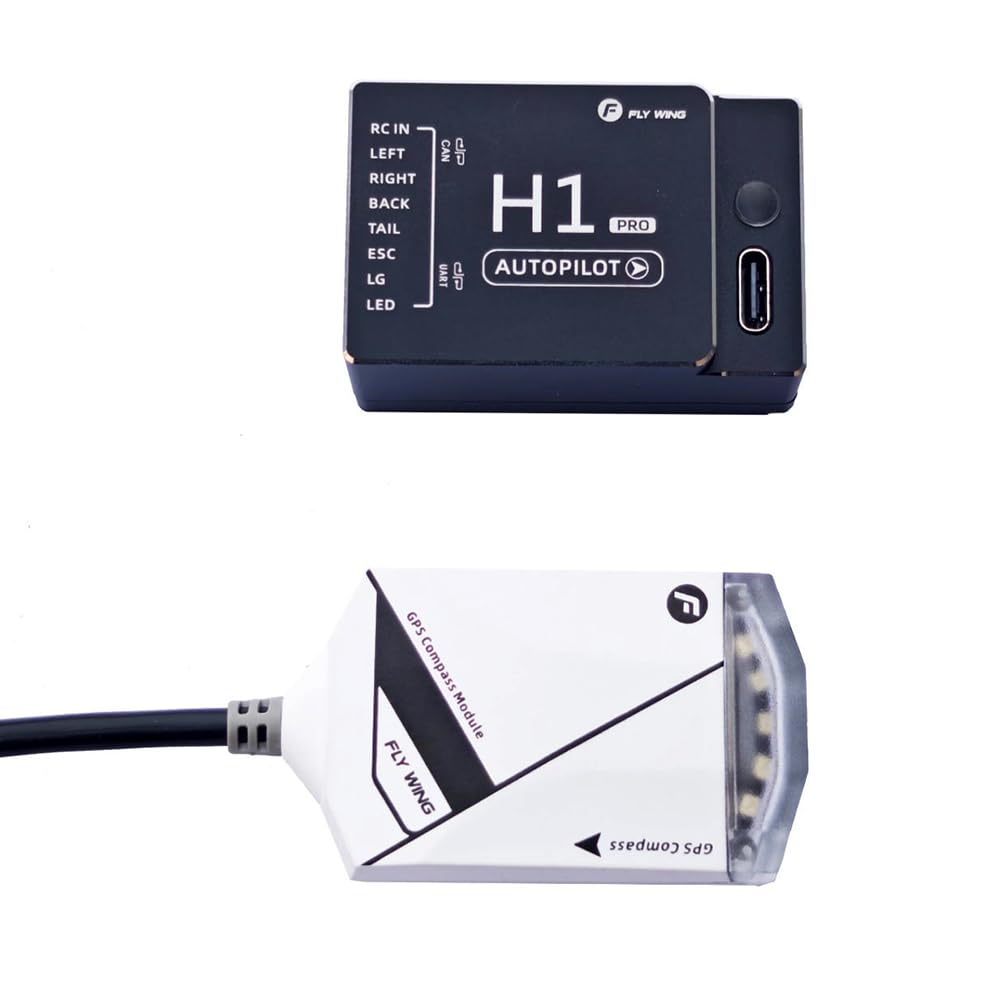
Image: Overview of the Flywing H1 Pro Flight Controller and its GPS module.
2. Package Contents
Verify that all items listed below are included in your package:
- 1x Flywing H1 Pro Flight Controller (FC)
- 1x CAN GNSS Module (GPS Compass Module)
- 1x GNSS Fixed Base
- 1x Wire Package (various connection cables)

Image: Diagram illustrating the components included in the Flywing H1 Pro package.
3. Specifications
| Feature | Detail |
|---|---|
| Helicopter Type | HR3/H3 |
| Battery Type | 3S, 4S, 6S, 12S Lithium Polymer (LiPo) |
| Receiver Type | S-BUS/PPM/i-BUS/WBUS/SUMD/ELRS (DSM2/DSMX adapter required for compatible receivers) |
| Software System | Win10, Win11 (64-bit) |
| Power Consumption | 2 W |
| Input Voltage | 6 V - 13 V (ESC BEC power supply) |
| Operating Temperature | -10 ℃ to 55 ℃ |
| Main Controller Dimensions | 48 mm × 31 mm × 18.5 mm |
| CAN GPS Dimensions | 47 mm × 30 mm × 14 mm |
| UART GPS Dimensions (Optional) | 37 mm × 30 mm × 13.5 mm |
| Main Controller Weight | 34 g |
| CAN GPS Weight | 33 g |
| UART GPS Weight (Optional) | 21.5 g |
| Maximum Flight Angle (Soft) | 25° |
| Maximum Flight Angle (Standard) | 35° |
| Maximum Flight Angle (Exercise) | 40° |
| Hovering Accuracy (GPS Mode, Vertical) | ± 0.5 m |
| Hovering Accuracy (GPS Mode, Horizontal) | ± 1.5 m |
| Product Dimensions (L x W x H) | 5.08 x 7.62 x 2.54 cm |
| Main Material | Metal, Plastic |
The H1 Pro features a next-generation high-performance sensor, including an ICM42688P gyroscope, IST8310 compass, and MS5611 gas pressure sensor, ensuring significant precision improvement and anti-interference performance. It also incorporates a built-in shock absorption design to filter out vibrations.

Image: Exploded view of the H1 Pro's high-performance sensor with shock-absorbing sponge and copper counterweight.
4. Setup and Installation
4.1 Component Overview
The H1 Pro system consists of the main flight controller unit and a separate GPS Compass Module. Familiarize yourself with the ports and indicators on each component.

Image: Flywing H1 Pro Main Controller showing RC IN, LEFT, RIGHT, BACK, TAIL, ESC, LG, LED ports.

Image: Flywing H1 Pro GPS Compass Module connected via cable.
4.2 Wiring and Connections
Connect the flight controller to your RC helicopter's receiver, ESC, servos, and GPS module according to the provided wiring diagrams (refer to the official Flywing H1 Pro software or documentation for detailed diagrams). Ensure all connections are secure and correctly oriented.
- RC IN: Connects to your receiver (S-BUS/PPM/i-BUS/WBUS/SUMD/ELRS).
- LEFT, RIGHT, BACK, TAIL, ESC, LG, LED: Connect to corresponding servos, ESC, landing gear, and LED indicators.
- GPS CAN: Connects to the CAN GNSS Module.
- Voltage Detection Port: Supports up to 12S (51V) battery input for voltage monitoring.

Image: Close-up of the H1 Pro's voltage detection port, upgraded to support up to 12S battery configurations.
4.3 Mounting
Mount the main flight controller unit securely to the helicopter frame, ensuring it is level and free from excessive vibrations. Use the provided GNSS fixed base to mount the GPS Compass Module in an elevated position, away from other electronics that might cause interference, with a clear view of the sky.
4.4 Software Installation and Configuration
The H1 Pro requires configuration via dedicated software compatible with Windows 10 or Windows 11 (64-bit) operating systems. Download the latest software from the official Flywing website. Connect the H1 Pro to your computer via USB and follow the on-screen instructions for initial setup, parameter adjustments, and firmware updates.
5. Operating Instructions
5.1 Flight Modes
The H1 Pro supports multiple flight modes to suit various piloting styles and conditions:
- GPS Mode: Provides precise position holding and hovering accuracy (Vertical: ± 0.5m, Horizontal: ± 1.5m).
- ATT Mode: Attitude mode, offering stable flight without GPS positioning.
- 3D Acro Mode: For advanced aerobatic maneuvers, providing full control similar to a traditional gyroscope.

Image: An RC helicopter demonstrating flight in 3D Acro mode, highlighting the freedom of movement.
5.2 Calibration
Perform wireless calibration of the flight controller and compass as instructed by the configuration software. Regular calibration ensures optimal performance and accuracy, especially after significant changes in location or environment.
5.3 Flight Sensitivities
The H1 Pro offers three flight sensitivities modes (Soft, Standard, Exercise) with varying maximum flight angles (25°, 35°, 40° respectively). Adjust these settings in the software to match your skill level and desired flight characteristics.

Image: Overview of H1 Pro features, including wireless calibration, coordinated turn, three flight sensitivities, and soft take-off/landing.
6. Maintenance
To ensure the longevity and reliable performance of your Flywing H1 Pro Flight Controller, follow these maintenance guidelines:
- Keep Clean: Regularly inspect the flight controller and GPS module for dust, dirt, or debris. Clean gently with a soft, dry cloth.
- Check Connections: Periodically verify that all wiring connections are secure and free from damage. Loose connections can lead to intermittent issues or system failure.
- Inspect for Damage: After any hard landing or crash, carefully inspect all components for physical damage, including cracks, bent pins, or damaged cables. Replace any damaged parts immediately.
- Firmware Updates: Keep the flight controller firmware updated to the latest version available from the manufacturer's website to benefit from performance improvements and bug fixes.
7. Troubleshooting
If you encounter issues with your Flywing H1 Pro, consider the following troubleshooting steps:
- No Power/No Indicator Lights:
- Check the input voltage and ensure it is within the specified 6V-13V range.
- Verify the ESC BEC power supply is functioning correctly.
- Inspect all power connections for proper seating and continuity.
- GPS Signal Issues:
- Ensure the GPS module has a clear, unobstructed view of the sky.
- Relocate the GPS module away from other electronic components that may cause interference.
- Perform a GPS calibration using the configuration software.
- Unstable Flight:
- Verify that the flight controller is securely mounted and isolated from vibrations.
- Check all servo connections and ensure they are correctly assigned in the software.
- Recalibrate the gyroscope and accelerometer.
- Ensure the helicopter type (HR3/H3) is correctly configured in the software.
- Software Connection Problems:
- Ensure your computer is running Windows 10 or 11 (64-bit).
- Try a different USB cable or USB port.
- Reinstall the H1 Pro configuration software and drivers.
For further assistance, refer to the official Flywing support resources or community forums.
8. Safety Information
Operating RC helicopters equipped with flight controllers requires adherence to strict safety protocols. While the Flywing H1 Pro enhances flight stability, it does not replace responsible piloting. Always observe the following safety guidelines:
- Always operate your RC helicopter in open areas, away from people, animals, buildings, and power lines.
- Ensure all pre-flight checks are completed, including battery levels, control surface movements, and secure connections.
- Understand and comply with all local regulations regarding RC aircraft operation.
- Never operate the helicopter under the influence of alcohol or drugs.
- Maintain a safe distance from the helicopter during take-off and landing.
- In case of any malfunction, immediately cut power to the motors if safe to do so.
- The manufacturer recommends this product for users aged 18 years and above.
Warning: No specific safety warnings were provided by the manufacturer beyond general product safety. Always exercise caution and good judgment when operating RC equipment.
9. Warranty and Support
Specific warranty information for the Flywing H1 Pro Flight Controller was not provided in the product details. For warranty claims, technical support, or further inquiries, please contact the manufacturer, STASRC, or visit their official website. Keep your proof of purchase for any warranty-related requests.
Manufacturer: STASRC
Product ASIN: B0G9178D5Y
First Available Date: December 19, 2025
Ask a question about this manual
Ask about setup, troubleshooting, compatibility, parts, safety, or missing instructions. Manuals+ will review the question and use this page’s manual context to help answer it.