
1. Introduction
This manual provides detailed instructions for the installation, operation, and maintenance of the Compex Systems WLTE7000E6 QCN6274 WiFi 7 (802.11be) 4x4 MU-MIMO 2.4GHz Single Band Module. Please read this manual thoroughly before using the product to ensure proper functionality and to prevent damage.
The WLTE7000E6 is a high-performance wireless module designed for advanced networking applications, offering WiFi 7 capabilities for enhanced speed and efficiency.
2. Safety Information
- Always disconnect power from the host device before installing or removing the module.
- Handle the module with care to avoid electrostatic discharge (ESD) damage. Use an anti-static wrist strap if available.
- Do not expose the module to moisture or extreme temperatures outside its specified operating range.
- Ensure proper ventilation for the host device to prevent overheating.
- This product is intended for integration into compatible host systems by qualified personnel.
3. Package Contents
Verify that your package contains the following items:
- Compex Systems WLTE7000E6 QCN6274 WiFi 7 Module (2 pieces, as a set)
- Quick Start Guide (if included)
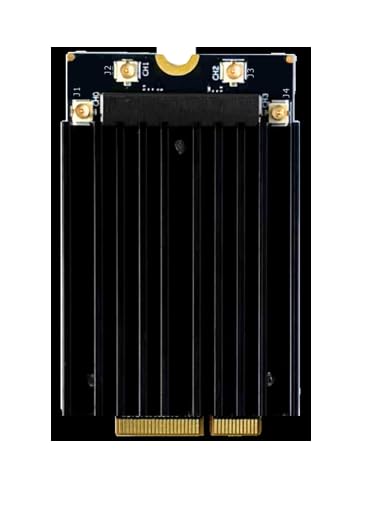
Image: Two WLTE7000E6 modules, each with a black heatsink, resting on a brown cardboard box.
4. Product Overview
The WLTE7000E6 is a Single-Band 6GHz WiFi 7 (802.11be) module based on Qualcomm’s QCN6274 ‘Waikiki’ series radio solution. It features a 4T4R (4x4) MU-MIMO configuration, capable of achieving data rates up to 11.53Gbps. Designed for robust performance, it delivers up to 17dBm per chain and supports both Access Point (AP) and Station (STA) modes.
Key features include:
- Qualcomm QCN6274 ‘Waikiki’ series for Commercial Grade applications.
- M.2 E Key Interface with PCIe 3.0 for host connectivity.
- Support for up to 4096-QAM for higher data density.
- Multi-link operation (MLO) support to reduce latency and aggregate throughput.
- Preamble puncturing for improved spectral efficiency.
- Wide signal coverage due to its 3.3V design.
5. Setup & Installation
5.1 Physical Installation
The WLTE7000E6 module utilizes an M.2 E Key interface. Follow these steps for physical installation:
- Prepare Host System: Power off your computer or host device and disconnect it from the power source. Open the casing to access the M.2 slot.
- Locate M.2 E Key Slot: Identify an available M.2 E Key slot on your motherboard or expansion board.
- Insert Module: Carefully align the WLTE7000E6 module with the M.2 E Key slot. Insert the module at a slight angle (approximately 30 degrees) into the slot until the gold contacts are fully seated.
- Secure Module: Gently push down the module until it is parallel with the motherboard. Secure it with the provided screw (usually included with the motherboard or host device) into the standoff.
- Connect Antennas (if applicable): If your system uses external antennas, connect them to the appropriate connectors on the module.
- Close Casing: Reassemble your computer or host device casing.

Image: A detailed view of one WLTE7000E6 module, highlighting its heatsink and M.2 interface.
5.2 Driver Installation
After physical installation, you will need to install the appropriate drivers for your operating system. The WLTE7000E6 is compatible with Windows, Linux, and Android operating systems.
- Power On: Power on your host device.
- Obtain Drivers: Drivers for the QCN6274 chipset are typically provided by your host system manufacturer or can be found on the Compex Systems support website. For 3rd party platforms (e.g., Intel x86, ARM processors like NXP and Marvell), specific drivers or kernel modules may be required.
- Install Drivers: Follow the instructions provided with the driver package to install them. This may involve running an executable file or compiling kernel modules for Linux-based systems.
- Verify Installation: After installation, check your device manager (Windows) or use network configuration tools (Linux/Android) to confirm that the WiFi 7 module is recognized and functioning correctly.
6. Operating Instructions
The WLTE7000E6 module supports advanced WiFi 7 features to optimize wireless performance.
6.1 Modes of Operation
- Access Point (AP) Mode: The module can function as a wireless access point, providing network connectivity to other devices. This is suitable for creating a local WiFi network.
- Station (STA) Mode: The module can connect to an existing wireless network as a client device.
- The module is capable of operating in both AP and STA modes simultaneously, allowing for backhaul and client connectivity.
6.2 Advanced Features
- 4096-QAM: This modulation scheme allows for a higher density of data per signal, contributing to increased throughput. Ensure your connected devices also support 4096-QAM for maximum benefit.
- OFDMA (Orthogonal Frequency-Division Multiple Access): OFDMA improves network efficiency by allowing multiple users to transmit data simultaneously on different sub-carriers, reducing latency and improving performance in dense environments.
- MLO (Multi-Link Operation): MLO enables devices to use multiple frequency bands or channels concurrently, reducing latency and aggregating throughput. This feature depends on the setup of your network and client devices.
- Preamble Puncturing: This feature allows the module to utilize portions of a spectrum channel even if other parts are occupied by legacy users, improving spectral efficiency and overall network capacity.
Configuration of these advanced features is typically done through the operating system's network settings or specific utility software provided by the driver or host system manufacturer.
7. Maintenance
The WLTE7000E6 module is designed for reliable operation with minimal maintenance. Adhere to the following guidelines:
- Operating Environment: Ensure the module operates within its specified temperature range of -20°C to 70°C. Avoid environments with excessive dust, humidity, or extreme temperatures.
- Cleaning: If necessary, gently clean the module and surrounding area with a soft, dry cloth. Do not use liquid cleaners or solvents.
- Firmware Updates: Periodically check the Compex Systems support website or your host system manufacturer's website for firmware updates. Keeping the firmware updated can improve performance and security.
8. Troubleshooting
If you encounter issues with your WLTE7000E6 module, refer to the following troubleshooting steps:
| Problem | Possible Cause | Solution |
|---|---|---|
| Module not detected by OS | Incorrect installation, missing/corrupt drivers, M.2 slot issue. |
|
| Poor wireless performance | Outdated drivers, interference, distance from AP, incorrect settings. |
|
| Intermittent connection | Driver issues, power management settings, network congestion. |
|
If the problem persists after trying these steps, contact technical support.
9. Specifications
| Feature | Description |
|---|---|
| Model Number | WLTE7000E6 |
| Chipset | Qualcomm QCN6274 ('Waikiki' series) |
| Wireless Standard | WiFi 7 (802.11be) |
| Frequency Band | 6GHz Single Band |
| MIMO Configuration | 4x4 MU-MIMO |
| Data Transfer Rate | Up to 11.53 Gbps |
| Interface | M.2 E Key (PCIe 3.0) |
| Operating Temperature | -20°C to 70°C |
| Supported OS | Windows, Linux, Android |
| Dimensions (L x W x H) | 2"L x 1.18"W x 0.99"H (50.8mm x 29.97mm x 25.15mm) |
| Item Weight | 120 Grams |
| Data Link Protocol | 802.11ac, 802.11ax, 802.11be, Ethernet, Wireless |
10. Warranty & Support
10.1 Manufacturer Warranty
The Compex Systems WLTE7000E6 module comes with a 1 Year Manufacturer Warranty from the date of purchase. This warranty covers defects in materials and workmanship under normal use. It does not cover damage caused by misuse, accident, unauthorized modification, or improper installation.
10.2 Technical Support
For technical assistance, driver downloads, or further inquiries, please visit the official Compex Systems website or contact your vendor. When contacting support, please have your product model number (WLTE7000E6) and purchase information readily available.