
Product Overview
The OYLUS 18000 BTU Mini Split Air Conditioner and Heating System provides efficient climate control for spaces up to 1250 sq.ft. This 230V, 21 SEER2 unit features inverter technology, Wi-Fi connectivity, and operates with eco-friendly R454B refrigerant. It offers year-round performance, including heating capabilities down to -13°F.
- Year-Round Performance: Operates efficiently from -4°F to 122°F, with reliable heating down to -13°F thanks to a crankcase heater and high-efficiency compressor.
- Wide-Coverage 4D Airflow: Features 4D auto-swing louvers and 8 adjustable fan speeds for even air circulation.
- High-temp Self-Cleaning: Includes an easily removable and washable filter, and a 131°F (55°C) high-temperature self-cleaning cycle for fresh air.
- Smart Control System: Manage functions via remote or smartphone with Wi-Fi. Features iFeel mode, LED display off option, 24-hour timer, and safety lock.
- Energy-Efficient Inverter: Utilizes R454B refrigerant and inverter technology, reducing energy consumption by up to 30% in ECO mode. AHRI-certified performance.
- Ultra-Quiet Operation: Noise levels as low as 30dB in sleep mode, maintaining quiet operation even at higher settings (40dB).
Package Contents
Upon unboxing, verify that all components listed below are present. Packages may arrive separately.
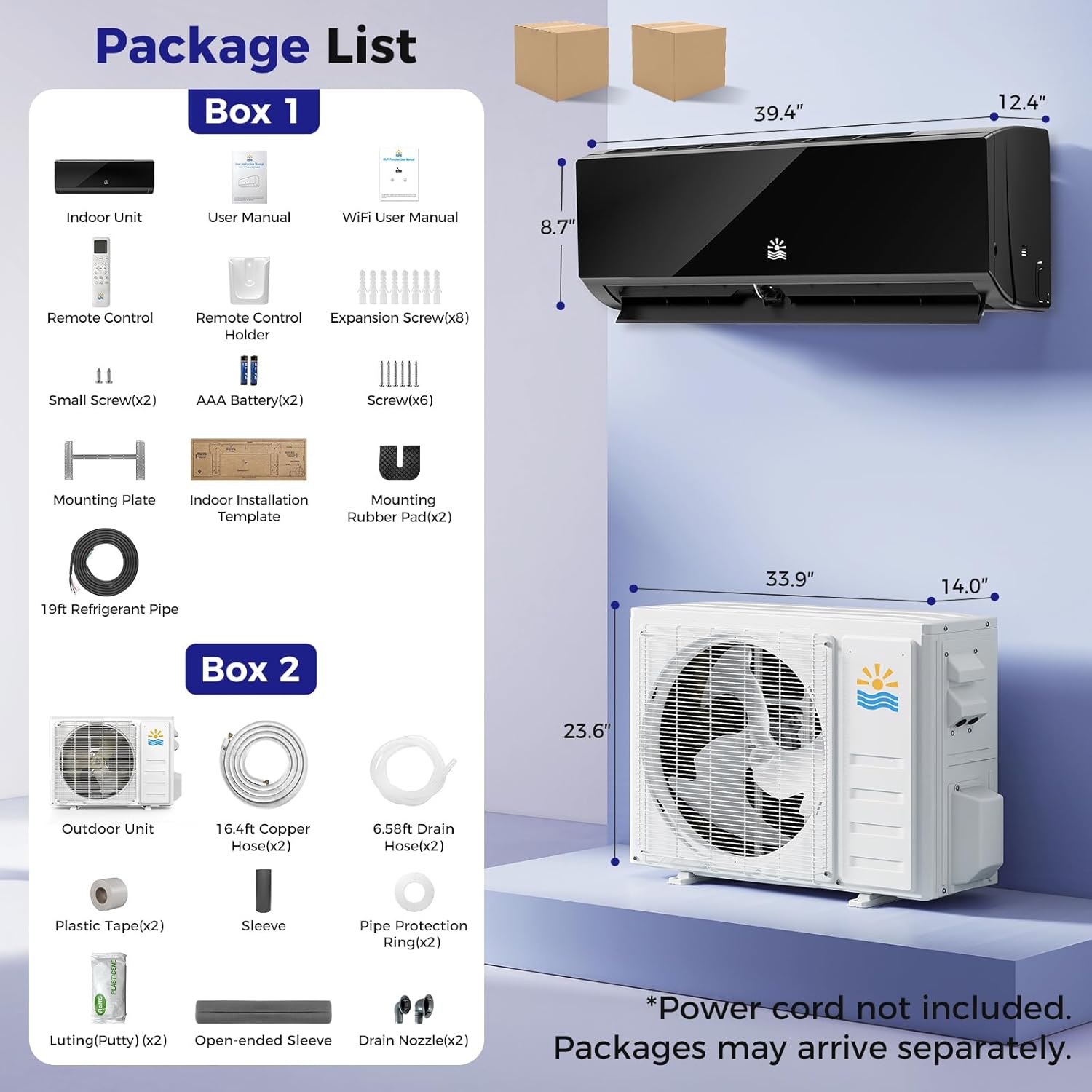
Figure 1: Overview of OYLUS Mini Split System package contents, including indoor and outdoor units, remote control, user manuals, and various installation accessories like connecting pipes, mounting plate, and drain hoses.
- Indoor Unit
- Outdoor Unit
- User Manual & WiFi User Manual
- Remote Control & Remote Control Holder
- Small Screws (x2), Expansion Screws (x8), Screws (x6)
- Mounting Plate
- Indoor Installation Template
- Mounting Rubber Pad (x2)
- 19ft Refrigerant Pipe
- 16.4ft Copper Hose (x2)
- 6.58ft Drain Hose (x2)
- Plastic Tape (x2)
- Sleeve
- Pipe Protection Ring (x2)
- Luting (Putty) (x2)
- Open-ended Sleeve
- Drain Nozzle (x2)
- Connecting Pipe
Note: Power cord is not included.
Installation Guide
Proper installation is crucial for optimal performance and longevity of your mini split system. While the system is designed for straightforward installation, professional assistance is recommended for complex setups or if you are unfamiliar with HVAC systems.
1. Choosing Installation Location
Select a location for the indoor unit that allows for proper airflow and is free from obstructions. The outdoor unit should be placed on a stable surface, ideally a concrete pad, and spaced away from walls and any plants or objects that could impede airflow.
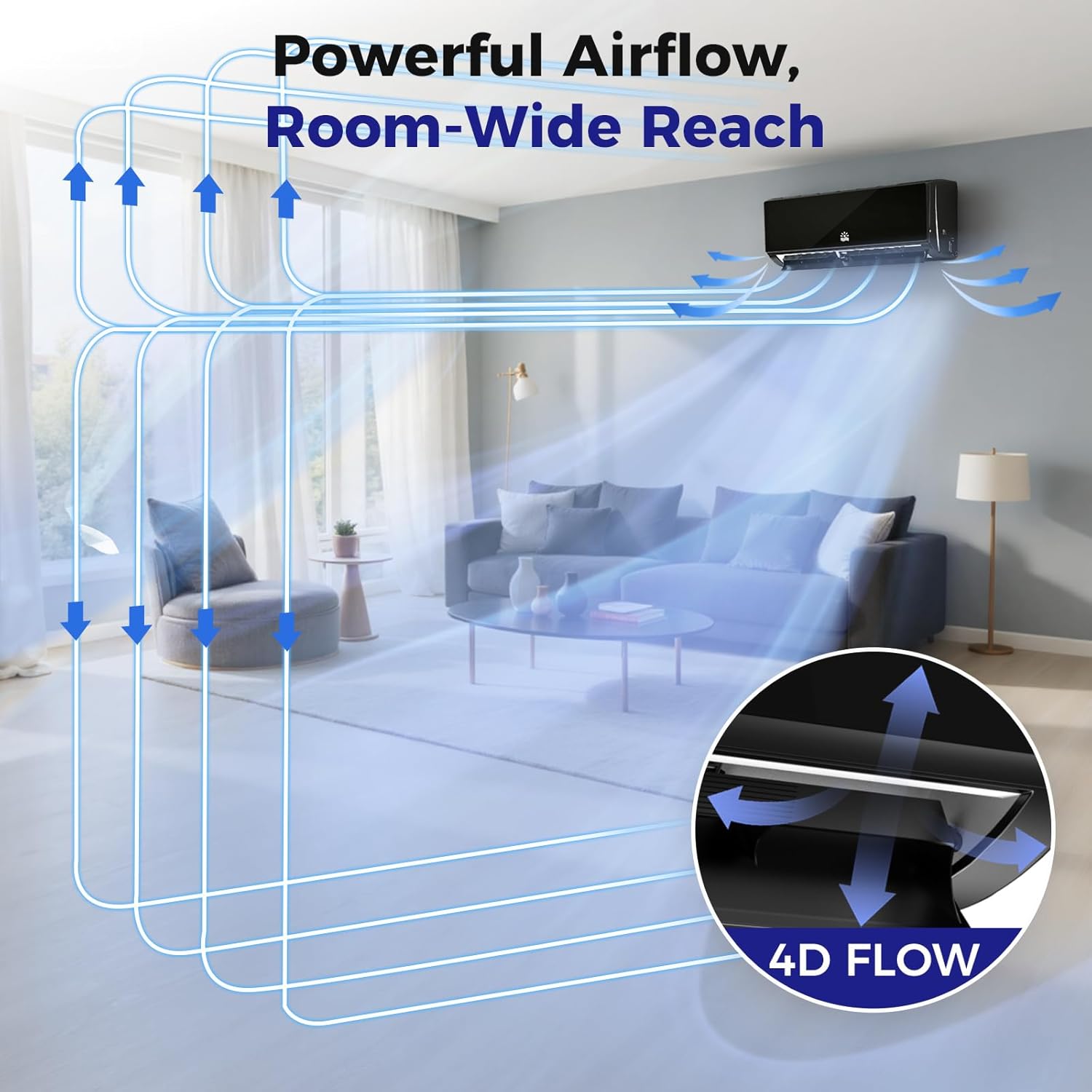
Figure 2: Illustration of 4D airflow distribution from the indoor unit, ensuring wide-coverage and room-wide reach for consistent comfort.

Figure 3: Comparison highlighting the durable, corrosion-resistant design of the OYLUS outdoor unit compared to a standard unit, emphasizing longevity.
2. Mounting the Indoor Unit
Use the provided mounting plate and screws to securely attach the indoor unit bracket to the wall. Ensure the bracket is level for proper drainage and operation.
Video 1: Oylus Mini Split AC/Heating System overview, showing the indoor unit being mounted on a wall and the outdoor unit placed on the ground. This video provides a visual guide to the initial setup steps.
3. Connecting Refrigerant Lines and Electrical Wiring
Carefully connect the pre-charged refrigerant pipes between the indoor and outdoor units. Ensure all connections are tight to prevent leaks. The outdoor unit must be within 10 feet of the indoor unit for the provided pipes. Connect the electrical wiring according to the wiring diagram in the user manual. Ensure proper voltage (230V for this model) and use appropriate gauge wiring.
Video 2: Installation guide for DELLA Mini Split Unit, demonstrating the process of connecting refrigerant lines and electrical wiring between the indoor and outdoor units. This video highlights key connection points and proper handling of components.
Video 3: "5 Urgent Steps Need to Know Before Installing Della Mini Split" provides crucial tips for pre-installation, including handling refrigerant pipes and ensuring proper clearances. This video emphasizes critical steps for a successful setup.
4. Vacuuming the Refrigerant Circuit
After connecting the lines, it is essential to vacuum the refrigerant circuit to remove air and moisture. This step ensures maximum efficiency and prevents damage to the system. Use a vacuum pump and manifold gauge set. Aim for -30 PSI on the manifold gauge.
Video 4: "Mini Split System Air Conditioner & Heater with Inverter" demonstrates the vacuuming process for the refrigerant lines, highlighting the importance of removing air and moisture for optimal system performance.
Operating Instructions
Your OYLUS Mini Split system can be controlled via the included remote control or through a smartphone app (Wi-Fi enabled models). Familiarize yourself with the various modes and settings for optimal comfort.
Remote Control Functions

Figure 4: Smart control options for the OYLUS Mini Split, illustrating both remote control and smartphone app functionality for convenient temperature management.
- MODE Button: Cycles through Cooling, Heating, Dry, Fan, and Auto modes.
- Temperature Adjustment: Use the Up/Down arrows to set desired temperature.
- FAN Speed: Adjust fan speed (8 levels available) for desired airflow.
- SWING: Activates 4D auto-swing louvers for even air distribution.
- ECO Mode: Reduces energy consumption by up to 30%.
- SLEEP Mode: Adjusts temperature and fan speed for quiet operation (as low as 30dB).
- TIMER: Set a 24-hour timer for automatic on/off operation.
- iFeel Mode: Localized temperature sensing for precise comfort around the remote control.
- DISPLAY: Turns off the LED display on the indoor unit for undisturbed sleep.

Figure 5: Visual representation of the OYLUS Mini Split operating in both quick cooling (61°F) and quick heating (88°F) modes, with various fan speed options.
Figure 6: Illustration of the OYLUS Mini Split's 4D airflow system, demonstrating how air is circulated effectively throughout a room for wide coverage.

Figure 7: Depiction of the 5-in-1 functions of the OYLUS Mini Split, including Cooling (down to 61°F), Heating (up to 88°F), Dry (45-75 pints per day), and Fan (Auto/Low/Medium/High/Turbo) modes.
Maintenance
Regular maintenance ensures the longevity and efficiency of your OYLUS Mini Split system.
1. Filter Cleaning
The indoor unit features an easily removable and washable filter. Clean the filter regularly (e.g., every 2-4 weeks, depending on usage) to maintain optimal airflow and air quality.
2. High-Temperature Self-Cleaning
The indoor unit can activate a 131°F (55°C) high-temperature self-cleaning cycle. This feature helps maintain fresh, well-conditioned airflow and reduces manual upkeep.

Figure 8: Visual guide to the 131°F (55°C) self-cleaning feature and the easily removable and washable filter, promoting fresh air and effortless upkeep.
Troubleshooting
If you encounter issues with your OYLUS Mini Split system, refer to the following common troubleshooting tips. For persistent problems, contact customer support.
- Unit not turning on: Check power supply, ensure the unit is properly plugged in, and verify circuit breaker status.
- No cooling/heating: Ensure correct mode is selected. Check temperature settings. Verify outdoor unit fan is running.
- Poor airflow: Clean or replace air filters. Check for obstructions around the indoor or outdoor unit.
- Unusual noises: Check for loose parts or debris in the fan. If noise persists, contact support.
- Water leakage from indoor unit: Ensure the drain hose is properly installed and not clogged. Verify the unit is level.
- Fluorine Leak Protection: Smart sensor will alert you to potential refrigerant issues. If an alert occurs, contact a qualified technician.

Figure 9: The Fluorine Leak Protection system, which uses a smart sensor to alert users to potential refrigerant issues, ensuring safety and timely maintenance.
Specifications
| Feature | Detail |
|---|---|
| Brand | OYLUS |
| Model Number | OAS-01_18K-230V_SEER20 |
| Cooling Power | 18000 British Thermal Units |
| Capacity | 4800 Cubic Feet |
| Seasonal Energy Efficiency Ratio (SEER2) | 21 |
| Voltage | 230 Volts |
| Wattage | 1700 watts |
| Noise Level | 30 Decibels (Sleep Mode) |
| Refrigerant | R454B |
| Installation Type | Split System |
| Product Dimensions (D x W x H) | 39.4"D x 8.7"W x 12.4"H |
| Item Weight | 28.3 Pounds |
| Floor Area Coverage | 1250 Square Feet |
| Control Method | Remote Control, Wi-Fi App |
Warranty and Support
The OYLUS Mini Split Air Conditioner comes with a 1-Year Manufacturer Limited Warranty. For any questions, technical support, or warranty claims, please refer to the contact information provided in your user manual or visit the OYLUS official website.
- Warranty Type: Limited
- Warranty Description: 1 Year Manufacturer

Figure 10: OYLUS commitment to customer satisfaction, highlighting 360° Quality Protection, Hassle-Free After-Sales Support, and a 24/7 Rapid Response System.