
Introduction
Welcome to the Aoocci C6 PRO Motorcycle Carplay Dash Cam. This manual provides detailed instructions for the installation, operation, maintenance, and troubleshooting of your new device. Please read this manual thoroughly before use to ensure proper functionality and safety.
What's in the Box
Verify that all components are present in the package:
- Motorcycle Dash Cam main unit
- Front and Rear Cameras
- Bracket (mount diameter: 22-26mm) and TPMS sensors
- Controller & 64GB TF Card & Screen Protector
- Accessories and Tools
- USB Test Cable
- Power Cable
- Camera Connection Cables
- User Manual

This image displays all items included in the Aoocci C6 PRO package: the main dash cam unit, front and rear cameras, TPMS sensors, mounting bracket, controller, 64GB TF card, screen protector, various cables (USB test, power, camera connection), and a user manual.
Setup and Installation
Mounting the Main Unit
Secure the main dash cam unit to your motorcycle's handlebars using the provided bracket. Ensure the mount diameter is compatible (22-26mm). Position the unit for optimal visibility and accessibility.
Camera Installation
Install the front and rear cameras in desired locations, ensuring a clear, unobstructed view. The cameras are IP67 waterproof. Connect the camera cables to the main unit.

This diagram illustrates the recommended installation points for the front and rear cameras on a motorcycle. Both cameras record in 1080P at 30 frames per second, each offering a 140-degree wide-angle view for comprehensive coverage.
Power Connection
Connect the power cable to your motorcycle's ACC power source (12-30V). The system is designed for ACC start mode, meaning it powers on and off with your motorcycle's ignition.
TPMS Sensor Installation
Install the tire pressure monitoring system (TPMS) sensors on your motorcycle's tire valves. Refer to the specific TPMS installation guide for detailed steps.

This image demonstrates how to install the TPMS sensors onto the motorcycle tire valves. It also shows the dash cam display interface, which provides real-time readings for front and rear tire pressure (e.g., 25psi, 18psi) and temperature (e.g., 24°C).
Screen Protector Application
Carefully apply the provided screen protector to the 6.25-inch display to prevent scratches and damage.

This image shows the included premium screen protector positioned above the Aoocci C6 PRO dash cam's 6.25-inch display, ready for application to protect the screen from scratches and wear.
Operating Instructions
Power On/Off
The device powers on automatically when your motorcycle's ignition is turned on (ACC start mode) and powers off when the ignition is turned off.
Display and Interface
The 6.25-inch touchscreen display features a 1560x720P resolution and automatically adjusts brightness for optimal visibility in various lighting conditions. Navigate through menus and functions using touch controls.

This image shows the main interface of the Aoocci C6 PRO dash cam, which supports wireless CarPlay and Android Auto. The screen displays icons for driving recorder, interconnectivity, current time, temperature, and video replay, all accessible via touch.
Wireless CarPlay and Android Auto
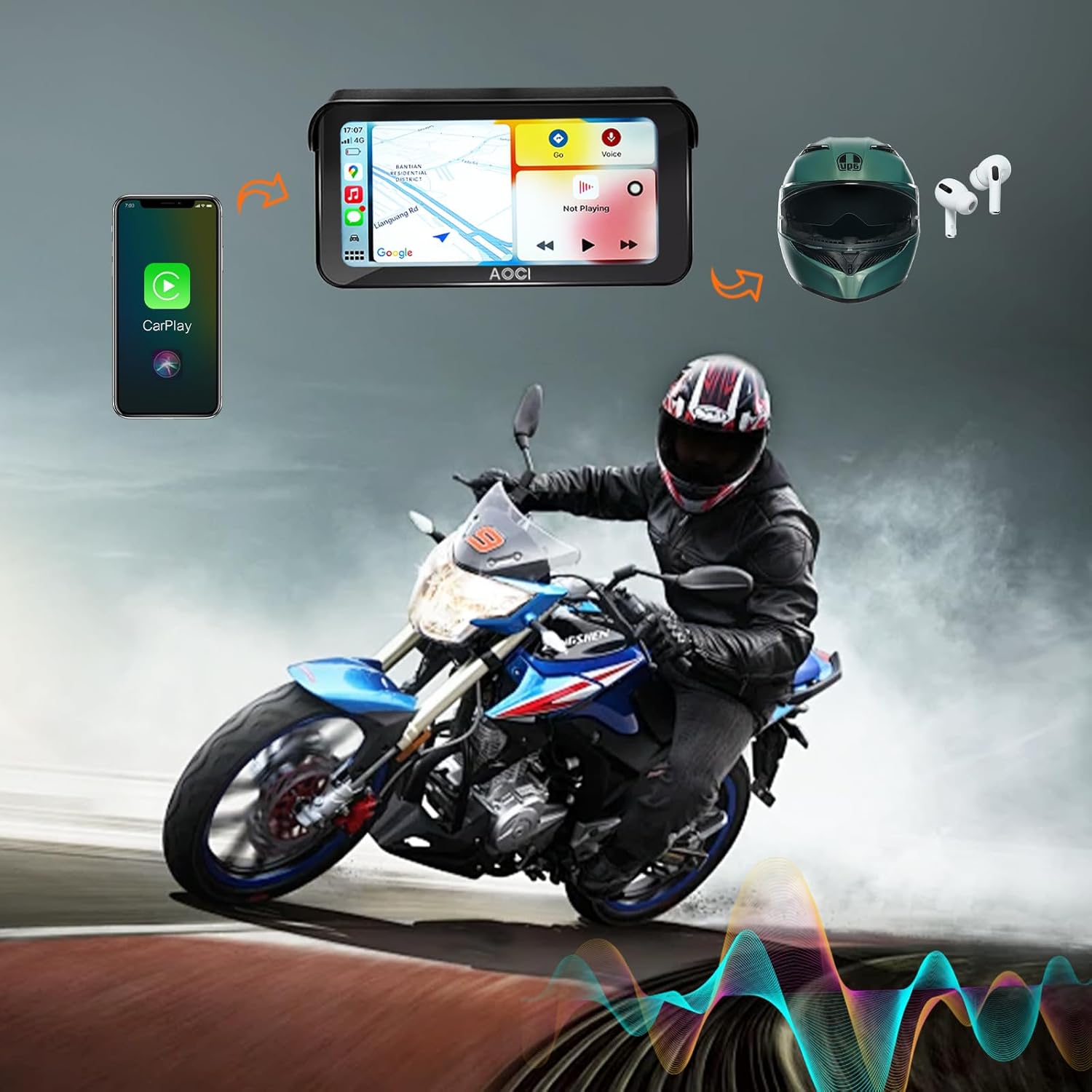
Connect your smartphone wirelessly via Bluetooth 5.0 for pairing and Wi-Fi 5.0 GHz for data transfer. Once connected, you can access navigation, music, and hands-free calls directly from the dash cam display. The system supports 1-to-2 connectivity, allowing simultaneous connection of your smartphone and helmet.

This image depicts the wireless connectivity features of the Aoocci C6 PRO. It shows a smartphone connected to the dash cam for CarPlay, and a helmet connected for audio, enabling seamless integration of navigation, communication, and entertainment while riding.
Video Recording
The C6 PRO records continuously in 1080P Full HD from both front and rear cameras.
- Loop Recording: When the storage card is full, the system automatically overwrites the oldest files to make space for new recordings.
- Emergency Recording (G-Sensor): In the event of a sudden impact or collision, the built-in G-sensor automatically locks the current video footage, preventing it from being overwritten. These files are stored in a separate folder.

This image illustrates two key recording features: the G-sensor, which automatically locks video footage during an accident (depicted by a motorcycle crash scene), and loop recording, which continuously records by overwriting older files, ensuring constant coverage.
GPS Tracking and Navigation
The built-in GPS module records your motorcycle's location, driving path, time data, and speed. This data can be reviewed later to track your routes. When connected to CarPlay or Android Auto, the device supports GPS navigation.
This image highlights the built-in GPS feature, displaying a map with a motorcycle's route and icons representing recorded data: motorcycle's location, driving path, time data, and speed data. This allows for detailed journey tracking.
Tire Pressure and Temperature Monitoring (TPMS)
The system continuously monitors your tire pressure and temperature in real-time, displaying the information on the dash cam screen. This feature helps in identifying potential tire issues early.
Maintenance
- Cleaning: Use a soft, damp cloth to clean the display and camera lenses. Avoid abrasive cleaners.
- Storage Card: Regularly format the TF card (up to 256GB supported) to maintain optimal recording performance. Back up important footage before formatting.
- Firmware Updates: Keep your device updated with the latest firmware. Updates are typically performed via TF card. Refer to the official Aoocci website for the latest firmware and instructions.
Troubleshooting
| Problem | Possible Cause | Solution |
|---|---|---|
| Device does not power on. | No power supply; incorrect wiring. | Check power cable connection to ACC. Ensure motorcycle ignition is on. |
| Poor video quality. | Dirty lens; low light conditions; TF card issue. | Clean camera lenses. Ensure sufficient lighting. Format or replace TF card. |
| CarPlay/Android Auto not connecting. | Bluetooth/Wi-Fi off; phone compatibility; interference. | Ensure Bluetooth and Wi-Fi are enabled on your phone. Restart both devices. Check phone compatibility. |
| TPMS not displaying readings. | Sensors not installed correctly; battery low in sensors. | Recheck sensor installation. Replace sensor batteries if necessary. |
Specifications
- Model: C6 PRO
- Display: 6.25-inch IPS Touchscreen, 1560 x 720P resolution, Auto Adjustable Brightness
- Cameras: Front & Rear, AHD 1920 x 1080P, 140° Lens Angle
- Recording: Front and Rear Dual Recording, Loop Recording, Emergency Recording (G-Sensor)
- Video Properties: H.264 / 30 fps / TS stream
- Operating System: Linux
- Connectivity: Wireless CarPlay / Android Auto, Bluetooth 5.0, Wi-Fi 5.0 GHz
- GPS: Built-in GPS Tracking and Navigation
- TPMS: Supported (Tire Pressure and Temperature Monitoring)
- Storage: Supports TF Card up to 256GB
- Waterproof Rating: IP67
- Operating Voltage: 12-24 V (ACC Power Cable: 12-30 V)
- Operating Temperature: -10°C to 60°C (14°F to 140°F)
- Host Dimensions: 173 × 88 × 21 mm
- Host Weight: 0.33 kg
Warranty and Support
Warranty Information
The Aoocci C6 PRO comes with a 12-month warranty from the date of purchase. This warranty covers manufacturing defects and malfunctions under normal use. It does not cover damage caused by misuse, accidents, unauthorized modifications, or improper installation. Please retain your proof of purchase for warranty claims.
Customer Support
For technical assistance, troubleshooting, or warranty inquiries, please contact Aoocci customer support.
Visit the official Aoocci store for more information and support resources: Aoocci Official Store.


