
1. Product Overview
The RIDGID 18V SubCompact Brushless 1/2 inch Drill/Driver Kit (Model R87012K) combines powerful brushless motor technology with a compact tool design. This kit is engineered for a wide range of demanding drilling and driving applications, offering a lightweight and efficient solution for both professional and home use.
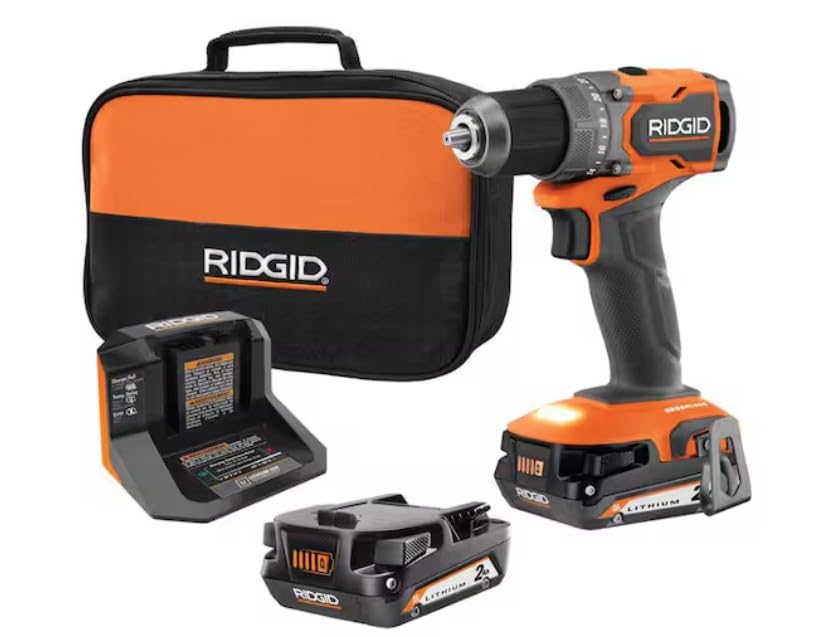
Figure 1: RIDGID 18V SubCompact Brushless 1/2 inch Drill/Driver Kit.
Key Features
- Lightweight Design for enhanced maneuverability.
- Powerful Brushless Motor delivering 500 in./lbs. of torque and 0-450 / 0-1,750 RPM.
- 15% lighter and 25% more compact compared to the 18V Brushless model (R86114).
- 24-position clutch for precise torque control to match various applications.
- 2-speed gearbox to optimize power and speed for different tasks.
- Integrated LED Light for improved visibility in low-light conditions.
- 100% compatible with all RIDGID 18V batteries.
2. Safety Information
Always read and understand all safety warnings, instructions, illustrations, and specifications provided with this power tool. Failure to follow all instructions listed below may result in electric shock, fire, and/or serious injury.
General Power Tool Safety Warnings
- Work Area Safety: Keep your work area clean and well-lit. Cluttered or dark areas invite accidents. Do not operate power tools in explosive atmospheres, such as in the presence of flammable liquids, gases, or dust.
- Electrical Safety: Power tool plugs must match the outlet. Never modify the plug in any way. Do not abuse the cord. Never use the cord for carrying, pulling, or unplugging the power tool.
- Personal Safety: Always wear eye protection. Use safety glasses, goggles, or a face shield. Wear hearing protection when operating power tools for extended periods. Dress properly. Do not wear loose clothing or jewelry. Keep hair and clothing away from moving parts.
- Tool Use and Care: Do not force the power tool. Use the correct power tool for your application. Disconnect the plug from the power source and/or remove the battery pack from the power tool before making any adjustments, changing accessories, or storing power tools.
- Battery Tool Use and Care: Recharge only with the charger specified by the manufacturer. Use power tools only with specifically designated battery packs.
3. Components Included
Your RIDGID 18V SubCompact Brushless 1/2 in. Drill/Driver Kit includes the following items:
- R87012 18V SubCompact Brushless 1/2 in. Drill/Driver
- (2) 2.0 Ah Batteries
- Charger
- Belt Hook with Screw
- Driving Bit
- Tool Bag
4. Setup
Battery Installation and Removal
To install the battery, align the battery pack with the base of the tool and slide it in until it clicks securely into place. To remove the battery, press the two pinch tabs on the sides of the battery pack and slide it out.

Figure 2: Proper battery installation into the drill/driver.
Bit Installation and Removal
The drill/driver features a 1/2 inch ratcheting chuck for secure bit retention. To install a bit, twist the chuck counter-clockwise to open the jaws. Insert the bit fully into the chuck, then twist the chuck clockwise by hand until the bit is firmly secured. You will hear a clicking sound as it ratchets into place, indicating a secure grip. To remove a bit, twist the chuck counter-clockwise to loosen the jaws and pull the bit out.
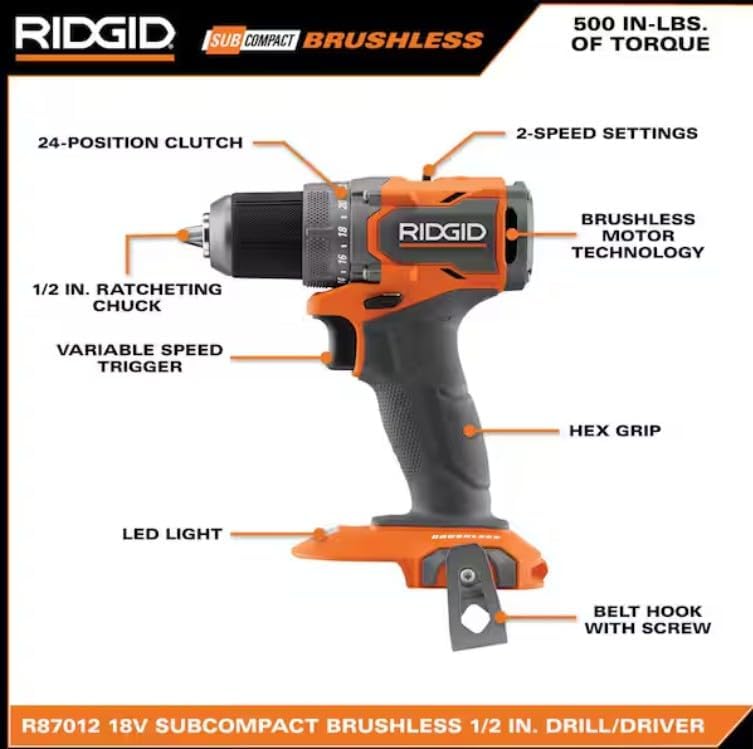
Figure 3: Key components of the drill/driver, including the 1/2 inch ratcheting chuck.
Charging the Battery
Connect the charger to a standard power outlet. Insert the battery pack into the charger. The indicator lights on the battery will show the charge level. Allow the battery to fully charge before first use and whenever the charge level is low. Refer to the charger's specific instructions for detailed charging times and indicator meanings.

Figure 4: Battery with visible charge level indicator.
5. Operating Instructions
Powering On/Off
To operate the drill/driver, press the variable speed trigger. The tool will start rotating. Release the trigger to stop the tool. The speed is proportional to how far the trigger is pressed.
Adjusting Speed Settings
The drill/driver features a 2-speed gearbox located on top of the tool. Slide the switch to position '1' for lower speed and higher torque, ideal for driving screws or drilling large holes. Slide the switch to position '2' for higher speed and lower torque, suitable for drilling smaller holes.
Adjusting Clutch Settings
The 24-position clutch allows you to adjust the torque output to prevent over-driving screws or damaging materials. Rotate the clutch collar to select the desired torque setting. Lower numbers provide less torque, while higher numbers provide more. For drilling, set the clutch to the drill icon for maximum torque.
Using the LED Light
The integrated LED light illuminates the work area when the trigger is pressed, improving visibility in dimly lit spaces.
General Operation
When drilling or driving, ensure the workpiece is securely clamped. Apply steady, even pressure to the tool. For drilling, start with a pilot hole if necessary, especially in hard materials or near edges. For driving, select a clutch setting that allows the screw to be driven flush without stripping the head or damaging the material.
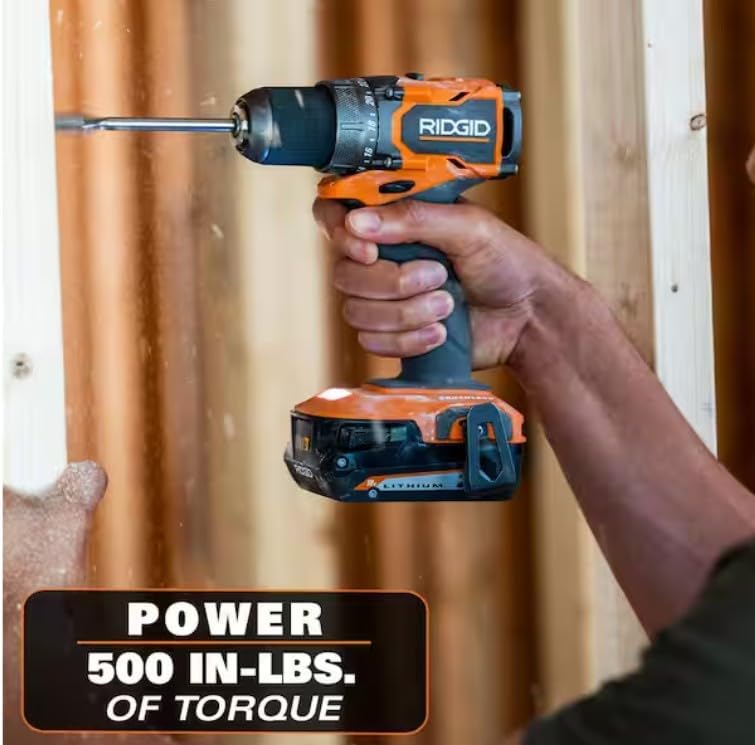
Figure 5: Driving a screw into wood with the drill/driver.

Figure 6: Operating the drill/driver in a confined area.

Figure 7: Installing cabinet hardware with the drill/driver.

Figure 8: Drilling into a metal channel.

Figure 9: Drilling into a wooden stud.
6. Maintenance
Cleaning
Keep the tool's air vents clear and free of debris to prevent overheating. Use a clean, dry cloth to wipe down the tool. Do not use solvents or harsh chemicals, as these can damage plastic parts.
Storage
Store the tool, batteries, and charger in a cool, dry place, away from direct sunlight and moisture. Ensure batteries are partially charged before long-term storage. Keep out of reach of children.
Battery Care
Do not store batteries in discharged condition. Recharge them regularly, even if not in use, to maintain optimal performance and lifespan. Avoid exposing batteries to extreme temperatures.
7. Troubleshooting
- Tool Not Starting: Ensure the battery is fully charged and properly inserted. Check that the forward/reverse selector is not in the center (locked) position.
- Reduced Power/Performance: The battery may be low on charge. Recharge the battery. Ensure the correct speed and clutch settings are selected for the task.
- Overheating: Ensure the tool's ventilation slots are not blocked. Allow the tool to cool down before continuing use. Avoid continuous heavy-duty operation.
- Bit Slipping in Chuck: Ensure the chuck is tightened securely by hand. The ratcheting mechanism should click into place.
If issues persist, contact customer support.
8. Specifications
| Specification | Value |
|---|---|
| Brand | RIDGID |
| Model Number | R87012K |
| Power Source | Battery Powered |
| Voltage | 18 Volts |
| Amperage | 2 Amps |
| Maximum Rotational Speed | 1750 RPM |
| Maximum Chuck Size | 0.5 Inches |
| Maximum Torque | 500 Inch Pounds |
| Number of Speeds | 2 |
| Drill Type | Combination Drill |
| Battery Capacity | 2 Amp Hours |
| Drilling Capacity Metal | 0.5 Inches |
| Material Type | Plastic |
| UPC | 693070933615 |
9. Warranty Information
This RIDGID product is covered by the manufacturer's warranty. For specific details regarding warranty coverage, terms, and conditions, please refer to the warranty card included with your product or visit the official RIDGID website. Keep your proof of purchase for warranty claims.
10. Customer Support
For technical assistance, replacement parts, or any questions regarding your RIDGID 18V SubCompact Brushless 1/2 in. Drill/Driver Kit, please contact RIDGID customer support. Contact information can be found on the official RIDGID website or in the documentation provided with your product.