
Introduction
Thank you for choosing the hjh OFFICE Vivadapt Professional Ergonomic Office Chair. This chair is designed to provide exceptional comfort and support throughout your workday, promoting a healthy posture with its advanced ergonomic features. This manual will guide you through the assembly, operation, and maintenance of your new office chair.
The Vivadapt chair features a breathable mesh backrest, adjustable lumbar support, 3D armrests, seat depth adjustment, and a synchronous mechanism for dynamic seating. Its robust construction ensures long-term reliability and comfort.
Setup and Assembly
The hjh OFFICE Vivadapt chair requires assembly. Please follow these general steps carefully. It is recommended to assemble the chair on a soft, clean surface to prevent damage.
- Unpack Components: Carefully remove all parts from the packaging and verify against the parts list (not provided in this manual, refer to your product packaging).
- Attach Casters to Base: Insert the load-dependent braked multi-function casters into the star base. Ensure they are securely seated.
- Insert Gas Lift: Place the gas lift cylinder into the center hole of the star base.
- Attach Seat Mechanism: Secure the seat mechanism to the underside of the seat cushion using the provided screws. Ensure the front of the mechanism faces the front of the seat.
- Attach Armrests: Fasten the 3D armrests to the seat cushion using the designated screws.
- Attach Backrest: Connect the backrest to the seat mechanism or seat frame, securing it with screws.
- Attach Headrest: Slide the adjustable headrest into its designated slot at the top of the backrest.
- Connect Seat to Gas Lift: Carefully place the assembled seat and backrest onto the gas lift cylinder. Apply gentle pressure to secure.
Ensure all screws are tightened, but do not overtighten. Test the chair's stability before use.
Operating Instructions and Adjustments
The Vivadapt chair offers multiple adjustment options to customize your seating experience for optimal ergonomics and comfort.
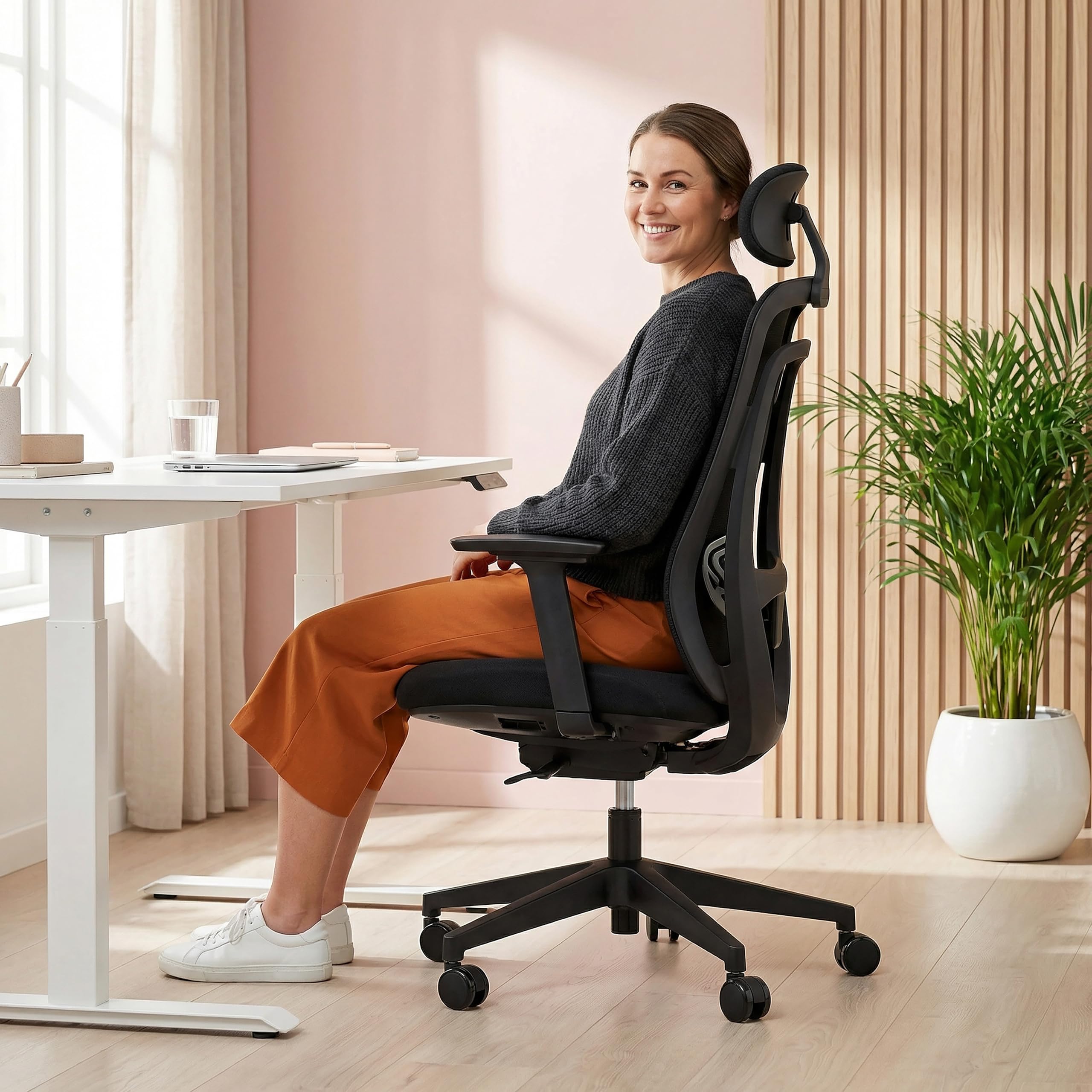
Image: Overview of hjh OFFICE Vivadapt chair highlighting adjustable headrest, lumbar support, and seat height.
1. Seat Height Adjustment
- Locate the lever on the right side, beneath the seat.
- To raise the seat: Lift the lever while taking your weight off the seat.
- To lower the seat: Lift the lever while seated.
- Adjust the seat height so your feet are flat on the floor and your knees are at a 90-degree angle.
2. Seat Depth Adjustment
- Locate the lever or button on the left side, beneath the seat.
- To adjust: Pull the lever/button and slide the seat forward or backward.
- Ensure there are 2-3 fingers' width between the edge of the seat and the back of your knees.
3. Adjustable Headrest
- The headrest can be adjusted in height and angle.
- To adjust height: Gently pull the headrest up or push it down.
- To adjust angle: Tilt the headrest forward or backward to support your neck comfortably.
4. Adjustable Lumbar Support
- The lumbar support is located on the backrest.
- To adjust height: Slide the lumbar support up or down to align with the natural curve of your lower back.

Image: Rear view of the Vivadapt chair, illustrating the adjustable lumbar support mechanism.
5. 3D Armrests
- The armrests can be adjusted in three dimensions: height, depth (forward/backward), and pivot (inward/outward).
- To adjust height: Press the button on the side of the armrest and slide it up or down. Release the button to lock.
- To adjust depth/pivot: Slide the armrest pad forward/backward or pivot it left/right as needed.
- Adjust armrests so your arms form a 90-degree angle at the elbow when typing.
6. Synchronous Mechanism (Recline and Tilt Tension)
- This mechanism allows the backrest and seat to recline in a synchronized motion, promoting dynamic seating.
- Recline Lock/Unlock: Use the lever on the left side (often the same as seat height or a separate one). Push in to lock the backrest in an upright position, pull out to allow recline.
- Tilt Tension Adjustment: The round knob under the seat (usually at the front) controls the resistance of the recline. Turn clockwise to increase tension (harder to recline), counter-clockwise to decrease tension (easier to recline).

Image: Side view of the Vivadapt chair, demonstrating the recline function of the synchronous mechanism.
Maintenance
Regular maintenance will extend the life and appearance of your hjh OFFICE Vivadapt chair.
- Cleaning: Use a soft, damp cloth for general cleaning of plastic and metal parts. For fabric and mesh areas, use a mild upholstery cleaner or a damp cloth with a small amount of mild soap. Avoid abrasive cleaners or harsh chemicals.
- Caster Care: Periodically check the casters for accumulated dust, hair, or debris. Clean them to ensure smooth movement. The load-dependent braked casters are designed to prevent unintentional movement when unoccupied.
- Fastener Check: Every few months, check all screws and bolts to ensure they are tight. Retighten if necessary, but do not overtighten.
- Avoid Overloading: Do not exceed the maximum weight capacity of 120 kg (264 lbs).
Troubleshooting
If you encounter any issues with your Vivadapt chair, refer to the following common solutions:
- Chair not rolling smoothly: Check casters for debris (hair, dust) and clean them. Ensure the casters are properly inserted into the base. Remember, the casters are load-dependent braked, meaning they will only roll freely when the chair is occupied.
- Seat height adjustment not working: Ensure the gas lift lever is fully engaged. If the gas lift is unresponsive, it may need replacement. Contact support.
- Backrest does not recline or is too stiff/loose: Check the recline lock lever to ensure it is disengaged. Adjust the tilt tension knob under the seat to increase or decrease resistance.
- Chair is wobbly: Check all assembly screws and bolts. Tighten any loose fasteners. Ensure the gas lift is fully seated in both the base and the seat mechanism.
Specifications
| Feature | Detail |
|---|---|
| Model Number | 800001 |
| Brand | hjh OFFICE |
| Overall Height | 108.5 - 130 cm |
| Overall Width | 68 - 71 cm |
| Overall Depth | 56 - 60 cm |
| Seat Height | 44 - 55 cm |
| Seat Width | 50 cm |
| Seat Depth | 47 cm (Adjustable) |
| Backrest Height | 57 cm |
| Armrest Height (from seat) | 20 cm (Adjustable) |
| Weight Capacity | 120 kg (264 lbs) |
| Item Weight | 16.8 kg |
| Material | Fabric / Mesh |
| Color | Black |
| Special Features | Adjustable Headrest, 3D Armrests, Adjustable Lumbar Support, Adjustable Seat Depth, Synchronous Mechanism, Load-dependent Braked Casters |
| Assembly Required | Yes |
| Care Instructions | Clean with damp cloth |
Warranty Information
Specific warranty terms and conditions for the hjh OFFICE Vivadapt Professional Ergonomic Office Chair may vary by region and retailer. Please refer to the warranty card included with your product packaging or contact your point of purchase for detailed warranty information.
Typically, hjh OFFICE products come with a manufacturer's warranty covering defects in materials and workmanship under normal use. Keep your proof of purchase for any warranty claims.
Customer Support
For technical assistance, spare parts, or any questions regarding your hjh OFFICE Vivadapt chair, please contact the retailer from whom you purchased the product. You may also visit the official hjh OFFICE website for further support resources and contact information.
When contacting support, please have your model number (800001) and proof of purchase readily available.


