
1. Introduction
This manual provides detailed instructions for the installation, operation, and maintenance of your new LASERTAIL 9-inch Android 13 Head Unit. This system is designed as a direct upgrade for Ford F-150 models from 2013 to 2014, offering enhanced features such as wireless CarPlay, Android Auto, GPS navigation, and a high-definition touchscreen display. Please read this manual thoroughly before installation and use to ensure proper function and safety.
Key Features:
- 9-inch HD Touchscreen Display
- Android 13 Operating System with Quad-Core Processor, 4GB RAM, 64GB ROM
- Wireless and Wired Apple CarPlay / Android Auto
- 5Ghz WiFi Connectivity
- Bluetooth 5.4 for Hands-Free Calling and Audio Streaming
- Built-in GPS Navigation
- Supports Original Steering Wheel Controls and OEM Functions
- Includes 1080P HD Waterproof Backup Camera
- AM/FM/RDS Radio with DSP and 36-band EQ
2. Safety Information
Always prioritize safety during installation and operation. Improper installation can lead to vehicle damage or personal injury. Consult a professional if you are unsure about any steps.
- Professional Installation Recommended: If you are not experienced with car electronics, seek professional installation.
- Disconnect Battery: Always disconnect the vehicle's negative battery terminal before beginning any electrical work to prevent short circuits and damage.
- Wiring: Ensure all wiring connections are secure and properly insulated to prevent electrical shorts.
- Vehicle Compatibility: Verify that this head unit is compatible with your specific Ford F-150 model year (2013-2014) and original radio configuration (4-inch or 8-inch screen).
- Driving Safety: Do not operate complex functions or watch videos while driving. Always keep your attention on the road.
- Backup Camera: The backup camera is an aid; always check your surroundings visually when reversing.
3. Setup and Installation
3.1 Package Contents
Verify that all components are present in the package:
- Car radio and frame * 1
- 1080P rear view camera * 1
- Installation kit * 1 (includes tools, power cable, RCA cable, Canbus, camera cable, 4/6Pin USB cable, original car USB adapter, rear camera cable, microphone cable, radio antenna, rear camera adapter cable, GPS antenna)
- Instruction manuals * 2

Image: Package contents including the head unit, wiring harnesses, camera, and tools.
3.2 Vehicle Compatibility Check
This head unit is compatible with Ford F-150 models from 2013 to 2014. Please ensure your vehicle's model year and original radio configuration (4-inch or 8-inch) match the compatibility requirements before proceeding with installation.

Image: Compatibility guide for Ford F-150 2013-2014, showing the head unit installed and examples of compatible original dashboards.
3.3 Installation Steps
General Installation Overview:
- Preparation: Disconnect the vehicle's negative battery terminal.
- Remove Original Radio: Carefully remove the trim panels and the original radio unit from your Ford F-150 dashboard. Refer to your vehicle's service manual for specific instructions.
- Connect Wiring Harnesses: Connect the provided wiring harnesses to the new head unit and the vehicle's existing wiring. Ensure all connections are secure.
- Install GPS Antenna: Mount the GPS antenna in a location with a clear view of the sky, typically on the dashboard or under the windshield.
- Install Backup Camera (Optional): If installing the included backup camera, route the camera cable from the rear of the vehicle to the head unit and connect it.
- Test Connections: Before fully reassembling the dashboard, reconnect the battery and perform a basic test of the head unit's functions (power, audio, touch screen, steering wheel controls, camera).
- Reassemble: Once confirmed working, carefully reassemble the dashboard panels.
For a detailed visual guide on wiring connections, please refer to the video below:
Video: Detailed Wiring Harness Connection Guide for Ford F-150 9-inch Head Unit. This video demonstrates the process of connecting the various wiring harnesses to the head unit for proper installation.
3.4 Initial Configuration
After installation, perform the following initial settings:
- Agreement Selection: Navigate to Settings. Select 03: -Simple Soft - 41: Ford - 33: Other Ford RP3 models - Public - OK.
- AC Setting: Go to Car Setting - Air conditioning type setting status. Select either auto ac Type 1 or manual ac Type 1, depending on your vehicle's AC system.

Image: Common settings screen, illustrating options for speed unit, temperature unit, and reverse camera display.
4. Operating Instructions
4.1 System Overview
The LASERTAIL head unit runs on Android 13, providing a familiar and intuitive interface. The 9-inch HD touchscreen offers clear visuals and responsive control.

Image: High-definition IPS touchscreen display with 1280x720 resolution.
Video: Function Display for Ford F150 2013-2014 9-inch Head Unit. This video demonstrates various functions and the user interface of the head unit.
4.2 Wireless CarPlay & Android Auto
The head unit supports both wireless and wired Apple CarPlay and Android Auto. This allows seamless integration of your smartphone for navigation, music, messages, and calls.
- Ensure Bluetooth is enabled on your smartphone.
- On the head unit, open the "Tlink5" application.
- Pair your phone with the head unit via Bluetooth.
- Once paired, CarPlay or Android Auto should automatically launch.

Image: Wireless CarPlay and Android Auto interface on the head unit.
Video: How to Connect Wireless CarPlay. This video demonstrates the steps to connect your iPhone to the head unit using wireless CarPlay.
4.3 GPS Navigation
The head unit features a built-in GPS module for accurate navigation. It supports both online and offline maps, allowing you to plan your routes effectively. You can download navigation apps from the Google Play Store.

Image: GPS Navigation interface with online and offline map options.
4.4 5Ghz WiFi Connectivity
Connect the head unit to a WiFi hotspot (e.g., from your smartphone) to access online content, download apps, and browse the internet. The 5Ghz band provides faster and more stable connections.

Image: 5Ghz and 2.4Ghz dual-band WiFi connectivity for online access.
4.5 Bluetooth 5.4
Bluetooth 5.4 enables stable and clear hands-free calls and high-quality audio streaming from your mobile device. Pair your phone via Bluetooth settings on the head unit.

Image: Bluetooth 5.4 interface for calls and music, also showing backup camera features.
4.6 Steering Wheel Control (SWC)
The head unit supports your vehicle's original steering wheel controls. This allows you to adjust volume, change tracks, and answer calls without taking your hands off the wheel, enhancing driving safety.

Image: Steering wheel control functionality diagram.
4.7 Backup Camera
The included 1080P HD waterproof backup camera automatically displays a clear image with distance guidelines when the vehicle is in reverse. It features night vision and a 170° wide-angle view for improved safety.
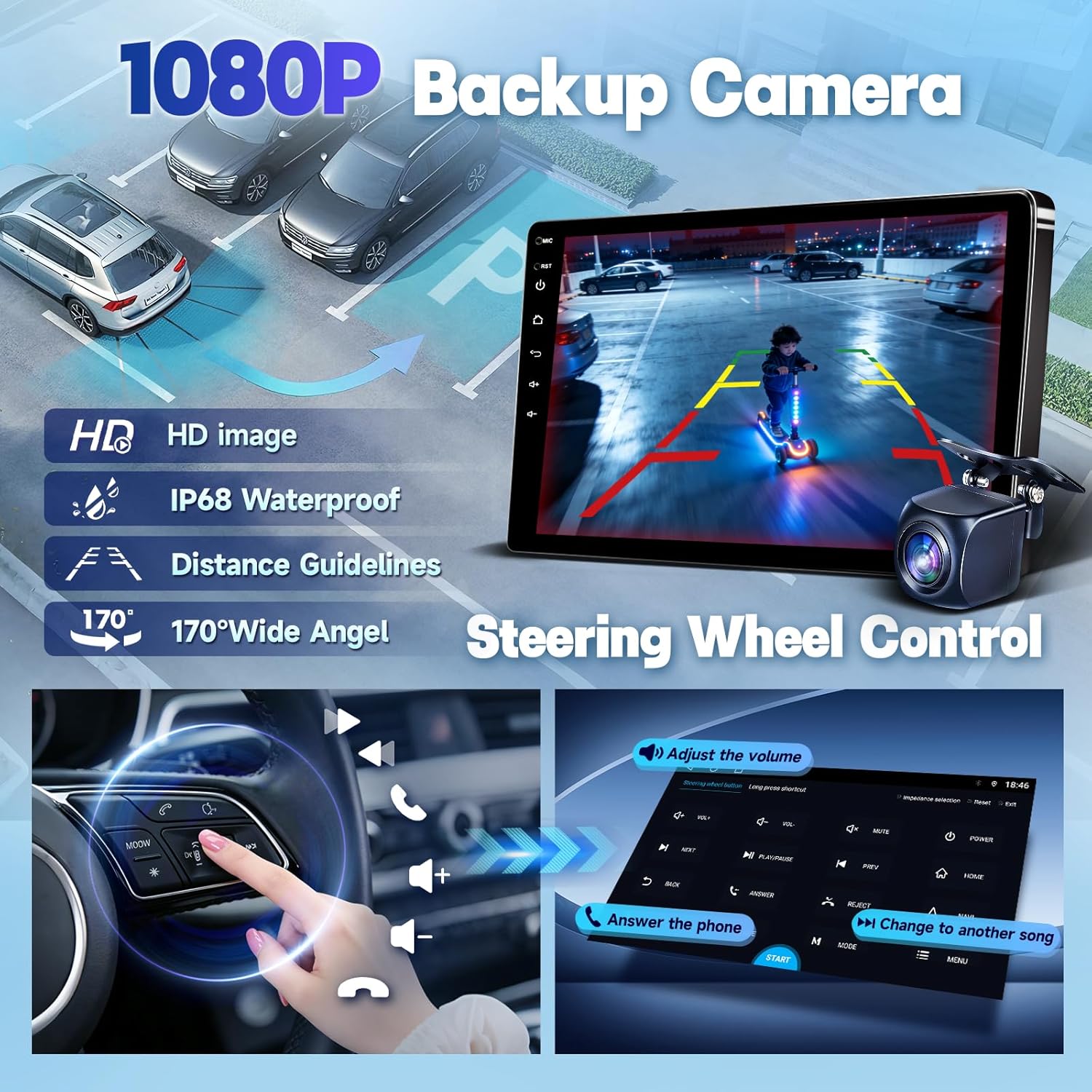
Image: 1080P backup camera view with distance guidelines.
4.8 Audio Settings (DSP & EQ)
The head unit features a Digital Sound Processor (DSP) and up to a 36-band Equalizer (EQ), allowing you to customize the audio output to your preference for an immersive listening experience.

Image: DSP and Equalizer settings interface.
4.9 Retained OEM Functions
This head unit is designed to retain several original equipment manufacturer (OEM) functions of your Ford F-150, including:
- Original steering wheel controls
- OEM front and reverse cameras (if equipped)
- Ambient lighting information
- AC information display
- Original USB port functionality

Image: Illustration of the head unit's internal hardware: 4-core CPU, 4GB RAM, 64GB ROM, and Android 13 OS.
5. Maintenance
To ensure the longevity and optimal performance of your LASERTAIL head unit, follow these maintenance guidelines:
- Screen Cleaning: Use a soft, lint-free cloth to gently wipe the touchscreen. Avoid abrasive cleaners or harsh chemicals that could damage the display.
- Software Updates: Periodically check for system software updates to ensure you have the latest features and security patches. Updates can typically be found in the system settings.
- Avoid Extreme Temperatures: Do not expose the head unit to extreme heat or cold for extended periods, as this can affect its electronic components.
- Cable Connections: Occasionally check all visible cable connections to ensure they are secure and free from damage.
- Resetting: A factory reset (see Troubleshooting section) can resolve some software issues, but it will erase all user data and settings. Use this option only when necessary.
6. Troubleshooting
This section addresses common issues you might encounter. If the problem persists, please contact customer support with your order ID, car model, and a detailed description of the issue.
| Problem | Possible Cause / Solution |
|---|---|
| 1. Cannot turn on | Refer to the installation instructions to ensure all power connections are correctly made. Check vehicle fuses. Contact technical support if the issue persists. |
| 2. No sound |
|
| 3. Steering wheel control does not work |
|
| 4. Abnormal or distorted reverse camera display | Navigate to Setting - Reverse - Reversing system selection and select "NTSC". |
| 5. Reset factory | The reset code is 7890. Be aware that resetting will erase all apps and data. Re-download or contact support for APKs if needed. Resetting is generally not recommended unless other troubleshooting steps fail. |

Image: Troubleshooting guide for common head unit issues.
7. Specifications
| Feature | Detail |
|---|---|
| Brand | LASERTAIL |
| Vehicle Service Type | Truck (Ford F-150 2013-2014) |
| Screen Size | 9 Inches |
| Display Type | LCD, Capacitive Touchscreen |
| Operating System | Android 13 |
| Processor | Quad-Core |
| Memory (RAM) | 4 GB |
| Storage (ROM) | 64 GB |
| Connectivity Technology | Bluetooth 5.4, Wi-Fi (5Ghz supported) |
| Supported Navigation System | GPS (North America maps) |
| Audio Output Mode | Stereo, DSP, up to 36-band EQ |
| Backup Camera | 1080P HD, Waterproof, 170° Wide-Angle |
| Human-Interface Input | Touchscreen |
| Included Components | Car radio and frame, 1080P rear view camera, Installation kit, Instruction manuals |
8. Warranty and Support
Warranty: This LASERTAIL head unit comes with a 1-year manufacturer's warranty from the date of purchase. This warranty covers defects in materials and workmanship under normal use.
Customer Support: For technical assistance, troubleshooting, or warranty claims, please contact LASERTAIL customer support. When contacting support, please provide your order ID, vehicle model, and a detailed description of the issue to expedite assistance.
You can typically find contact information on the seller's page or within the product packaging.