
Introduction
Welcome to the NOKLEAD IPX5 Waterproof Shower Timer user manual. This guide provides instructions for the setup, operation, and maintenance of your digital timer, designed to assist with time management in various environments such as bathrooms, kitchens, and classrooms. Please read this manual thoroughly before using the product to ensure proper function and longevity.
Safety Information
- IPX5 Rating: This device resists low-pressure water jets. Do not submerge the timer in water, as this will cause damage.
- Avoid placing the timer near heat sources such as radiators, stoves, or heaters, as high temperatures can affect performance and safety.
- Keep the timer away from extreme hot or cold temperatures and heavy dust to prevent damage to internal components and extend service life.
- Do not use hard objects to wipe or scratch the screen. This can cause irreversible scratches or display malfunctions.
- Do not disassemble or modify the timer. Unauthorized disassembly will void the product warranty.
Package Contents
Verify that all items are present in your package:
- NOKLEAD Digital Timer (x1)
- Type-C Charging Cable (x1)
- Suction Cup (x1)
- Lanyard (x1)
- User Manual (x1)
Note: A power adapter is not included.
Product Overview and Features
The NOKLEAD IPX5 Waterproof Shower Timer is designed for versatile time management with user-friendly features:
- IPX5 Waterproof Rating: Withstands low-pressure water spray, suitable for damp environments.
- Extended Count Range: Supports both countdown and count-up modes up to 199 minutes and 59 seconds.
- Memory Function: Automatically remembers the last countdown setting for convenience.
- Large LED Display: Clear, easy-to-read digits with a visual water drop progress bar.
- Adjustable Volume: Four volume options (Loud, Medium, Soft, Mute) to suit different environments.
- Adjustable Brightness: Three dimming levels (Dim, Medium, Bright) for optimal visibility.
- Multiple Placement Options: Includes a suction cup for smooth surfaces, a lanyard for hanging, and a built-in stand for desktop use.
- Rechargeable Battery: Equipped with a 1000mAh rechargeable battery, offering 13-48 hours of continuous use on a 3-hour charge. Features a low power indicator.
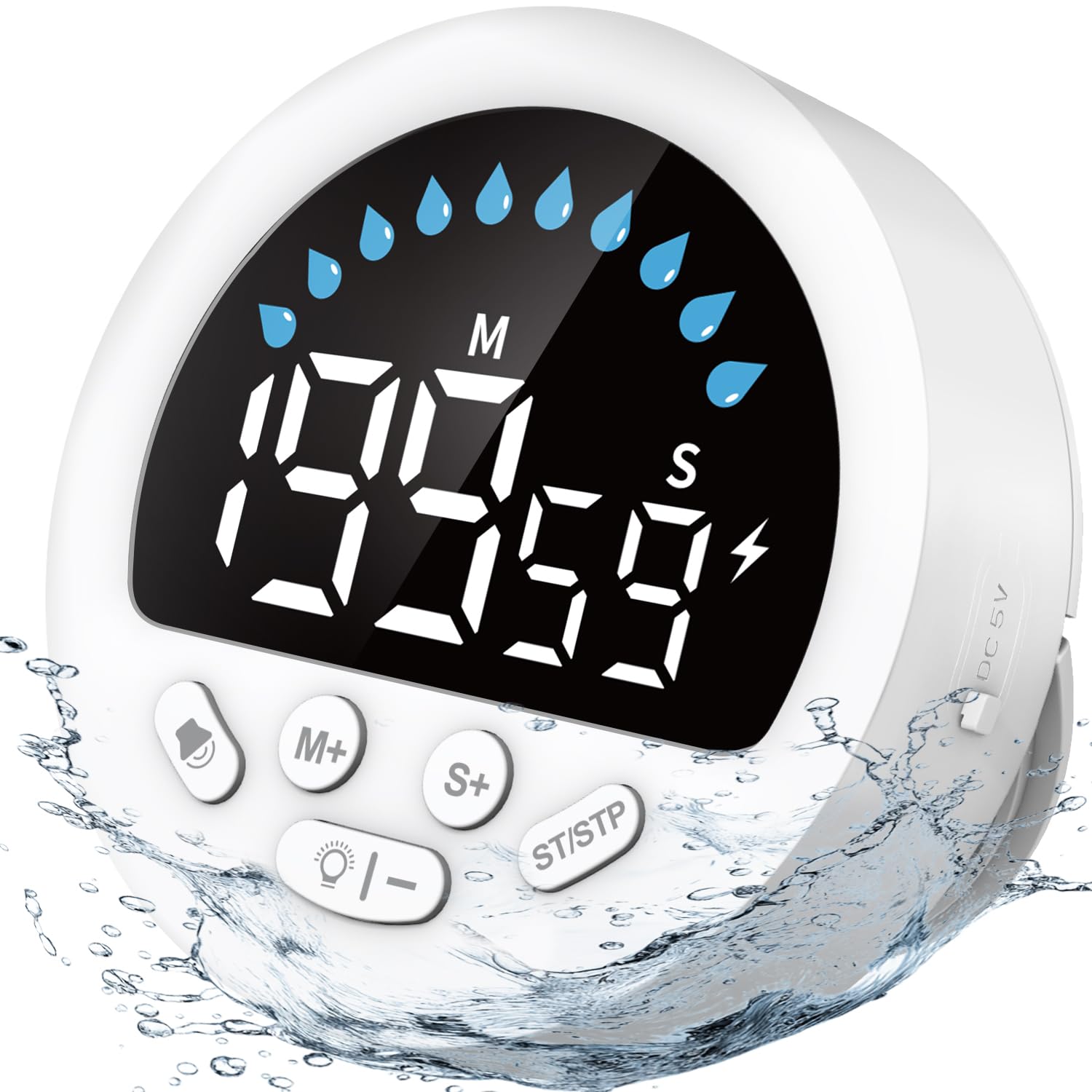
Image: The NOKLEAD IPX5 Waterproof Shower Timer showcasing its design and key features like IPX5 rating, large display, and multiple functions.
Setup
1. Charging the Timer
Before first use, fully charge the timer. Connect the provided Type-C charging cable to the timer's charging port and a compatible USB power source (not included). A full charge takes approximately 3 hours and provides 13-48 hours of continuous use, depending on brightness and volume settings. A low power icon will appear on the display to remind you when charging is needed.

Image: The timer displaying different brightness levels and illustrating the Type-C charging port and rechargeable battery feature.
2. Placement Options
The timer offers three versatile placement methods:
- Suction Cup Wall Mount: Attach the included suction cup to the back of the timer. Ensure the wall surface is clean, non-porous, and flat (e.g., bathroom cabinets, windows, mirrors, shiny tile walls). Apply a small amount of water to the suction cup for better adhesion, then press firmly to expel air.
- Hanging Lanyard: Use the provided lanyard to hang the timer from a hook or rack.
- Desktop Stand: Utilize the durable built-in stand on the back of the timer for stable placement on any flat surface.

Image: Demonstrates the three ways to place the timer: using the suction cup on a mirror, hanging it with the lanyard, and standing it on a countertop.
Operating Instructions
Button Functions
The timer features 5 control buttons:
| Button | Function |
|---|---|
| Volume | Adjusts alarm volume (Loud, Medium, Soft, Mute). |
| M+ | Increases minutes. |
| S+ | Increases seconds. |
| ST/STP | Starts/Pauses the timer. Long-press to reset. |
| Light bulb/- | Adjusts display brightness (Dim, Medium, Bright). Also decreases minutes/seconds when setting time. |

Image: A close-up view of the timer's front panel, detailing the function of each of the five control buttons.
Setting and Using Countdown Mode
- Press the M+ button to set the desired minutes (up to 199).
- Press the S+ button to set the desired seconds (up to 59).
- Alternatively, use the Light bulb/- button to decrease minutes or seconds.
- Press the ST/STP button to start the countdown.
- To pause the countdown, press ST/STP again. Press again to resume.
- When the countdown reaches zero, the alarm will sound for 1 minute and then auto-shut off.
- To reset the timer to 00:00, long-press the ST/STP button.
Using Count-up Mode (Stopwatch)
- Ensure the timer is reset to 00:00 (long-press ST/STP if necessary).
- Press the ST/STP button to start counting up.
- To pause the count-up, press ST/STP again. Press again to resume.
- To reset the count-up timer to 00:00, long-press the ST/STP button.

Image: The timer displaying both countdown and count-up functions, highlighting the visual water drop progress bar and compact dimensions.
Adjusting Volume
Press the Volume button repeatedly to cycle through the four available volume settings: Loud (85±5 dB), Medium (75±5 dB), Soft (60±5 dB), and Mute Mode. The current volume level will be indicated on the display.

Image: Illustrates the four volume settings (Mute, Soft, Medium, Loud) and their suitability for different environments like studying, yoga, office, and shower.
Adjusting Brightness
Press the Light bulb/- button repeatedly to cycle through the three display brightness levels: Bright, Medium, and Dim. Select the level that best suits your viewing conditions.
Memory Function
The timer automatically saves your last set countdown time. When you turn the timer on or reset it, it will display the last used countdown setting, allowing for quick reuse without re-entering the time.
Maintenance
- Clean the timer's exterior with a soft, damp cloth. Do not use abrasive cleaners, solvents, or harsh chemicals.
- Ensure the Type-C charging port cap is securely closed when the timer is not charging, especially when used in wet environments, to maintain its IPX5 water resistance.
- Store the timer in a cool, dry place when not in use for extended periods.
Troubleshooting
- Timer not turning on or unresponsive:
- Ensure the battery is charged. Connect the timer to the Type-C charging cable and a power source for at least 30 minutes. If the issue persists, try resetting by long-pressing the ST/STP button.
- Suction cup not holding securely:
- Ensure the mounting surface is clean, dry, non-porous, and flat. Apply a small amount of water to the suction cup before pressing it firmly against the surface to expel all air. Avoid textured or uneven surfaces.
- Water damage observed:
- The timer is IPX5 water-resistant, meaning it can withstand low-pressure water jets. It is not designed to be submerged in water. If water ingress occurs due to submersion, the device may be permanently damaged and this is not covered under warranty.
- Alarm not audible:
- Check the volume setting by pressing the Volume button. Ensure the timer is not in Mute Mode. Increase the volume to a desired level.
- Display is too dim or too bright:
- Press the Light bulb/- button to cycle through the three brightness levels (Dim, Medium, Bright) until the desired visibility is achieved.
Specifications
| Feature | Detail |
|---|---|
| Model Number | 6252 |
| Brand | NOKLEAD |
| Color | White |
| Material | Acrylonitrile Butadiene Styrene (Plastic), Silicone Buttons, Silicone Suction Cup |
| Product Dimensions (D x W x H) | 3D x 8W x 8H centimetres |
| Item Weight | 92.7 g |
| Screen Size | 3.1 inches |
| Battery Type | Rechargeable (1000mAh) |
| Battery Life | 13-48 hours (continuous use, varies by settings) |
| Water Resistance | IPX5 (Water Spray Resistant) |
| Max Timing Range | 199 minutes 59 seconds |
| Manufacturer Warranty | 2 Years |
Warranty
The NOKLEAD IPX5 Waterproof Shower Timer (Model 6252) is covered by a 2-year manufacturer's warranty from the date of purchase. This warranty covers defects in materials and workmanship under normal use. Please retain your proof of purchase for warranty claims.
The warranty does not cover:
- Damage caused by misuse, abuse, accident, or neglect.
- Damage resulting from unauthorized repair or modification.
- Damage due to submersion in water.
- Normal wear and tear.
Support
For further assistance, troubleshooting, or to make a warranty claim, please contact NOKLEAD customer service through the retailer where the product was purchased. You may also visit the official NOKLEAD website for additional support resources.