
Introduction
This manual provides detailed instructions for the installation, operation, and maintenance of your ANJIELO SMART 4-Wire Video Door Intercom System. This system includes a wired doorbell with a camera and a 7-inch WiFi monitor, designed for enhanced home security and communication. It features IP65 weatherproofing for the outdoor unit and multiple door unlocking methods.
Package Contents
Please verify that all items listed below are present in your package:
- Outdoor Doorbell Unit (2 units for this model)
- 7-inch Indoor Monitor (1 unit for this model)
- Mounting Brackets and Screws
- Power Adapter for Indoor Monitor
- Wiring Cables (4-wire)
- IC Cards (5 included)
- User Manual (this document)

Image: Overview of the ANJIELO SMART 4-line video intercom system, showing the outdoor doorbell unit, indoor monitor, and IC cards.
Setup
1. Outdoor Doorbell Unit Installation
Select a suitable location near your door, ensuring it is within reach of the 4-wire cabling. The unit is IP65 weatherproof, designed to withstand rain, snow, and various outdoor conditions. Mount the unit securely using the provided screws. Ensure the rain cover is properly installed over the doorbell unit for added protection.

Image: The outdoor doorbell unit shown with its protective rain cover, highlighting its IP65 dustproof and waterproof rating and operating temperature range.
2. Indoor Monitor Installation
Choose a convenient indoor location for the 7-inch monitor. Mount the bracket to the wall and then secure the monitor. Connect the 4-wire cable from the outdoor unit to the designated port on the indoor monitor. Connect the power adapter to the monitor and plug it into a power outlet.
3. Initial Configuration and App Setup
Upon powering on, the monitor will guide you through the initial setup. Connect the monitor to your home WiFi network. Download the Tuya Smart or Smart Life app on your smartphone and follow the in-app instructions to pair your intercom system. This enables remote access and control.
Operating Instructions
1. Answering a Call and Two-Way Audio
When a visitor presses the doorbell, all connected indoor monitors and paired smartphones will ring. You can answer the call from the indoor monitor or the app to see, hear, and speak to the visitor. This two-way audio feature allows for clear communication without opening the door.

Image: A person communicating with a delivery driver through the video intercom system, illustrating the two-way audio function.
2. Unlocking the Door
The system offers five methods to unlock your door:
- Fingerprint: Use a registered fingerprint on the outdoor unit.
- Password: Enter a pre-set password on the outdoor unit's keypad.
- IC Card: Tap a registered IC card on the outdoor unit.
- APP: Use the Tuya Smart or Smart Life app on your smartphone.
- Monitor: Press the unlock button on the indoor monitor.

Image: Visual representation of the five different unlocking methods available with the intercom system, including fingerprint, password, IC card, indoor monitor, and mobile app.

Image: A user interacting with the indoor monitor to perform a one-button unlock, demonstrating ease of access.
3. Monitoring and Night Vision
You can view the outdoor camera feed at any time from the indoor monitor or the mobile app. The outdoor unit is equipped with a light sensor and IR LED lens, allowing it to automatically switch to infrared night vision mode in low-light conditions, providing clear images even at night.
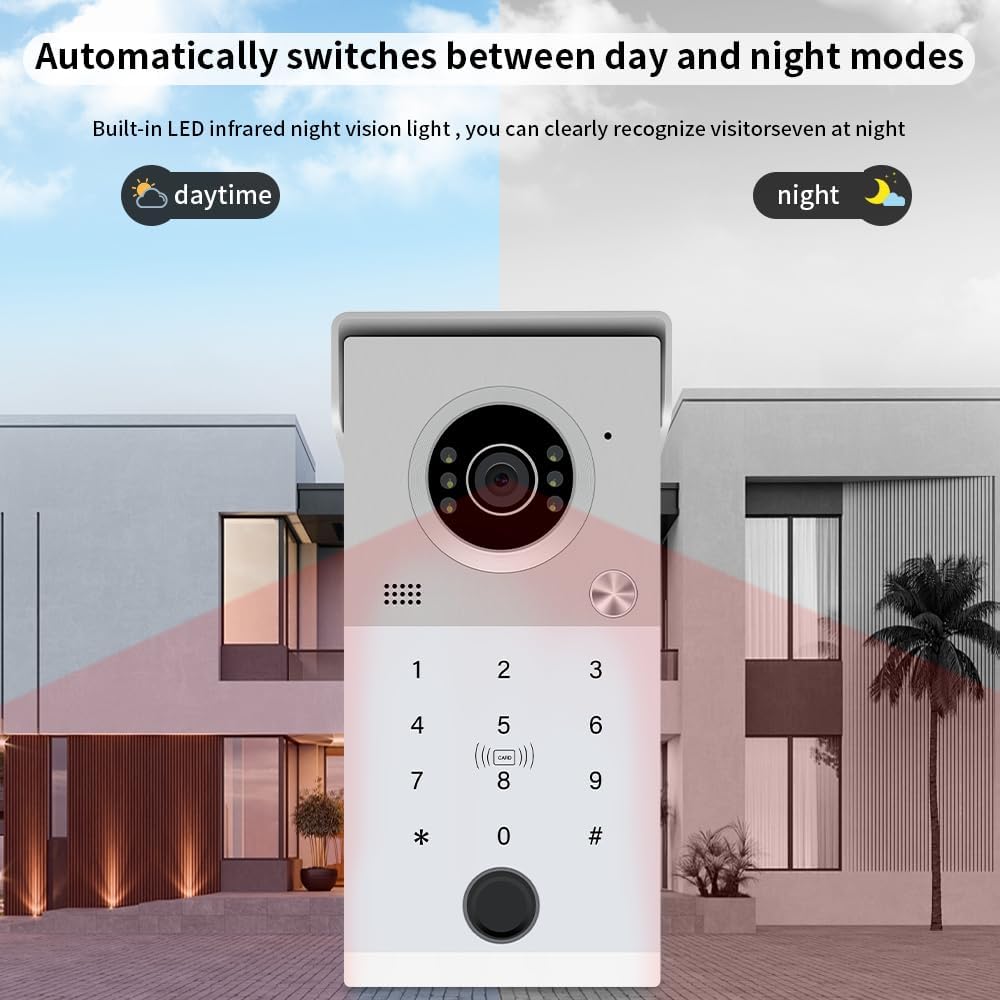
Image: The outdoor doorbell unit illustrating its automatic transition between daytime and nighttime modes, utilizing built-in infrared night vision for clear visibility.
4. Motion Detection
The system features motion detection capabilities. When motion is detected near the outdoor unit, it can trigger recordings or send notifications to your paired smartphone, enhancing security by alerting you to activity at your door.

Image: A visual representation of the motion detection zone around the outdoor doorbell unit, indicating how it senses movement.
5. Operating Modes
The indoor monitor supports three operating modes:
- At Home: When a visitor presses the 'Call' button, the indoor monitor will ring, and the associated app will receive a call or push notification.
- Not at Home: If the 'Call' button is pressed, the visitor will be prompted to leave a message, and the app will receive a push notification.
- Dormant: In this mode, neither the outdoor station nor the indoor monitor will ring. The app will still receive the call.

Image: The indoor monitor's interface showing the selection for 'Three modes': At Home, Not at Home, and Dormant, with descriptions of each mode's behavior.
Maintenance
To ensure optimal performance and longevity of your ANJIELO SMART Video Door Intercom System, follow these maintenance guidelines:
- Cleaning: Gently wipe the outdoor unit's camera lens and the indoor monitor screen with a soft, damp cloth. Avoid abrasive cleaners or solvents.
- Wiring Check: Periodically inspect all wiring connections for any signs of wear or damage. Ensure connections remain secure.
- Firmware Updates: Check the manufacturer's website or the mobile app for any available firmware updates. Keeping your system updated ensures the latest features and security enhancements.
- Environmental Protection: While the outdoor unit is weatherproof, ensure its rain cover is always properly positioned to maximize protection against harsh elements.
Troubleshooting
If you encounter issues with your intercom system, refer to the following common problems and solutions:
- No Video/Audio from Outdoor Unit:
- Check all 4-wire connections between the outdoor unit and the indoor monitor. Ensure they are secure and correctly wired.
- Verify the indoor monitor is powered on and receiving power. - Door Unlock Function Not Working:
- Ensure the electronic lock (if connected) is receiving power and is compatible with a 12V output.
- Re-register IC cards, fingerprints, or passwords if they are not recognized.
- Check the app's connection to the monitor and ensure the unlock command is being sent successfully. - Indoor Monitor Not Connecting to WiFi:
- Ensure your WiFi network is active and within range.
- Double-check the WiFi password entered on the monitor.
- Try restarting your WiFi router and the indoor monitor. - Poor Night Vision Quality:
- Ensure the camera lens on the outdoor unit is clean and free from obstructions.
- Verify there are no strong light sources directly interfering with the IR sensor. - App Notifications Not Received:
- Check your smartphone's notification settings for the Tuya Smart/Smart Life app.
- Ensure the app is running in the background and has internet access.
- Verify the monitor is connected to WiFi and the app is properly paired.
Specifications
| Feature | Specification |
|---|---|
| Brand | ANJIELO SMART |
| Model Name | 61111HD-S+60075IP |
| Connectivity Technology | Wired |
| Power Source | Corded Electric |
| Installation Type | Screw In |
| Control Method | App, Touch |
| Item Dimensions | 5.9 x 1.9 x 8.6 inches (approximate for outdoor unit) |
| Weather Resistance | IP65 Dustproof and Waterproof |
| Monitor Size | 7-inch Touch Screen |
| Camera Resolution | 1080P HD |
| Night Vision | Built-in IR LED |
Warranty Information
Specific warranty details for your ANJIELO SMART Video Door Intercom System are typically provided with your purchase documentation or can be found on the official ANJIELO SMART website. Please retain your proof of purchase for warranty claims. For extended protection, optional protection plans may be available from your retailer.
Support
For further assistance, technical support, or to inquire about replacement parts, please visit the official ANJIELO SMART website or contact their customer service department. You can often find FAQs, additional guides, and contact information on their support pages.
Visit the ANJIELO SMART Store on Amazon for more product information.


