
Introduction
Thank you for choosing the Nimble Podium 2-in-1 Wireless Charging Station. This device is designed to provide efficient and convenient wireless charging for your compatible iPhone and AirPods. Featuring Qi2 certification and MagSafe compatibility, it ensures optimal alignment and fast charging speeds. Please read this manual carefully to ensure proper setup and operation.
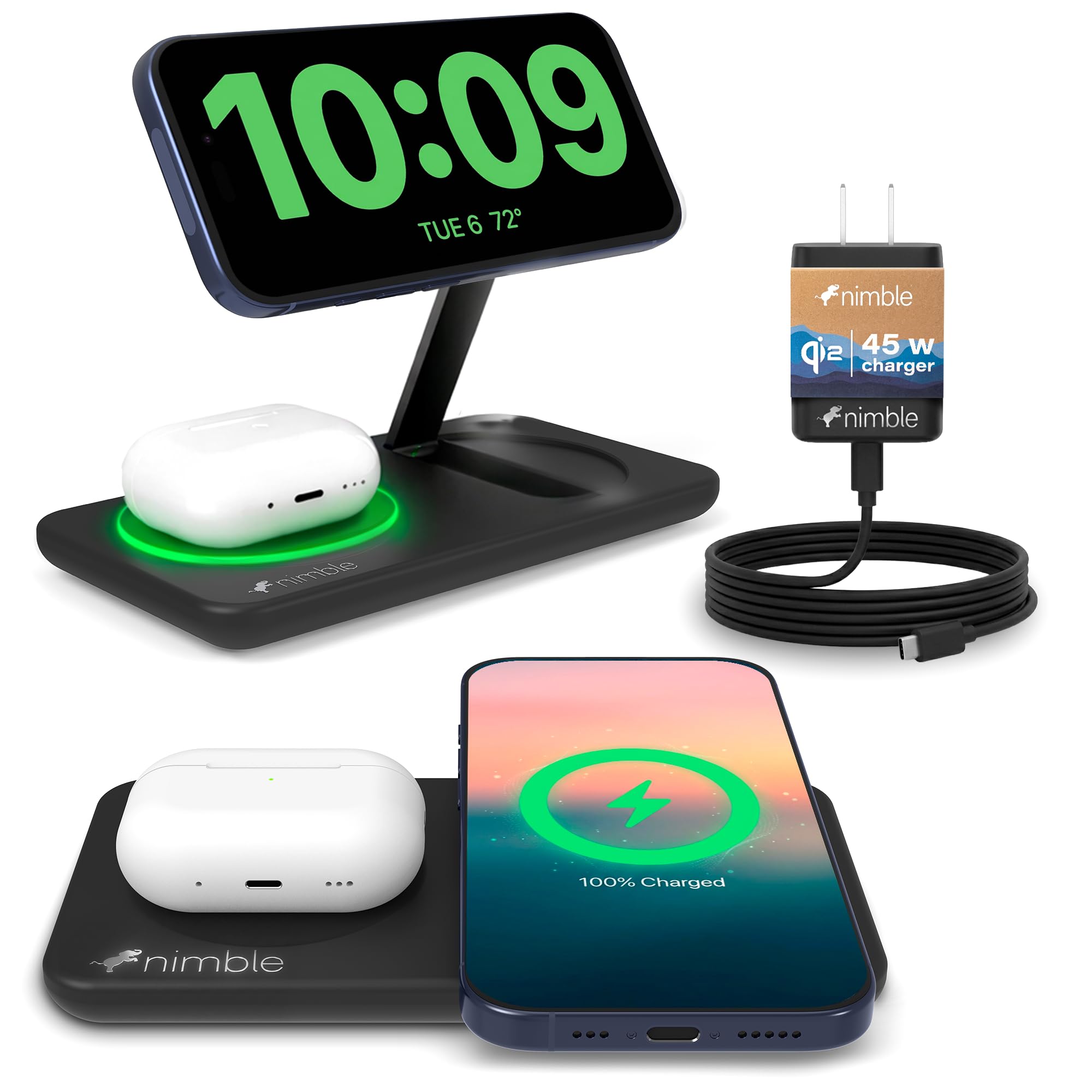
Image: The Nimble Podium 2-in-1 Wireless Charging Station, showcasing an iPhone magnetically attached to the upright stand and AirPods charging on the base. This image illustrates the product's primary function of charging two devices simultaneously.
What's Included
The Nimble Podium 2-in-1 Wireless Charging Station package contains the following items:
- 1x Nimble Podium 2-in-1 Wireless Charging Stand
- 1x 45W USB-C Power Adapter
- 1x 1.5M USB-C to USB-C Cable
- 1x Quick Start Guide (this manual)

Image: A visual representation of the package contents, including the charging stand, 45W USB-C power adapter, USB-C cable, and quick start guide.
Setup Instructions
- Connect the Power Adapter: Insert one end of the provided USB-C cable into the USB-C port on the back of the Nimble Podium charging station.
- Plug into Power: Connect the other end of the USB-C cable to the 45W USB-C Power Adapter. Plug the power adapter into a wall outlet.
- Position the Stand: The charging stand features an adjustable magnetic phone charger. Gently pull the magnetic disc upwards to raise the stand to your desired viewing angle. It can be used upright or folded flat.

Image: A step-by-step visual guide for effortless charging: 1. Place device on the base. 2. Instant contact charging begins. 3. Lift upward to remove.
Operating Instructions
Charging Your iPhone
- Magnetic Attachment: Place your MagSafe-compatible iPhone (iPhone 12 series or newer) onto the upright magnetic charging pad. The magnets will automatically align your device for optimal charging.
- Charging Confirmation: Your iPhone screen will display a charging animation to confirm that charging has begun.
- Adjustable Viewing: The magnetic stand allows for 360° rotation, enabling you to use your iPhone in portrait mode for video calls or landscape mode for streaming content while it charges.

Image: The charging station demonstrating three flexible viewing modes: portrait for video calls, landscape for movies, and laying flat for a clean setup.
Charging Your AirPods
- Placement: Place your AirPods (with a wireless charging case) onto the flat charging pad located on the base of the station.
- Charging Confirmation: The indicator light on your AirPods case will illuminate to confirm that charging has begun.
Simultaneous Charging
You can charge both your iPhone and AirPods simultaneously. The Nimble Podium is designed to deliver up to 25W fast charging for your iPhone and efficient charging for your AirPods.

Image: The charging station with an iPhone on the magnetic stand and AirPods on the flat charging pad, illustrating simultaneous charging of multiple devices.
Nightstand Mode
When your iPhone is placed in landscape orientation on the magnetic stand, it can activate Nightstand Mode (if supported by your iPhone model and iOS version), turning your phone into a bedside clock and smart display.
Video: An official product video demonstrating the Nimble Podium 2-in-1 Wireless Charging Station in use, highlighting its adjustable stand, MagSafe compatibility, fast charging, and ability to charge two devices simultaneously, including Nightstand Mode functionality.
Compatibility
The Nimble Podium 2-in-1 Wireless Charging Station is compatible with:
- iPhones: iPhone 17, 17 Air, 17 Pro, 17 Max, 16, 16 Plus, 16 Pro, 16 Pro Max, 16e, 15, 15 Plus, 15 Pro, 15 Pro Max, 14, 14 Plus, 14 Pro, 14 Pro Max, 13, 13 mini, 13 Pro, 13 Pro Max, 12, 12 mini, 12 Pro, 12 Pro Max. (Requires MagSafe compatibility for magnetic attachment and optimal charging.)
- AirPods: AirPods Pro, AirPods 4, AirPods 3, AirPods 2 (requires a wireless charging case).
For optimal magnetic hold and charging efficiency, ensure your iPhone is either used without a case or with a MagSafe-compatible case.

Image: A visual guide detailing compatible iPhone models (17/16 series, 15/14/13/12 series) and AirPods with wireless charging cases. It also illustrates the necessity of a MagSafe magnetic case for proper function.
Safety Features
The Nimble Podium is equipped with multiple safety protections to ensure safe and reliable charging:
- Adaptive Charging: Adjusts power delivery for optimal charging.
- Overheat Protection: Prevents the device from reaching excessive temperatures.
- Overcharge Protection: Protects your devices from being overcharged.
- Object Detection: Detects foreign objects on the charging surface to prevent hazards.
- Short Circuit Protection: Guards against electrical short circuits.

Image: A graphic illustrating the 5-in-1 safety protection features of the charging station, including adaptive charging, overheat protection, overcharge protection, object detection, and short circuit protection.
Specifications
| Brand | Nimble |
| Model | Podium 2-in-1 Wireless Charging Station |
| Connectivity Technology | Wireless |
| Connector Type | USB Type C |
| Wattage | 25 Watts (Max) |
| Input Voltage | 24.49 Volts |
| Color | Black |
| Special Feature | Qi2 Certified, MagSafe Compatible, Foldable Design, 360° Viewing Angle |
| Dimensions (Folded) | Approximately 6.29 in (Length) x 3.36 in (Width) x 0.85 in (Height) |

Image: The Nimble Podium in its compact, folded state, highlighting its ultra-slim design, portability, durability, and lightweight construction, along with its approximate dimensions.
Care and Maintenance
- Cleaning: Disconnect the charging station from power before cleaning. Use a soft, dry, lint-free cloth to wipe the surface. Avoid using abrasive cleaners, solvents, or aerosol sprays.
- Storage: When not in use, store the charging station in a cool, dry place. Its foldable design makes it convenient for compact storage or travel.
- Environmental Considerations: Nimble products are designed with sustainability in mind, utilizing recycled materials. For information on recycling old electronics, please refer to local guidelines or Nimble's recycling program.

Image: The Nimble Podium alongside graphics indicating its "Sustainable by Design" philosophy, including certifications like B Corporation, Ecovadis Gold, and The Climate Label, emphasizing its eco-friendly manufacturing.
Troubleshooting
| Problem | Possible Cause / Solution |
|---|---|
| Device not charging. |
|
| Slow charging. |
|
| Magnetic stand is stiff or difficult to adjust. |
|
| Device or charger feels warm during charging. |
|
Warranty and Support
The Nimble Podium 2-in-1 Wireless Charging Station comes with a 2-year warranty. For warranty claims, technical support, or further assistance, please contact Nimble customer service through their official website or the retailer where the product was purchased.
For more information, visit the Nimble Store on Amazon.

