
1. Introduction
The NJTY Digital Inclinometer SZ-08 is a precision tool designed for fast and accurate angle measurement. It is suitable for various applications including construction, woodworking, mechanical setup, and equipment calibration. This device features a high-definition backlit display, a high-sensitivity illuminated bubble level, and a dual magnetic base for stable and versatile use. It supports both absolute and relative angle measurements, data hold, and an auto-rotating display for ease of operation.
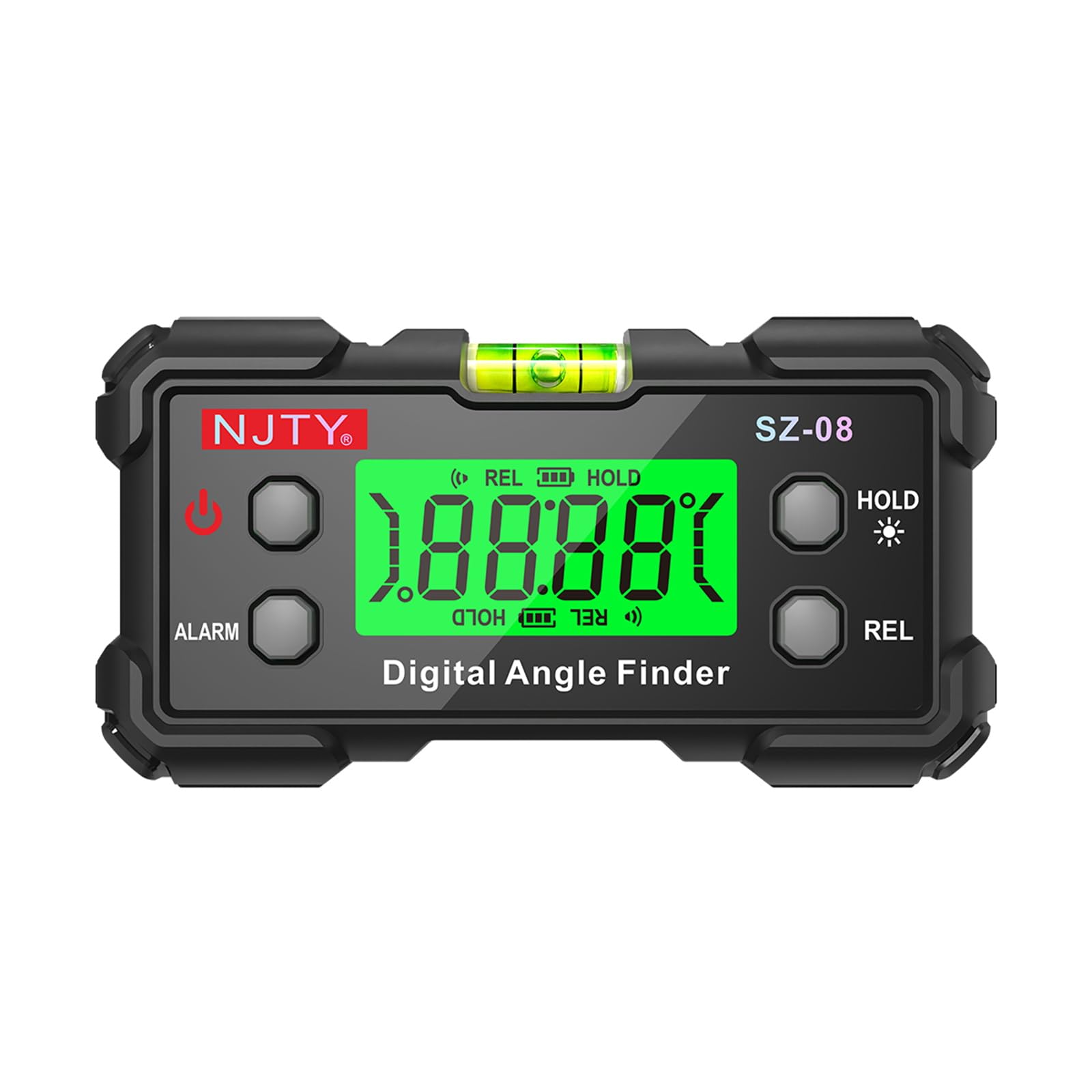
Figure 1: Overview of the NJTY Digital Inclinometer SZ-08 and its key features.
2. Package Contents
- 1 x NJTY Digital Inclinometer SZ-08
- 2 x AAA Batteries (may be included or require separate purchase)
- 1 x User Manual (this document)
3. Product Overview
Familiarize yourself with the components of your Digital Inclinometer:
- Digital Display: Backlit LCD for clear angle readings.
- Bubble Level: High-sensitivity illuminated bubble for visual leveling guidance.
- Magnetic Base: Dual-sided magnets for secure attachment to metal surfaces.
- Power Button: Turns the device on/off.
- HOLD Button: Freezes the current measurement on the display.
- REL Button: Toggles between Absolute and Relative measurement modes.
- ALARM Button: Activates/deactivates the angle alarm function.
- Battery Compartment: Located on the back for AAA battery installation.

Figure 2: Detailed view of the inclinometer's display, bubble level, and battery compartment.
4. Setup
4.1 Battery Installation
- Locate the battery compartment cover on the back of the device.
- Using a small Phillips head screwdriver (not included), unscrew the cover.
- Insert two AAA batteries, ensuring correct polarity (+/-).
- Replace the battery compartment cover and secure it with the screw.
4.2 Powering On/Off
- To power on, press the Power button. The backlit display will illuminate.
- To power off, press and hold the Power button for approximately 3 seconds.
- The device features an automatic power-off function after 5 minutes of inactivity to conserve battery life. The backlight will turn off after 3 minutes of inactivity.
5. Operating Instructions
5.1 Basic Angle Measurement
- Place the inclinometer on the surface you wish to measure.
- The digital display will show the angle relative to the horizontal plane (in Absolute mode) or a set reference (in Relative mode).
- Allow a few seconds for the reading to stabilize.
- For visual confirmation, observe the illuminated bubble level.
5.2 Absolute and Relative Measurement Modes
The inclinometer supports two measurement modes:
- Absolute Measurement Mode: Measures the angle relative to a true horizontal (0°) or vertical (90°) plane. This is the default mode when the device is powered on.
- Relative Measurement (REL) Mode: Allows you to set any surface as a 0° reference point. Subsequent measurements will display the angle difference from this set reference.
To switch between modes, press the REL button. When in REL mode, "REL" will be displayed on the screen.
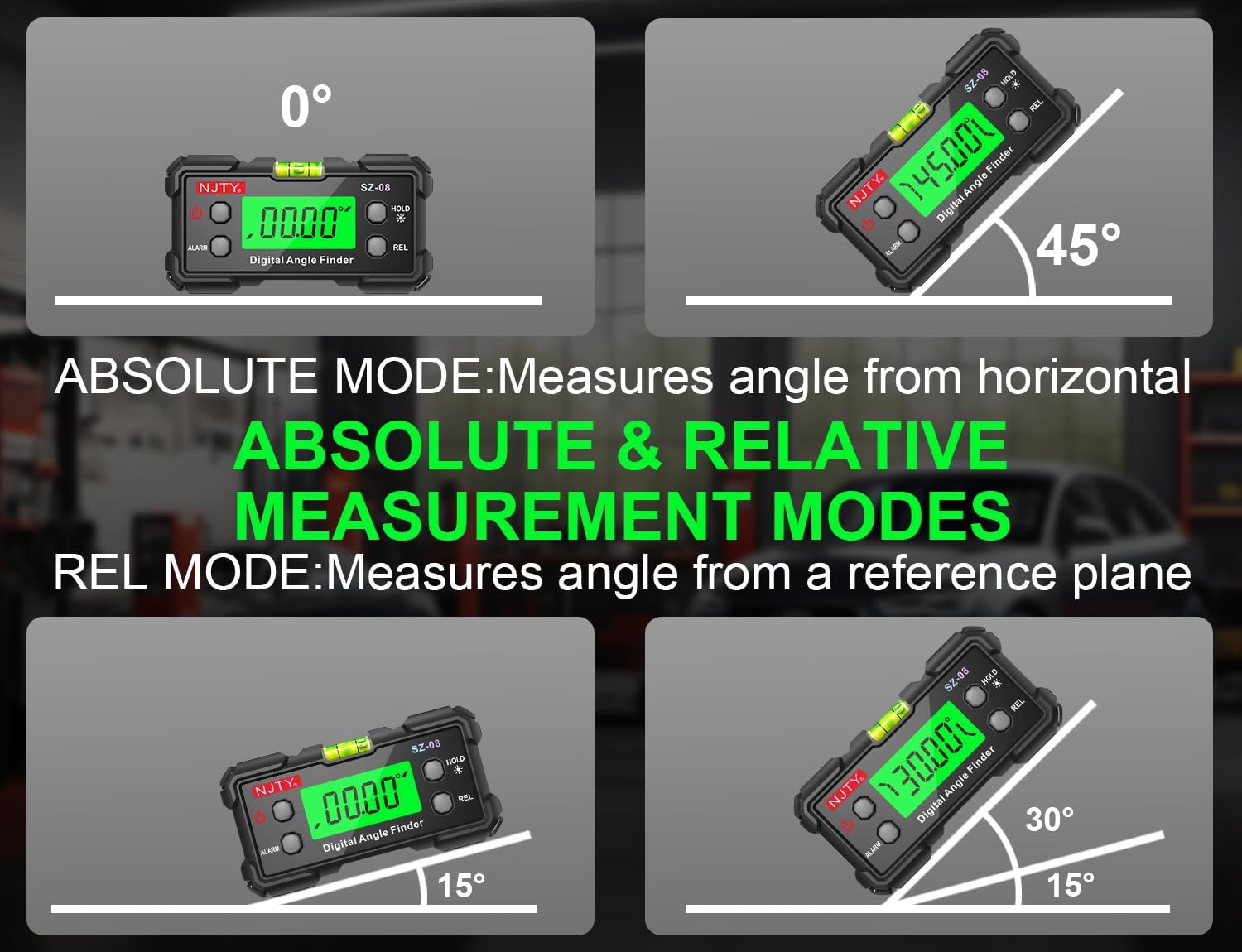
Figure 3: Illustration of Absolute and Relative Measurement Modes.
5.3 Data Hold Function
To freeze the current reading on the display, press the HOLD button. "HOLD" will appear on the screen. Press the HOLD button again to release the reading and resume live measurement.
5.4 Angle Alarm
The device can be set to emit an audible alarm when a specific angle is reached. Refer to the full manual for detailed instructions on setting the angle alarm threshold.
5.5 Automatic Flipping Display
The digital display automatically rotates to remain upright, regardless of the inclinometer's orientation. This ensures easy readability from any angle, including inverted positions.

Figure 4: Automatic Flipping Reading in various orientations.
5.6 Using the Magnetic Base
The inclinometer features strong magnets on its base, allowing it to securely attach to metal surfaces. This enables hands-free operation for tasks such as welding, machine installation, or working on metal frames. Ensure the surface is clean and flat for optimal magnetic adhesion.

Figure 5: Magnetic base for vertical and inverted measurements.
6. Maintenance
- Cleaning: Wipe the device with a soft, dry cloth. Do not use abrasive cleaners or solvents.
- Storage: Store the inclinometer in a dry, cool place away from direct sunlight and extreme temperatures. If storing for extended periods, remove the batteries to prevent leakage.
- Battery Replacement: Replace batteries when the low battery indicator appears on the display or when the device fails to power on. Follow the battery installation steps in Section 4.1.
7. Troubleshooting
| Problem | Possible Cause | Solution |
|---|---|---|
| Device does not power on. | Dead or incorrectly installed batteries. | Check battery polarity or replace with new AAA batteries. |
| Inaccurate or inconsistent readings. | Device not calibrated; unstable surface; magnetic interference. | Ensure the device is on a stable, non-vibrating surface. If persistent, perform a user calibration (refer to advanced manual if available). Avoid strong magnetic fields. |
| Display is dim or flickering. | Low battery. | Replace batteries. |
| Auto power-off occurs too quickly. | Normal operation (5 minutes inactivity). | This is a power-saving feature. Ensure you are actively using the device or press a button periodically to reset the timer. |
8. Specifications
| Model Number | SZ-08 |
| Measuring Range | 0-90° x 4 (360° total coverage) |
| Accuracy | ±0.3° |
| Resolution | 0.05° |
| Display | Backlit LCD with auto-flip orientation |
| Power Source | 2 x AAA Batteries |
| Auto Power-Off | 5 minutes (backlight auto-off after 3 minutes) |
| Dimensions | Approx. 10 x 6.6 x 4.3 cm (4 x 2.6 x 1.7 inches) |
| Weight | Approx. 142g (5 ounces) |
| Base | Dual-sided magnetic attachment |
9. Warranty and Support
For warranty information, technical support, or service inquiries, please refer to the documentation provided with your purchase or visit the official NJTY website. Keep your purchase receipt as proof of purchase.

