Download PDFFree PDF. The Save button below keeps a bookmark and private notes in your account.
KITPLUS T800PRO Wireless Dog Fence System User Manual
Model: T800PRO | Brand: KITPLUS
1. Introduction
The KITPLUS T800PRO Wireless Dog Fence System is a versatile 4-in-1 device designed to provide a safe and controlled environment for your dog. It integrates a portable wireless boundary system, a remote training collar, a bark control feature, and a real-time status monitor. This manual provides detailed instructions for setup, operation, and maintenance to ensure optimal performance and the safety of your pet.
Image: Overview of the 4-in-1 KITPLUS T800PRO Wireless Dog Fence System, showing its various functions.
2. Package Contents
Please check the package to ensure all items are present:
Dog Wireless Fence Receiver Collar
Dog Wireless Fence Transmitter Unit
Set of Long & Short Contact Points
Stimulation Tester
Type-C Charging Cable
User Manual (this document)
3. Product Overview
3.1. Transmitter Unit
The handheld transmitter unit features a clear TFT color display for intuitive control. It allows you to manage the wireless fence, remote training, bark control, and real-time dog status monitoring functions. It is equipped with a Type-C charging port for fast charging.
Image: The KITPLUS T800PRO Transmitter Unit and Receiver Collar, highlighting the long-lasting battery and Type-C fast charging.
3.2. Receiver Collar
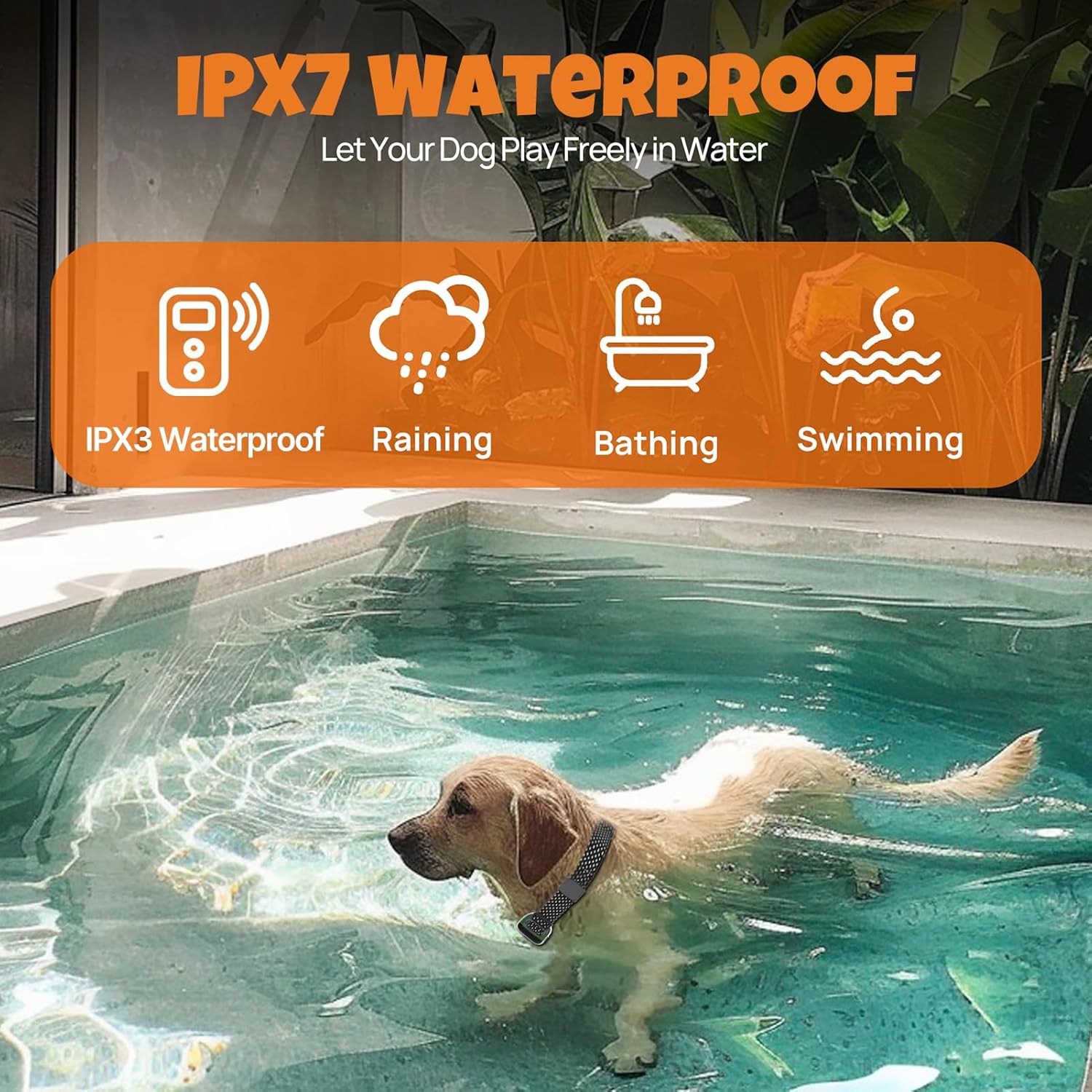
The receiver collar is designed for durability and comfort, featuring IPX7 waterproof protection for reliable performance in various outdoor conditions. It includes contact points for static stimulation and vibration, and an adjustable strap to fit dogs weighing 10-130 lbs with neck sizes from 10-26 inches.
Image: The KITPLUS T800PRO Receiver Collar demonstrating its IPX7 waterproof capabilities, suitable for rain, bathing, and swimming.
4. Setup
4.1. Charging the Devices
Before first use, fully charge both the transmitter and the receiver collar using the provided Type-C charging cable. The LED indicator on the receiver will show charging status.
4.2. Attaching Contact Points
Select the appropriate length of contact points (long or short) based on your dog's coat thickness. Screw them firmly into the receiver collar. Ensure good skin contact for effective stimulation.
4.3. Powering On/Off
Transmitter: Short press the lock button to power on. Long press the lock button for 3 seconds to power off.
Receiver Collar: Short press the on/off button to power on. The receiver will beep once and vibrate once. Long press the on/off button for 3-5 seconds to power off.
4.4. Pairing Transmitter and Receiver
The transmitter and receiver must be successfully paired before using the training and fence functions. One transmitter can pair with up to 3 receivers.
Turn on the transmitter, and toggle to the training function.
Long press the dog 1/2/3 button on the transmitter to enter channel switching, then short press the button to switch the channel.
Turn off the receiver, and long press the on/off button for 3-5 seconds. The receiver will vibrate and enter pairing mode with the LED indicator flashing for 15 seconds.
Within 15 seconds, press the beep/vibration button on the transmitter. A beep will confirm successful pairing. Once paired, the transmitter will display the receiver's battery level. (Repeat above steps when timeout occurs).
Video: This video demonstrates the pairing process for the KITPLUS Wireless Dog Fence System, showing how to connect the transmitter and receiver collar.
5. Operating Instructions
5.1. Wireless Fence Function
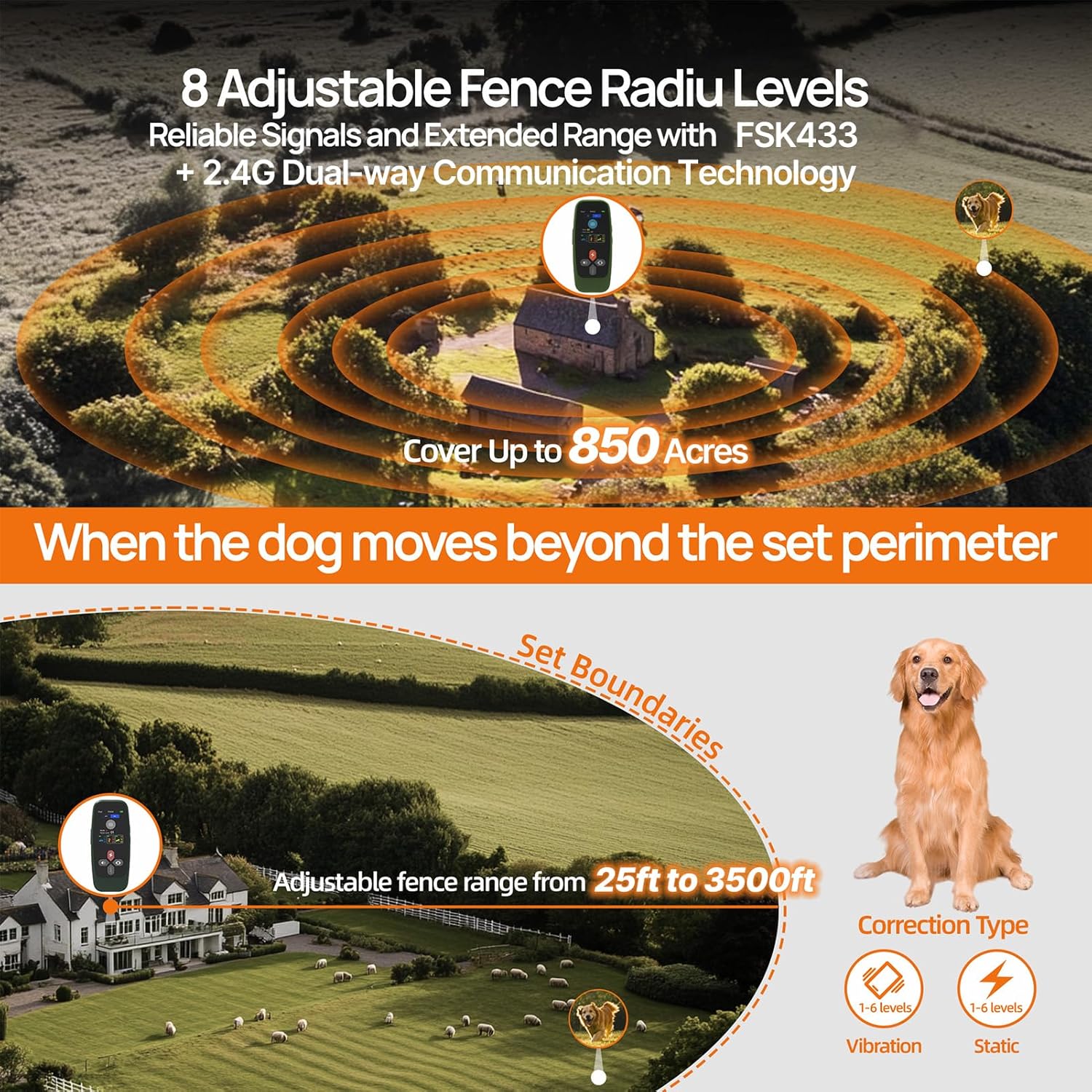
The wireless fence creates a customizable safe zone for your dog, ranging from 25 to 3500 feet. If your dog approaches or crosses the set boundary, the system will provide a warning.
After entering the fence function, select the desired dog channel.
Short press the lock button on the transmitter to enable or disable the fence function.
Use the up/down buttons to adjust the fence level from 1 to 8. Higher levels correspond to a larger boundary area.
When the dog crosses the boundary, the transmitter will emit an immediate sound reminder.
Image: Diagram illustrating the adjustable fence radius levels of the KITPLUS T800PRO, covering up to 850 acres with a range from 25ft to 3500ft.
5.2. Remote Training Function
The remote training function allows you to correct your dog's behavior with beep, vibration, or static stimulation. It offers 1-6 levels of vibration and static correction.
After entering the training function, select the desired dog channel.
Short press the mode button to toggle between beep, vibration, and static modes.
Use the up/down buttons to adjust the intensity levels for beep, vibration, and static stimulation.
Short or long press the beep button to emit beep commands.
Short or long press the static button to emit static stimulation commands. Use the stimulation tester to verify functionality.
Image: Visual guide on how the KITPLUS T800PRO can be used to correct various behaviors like barking, chewing, and digging, and encourage positive actions like sitting, coming, staying, and following.
5.3. Bark Control Function
The automatic bark control feature helps manage excessive barking, providing gentle correction to promote a quieter environment.
After entering the bark collars function, short press the lock button to enable or disable the function.
Short press the vibration or static button to select the warning mode.
Use the up/down buttons to adjust the sensitivity level setting (1 to 5). Higher levels are more prone to trigger.
Image: A Golden Retriever wearing the KITPLUS T800PRO collar, illustrating the automatic bark control feature with 5 customizable sensitivity levels for vibration and static correction.
5.4. Real-Time Monitoring
The system provides real-time monitoring of your dog's movements (stay, walk, run, jump) within a 200-yard range, offering insights into their activity levels.
Image: A family with dogs in a living room, demonstrating the real-time dog status monitor feature of the KITPLUS T800PRO, showing different activity icons on the remote.
6. Safety Guidelines
Do not leave the collar on your dog for more than 12 hours a day.
Check your dog's neck area daily for any signs of irritation or sores.
Ensure the contact points are making proper contact but are not too tight.
Use the lowest effective stimulation level for training.
The transmitter has a security lock to prevent unintentional static correction.
Image: A person with a Golden Retriever, showing the KITPLUS T800PRO transmitter with its security lock feature, designed to prevent accidental static correction.
7. Maintenance
Regularly clean the receiver collar and contact points with a damp cloth.
Ensure the charging port cover is securely closed when not charging to maintain waterproof integrity.
Store the device in a cool, dry place when not in use.
8. Troubleshooting
Problem
Possible Cause
Solution
Receiver not responding to transmitter.
Not paired, low battery, out of range.
Re-pair devices, charge batteries, ensure within operating range.
No static stimulation.
Contact points not touching skin, stimulation level too low, safety lock engaged.
Adjust collar fit, increase level, disengage safety lock, use tester.
Fence function not working.
Fence function disabled, incorrect level setting, environmental interference.
Enable fence function, adjust level, test in a different location.
Short battery life.
Frequent use of high stimulation levels, aging battery.
Reduce stimulation intensity, ensure full charge before use.
Video: A user demonstrating an issue with the KITPLUS T800PRO pairing process, where the device does not respond as expected. This video highlights a common troubleshooting scenario.
9. Specifications
Model Name: T800PRO
Item Weight: 13 ounces
Product Dimensions: 4.96 x 2.44 x 5.91 inches
Batteries: 1 Lithium Ion battery required (included)
Multi-Dog Support: Up to 3 dogs (with additional receiver collars)
Charging: Type-C Fast Charging
10. Warranty and Support
The KITPLUS T800PRO Wireless Dog Fence System is backed by a 1-year warranty. For any questions, technical assistance, or warranty claims, please contact our dedicated customer support team. Refer to the contact information provided with your purchase or visit the official KITPLUS website.
Ask a question about this manual
Ask about setup, troubleshooting, compatibility, parts, safety, or missing instructions. Manuals+ will review the question and use this page’s manual context to help answer it.