
1. Introduction
Thank you for choosing the Lefant M5 MAX Robot Vacuum and Mop. This manual provides essential information for the safe operation, maintenance, and troubleshooting of your device. Please read it thoroughly before first use and keep it for future reference.
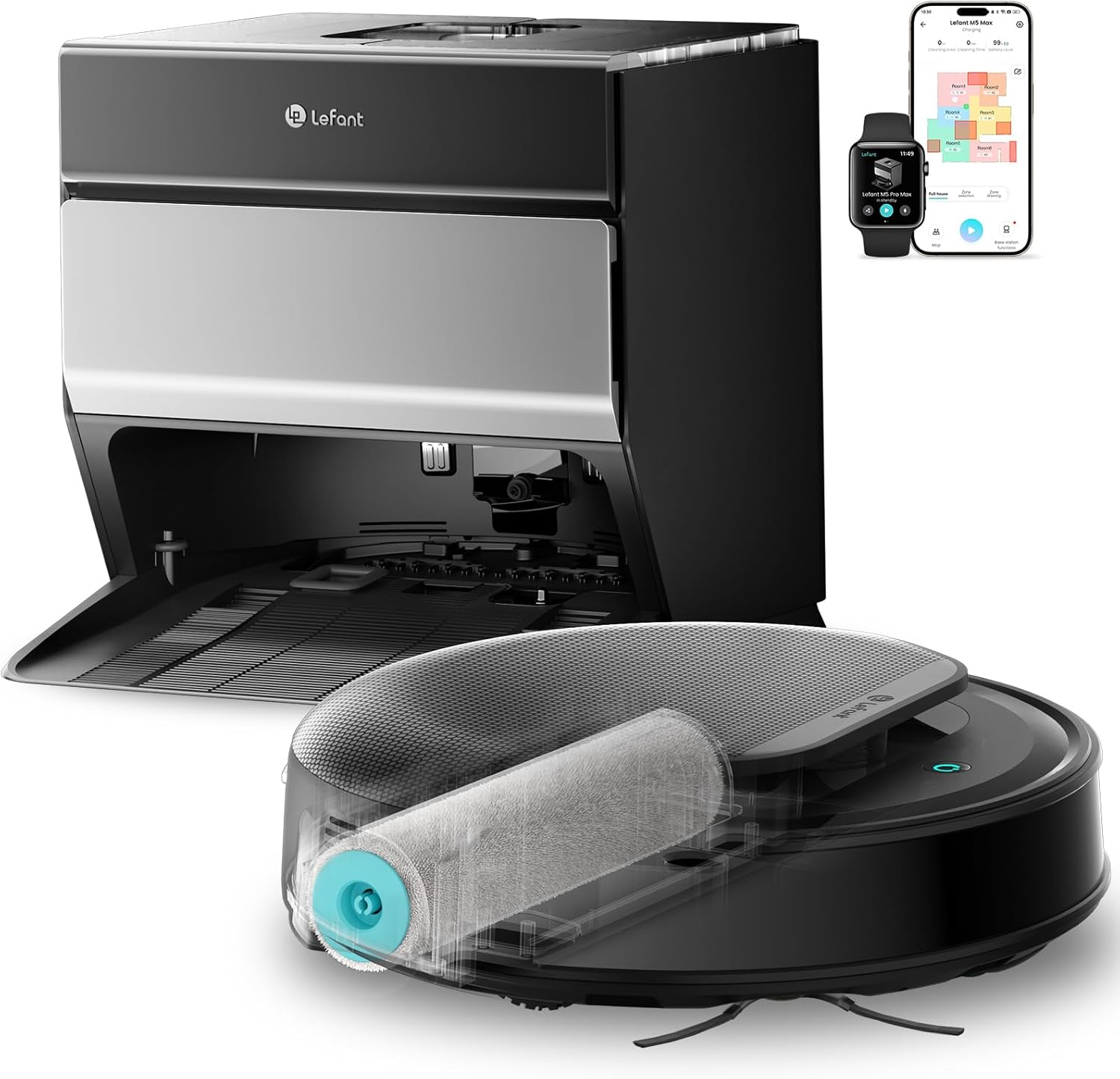
The Lefant M5 MAX Robot Vacuum and Mop with its integrated self-cleaning station.
2. Product Overview and Components
The Lefant M5 MAX is an advanced robot vacuum and mop designed for efficient floor cleaning. It features powerful suction, a wide roller mop, intelligent navigation, and a multifunctional self-cleaning station.
Key Features:
- 20 cm Roller Mop: Wider coverage for effective mopping with continuous clean water supply.
- 23,000 Pa Suction: Powerful vacuuming for dust, debris, and pet hair.
- Zero-Tangle System: V-shaped brush with dual combs to minimize hair entanglement.
- 75°C Hot Water Mop Wash: Ensures hygienic cleaning of the roller mop.
- Cold Air Drying: Protects mop fibers and prevents odors.
- dToF Laser Navigation: Precise mapping and optimized cleaning paths.
- PSD 2.0 Obstacle Avoidance: Detects low obstacles (up to 25 ± 5 mm) with 12 sensors covering 190°.
- Multifunction Base: Automatic clean water management, dirty water drainage, mop washing, and dust collection.
- Up to 120 Days Dust-Free: Large dust collection capacity in the base station.
Main Components:
- Lefant M5 MAX Robot Unit
- Auto-Empty & Self-Cleaning Station
- Roller Mop
- Side Brushes
- Clean Water Tank (in station)
- Dirty Water Tank (in station)
- Dust Bag (in station)
- HEPA Filter
- Power Cord

Detailed view of the robot and its self-cleaning station components.
3. Setup Guide
3.1 Unpacking and Placement
- Carefully remove all components from the packaging.
- Choose a suitable location for the self-cleaning station. Ensure it is against a wall, with at least 0.5 meters (1.6 feet) of clear space on both sides and 1.5 meters (4.9 feet) in front.
- Plug the power cord into the station and a wall outlet.
- Place the robot onto the charging contacts of the station to begin initial charging.
3.2 App Connection
To unlock the full potential of your Lefant M5 MAX, connect it to the Lefant App.
- Download the 'Lefant' app from your smartphone's app store.
- Open the app and follow the on-screen instructions to add your M5 MAX robot.
- Ensure your phone is connected to a 2.4 GHz Wi-Fi network.
- Power on the robot by pressing the power button.
- Press and hold the start button for 6 seconds to enter pairing mode.
- Select 'M5 MAX' in the app and wait for successful connection.

Steps for connecting your Lefant M5 MAX to the mobile application.
3.3 Voice Control Setup (Alexa/Google Assistant)
You can control your M5 MAX using voice commands through Amazon Alexa or Google Assistant.
- Open the Lefant APP, navigate to 'Mine' and then 'Third-party voice access service'.
- Register your voice account and password.
- Open the Alexa or Google Home app, go to 'More' or 'Skills & Games'.
- Search for 'Smart Life' skill/service.
- Enable the skill and link your Lefant account using the registered voice account and password.
- Wait for the connection to complete.

Steps for connecting your Lefant M5 MAX to Amazon Alexa.
4. Operating Instructions
4.1 Starting and Stopping Cleaning
- Start Cleaning: Press the power button on the robot or use the 'Start' command in the Lefant App.
- Pause Cleaning: Press the power button once during cleaning.
- Resume Cleaning: Press the power button again after pausing.
- Return to Base: Press the home button on the robot or use the 'Return to Base' command in the app.
4.2 Intelligent Navigation and Mapping
The M5 MAX uses dToF laser navigation for precise mapping and efficient cleaning paths. The PSD 2.0 system helps it avoid obstacles.

The robot intelligently navigates and maps your home for optimal cleaning.
4.3 Carpet Detection and Mop Lifting
The robot automatically detects carpets and lifts its mop by 8mm to prevent wetting the carpet while vacuuming.
Automatic mop lifting ensures carpets remain dry during vacuuming.
4.4 Customizing Cleaning with the App
The Lefant App allows you to set no-go zones, schedule cleaning, and customize cleaning modes.
- No-Go Zones: Define areas the robot should avoid.
- Scheduled Cleaning: Set specific times for the robot to clean automatically.
- Cleaning Modes: Adjust suction power and water flow for different floor types.

Utilize the Lefant App for advanced cleaning customization.
4.5 Quiet Operation
The M5 MAX operates at a low noise level of 55dB, making it suitable for homes with children or pets.

Enjoy quiet cleaning without disturbing your family or pets.
5. Maintenance
Regular maintenance ensures optimal performance and extends the lifespan of your Lefant M5 MAX.
5.1 Automatic Maintenance by the Station
The multifunction station handles several maintenance tasks automatically:
- 75°C Hot Water Mop Washing: The station washes the roller mop with hot water to remove stubborn dirt and ensure hygiene.
- Cold Air Drying: After washing, the mop is dried with cold air to prevent mildew and odors.
- Automatic Dust Collection: The robot's dustbin is automatically emptied into a 3.2L dust bag in the station, providing up to 120 days of hands-free dust disposal.
Video demonstrating the 75°C hot water mop washing and cold air drying process in the self-cleaning station.

The station provides fully automatic maintenance, reducing manual effort.

The 3.2L antibacterial dust collection system allows for up to 120 days without manual emptying.
5.2 Manual Cleaning of Components
Periodically inspect and clean the following components:
- Roller Mop: Even with automatic washing, occasional manual inspection for debris is recommended.
- Side Brushes: Remove any tangled hair or debris. Replace if worn.
- Sensors: Wipe the dToF laser sensor and PSD sensors with a clean, dry cloth.
- Charging Contacts: Clean the charging contacts on both the robot and the station.
- Water Tanks: Rinse the clean and dirty water tanks regularly.
6. Troubleshooting
If you encounter issues with your Lefant M5 MAX, refer to the following common problems and solutions.
6.1 Robot Gets Stuck or Trapped
If the robot frequently gets stuck, consider the following:
- Clear Obstacles: Remove cables, small toys, and other items that can entangle the robot or block its path.
- Set No-Go Zones: Use the Lefant App to define no-go zones around problematic areas like loose cables or cluttered spaces.
Video demonstrating common causes and solutions if the robot gets stuck, such as clearing cables and setting no-go zones.
6.2 Poor Cleaning Performance
- Check Water Tanks: Ensure the clean water tank is filled and the dirty water tank is empty.
- Clean Roller Mop: Verify the roller mop is clean and free of debris. The automatic washing should keep it clean, but manual inspection is good.
- Empty Dust Bag: Ensure the dust bag in the station is not full.
- Check Brushes: Clean the side brushes and the V-shaped main brush for tangled hair or debris.
6.3 Robot Not Charging
- Verify Power: Ensure the charging station is plugged in and receiving power.
- Clean Contacts: Wipe the charging contacts on both the robot and the station with a dry cloth.
- Proper Docking: Ensure the robot is correctly docked with its charging contacts aligned.
7. Specifications
| Feature | Specification |
|---|---|
| Brand | Lefant |
| Model Name | M5 MAX |
| Suction Power | 23,000 Pa |
| Roller Mop Size | 20 cm |
| Navigation Type | dToF Laser |
| Obstacle Avoidance | PSD 2.0 (190° coverage) |
| Mop Washing Temperature | 75°C |
| Dust Collection Capacity (Station) | 3.2 Liters (up to 120 days) |
| Battery Composition | Lithium Ion |
| Voltage | 19 Volts |
| Noise Level | 55 Decibels |
| Control Type | APP (2.4 GHz WiFi+Bluetooth), Alexa & Google Assistant, Button Control |
| Dimensions (L x W x H) | 32L x 32W x 10H cm |
| Item Weight | 9.7 Kilograms |
| Filter Type | HEPA |
| Recommended Surfaces | Hard floor, Carpet, Parquet, Tiles |
8. Warranty and Support
8.1 Manufacturer's Warranty
The Lefant M5 MAX comes with a 2-year manufacturer's warranty. This warranty covers defects in materials and workmanship under normal use. Please retain your proof of purchase for warranty claims.
8.2 Customer Support
If you have any questions, require technical assistance, or need to make a warranty claim, please contact Lefant Customer Support. Refer to the contact information provided in your product packaging or visit the official Lefant website for the most up-to-date support details.
For further assistance, you may also visit the Lefant Store on Amazon.


