
1. Introduction
Thank you for purchasing the taopodo S18 Portable Speaker. This manual provides essential information for setting up, operating, and maintaining your speaker. Please read it thoroughly before use to ensure optimal performance and longevity of your device.
The taopodo S18 is a high-quality, IPX7 waterproof wireless speaker designed to deliver 30W loud stereo sound with Bluetooth 5.4 connectivity and True Wireless Stereo (TWS) pairing capabilities for an enhanced audio experience.
2. Package Contents
Please check the package for the following items:
- taopodo S18 Portable Speaker
- Power Cable (USB-C charging cable)
- User Manual (this document)
The image above displays the taopodo S18 Portable Speaker along with its power cable, as typically found in the product packaging.
3. Product Overview
Familiarize yourself with the speaker's components and controls.
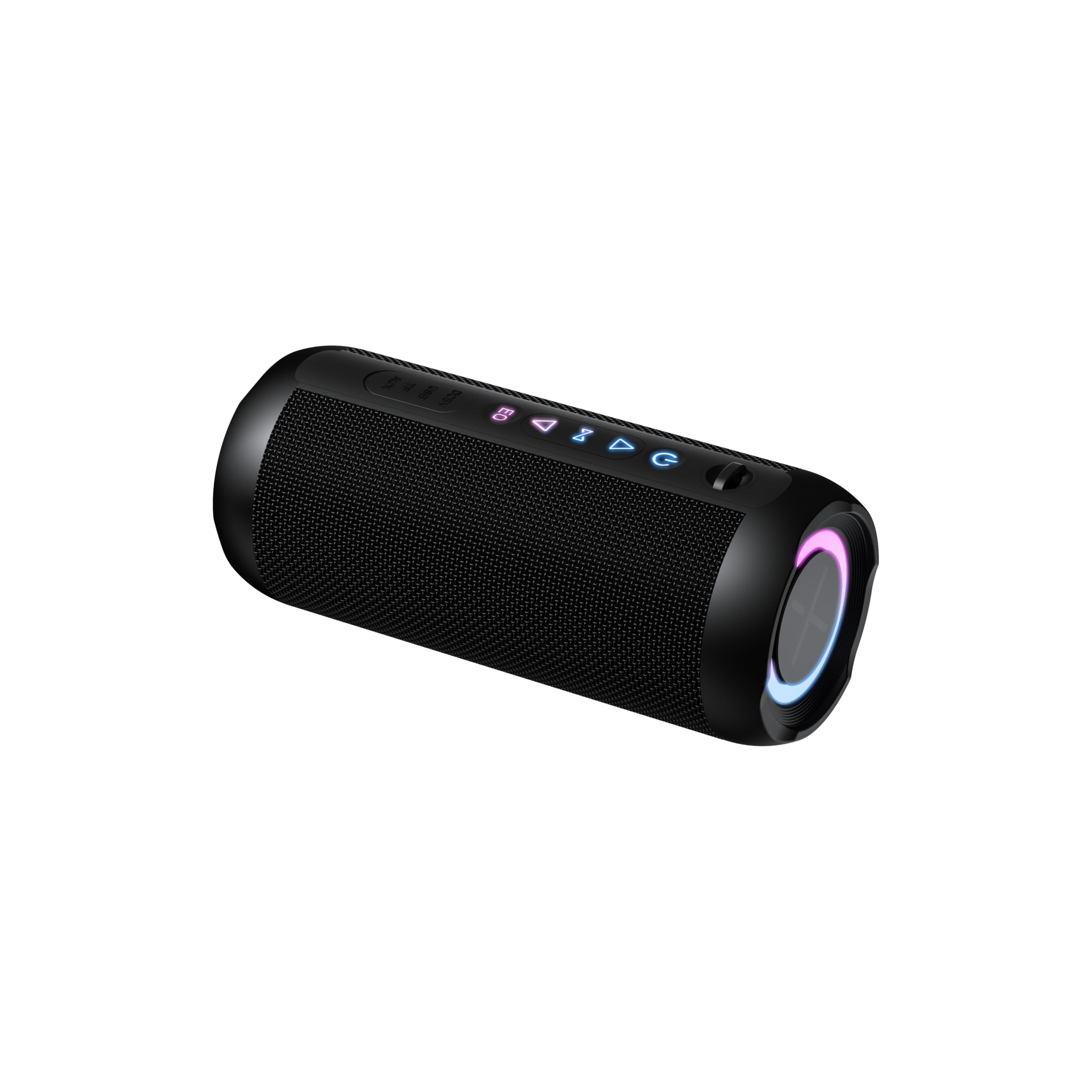
3.1. Controls and Indicators

This diagram illustrates the location of the control buttons and ports on the taopodo S18 speaker.
- Power Button: Press and hold to power on/off. Short press to check battery status.
- Volume Down (-): Short press to decrease volume. Long press for previous track.
- Play/Pause Button: Short press to play/pause music. Short press to answer/end calls. Long press to reject calls.
- Volume Up (+): Short press to increase volume. Long press for next track.
- Bluetooth/TWS Button: Short press to enter Bluetooth pairing mode. Long press to initiate TWS pairing.
- USB-C Charging Port: For charging the speaker.
- LED Indicator: Displays power, charging, and Bluetooth status.
4. Setup
4.1. Charging the Speaker
Before first use, fully charge the speaker.
- Connect the provided USB-C charging cable to the speaker's charging port.
- Connect the other end of the cable to a USB power adapter (not included) or a computer's USB port.
- The LED indicator will glow red during charging and turn off when fully charged.

The speaker's USB-C port is located on the side, allowing for easy connection of the charging cable.
4.2. Powering On/Off
- To Power On: Press and hold the Power Button for 2-3 seconds. You will hear an audible prompt, and the LED indicator will flash blue.
- To Power Off: Press and hold the Power Button for 2-3 seconds. You will hear an audible prompt, and the LED indicator will turn off.
5. Operating Instructions
5.1. Bluetooth Pairing
Connect your taopodo S18 speaker to a Bluetooth-enabled device.
- Ensure the speaker is powered on and the LED indicator is flashing blue, indicating it is in pairing mode. If not, short press the Bluetooth button.
- Enable Bluetooth on your device (smartphone, tablet, computer).
- Search for Bluetooth devices and select "taopodo S18" from the list.
- Once paired, the LED indicator will turn solid blue, and you will hear a confirmation sound.
- The speaker will automatically reconnect to the last paired device when powered on, if the device's Bluetooth is active and within range.

Locate and select "taopodo S18" in your device's Bluetooth settings to establish a connection.
5.2. Playing Audio
- After successful Bluetooth pairing, open your preferred music application on your device.
- Use the Play/Pause button on the speaker to control playback.
- Use the Volume Up (+) and Volume Down (-) buttons to adjust the speaker's volume. You can also control volume from your connected device.
- Long press Volume Up (+) for the next track, and long press Volume Down (-) for the previous track.
5.3. Answering Calls
- When a call comes in, the speaker will ring.
- Short press the Play/Pause button to answer the call.
- Short press the Play/Pause button again to end the call.
- Long press the Play/Pause button to reject an incoming call.
6. True Wireless Stereo (TWS) Pairing
TWS allows you to pair two taopodo S18 speakers together for a true stereo sound experience.
- Ensure both taopodo S18 speakers are powered on and not connected to any Bluetooth device.
- On one speaker (this will be the primary speaker), long press the Bluetooth/TWS Button until you hear a pairing tone. The LED indicator will flash rapidly.
- On the second speaker (this will be the secondary speaker), long press the Bluetooth/TWS Button until you hear a pairing tone.
- The two speakers will automatically connect to each other. You will hear a confirmation sound, and the LED indicator on the primary speaker will flash blue, while the secondary speaker's LED will turn solid blue.
- Now, connect your device to the primary speaker via Bluetooth as described in section 5.1. Both speakers will play audio in stereo.
- To disconnect TWS, long press the Bluetooth/TWS Button on either speaker.

Two taopodo S18 speakers can be paired together using TWS for an immersive stereo audio experience.
7. Maintenance
7.1. Cleaning
- Wipe the speaker with a soft, damp cloth. Do not use abrasive cleaners or solvents.
- Ensure the charging port cover is securely closed when not charging to maintain IPX7 water resistance.
7.2. Storage
- Store the speaker in a cool, dry place away from direct sunlight and extreme temperatures.
- If storing for an extended period, charge the battery to approximately 50% every three months to preserve battery life.
7.3. Water Resistance (IPX7)
The taopodo S18 speaker is IPX7 waterproof, meaning it can be immersed in water up to 1 meter (3.3 feet) for 30 minutes. This makes it suitable for use by the pool, at the beach, or in the shower. However, it is not designed for prolonged submersion or use under high-pressure water jets. Always ensure the charging port cover is sealed before exposing the speaker to water.
8. Troubleshooting
If you encounter issues with your speaker, please refer to the following common problems and solutions:
| Problem | Solution |
|---|---|
| Speaker does not power on. | Ensure the speaker is charged. Connect it to a power source using the USB-C cable. |
| Cannot pair with Bluetooth device. |
|
| No sound or low volume. |
|
| Poor sound quality. |
|
| TWS pairing fails. |
|
9. Specifications
| Feature | Detail |
|---|---|
| Brand | taopodo |
| Model Number | S18 |
| Speaker Maximum Output Power | 30 Watts |
| Connectivity Technology | Bluetooth 5.4 |
| Audio Output Mode | Stereo |
| Waterproof Rating | IPX7 |
| Control Method | Push Button |
| Item Dimensions (D x W x H) | 4"D x 1.9"W x 2.5"H |
| Compatible Devices | Smartphone, Tablet, Computer, Music Players, Televisions, Gaming Consoles |
10. Warranty and Support
The taopodo S18 Portable Speaker comes with a limited warranty. Please refer to the warranty card included in your package for specific terms and conditions. For technical support, troubleshooting assistance, or warranty claims, please contact taopodo customer service through the retailer where the product was purchased or visit the official taopodo website.
Warranty Description: 1 year (as per product data)
