
1. Introduction
The Thermal Master T2 Max is a high-resolution thermal camera designed for birdwatching and wildlife observation. It connects to Android smartphones, offering advanced thermal imaging capabilities including long-range detection, enhanced resolution, and specialized birdwatching modes. This manual provides instructions for setting up, operating, maintaining, and troubleshooting your T2 Max thermal camera.
2. Getting Started
2.1 Package Contents
Before use, verify that all items are present in the package. The standard package includes the T2 Max thermal camera, a USB cable, a quick guide, a portable case, a service card, and a 5000mAh battery with a transformer kit.

Image: Components included in the T2 Max package.
2.2 Connecting to Your Android Device
The T2 Max is designed for plug-and-play operation with Android phones. Simply connect the camera to your Android device's USB port. Ensure your phone supports USB On-The-Go (OTG) functionality.
2.3 Powering the Device
The thermal camera draws power directly from your connected Android phone. For extended use, the included rechargeable handle provides up to 18 hours of combined runtime, reducing drain on your phone's battery.
2.4 Compatibility
The T2 Max thermal camera is compatible with Android phones only. iOS devices are not supported for direct plug-and-play operation. An external display (Titan PAD Plus) is available separately for iOS compatibility.
Image: The T2 Max with its optional transformer kit and accessories.
3. Operation
3.1 Thermal Detection and Identification
Equipped with a 12µm 256×192 thermal detector and 15mK NETD sensitivity, the T2 Max can detect heat signatures up to 1600 meters away. Target identification is possible at distances up to 400 meters for a 2-meter heat source. This thermal vision functions effectively in complete darkness, low light, fog, or dense vegetation.

Image: Thermal detection range comparison.
3.2 Focus and Resolution Enhancement
The 15mm manual focus lens allows adjustment for various distances. The X³ Super Resolution algorithm processes the native 256×192 resolution to an enhanced 512×384 clarity, providing sharper outlines and improved target recognition in diverse environments.
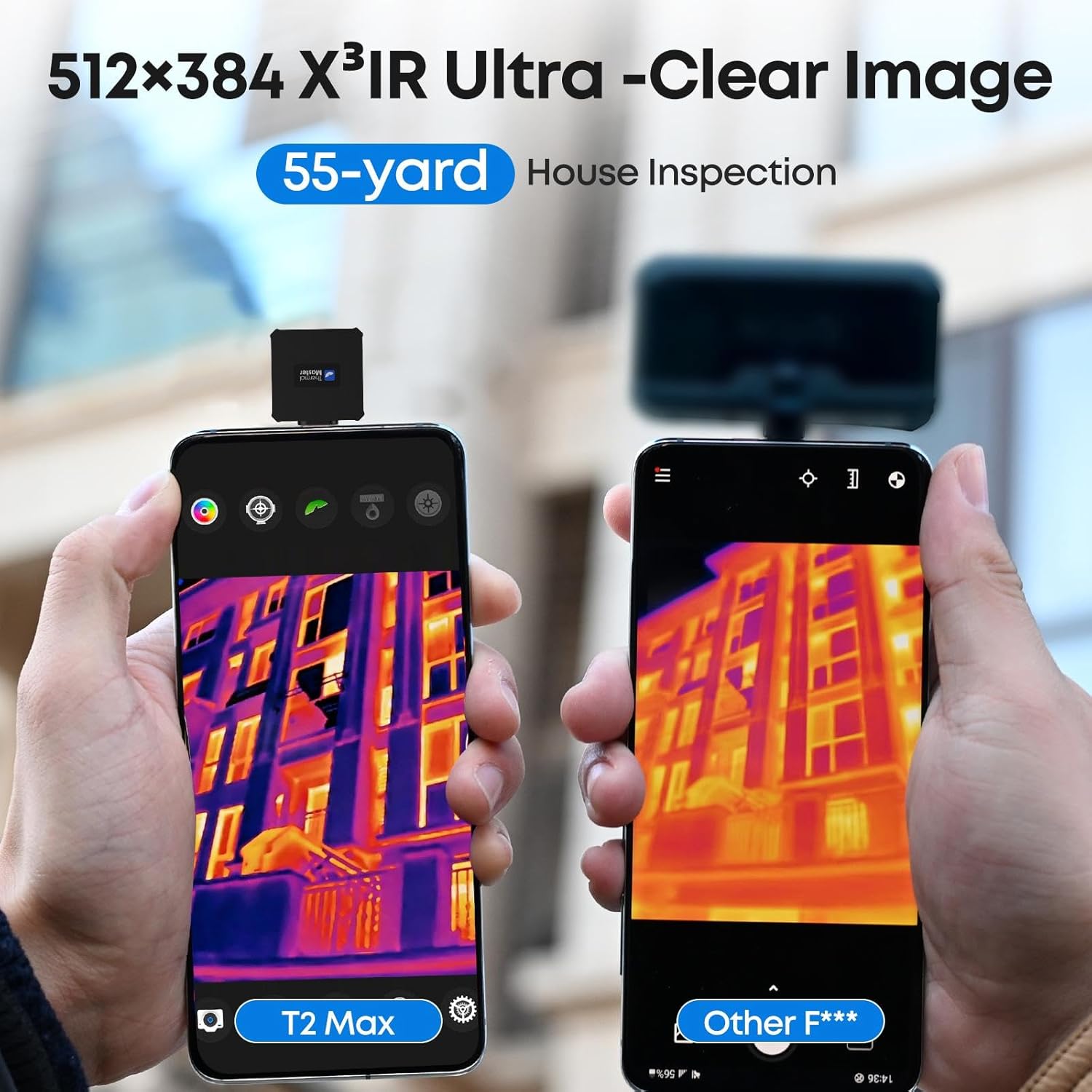
Image: Resolution comparison demonstrating X³ Super Resolution.
3.3 Super Birdwatching Mode
This specialized mode is optimized for avian observation. It reduces sky-temperature interference and enhances small heat signatures, making birds easier to locate whether perched or in flight against varying sky conditions.
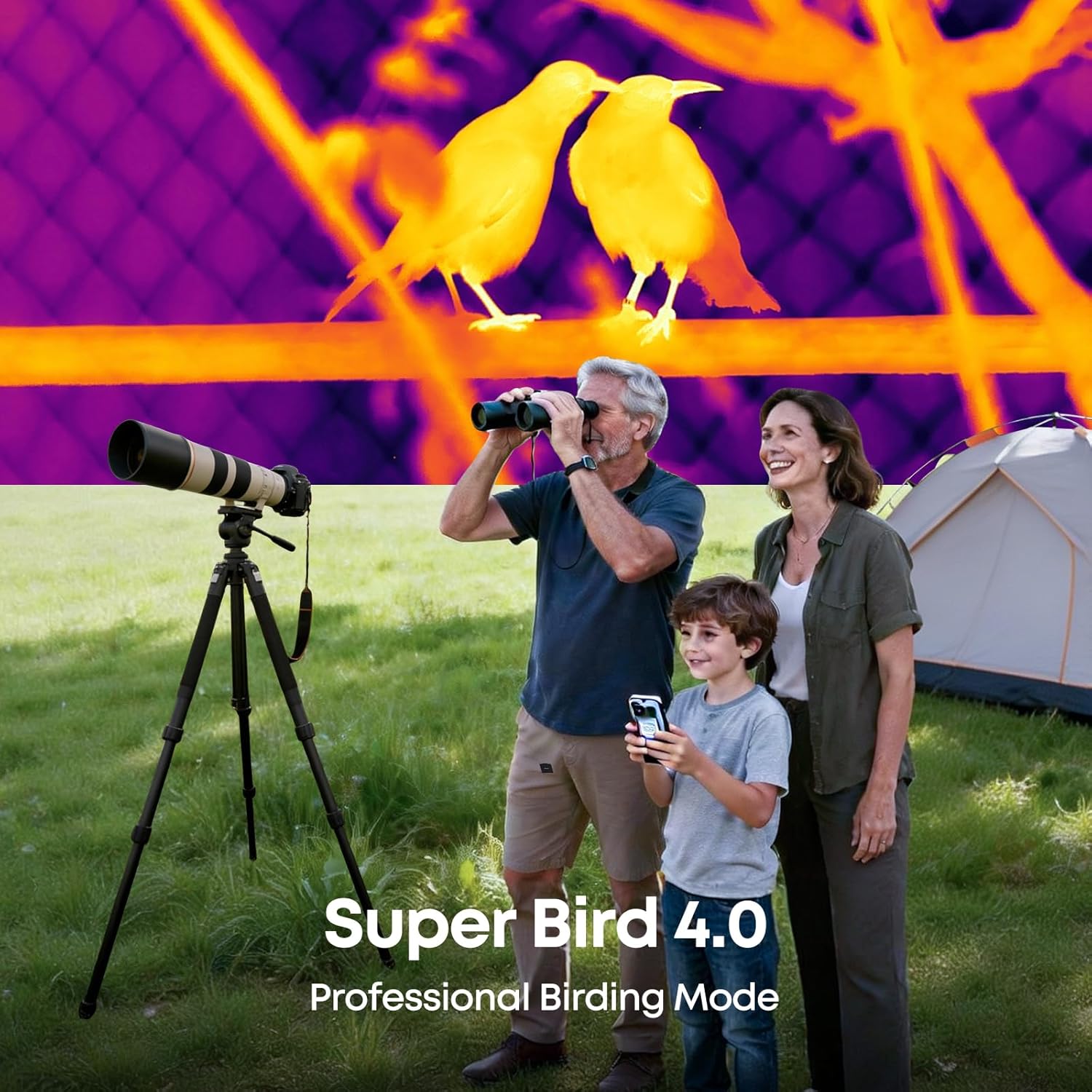
Image: Users engaging with the Super Birdwatching Mode.

Image: Comparison of Super Bird 4.0 mode performance.
3.4 Tracking and Digital Zoom
A 50Hz refresh rate provides smooth, real-time thermal imaging, minimizing motion blur. The camera features up to 15x digital zoom, picture-in-picture view, and hotspot tracking for precise monitoring of moving subjects.

Image: Hotspot tracking and smooth imaging demonstration.

Image: Demonstrating 15x digital zoom.
3.5 Image Modes
The T2 Max offers distinct image modes:
- HD (Eagle Eye) Mode: Provides clear display of animal features, suitable for situations where the target is distinct but requires detailed recognition.
- Highlight (Red Eye) Mode: Activates when ambient temperatures are high, making it challenging to distinguish targets. This mode enhances target visibility in such conditions.

Image: HD and Highlight image modes explained.
3.6 Photo and Video Recording
The device supports photo and video recording, allowing users to capture and review observations. Captured media can be shared directly from the connected Android device.

Image: Photo and video recording and sharing capabilities.
3.7 Software Interface Overview
The dedicated application on your Android device provides a user interface with various controls and settings, including image modes, digital zoom, recording options, and specialized features like Super Bird mode.

Image: Overview of the Thermal Master application interface.
4. Maintenance
4.1 Care and Cleaning
The T2 Max features IP54 water resistance, offering protection against splashes and dust. It is also designed to withstand a 1-meter drop. For cleaning, gently wipe the lens and body with a soft, lint-free cloth. Avoid abrasive materials or harsh chemicals. Ensure the device is dry before storage.
4.2 Storage
Store the camera in its protective carrying case when not in use. Keep it in a cool, dry place, away from extreme temperatures and direct sunlight. The operating temperature range is -20°C to 60°C.
5. Troubleshooting
5.1 Image Clarity Issues
- Blurry Image: Adjust the 15mm manual focus lens to achieve a clear image.
- Poor Target Recognition: Ensure you are using the appropriate image mode (e.g., Super Bird mode for avian observation, Highlight mode in warm environments).
5.2 Device Not Connecting/Powering On
- Android Compatibility: Confirm your smartphone is an Android device and supports USB OTG. iOS devices are not directly compatible.
- Power Source: Check if your phone has sufficient battery or if the rechargeable handle is charged and properly connected for extended use.
5.3 Thermal Imaging Limitations
Thermal imaging detects surface temperature only. It cannot see through solid objects like walls. However, it may reveal indirect heat patterns caused by airflow or temperature differences related to humidity.
6. Specifications
| Feature | Specification |
|---|---|
| Thermal Detector | 12µm 256×192 |
| NETD Sensitivity | 15mK |
| Lens | 15mm Manual Focus |
| Super Resolution | 512×384 (via X³ algorithm) |
| Refresh Rate | 50Hz |
| Digital Zoom | Up to 15x |
| Detection Range | Up to 1600m |
| Target Identification Range | Up to 400m (for 2-meter heat source) |
| Power Source | Android phone or rechargeable handle |
| Combined Runtime | Up to 18 hours (with rechargeable handle) |
| Water Resistance | IP54 |
| Drop Protection | 1-meter |
| Operating Temperature | -20°C to 60°C |
| Item Weight | 2 pounds |
| Package Dimensions | 9.7 x 8.2 x 3.6 inches |
| Batteries | 1 Lithium Ion battery (included) |
7. Warranty and Support
7.1 Product Warranty
The Thermal Master T2 Max comes with a 2-year warranty. This warranty covers manufacturing defects. For warranty claims, please contact customer support with your purchase details.
7.2 Customer Support
For any questions, technical assistance, or support needs, please contact our customer support team. 24/7 email support is available to resolve issues efficiently.

Image: Information on warranty and customer support.


