
Introduction
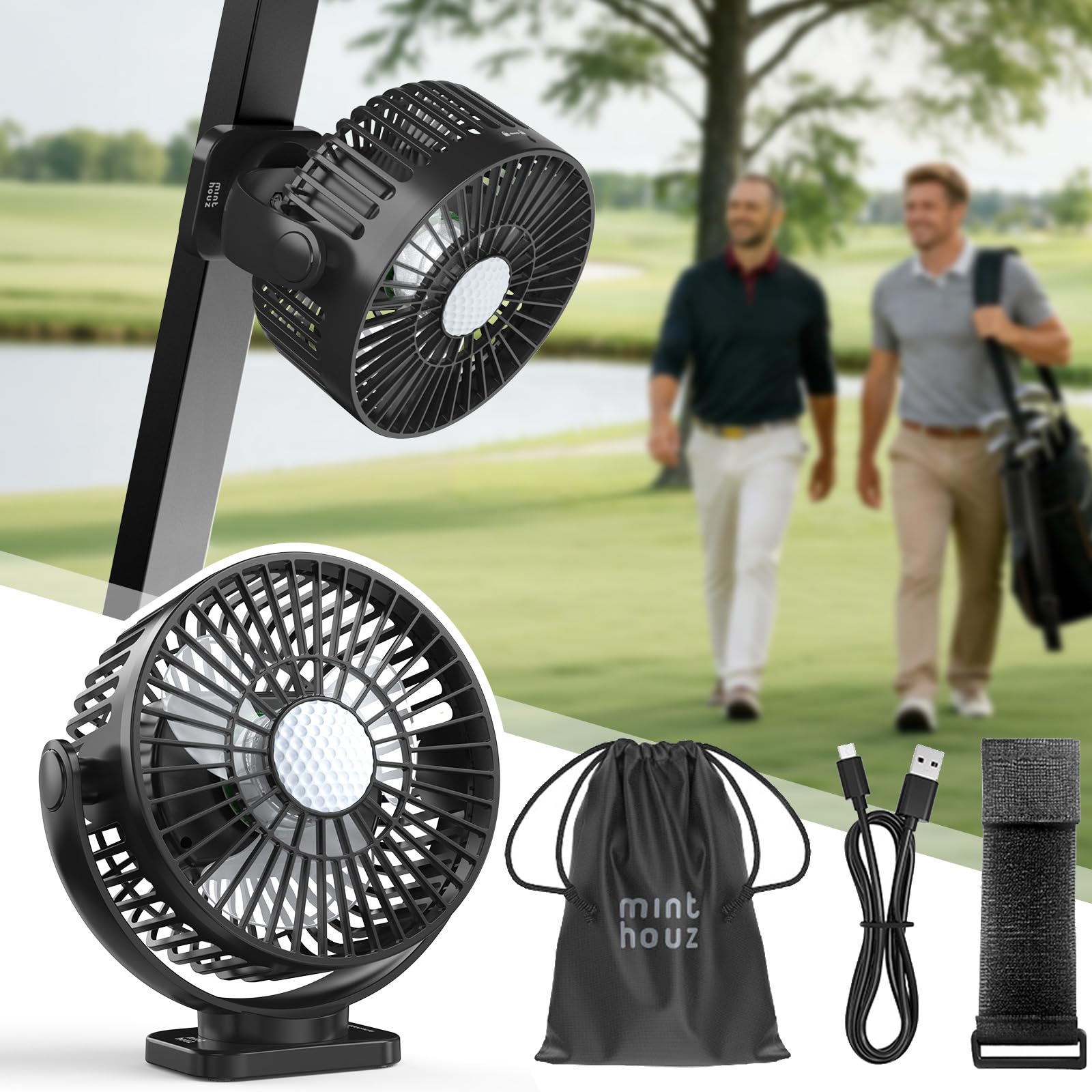
Welcome and thank you for choosing the Minthouz YH-F149 Rechargeable Magnetic Golf Cart Fan. This manual provides essential information for the safe and efficient operation of your fan. Please read it thoroughly before use and retain it for future reference. This fan is designed to provide powerful and portable cooling with versatile mounting options and additional features like an LED light and power bank functionality.
Package Contents
Carefully unpack the box and ensure all items are present:
- 1 x Minthouz YH-F149 Fan
- 1 x Storage Bag
- 1 x Velcro Strap
- 1 x USB-C Data Cable

Image displays the Minthouz YH-F149 fan, storage bag, Velcro strap, USB-C charging cable, and quick start guide, along with the product packaging.
Important Safety Information
To ensure safe operation and prevent damage, please observe the following safety guidelines:
- Do not insert fingers or any objects into the fan grille while it is operating.
- Keep the fan away from water, moisture, and excessive humidity.
- Do not disassemble, modify, or attempt to repair the fan yourself. Contact customer support if service is required.
- Use only the provided charging cable or a certified equivalent.
- Keep the fan out of reach of children and pets.
- Avoid prolonged exposure to direct sunlight or extreme temperatures.
- Ensure the fan is securely mounted before use, especially in moving vehicles like golf carts.
Setup and Installation
Charging the Fan
Before first use, fully charge the fan. Connect the provided USB-C cable to the fan's charging port and the other end to a compatible USB power adapter (not included). The LED indicator will show the charging status. A full charge provides up to 30 hours of runtime depending on the speed setting.
Attaching the Fan
The fan offers two primary attachment methods for versatile use:
- Magnetic Attachment: The fan is equipped with strong N52 magnets. Simply place the fan on any suitable metal surface, such as a golf cart frame, metal workbench, or gym equipment. Ensure a secure attachment before operation.
- Strap Attachment: For non-metallic surfaces or added security, use the included Velcro strap. Thread the strap through the designated slots on the fan base and secure it around a pole, bar, or handle.

Image illustrating the strong N52 dual-magnet grip on the fan base, showing how it firmly attaches to a surface. An inset shows the fan with both magnetic and strap options for secure mounting.
Operating Instructions
Power On/Off and Speed Control
Press the power button (usually marked with a fan icon) to turn the fan on. Each subsequent press cycles through the 3 fan speed settings: Low, Medium, and High. Pressing the button again after High speed will turn the fan off.
LED Light Function
The fan features an integrated LED light with 3 brightness levels. Press the light button (usually marked with a light bulb icon) to turn it on. Each press cycles through the brightness levels: 30%, 60%, and 100%. Pressing the button again after 100% brightness will turn the light off.

Image showing the fan's integrated LED light illuminating a map, with icons indicating 3 brightness levels (30%, 60%, 100%) and timer settings (2h, 4h, 6h).
Timer Function
To activate the timer, press the timer button (usually marked with a clock icon). The fan can be set to operate for 2, 4, or 6 hours before automatically shutting off.
Adjusting Airflow Direction
The fan head features a 360-degree rotation both vertically and horizontally. Manually adjust the fan head to direct airflow precisely where needed for optimal cooling.

Image demonstrating the fan's 360-degree rotatable head, showing arrows indicating vertical and horizontal adjustment for precise airflow direction.
Power Bank Function
The fan's built-in 12000mAh battery can also be used to charge other devices. Connect your smartphone or other USB-powered device to the fan's USB-A output port using a compatible USB cable. This is ideal for powering devices on the go, such as during long rounds on the golf course.

A collage of four images showing the Minthouz fan in various use cases: attached to a forklift for "Lifting", on a table for "Camping", on a refrigerator for "Cooking", and on gym equipment for "Training".
Maintenance
Cleaning
To clean the fan, ensure it is turned off and disconnected from any power source. The front cover is detachable for easy cleaning. Gently twist the front cover counter-clockwise to remove it. Wipe the fan blades and cover with a soft, damp cloth. Do not immerse the fan in water. Ensure all parts are completely dry before reassembling the front cover by twisting it clockwise until secure.

Image illustrating the detachable front cover of the fan, showing how to unlock and remove it for cleaning. Insets show wiping the fan and rinsing the cover.
Storage
When not in use for extended periods, store the fan in a cool, dry place. It is recommended to charge the battery every 3 months to maintain its lifespan. Use the provided storage bag for protection against dust and damage.
Troubleshooting
If you encounter any issues with your Minthouz YH-F149 fan, please refer to the table below for common problems and solutions:
| Problem | Possible Cause | Solution |
|---|---|---|
| Fan not turning on | Low battery Power button not pressed firmly | Charge the fan fully Press the power button firmly |
| Weak airflow | Low speed setting Obstruction in front/rear grille | Increase fan speed Check for and remove any obstructions |
| LED light not working | Light button not pressed Low battery | Press the light button Charge the fan |
| Fan not charging | Charging cable not connected properly Faulty cable or power adapter | Ensure cable is securely connected to both fan and power source Try a different USB-C cable or power adapter |
Specifications
- Brand: Minthouz
- Model: YH-F149
- Power Source: Battery Powered (Rechargeable)
- Battery Capacity: 12000mAh
- Fan Speeds: 3 levels
- LED Light Brightness: 3 levels (30%, 60%, 100%)
- Timer Settings: 2h, 4h, 6h
- Rotation: 360 degrees (Vertical & Horizontal)
- Noise Level: 45 dB
- Material: Plastic
- Control Type: Button Control
- Mounting Type: Magnetic Base / Strap / Self-standing
- Number of Blades: 3
- Max Speed: 3350 RPM
- Voltage: 12 Volts
- Usage Environment: Outdoor
- Motor Type: Brushless
- Included Components: Fan, Storage Bag, Velcro Strap, USB-C Data Cable
Warranty Information
Your Minthouz YH-F149 fan comes with a standard manufacturer's warranty. Please refer to the warranty card included in your package or visit the official Minthouz website for detailed terms and conditions, including coverage period and claim procedures. Keep your proof of purchase for warranty validation.
Customer Support
For any questions, technical assistance, or support regarding your Minthouz YH-F149 fan, please contact our customer service team. Contact details can typically be found on the official Minthouz website, your purchase documentation, or the product packaging. Our team is ready to assist you with any inquiries.