
Product Overview
The wegear WL500 is a rechargeable silent wireless mouse designed for comfortable and efficient use across various devices. It features quiet click buttons, adjustable DPI settings, and a stable 2.4GHz wireless connection.

Image: The wegear WL500 mouse, emphasizing its silent click feature with a graphic of a sleeping baby and sound wave icon.
Setup Instructions
Follow these steps to set up your wegear WL500 wireless mouse:
- Locate the Nano USB-A receiver. It is stored in a compartment on the back of the mouse.
- Plug the USB-A receiver into an available USB port on your computer (laptop, PC, Mac).
- Turn on the mouse using the ON/OFF switch located on the bottom of the mouse.
- The mouse should connect automatically. No drivers are required for installation.

Image: The wegear WL500 mouse wirelessly connected to a laptop, demonstrating the 2.4G plug-and-play setup.
Video: A demonstration of unboxing the wegear wireless mouse and plugging in the USB receiver for initial setup.
Operating Instructions
Silent Click Buttons
The left, right, and scroll wheel buttons are designed for quiet operation, minimizing noise in shared environments. The side buttons are not silent.
Adjustable DPI Settings
The mouse offers three adjustable DPI (Dots Per Inch) levels for precision control:
- 800 DPI
- 1200 DPI (Default)
- 1600 DPI
To switch between DPI settings, press the DPI button located on the bottom of the mouse. The indicator light will flash to confirm the current setting (1 flash for 800 DPI, 2 flashes for 1200 DPI, 3 flashes for 1600 DPI).
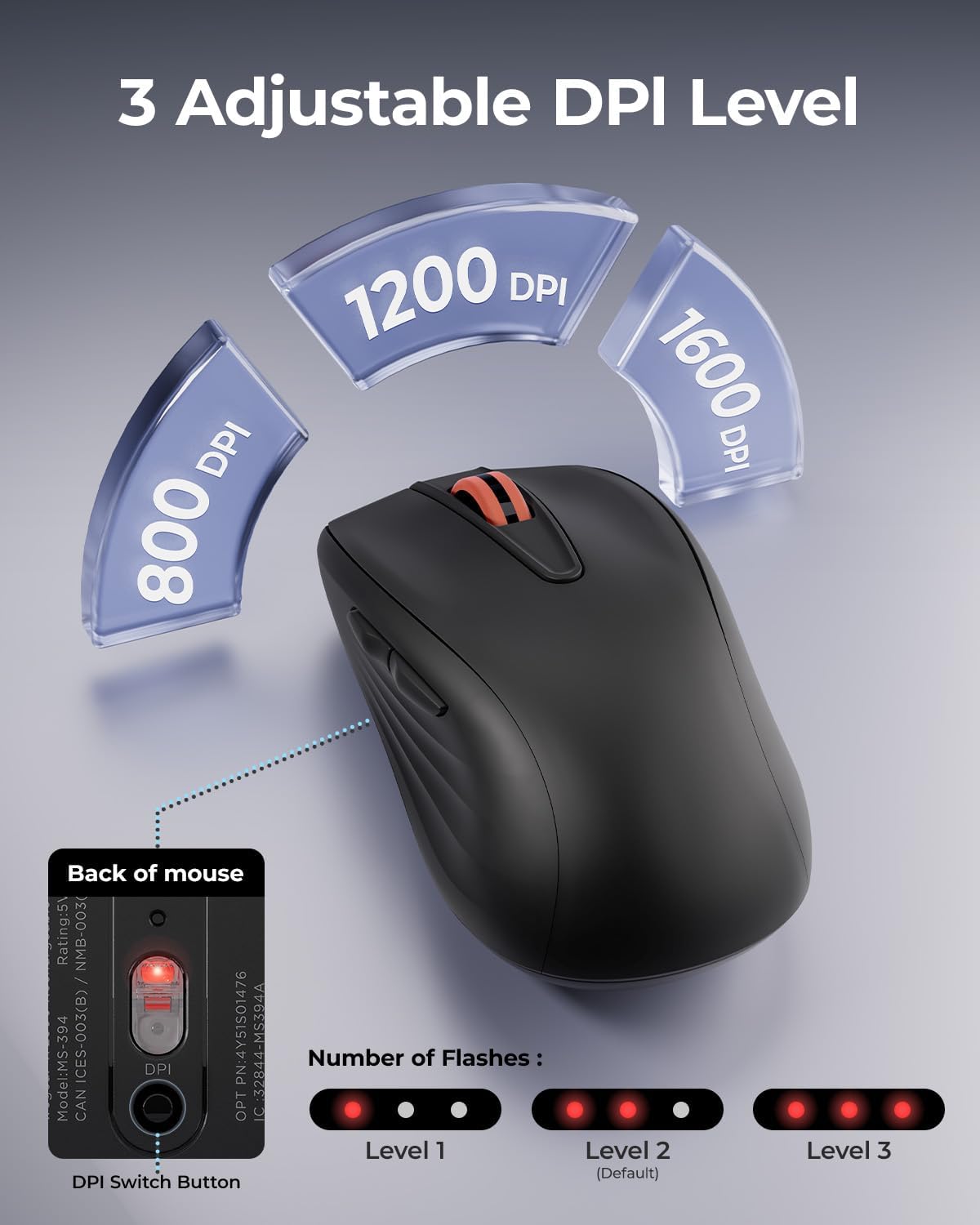
Image: Illustration of the DPI switch button on the mouse's underside and how LED flashes indicate the selected DPI level.
6-Button Functionality
The mouse includes six buttons for enhanced productivity:
- Left Click
- Right Click
- Scroll Wheel (Clickable)
- Forward Button (Side)
- Backward Button (Side)
- DPI Switch Button (Bottom)
The forward and backward buttons are useful for navigating web pages. Note: Forward/backward buttons may not be recognized on Mac operating systems.
Compatibility
The wegear WL500 mouse is compatible with:
- Windows 7/8/10/11
- macOS 13.0 and above
- iPadOS 13.3 and above
- Android 7.0 and above
It is suitable for desktops, laptops, PCs, MacBooks, and iPads (some iPads may require a USB-A to USB-C converter).

Image: A user operating the wegear WL500 mouse, with operating system logos indicating broad compatibility.
Maintenance
Charging the Mouse
The wegear WL500 mouse features a built-in 380mAh lithium battery. To charge:
- Connect the provided USB-C charging cable to the charging port on the front of the mouse.
- Connect the other end of the cable to a USB power source (e.g., computer, wall adapter).
- A full charge takes approximately 1.5-2 hours and provides up to 45 hours of continuous use.

Image: The wegear WL500 mouse connected for USB-C charging, with details on charging time and battery life.
Cleaning
To maintain optimal performance, periodically clean the mouse with a soft, dry cloth. Avoid using harsh chemicals or abrasive materials.
Troubleshooting
- Mouse not responding: Ensure the mouse is turned on and the USB receiver is securely plugged into your computer. Try plugging the receiver into a different USB port.
- Lag or intermittent connection: Ensure the mouse is within the 33ft (10m) operating range of the receiver. Avoid placing the receiver near strong interference sources like other wireless devices or large metal objects.
- DPI setting not changing: Press the DPI button firmly on the bottom of the mouse. Observe the LED flashes to confirm the change.
- Forward/Backward buttons not working on Mac: These buttons may not be recognized by macOS. This is a known compatibility limitation.
- Charging issues: Ensure the USB-C cable is properly connected to both the mouse and the power source. Try a different USB-C cable or power adapter.
Specifications
| Feature | Detail |
|---|---|
| Brand | wegear |
| Model Name | WL500 Mouse |
| Connectivity Technology | 2.4GHz USB Wireless |
| Movement Detection Technology | Optical |
| DPI Levels | 800, 1200, 1600 |
| Button Quantity | 6 (Left, Right, Scroll Wheel, Forward, Backward, DPI Switch) |
| Special Features | Ergonomic Design, Portable, Rechargeable, Silent Click |
| Battery | Built-in 380mAh Lithium Battery |
| Battery Life | Up to 45 hours (continuous use) |
| Charging Port | USB-C |
| Operating System Compatibility | Windows 7/8/10/11, macOS 13.0+, iPadOS 13.3+, Android 7.0+ |
| Keystroke Test | 3 Million times |
Warranty and Support
The wegear WL500 Rechargeable Silent Wireless Mouse comes with a 1-Year Warranty from the manufacturer.
For technical support, warranty claims, or further assistance, please contact wegear customer service through their official website or the retailer where the product was purchased.