
1. Introduction
Thank you for choosing the Oraimo Necklace 5 ANC Wireless Neckband Earphones. This manual provides essential information for setting up, operating, and maintaining your earphones. Please read it carefully to ensure optimal performance and longevity of your device.
The Oraimo Necklace 5 ANC earphones are designed for daily music listening, long commutes, hands-free calls, active lifestyles, gaming, and video playback. They feature Active Noise Cancellation (ANC) for an immersive audio experience.
2. Product Overview
2.1 Package Contents
The following items are included in your Oraimo Necklace 5 package:
- Oraimo Necklace 5 Earphones x1
- User Manual x1
- Type-C Charging Cable x1
- Extra Ear Tips (S/L sizes) x2 pairs

Figure 2.1: What's in the Box - Oraimo Necklace 5 Earphones, Type-C charging cable, extra ear tips, and user manual.
2.2 Earphone Components
Familiarize yourself with the main components of your Oraimo Necklace 5 earphones:
- Neckband: Flexible band that rests around your neck.
- Earbuds: In-ear design with silicone ear tips.
- Control Panel: Integrated buttons for power, volume, playback, and call management.
- Microphone: For hands-free calls.
- Type-C Charging Port: For charging the device.

Figure 2.2: Front view of the Oraimo Necklace 5 Earphones, showing the neckband and earbuds.
3. Setup
3.1 Charging the Earphones
- Connect the provided Type-C charging cable to the charging port on the neckband.
- Connect the other end of the cable to a USB power adapter (not included) or a computer's USB port.
- The indicator light will show the charging status. A full charge typically takes a few hours.
Note: A quick 10-minute charge can provide up to 12 hours of playback time.
3.2 Powering On/Off
The Oraimo Necklace 5 features a magnetic auto switch for convenient power control:
- Power On: Separate the magnetic earbuds to automatically power on the earphones.
- Power Off: Clip the magnetic earbuds together to automatically power off the earphones.

Figure 3.1: Magnetic Auto Switch for powering the earphones on and off.
3.3 Bluetooth Pairing
- Ensure the earphones are powered on (separate the earbuds).
- On your device (smartphone, tablet, laptop), enable Bluetooth.
- Search for available Bluetooth devices and select "Oraimo Necklace 5" from the list.
- Once connected, you will hear an audio prompt, and the indicator light will confirm the connection.
4. Operating Instructions
4.1 Active Noise Cancellation (ANC)
The Oraimo Necklace 5 features Active Noise Cancellation to reduce ambient noise.
- To activate/deactivate ANC, locate the dedicated ANC button on the control panel and press it.
- An audio prompt will confirm the ANC status.

Figure 4.1: Active Noise Cancellation in action, muting external noise.
4.2 Music Playback and Volume Control
Use the control buttons on the neckband to manage your audio:
- Play/Pause: Press the multi-function button once.
- Next Track: Press and hold the Volume Up button.
- Previous Track: Press and hold the Volume Down button.
- Volume Up: Press the Volume Up button.
- Volume Down: Press the Volume Down button.
4.3 Call Management
The earphones support hands-free calling with clear sound quality and AI Call Noise Cancellation.
- Answer/End Call: Press the multi-function button once.
- Reject Call: Press and hold the multi-function button.
- Personalized Vibration Alert: The neckband will vibrate for incoming calls, ensuring you don't miss important communications.

Figure 4.2: Personalized Vibration Alert for incoming calls.
4.4 Dual Device Connection
The Oraimo Necklace 5 can connect to two devices simultaneously, allowing for seamless switching.
- Pair the earphones with your first device.
- Disconnect Bluetooth on the first device, then pair with the second device.
- Reconnect Bluetooth on the first device. The earphones should now be connected to both.
- Audio will automatically switch to the device playing content or receiving a call.

Figure 4.3: Dual Device Connection for seamless switching between devices.
4.5 Sound360 Spatial Audio
Experience enhanced audio with Sound360 Spatial Audio, providing a more immersive listening experience.

Figure 4.4: Sound360 Spatial Audio for redefined surround sound.
5. Maintenance
5.1 Cleaning
- Regularly clean the earbuds and ear tips with a soft, dry, lint-free cloth.
- Remove ear tips and clean them with mild soap and water if necessary, ensuring they are completely dry before reattaching.
- Do not use harsh chemicals or abrasive materials for cleaning.
5.2 Storage
- Store the earphones in a cool, dry place away from direct sunlight and extreme temperatures.
- When not in use, clip the magnetic earbuds together to prevent tangling and conserve battery.
5.3 Water Resistance
The Oraimo Necklace 5 earphones are water resistant, making them suitable for active lifestyles and protection against sweat. However, they are not designed for submersion in water. Avoid exposing them to heavy rain or swimming.
6. Troubleshooting
If you encounter any issues with your Oraimo Necklace 5 earphones, please refer to the following common solutions:
- No Power: Ensure the earphones are charged. Connect them to a power source using the Type-C cable.
- Cannot Pair: Make sure Bluetooth is enabled on your device and the earphones are in pairing mode (usually indicated by a flashing light). Try turning Bluetooth off and on again on your device.
- No Sound: Check the volume levels on both your earphones and your connected device. Ensure the earphones are properly paired and selected as the audio output.
- Poor Sound Quality: Ensure there are no obstructions between the earphones and your device. Move closer to your device to avoid interference. Check if ear tips are properly sealed in your ears.
- ANC Not Working: Ensure the ANC feature is activated using its dedicated button.
If the problem persists, try resetting the earphones (refer to the manufacturer's website or contact support for specific reset instructions if not detailed here).
7. Specifications
| Feature | Specification |
|---|---|
| Brand Name | Oraimo |
| Model Number | OEB-611 |
| Model Name | Open Fit |
| Color | Black |
| Connectivity Technology | Wireless |
| Wireless Communication Technology | Bluetooth |
| Headphone Form Factor | In-Ear |
| Ear Placement | In Ear |
| Impedance | 32 Ohm |
| Noise Control | Active Noise Cancellation |
| Frequency Range | 20 Hz - 20000 Hz |
| Material | Plastic, Silicone |
| Water Resistance Level | Water Resistant |
| Special Features | Noise Cancellation, Personalized Vibration Alert, Magnetic Auto Switch, Sound360 Spatial Audio, Dual Device Connection |
| Control Type | Button Control |
| Control Method | Push Button |
| Item Weight | 1 Grams |
| Warranty Description | One Year |
| Compatible Devices | Desktop Computers, Digital Video Game Consoles, Laptops, Android, iPhone, Game Controllers |
| Recommended Uses For Product | Gaming, Making Calls, Cycling, Outdoors |
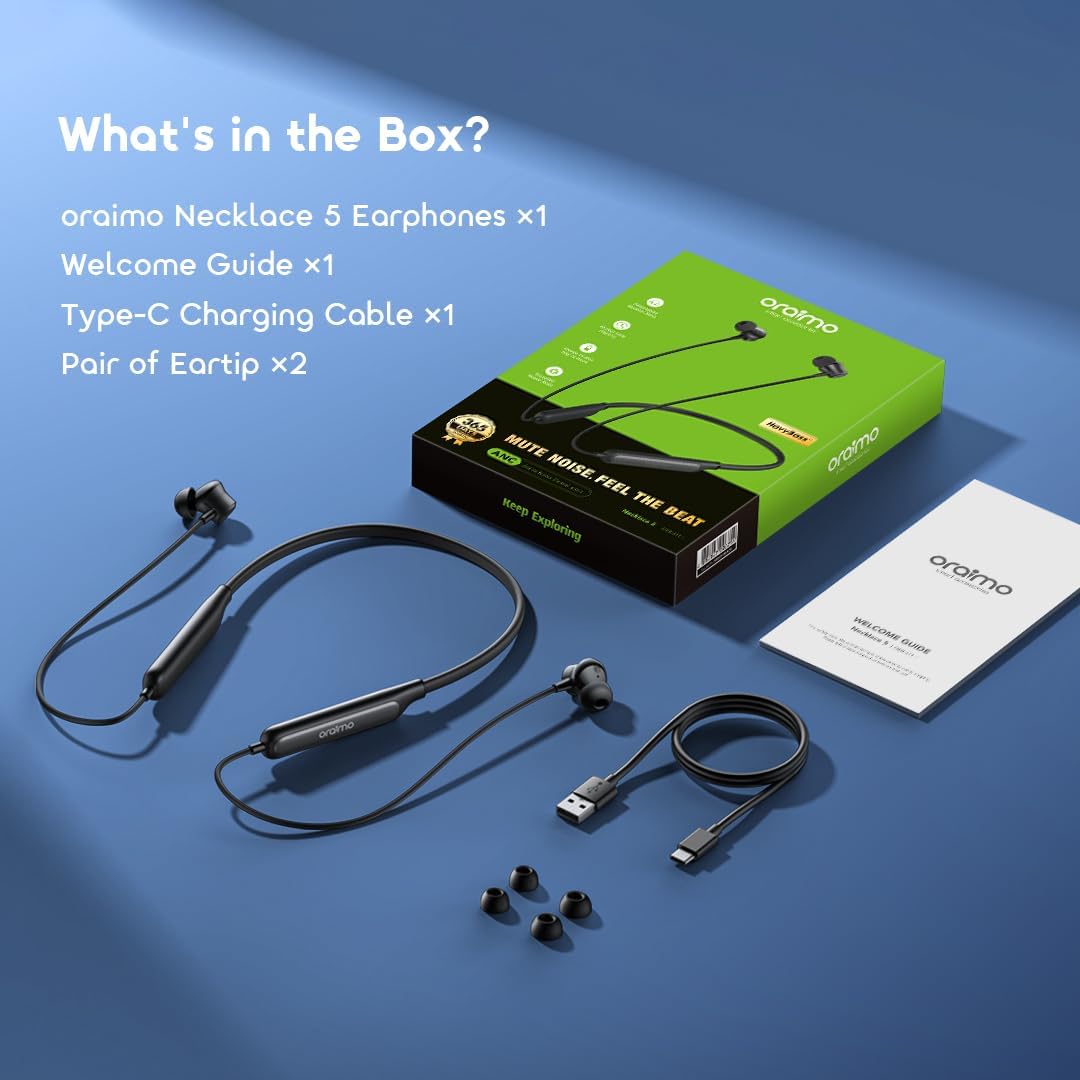
Figure 7.1: Battery performance, showing 40 hours playtime with ANC off and 28 hours with ANC on.
8. Warranty and Support
8.1 Warranty Information
Your Oraimo Necklace 5 ANC Wireless Neckband Earphones come with a one-year warranty from the date of purchase. This warranty covers manufacturing defects and ensures your product functions as intended under normal use.
Please retain your proof of purchase for warranty claims.
8.2 Customer Support
For further assistance, technical support, or warranty inquiries, please visit the official Oraimo website or contact their customer service department. Contact details can typically be found on the product packaging or the official Oraimo support page.


