
Introduction
Thank you for choosing the MERACH MR-T31B1 Treadmill. This manual provides essential information for the safe assembly, operation, and maintenance of your new fitness equipment. Please read all instructions carefully before use to ensure optimal performance and user safety.
Safety Warnings
- Always consult with a physician before starting any new exercise program.
- Children should use the treadmill under adult supervision.
- Keep hands and feet clear of all moving parts.
- Ensure the safety key is properly inserted before operating the treadmill.
- Unplug the unit before cleaning or servicing.
- If you experience any pain, dizziness, or discomfort during your workout, cease use immediately.
What's in the Box
Upon unpacking, please ensure all components listed below are present:
- User Manual
- Safety Key
- Tool Kit
- Power Cord
- Main Frame (Pre-assembled with running belt)
- Display Screen
- Bottom Covers (Left and Right)
- Cup Holder
Setup and Assembly
The MERACH MR-T31B1 Treadmill comes mostly pre-assembled. Follow these steps to complete the setup:
Assembly Video Guide
Video: Official MERACH T31 Treadmill Setup Guide. This video demonstrates the step-by-step assembly process, including unpacking, attaching uprights, installing the display, and connecting the power cord.
Step-by-Step Assembly
- Unpacking: Carefully open the package box, remove all components, and place the main frame flat on the ground. Ensure all packing materials are removed.
- Install Uprights: Lift the treadmill upright tube and align it with the holes on the base. Use four M8×50 screws and the provided Allen wrench to hand-tighten them first, then fully tighten.
- Install Handlebar Tubes: Lift the handlebar tube assembly and position it perpendicular to the upright tubes. Align the holes and use the Allen wrench to fasten and tighten the two M8×30 screws.
- Install Bottom Covers: Take out the Right Bottom Cover (#2R). Align the holes and use the Allen wrench to fasten and tighten one M5×18 screw. Repeat for the Left Bottom Cover (#2L).
- Install Display Screen: Take out the display and connect the Power Sensor Cable. Make sure the pins of the 7-Pin Connector are properly aligned and gently connected. Attach the display to the handlebar tube, align the holes, then use the Allen wrench to fasten and tighten two M8×30 screws with spring washers.
- Install Safety Lock and Cup Holder: Insert the Safety Key into the console's yellow socket. Align the Cup Holder with its slot and snap it into place.
- Plug in Power Cord: Insert one end of the power cord into the treadmill power socket and plug the other end into an indoor power outlet. Turn on the main power switch located near the power cord connection. The treadmill is now ready for use.
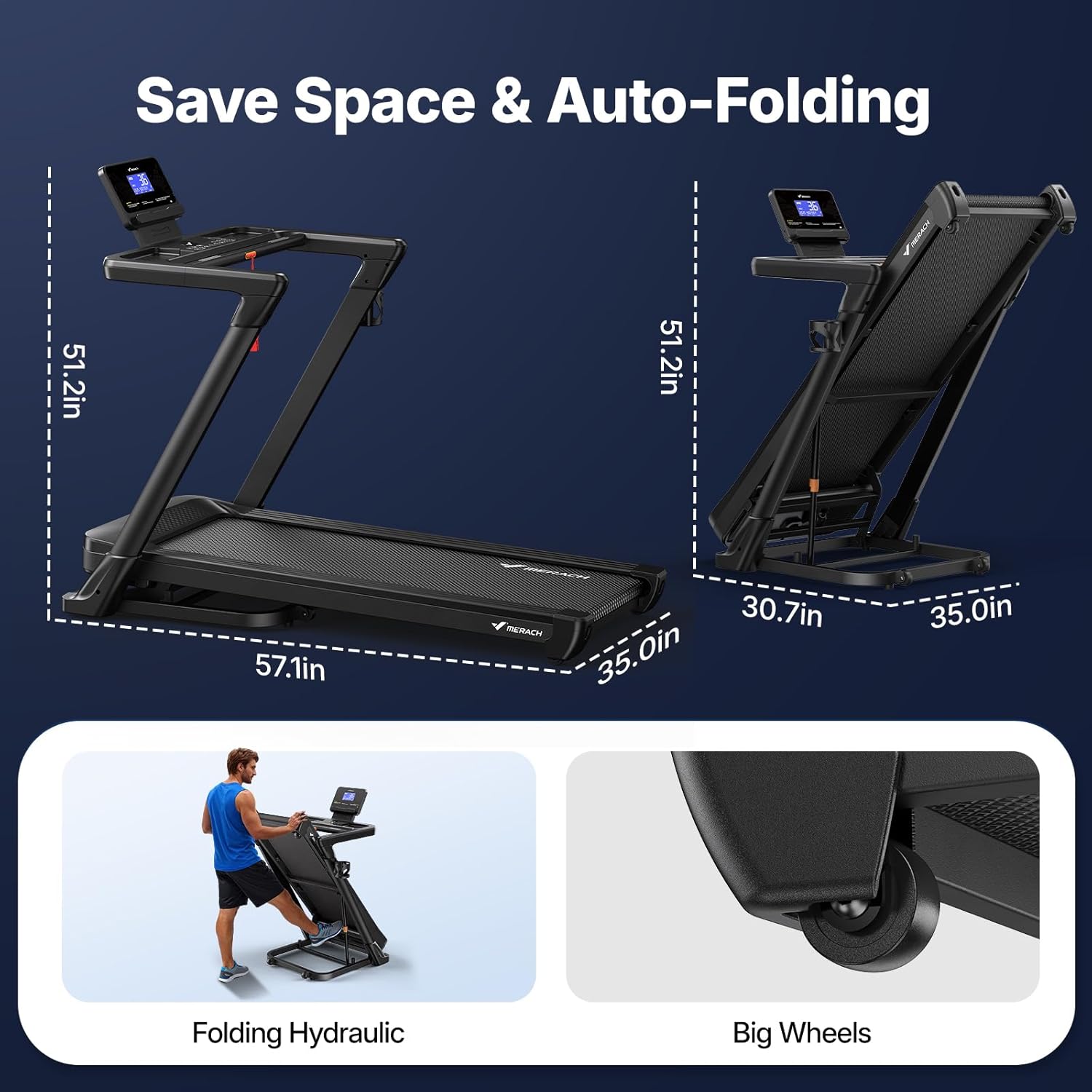
Image: The MERACH treadmill shown in its folded position, highlighting its space-saving design. The hydraulic folding system allows for easy storage when not in use.
Operating Instructions
Familiarize yourself with the control panel and features for an effective workout.
Control Panel Overview

Image: A close-up view of the MERACH treadmill's LCD display and control panel. The display shows speed, time, distance, calories, incline, and heart rate. Below the display are quick-select buttons for incline and speed, along with start/stop controls and heart rate monitors.
- Start/Stop: Press the green button to start the treadmill. It will count down from 3 before the belt begins to move. Press the red button to stop the treadmill.
- Speed Adjustment: Use the '+' and '-' buttons to adjust the speed. Quick-select buttons (2, 4, 6 MPH) are also available for instant speed changes. The maximum speed is 8.7 MPH.
- Incline Adjustment: Use the '▲' and '▼' buttons to adjust the incline. Quick-select buttons (5, 10, 15% incline) are available. The maximum auto incline is 18%.
- Display Metrics: The LCD screen tracks Time, Speed, Distance, Calories Burned, Incline, and Heart Rate.
- Heart Rate Monitoring: Place your hands on the metal sensors on the handlebars to monitor your heart rate.
- Pre-set Programs: The treadmill includes 20 built-in programs. Use the 'M' button to cycle through program modes.
MERACH App Connectivity

Image: A collage of screenshots showing the MERACH proprietary app interface, offering personalized workout plans, daily goal settings, map racing, scenic workouts, and free tutorials for an enhanced user experience.
Enhance your workout experience by connecting your treadmill to the MERACH app via Bluetooth. The app offers personalized coaching plans, tracks your progress, and provides interactive fitness classes.
- Download the MERACH app from your device's app store.
- Enable Bluetooth on your device and open the MERACH app.
- Follow the in-app instructions to pair your treadmill.

Image: A visual representation of the MERACH treadmill's 18% auto incline capability, demonstrating how different incline levels (0%, 5%, 18%) can significantly increase calorie burn during a workout, simulating hill climbing for diverse training.
Maintenance
Regular maintenance ensures the longevity and optimal performance of your treadmill.
- Cleaning: Wipe down the treadmill with a damp cloth after each use. Avoid using abrasive cleaners or solvents.
- Belt Lubrication: Lubricate the running belt every 3 months or after 100 hours of use, whichever comes first. Refer to the user manual for specific instructions on applying silicone lubricant.
- Belt Adjustment: Periodically check the running belt for proper tension and alignment. Adjust as needed to prevent slipping or excessive wear.
- General Inspection: Regularly inspect all bolts and nuts for tightness. Tighten any loose fasteners.
Troubleshooting
If you encounter any issues, refer to the following common problems and solutions:
- Treadmill not starting: Ensure the power cord is securely plugged in, the main power switch is on, and the safety key is correctly inserted into the console.
- Running belt slipping: The belt may need tensioning. Refer to the maintenance section for belt adjustment instructions.
- Unusual noises: Check for loose parts or foreign objects under the running belt. If the noise persists, contact customer support.
- Display not working: Check all cable connections to the display. Ensure the treadmill is powered on.
Specifications
| Feature | Specification |
|---|---|
| Brand | MERACH |
| Model Name | MR-T31B1 |
| Color | Black |
| Product Dimensions (LxWxH) | 57.1"D x 35"W x 51.2"H |
| Item Weight | 122.4 Pounds |
| Material | Alloy Steel |
| Maximum Speed | 8.7 Miles per Hour |
| Minimum Speed | 0.6 Miles per Hour |
| Maximum Horsepower | 3.5 Horsepower |
| Maximum Incline Percentage | 18% |
| Running Belt Dimensions | 47"x18" |
| Maximum Weight Recommendation | 350 Pounds |
| Display Type | LED |
| Special Features | Adjustable Speed, Auto Incline, Foldable, Shock Absorbent |
| Metrics Measured | Distance, Heart Rate, Time, Calories Burned, Speed |
Warranty and Support
Warranty Information
The MERACH MR-T31B1 Treadmill comes with a 1 Year Warranty. Please retain your proof of purchase for any warranty claims.
Customer Support
For any questions, technical assistance, or warranty inquiries, please contact our responsive 24/7 customer service team. Your satisfaction is our priority, and we are ready to assist you to ensure a smooth fitness journey.
Contact details can typically be found on the MERACH official website or through your purchase platform.