
1. Introduction
Thank you for purchasing the AODK Electric L-Shaped Standing Desk. This manual provides essential information for the safe assembly, operation, and maintenance of your new desk. Please read these instructions carefully before use and retain them for future reference.
2. Safety Information
- Ensure all components are securely fastened before use.
- Keep children and pets away from the desk during height adjustment.
- Do not overload the desk. Refer to the specifications for maximum weight capacity.
- Avoid placing liquids directly on the control panel or power outlets.
- The desk features an anti-collision function. If an obstacle is detected during movement, the desk will automatically stop to prevent damage or injury.
- Only use the provided power adapter and cables.
3. Setup and Assembly
Assembly is required for this product. A wrench and an assembly guide are included in the package. For optimal safety and ease, two people are recommended for assembly.
3.1 Package Contents
- Desktop panels (L-shaped)
- Desk frame components
- Electric motor and control box
- Control panel
- Monitor stand components
- Power adapter and cables
- Assembly hardware (screws, bolts, etc.)
- Wrench and screwdriver (recommended tools)
- Assembly guide
3.2 Assembly Steps
- Unpack all components and verify against the parts list in the assembly guide.
- Assemble the desk frame according to the detailed instructions provided in the assembly guide. Ensure all connections are secure.
- Attach the desktop panels to the assembled frame. The main desktop can be configured for left or right-handed use to best fit your space.
- Install the electric motor and control box, connecting all necessary cables.
- Mount the control panel in the designated area.
- Assemble and attach the monitor stand to the desktop.
- Connect the power adapter to the desk and a suitable power outlet.
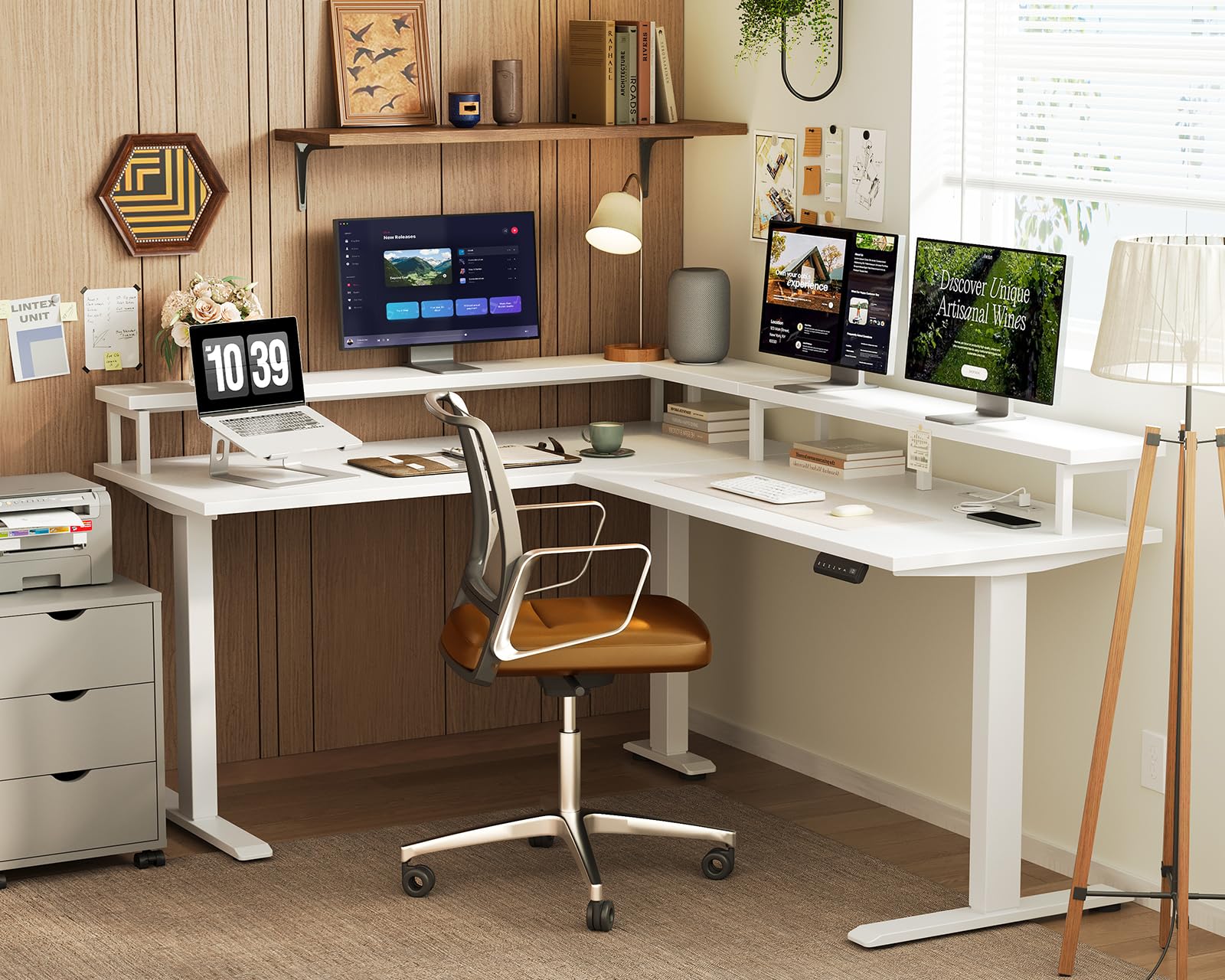
Image: The AODK Electric L-Shaped Standing Desk set up in an office environment, showcasing its spacious design and integrated monitor stand.
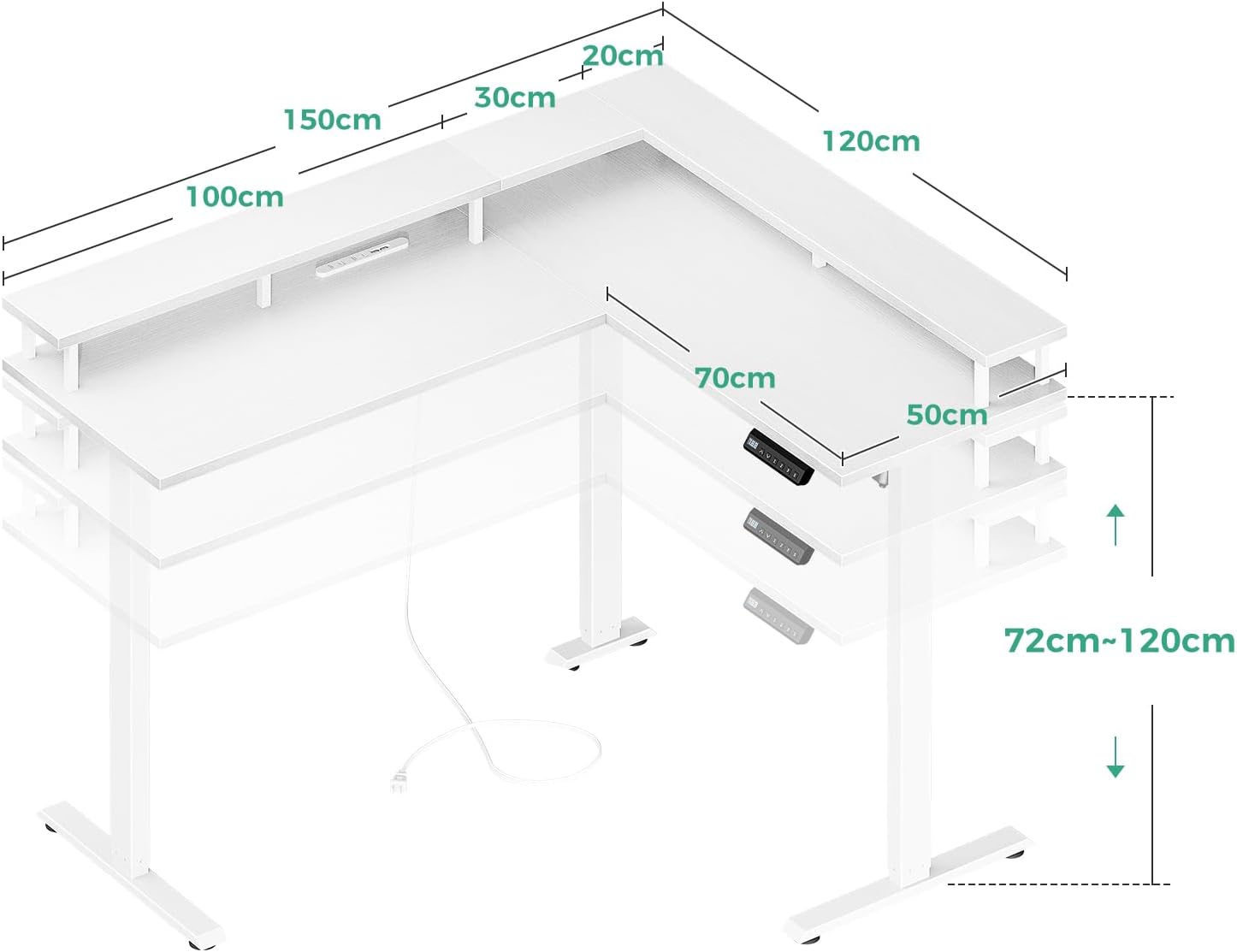
Image: A detailed diagram illustrating the dimensions of the L-shaped standing desk, including the adjustable height range of 72cm to 120cm and desktop measurements of 150cm by 120cm.
4. Operating Instructions
4.1 Height Adjustment
The desk offers stepless height adjustment from 72cm to 120cm. Use the up and down arrows on the control panel to manually adjust the desk to your desired height. This allows for comfortable transitions between sitting and standing positions throughout your workday.
4.2 Memory Function
The control panel allows you to save up to 3 preferred height settings. To set a memory position:
- Adjust the desk to your desired height using the up/down arrows.
- Press the 'M' button (Memory) followed by one of the numbered buttons (1, 2, or 3). The display will confirm the setting.
To recall a saved height, simply press the corresponding numbered button (1, 2, or 3). The desk will automatically move to the saved position.

Image: A close-up of the desk's control panel, showing the digital height display, up/down arrows, memory buttons (1, 2, 3), and integrated AC outlets and USB ports for convenient device charging.
4.3 USB Ports and Power Outlets
The desk is equipped with 2 AC power outlets and USB ports for convenient charging of your electronic devices such as computers and smartphones. Ensure devices are compatible with the provided power specifications.
4.4 Anti-Collision Feature
The desk's motor includes an anti-collision function for enhanced safety. If the desk encounters an obstacle during upward or downward movement, it will automatically detect the obstruction and stop. This feature helps prevent injuries and damage to the desk or other objects.

Image: An illustration demonstrating the anti-collision mechanism, where the desk automatically stops and slightly reverses if an object is detected during height adjustment, highlighting the quiet and durable motor.
4.5 Monitor Stand
The integrated monitor stand helps elevate your screen to an ergonomic height, improving posture and reducing strain on your neck and shoulders during long periods of use.

Image: A visual comparison showing how the monitor stand helps users maintain better posture, reducing neck and shoulder strain compared to desks without such elevation.
5. Maintenance
- Cleaning: Wipe the desk surfaces with a soft, damp cloth. Avoid abrasive cleaners or harsh chemicals that may damage the melamine laminated board.
- Inspection: Periodically check all screws and bolts to ensure they remain tight. Retighten if necessary.
- Cable Management: Ensure power cables are not pinched or tangled, especially during height adjustments.
- Motor Care: The electric motor is designed for durability. Avoid obstructing its movement or applying excessive force during operation.
6. Troubleshooting
| Problem | Possible Cause | Solution |
|---|---|---|
| Desk does not move | Power cable disconnected; Motor error; Overload | Check power connection; Unplug and replug to reset; Reduce weight on desk |
| Uneven height adjustment | Obstruction; Uneven weight distribution | Remove any obstructions; Redistribute weight evenly |
| Memory function not working | Incorrect setting procedure | Refer to 'Memory Function' section for correct procedure |
| Anti-collision activates frequently | Sensitive setting; Obstruction | Ensure no objects are in the path of movement; Consult customer support if issue persists |
If you encounter any issues not listed here or if the problem persists after attempting the solutions, please contact AODK customer support for assistance.
7. Specifications
- Brand: AODK
- Model Number: B03010OKT901009JP
- Desktop Size: Approximately 150 cm (Width) x 120 cm (Depth)
- Height Adjustment Range: 72 cm to 120 cm
- Maximum Recommended Weight Capacity: 50 kg
- Product Weight: Approximately 35.4 kg
- Color: White
- Desktop Material: High-strength melamine laminated board
- Frame Material: Steel
- Special Features: Electric height adjustment, 3-position memory function, anti-collision system, 2 AC power outlets, USB ports, integrated monitor stand, adjustable feet.
- Assembly: Customer assembly required. Tools (wrench, screwdriver) and guide included.
8. Warranty and Support
This product comes with a limited warranty. For specific warranty terms and conditions, please refer to the documentation included with your purchase or contact AODK customer support. If you have any questions or require assistance with your desk, please do not hesitate to contact us. Our support team is available to help with any product inquiries or issues.