Introduction
Thank you for choosing the CURSOR FITNESS 3-in-1 Walking Pad Treadmill. This manual provides essential information for the safe and efficient operation, setup, and maintenance of your new fitness equipment. This compact and versatile walking pad is designed for home and office use, offering a speed range of 0.6-6.2 MPH and a manual 15% incline for varied workout intensities. Its foldable design ensures easy storage, making it an ideal solution for small spaces.
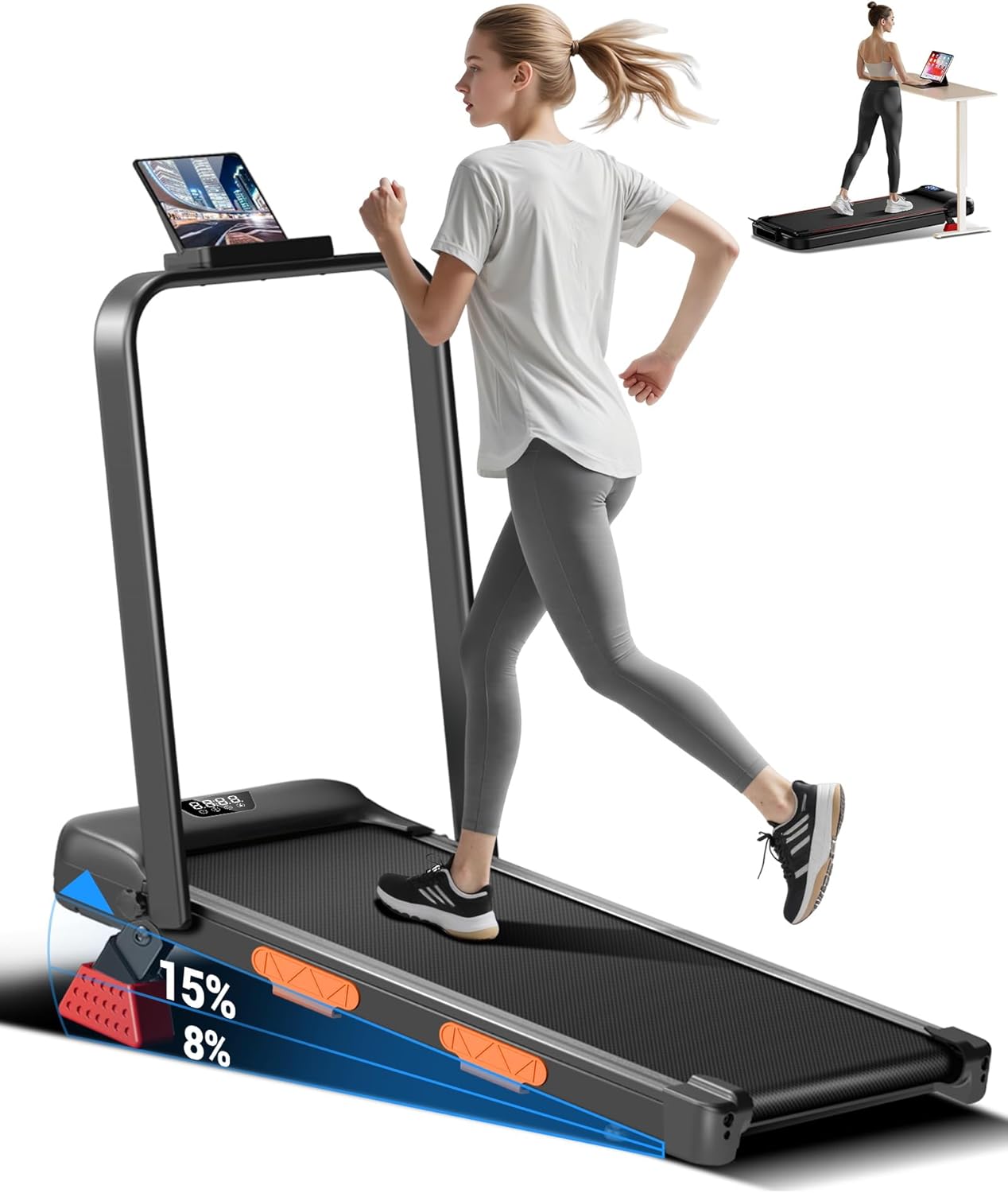
Image: The CURSOR FITNESS 3-in-1 Walking Pad Treadmill with its handle raised, positioned in a room.
Safety Information
Please read all instructions carefully before using this treadmill. Keep this manual for future reference. Failure to follow these safety guidelines may result in injury or damage to the product.
- Placement: Place the treadmill on a flat, stable surface with adequate clearance around it (at least 2 feet on all sides and 6 feet behind).
- Power: Connect the treadmill to a grounded electrical outlet. Do not use extension cords.
- User Weight: Do not exceed the maximum user weight capacity of 300 lbs (136 kg).
- Children and Pets: Keep children and pets away from the treadmill during operation.
- Clothing: Wear appropriate athletic clothing and footwear. Avoid loose clothing that could get caught in moving parts.
- Medical Conditions: Consult a physician before starting any exercise program, especially if you have pre-existing medical conditions.
- Emergency Stop: Familiarize yourself with the emergency stop function.
- Maintenance: Perform regular maintenance as described in this manual to ensure safe operation.
- Incline Adjustment: Adjust the manual incline only when the treadmill is off and stationary.
What's in the Box
Upon unpacking, please ensure all the following components are present:
- CURSOR FITNESS 3-in-1 Walking Pad Treadmill Unit
- Remote Control
- Tool Kit
- User Manual (this document)
Setup
Your CURSOR FITNESS Walking Pad Treadmill is designed for quick and easy setup. Follow these steps to prepare your treadmill for use:
- Unpack: Carefully remove all components from the packaging.
- Placement: Place the treadmill on a level surface. Ensure there is sufficient space around the unit for safe operation.
- Raise Handlebar (Optional): If you wish to use the handlebar, gently lift it into the upright position until it locks securely.
- Attach Phone/Tablet Holder (Optional): Secure the phone/tablet holder to the handlebar if desired.
- Connect Power: Plug the power cord into the treadmill's power port and then into a grounded electrical outlet.
- Incline Adjustment: To adjust the incline, locate the red support blocks at the rear of the treadmill. These can be manually positioned to achieve an 8% or 15% incline. Ensure both blocks are securely in place before use.

Image: Close-up view of the manual incline adjustment mechanism on the CURSOR FITNESS Walking Pad Treadmill, showing the red support blocks.
Video: A detailed product introduction for the CURSOR FITNESS Walking Pad Treadmill, demonstrating its features and initial setup.
Operating Instructions
Your treadmill is equipped with an intuitive LED display and a remote control for easy operation.
Power On/Off
- Locate the power switch at the front base of the treadmill. Flip it to the 'ON' position.
- The LED display will illuminate.
- To turn off, flip the power switch to the 'OFF' position.
Using the Remote Control
The remote control allows you to adjust settings without interrupting your workout.
- Start/Stop: Press the 'ON/OFF' button to start or stop the treadmill.
- Speed Adjustment: Use the '+' and '-' buttons to increase or decrease the speed. The speed range is 0.6-6.2 MPH.
- Mode Selection: The 'M' button cycles through different display modes (Time, Speed, Distance, Calories).
LED Display
The integrated LED display provides real-time feedback on your workout:
- Time: Displays the duration of your workout.
- Speed: Shows the current speed in MPH.
- Distance: Tracks the distance covered.
- Calories: Estimates calories burned during your session.

Image: The LED display showing workout metrics and the remote control for the CURSOR FITNESS Walking Pad Treadmill.
Video: A feature video highlighting various aspects and operational functions of the CURSOR FITNESS Walking Pad Treadmill.
Maintenance
Regular maintenance ensures the longevity and optimal performance of your treadmill.
- Cleaning: Wipe down the treadmill with a damp cloth after each use to remove sweat and dust. Avoid abrasive cleaners.
- Belt Lubrication: Periodically lubricate the running belt according to the instructions provided in the separate lubrication guide (if included) or consult the manufacturer's website. This typically involves applying silicone lubricant under the belt.
- Belt Tension and Alignment: Check the running belt for proper tension and alignment regularly. Adjust as needed using the provided tool kit. Refer to the specific instructions for belt adjustment.
- Motor Cover: Keep the motor cover free from dust and debris to ensure proper ventilation.
Troubleshooting
If you encounter any issues, refer to the following common troubleshooting steps:
- Treadmill Not Starting: Ensure the power cord is securely plugged in and the power switch is in the 'ON' position. Check the circuit breaker.
- Belt Slipping: The running belt may need tensioning. Refer to the maintenance section for belt adjustment instructions.
- Unusual Noise: Check for any loose parts or foreign objects under the belt. If the noise persists, discontinue use and contact customer support.
- Remote Control Not Responding: Check the batteries in the remote control. Ensure there are no obstructions between the remote and the treadmill's sensor.
For issues not covered here, please contact CURSOR FITNESS customer support.
Specifications
| Feature | Specification |
|---|---|
| Brand | CURSOR FITNESS |
| Model | B0G6SWZCSG |
| Motor Horsepower | 2.5 HP |
| Speed Range | 0.6 - 6.2 MPH |
| Maximum Incline | 15% (Manual) |
| Maximum Weight Capacity | 300 lbs |
| Running Belt Dimensions | 35.8" x 15.2" |
| Product Dimensions (LxWxH) | 45"D x 22"W x 4.3"H |
| Folded Size | 45" x 22" x 4.3" |
| Item Weight | 21 Kilograms |
| Display Type | LED |
| Special Features | Adjustable Speed, Compact Design, Foldable, Manual Incline |
Storage
The CURSOR FITNESS Walking Pad Treadmill features a space-saving foldable design for convenient storage.
- Fold Down Handlebar: If the handlebar is raised, unlock and gently lower it until it rests flat against the treadmill deck.
- Move: Utilize the integrated transport wheels at the front of the treadmill to easily move it.
- Store: The compact design allows it to be stored under a bed, sofa, or upright against a wall.

Image: The CURSOR FITNESS Walking Pad Treadmill folded flat and stored neatly under a sofa, demonstrating its compact storage capability.
Warranty and Support
For warranty information, product registration, or technical support, please refer to the documentation included with your purchase or visit the official CURSOR FITNESS website. Keep your purchase receipt as proof of purchase.