
1. Introduction
Thank you for choosing the Eridanus Smart Toilet with Bidet Built-in. This manual provides essential information for the safe installation, operation, and maintenance of your new smart toilet. Please read it thoroughly before use and retain it for future reference.
2. Safety Information
Observe all safety warnings and instructions to prevent injury or damage. This smart toilet incorporates several safety features:
- Prevent Low Temperature Scald: Designed to maintain safe water and seat temperatures.
- Overheating Prevention: Automatic shutdown if components exceed safe operating temperatures.
- 12V Safety Voltage: Internal components operate at a safe low voltage.
- Leakage Protection: Built-in mechanisms to detect and prevent water leakage.
- Water Pressure Protection: Regulates water pressure for consistent and safe operation.
- IPX4 Waterproof: Protected against splashing water from any direction.

Figure 2.1: Various Safety Functions
3. What's in the Box
Verify that all components are present before beginning installation:
- Smart Toilet Unit
- Remote Control
- Toddler Seat (Detachable)
- Wax Ring
- Shut-off Valve (1/2" NPT x 3/4" G)
- Toilet Inlet Adapter (3/4" G x 7/8")
- Flange & Mounting Bolts
- User Manual
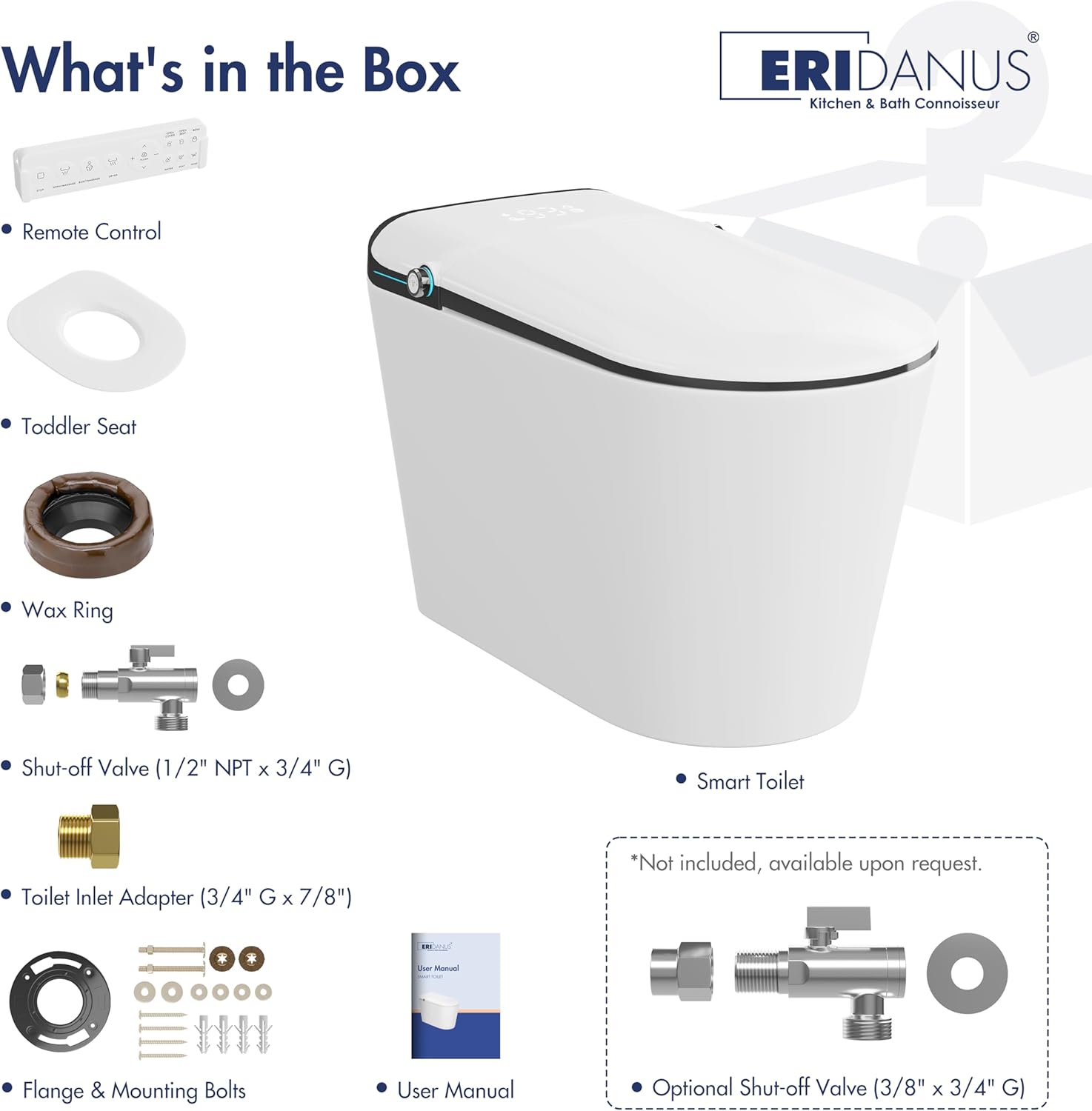
Figure 3.1: Package Contents
4. Installation
Installation should be performed by a qualified professional. Ensure all local plumbing and electrical codes are followed. Refer to the detailed installation guide provided with the product for step-by-step instructions.
4.1 Product Dimensions
Before installation, confirm that the toilet dimensions and rough-in measurements are compatible with your bathroom space.

Figure 4.1: Technical Data and Dimensions
5. Operating Instructions
5.1 Automatic Functions
- Auto Open/Close: The lid automatically opens when approached and closes after use.
- Off-seat Auto Flush: The toilet flushes automatically when you stand up after use.
- Foot Sensor Flush: A sensor at the base allows for hands-free flushing by foot activation.

Figure 5.1: Hands-Free Operation
5.2 Bidet Functions
The built-in bidet offers personalized cleaning options:
- Rear Wash: Standard posterior cleansing.
- Bidet Wash: Gentle feminine wash.
- Oscillating Mode: Moves the nozzle back and forth for a wider cleaning area.
- Adjustable Settings: Customize water temperature and pressure (4 levels each).
- Self-Cleaning Nozzle: The nozzle automatically cleans itself before and after each use.

Figure 5.2: Bidet Wash Options and Settings
5.3 Comfort Features
- Heated Seat: The seat warms quickly to a comfortable temperature, adjustable to 4 levels.
- Warm Air Drying: After washing, warm air dries the area, adjustable to 4 temperature levels.

Figure 5.3: Heated Seat and Warm Air Drying
5.4 Additional Features
- Digital Display: Shows current water, seat, and drying temperature settings.
- Night Light: Integrated night light for visibility in low light conditions.
- Pre-Wet Function: Automatically moistens the toilet bowl upon user seating to prevent waste adhesion.
- Air Freshening: Releases aroma during air-drying for a pleasant bathroom environment.
- Considerate Toddler Wash: Features adjustable water temperature and an oscillating mode for gentle toddler posterior washing. A detachable toddler seat is included.

Figure 5.4: Night Light and Digital Display

Figure 5.5: Pre-Wet Function

Figure 5.6: Air Freshening

Figure 5.7: Detachable Toddler Seat and Toddler Wash
5.5 Control Knob Functions (When User is Seated)
The control knobs provide direct access to various functions:
Left Knob
- Press and Hold: Power on/off
- Press: Once: Flush session; Again: Air drying
- Turn Clockwise: Once: Rear wash; Again: Oscillating mode
- Turn Counterclockwise: Once: Bidet wash; Again: Oscillating mode
Right Knob
- Press: Once: Toddler mode; Again: Oscillating mode
- Turn Clockwise: (Air Drying On) Increase air drying temperature
- Turn Counterclockwise: (Air Drying On) Decrease air drying temperature

Figure 5.8: Control Knob Functions
5.6 Multiple Flush Options
In addition to automatic flushing, the toilet offers several manual flush methods:
- Foot-sensor Flush: Activate flush with a foot gesture.
- Off-seat Auto Flush: Automatic flush upon standing.
- Remote Control Flush: Use the provided remote for flushing.
- Control Knob Flush: Use the left control knob to initiate a flush.
- Blackout Flush: Manual flush option available during power outages.

Figure 5.9: Multiple Flush Options
5.7 Power-Assisted Siphonic Flush
The toilet utilizes a power-assisted siphonic jet flush system, creating a powerful swirling motion for quick, quiet, and thorough cleaning of the bowl.

Figure 5.10: Power-Assisted Siphonic Flush Mechanism
6. Maintenance
Regular cleaning and maintenance ensure optimal performance and hygiene. Always disconnect power before performing any maintenance.
6.1 Cleaning the Nozzle
The bidet nozzle performs an automatic self-cleaning cycle before and after each use. For additional cleaning, refer to the detailed instructions in the full user manual.
6.2 General Cleaning
Use mild, non-abrasive cleaners and a soft cloth to clean the exterior surfaces. Avoid harsh chemicals that may damage the finish or electronic components.
7. Troubleshooting
If you encounter issues, consult the troubleshooting section of the comprehensive user manual for common problems and solutions. For persistent issues, contact customer support.
8. Specifications
| Feature | Specification |
|---|---|
| Model | ERI-ST200WB-P |
| Color | White & Black |
| Material | Ceramic |
| Rated Voltage | AC 110V, 60 Hz |
| Rated Power | 1350W |
| Water Pressure | 20-105 psi |
| Waterproof Level | IPX4 |
| Noise Level | ~52 dB |
| Flush Type | Power-Assisted Siphon Flush |
| Batteries Required | No |

Figure 8.1: Product Parameters
9. Warranty and Support
Eridanus provides comprehensive after-sales support for your smart toilet:
- One-Year Limited After-Sales Support: Includes spare parts availability.
- 24-Hour Responsive Customer Service: For quick technical assistance.
- 30-Days Easy Returns: Refer to purchase terms for details.
- Lifetime Service: Ongoing support for the product's lifespan.
For assistance, please contact Eridanus customer service.


