
podoru KT-D013
Contents
podoru KT-D013 10000mAh Foldable Magnetic Power Bank User Manual
Model: KT-D013
1. Introduction
Thank you for choosing the podoru KT-D013 10000mAh Foldable Magnetic Power Bank. This device is designed to provide convenient and efficient portable charging for your compatible devices, featuring strong magnetic attachment, wireless charging, fast wired charging, and a built-in foldable stand. Please read this manual carefully before use to ensure proper operation and to maximize the lifespan of your product.
2. Safety Information
- Do not expose the power bank to extreme temperatures (above 60°C/140°F or below 0°C/32°F), direct sunlight, or fire.
- Do not disassemble, modify, or attempt to repair the device. This will void the warranty and may cause damage or injury.
- Keep the power bank away from water, moisture, and corrosive materials.
- Do not drop, hit, or subject the power bank to strong impacts.
- Keep out of reach of children.
- Use only certified charging cables and adapters.
- If the power bank swells, emits an odor, or becomes excessively hot during use or charging, discontinue use immediately and contact support.
3. Package Contents
- podoru KT-D013 10000mAh Magnetic Power Bank
- USB-C to USB-C Charging Cable
- User Manual
4. Product Overview
Familiarize yourself with the components of your podoru power bank.
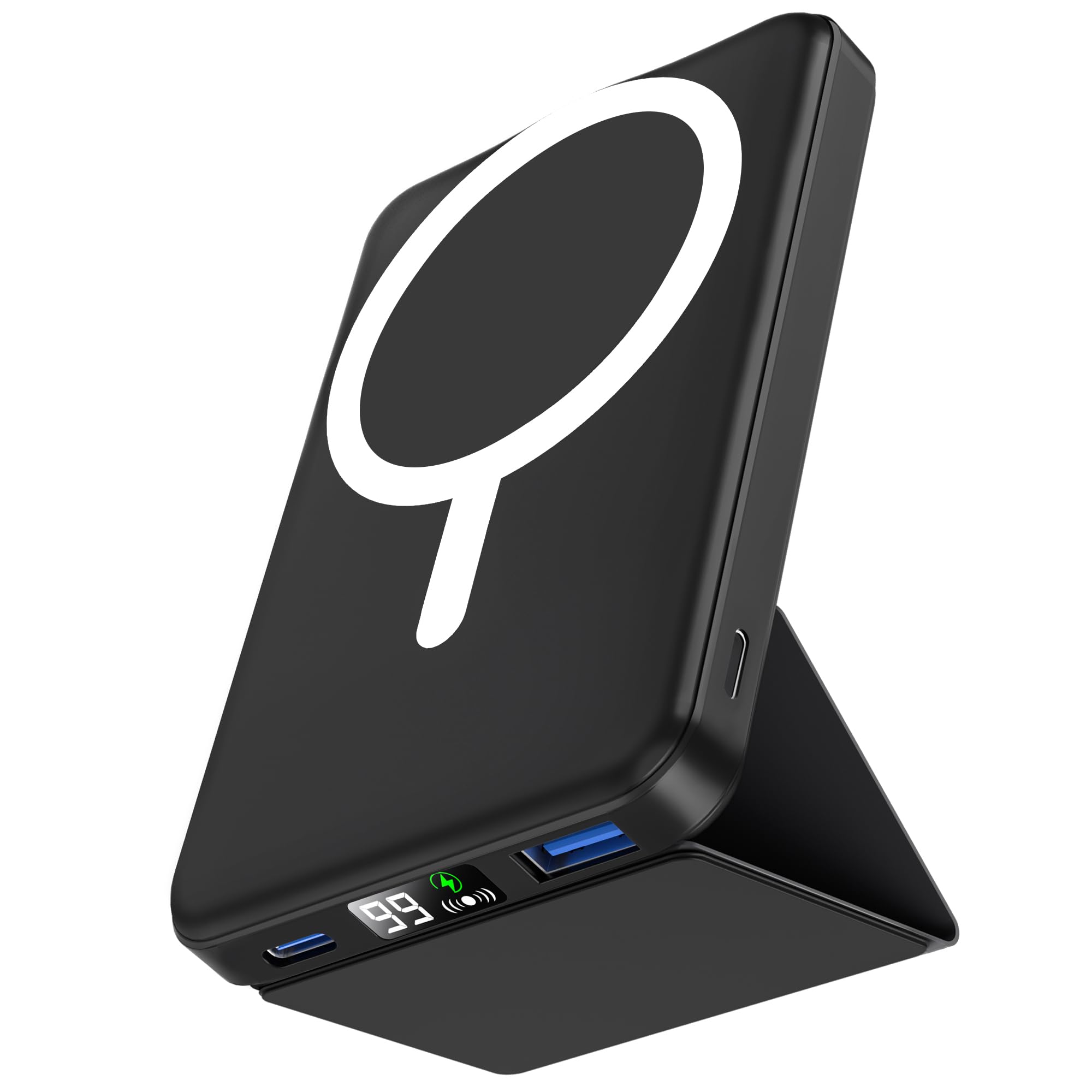
Figure 4.1: Front view of the podoru KT-D013 Magnetic Power Bank, showing the magnetic charging area.

Figure 4.2: Overview of the power bank's core technologies, including powerful magnetic attachment, low-temperature cooling, and advanced safety protection.
- Magnetic Charging Area: For wireless charging compatible devices.
- USB-C Port: For charging the power bank and for wired output charging.
- LED Digital Display: Shows remaining battery percentage.
- Power Button: Activates the power bank and display.
- Foldable Stand: Integrated stand for hands-free viewing.
5. Setup
5.1 Initial Charging of the Power Bank
- Before first use, fully charge your podoru power bank.
- Connect the provided USB-C cable to the USB-C port on the power bank.
- Connect the other end of the USB-C cable to a compatible USB-C wall adapter (not included).
- The LED digital display will show the charging progress. The power bank is fully charged when the display shows 100%.
6. Operating Instructions
6.1 Charging Devices Wirelessly (Magnetic)
This power bank is compatible with iPhone 12/13/14/15/16/17 series and other MagSafe-compatible devices.
- Ensure your device is compatible with magnetic wireless charging. For optimal performance, use without a case or with a MagSafe-compatible case.
- Align your compatible device with the magnetic charging area on the power bank. The magnets will automatically snap into place.
- Wireless charging will begin automatically. The LED display on the power bank will illuminate.
- To stop charging, simply detach your device from the power bank.

Figure 6.1: The power bank magnetically attached to a smartphone for wireless charging.
6.2 Charging Devices via USB-C Cable
- Connect one end of a USB-C cable (or your device's charging cable) to the USB-C port on the power bank.
- Connect the other end of the cable to your device's charging port.
- Charging will begin automatically. The LED display on the power bank will illuminate.
6.3 Using the Foldable Stand
The integrated foldable stand allows for hands-free viewing while your device is charging.
- Gently pull out the foldable stand from the back of the power bank.
- Adjust the stand to your desired viewing angle.
- Place your magnetically attached phone (or other device) on the stand.

Figure 6.2: The power bank's foldable stand in use, supporting a smartphone for hands-free viewing.
Video 6.1: Demonstration of the magnetic attachment and foldable stand feature of the podoru KT-D013 power bank.
7. LED Display Guide
The LED digital display provides real-time information about the power bank's battery status:
- Percentage (0-100): Indicates the remaining battery capacity of the power bank.
- Charging Indicator: When the power bank is being charged, the percentage will flash. When fully charged, it will show 100% steadily.
- Output Indicator: When charging a device, the display will show the current battery percentage.
8. Maintenance and Care
- Clean the power bank with a soft, dry cloth. Do not use harsh chemicals or abrasive cleaners.
- Store the power bank in a cool, dry place away from direct sunlight and extreme temperatures.
- If not used for extended periods, charge the power bank at least once every three months to maintain battery health.
9. Troubleshooting
9.1 Power Bank Not Charging
- Ensure the charging cable is securely connected to both the power bank and the wall adapter.
- Try a different USB-C cable and wall adapter.
- Ensure the wall adapter meets the power requirements (e.g., 5V/2A or higher).
9.2 Device Not Charging from Power Bank
- Wireless Charging: Ensure your device is properly aligned with the magnetic charging area. Remove any non-MagSafe cases or metal objects between the phone and power bank.
- Wired Charging: Ensure the cable is securely connected to both the power bank and your device. Try a different cable.
- Check if the power bank has sufficient charge.
9.3 Slow Charging
- Ensure you are using a fast-charging compatible cable and your device supports fast charging.
- For wireless charging, ensure optimal alignment and no obstructions.
- Close background apps on your device to reduce power consumption during charging.
10. Specifications
| Feature | Specification |
|---|---|
| Model Name | KT-D013 |
| Battery Capacity | 10000mAh |
| Battery Cell Type | Lithium Polymer |
| Wireless Charging Output | Up to 15W (varies by device) |
| USB-C Output | 22.5W PD Fast Charging |
| USB-C Input | 20W PD |
| Dimensions (L x W x H) | 4.09 x 2.68 x 0.68 inches |
| Weight | 0.24 kg |
| Color | Black |
| Special Features | Digital Display, Fast Charging, Foldable Stand, Pocket Size, Wireless Charging |
| Compatible Phone Models | iPhone 12/13/14/15/16/17 Series |
11. Warranty and Support
podoru products come with a standard manufacturer's warranty. For detailed warranty information, product support, or to contact customer service, please visit the official podoru store or website. Please retain your proof of purchase for warranty claims.
For further assistance, you may visit the podoru Store on Amazon.
Documents and downloads
Ask a question about this manual
Ask about setup, troubleshooting, compatibility, parts, safety, or missing instructions. Manuals+ will review the question and use this page’s manual context to help answer it.