
1. Introduction
This manual provides essential information for the safe and effective use of your ANCHEER Walking Pad TR70 Under Desk Treadmill. Please read this manual thoroughly before operating the device and retain it for future reference.
2. Safety Information
- Ensure the treadmill is placed on a flat, stable surface.
- Keep children and pets away from the treadmill during operation.
- Do not exceed the maximum weight capacity of 300 pounds (136 kg).
- Always wear appropriate athletic footwear.
- Stop the treadmill immediately if you feel unwell or experience pain.
- Unplug the treadmill when not in use or before cleaning/maintenance.
- Do not operate the treadmill if the power cord is damaged.
3. What's in the Box
Upon unpacking, please verify that all components are present:
- ANCHEER Walking Pad TR70 Treadmill
- Remote Control
- Power Cord
- Lubricant
- Tool Kit
- User Manual (this document)
4. Setup
The ANCHEER Walking Pad TR70 is designed for installation-free use. Simply remove it from the packaging, place it on a level surface, and plug it in.
4.1 Unpacking and Placement
Carefully remove the treadmill from its box. Due to its lightweight and compact design, it is easy to handle. Place the treadmill on a hard, level surface, ensuring there is adequate space around it for safe operation.

The ANCHEER Walking Pad TR70 features a slim design and built-in wheels, allowing for easy movement and storage under furniture like a sofa or bed.
4.2 Power Connection
Connect the power cord to the treadmill and then to a standard electrical outlet. Ensure the power switch on the treadmill is in the 'ON' position.
4.3 Initial Check
Before first use, ensure the running belt is centered and free from any obstructions. Test the remote control to ensure it powers on the treadmill and adjusts speed.
This video demonstrates the unboxing, initial setup, and basic operation of the ANCHEER Walking Pad TR70, including remote control functionality and portability.
5. Operating Instructions
Your ANCHEER Walking Pad TR70 offers versatile exercise options with its 2-in-1 design and user-friendly controls.
5.1 Modes of Operation
The treadmill supports two primary modes:
- Walking Mode (0.6 - 2.4 MPH): Ideal for use under a desk for light activity while working.
- Running Mode (2.4 - 3.9 MPH): Suitable for jogging or brisk walking.

The ANCHEER Walking Pad TR70 is designed for versatile use, including walking under a desk for office environments.
5.2 Remote Control
The included remote control allows you to easily start, stop, and adjust the speed of the treadmill without interrupting your workout. It comes pre-installed with batteries.

The remote control provides convenient access to speed adjustments and other functions, complementing the integrated LED display.
This video demonstrates the use of the remote control to operate the ANCHEER Walking Pad TR70, including starting, stopping, and adjusting speed.
5.3 LED Display
The integrated LED display provides real-time tracking of essential workout metrics, including speed, distance, and time. This helps you monitor your progress and stay connected to your fitness goals.
5.4 Bluetooth App Control
Connect your treadmill to a compatible Bluetooth app to access additional features and workout modes. The app offers 12 different modes to enhance your exercise experience.
This video illustrates the Bluetooth app connectivity and control features of the ANCHEER Walking Pad TR70, showcasing various workout options.
5.5 Running Belt
The treadmill features a 7-layer high-tech anti-slip shock-absorbing running belt. This design provides cushioning to protect your knees and joints during exercise.

The 7-layer running belt is engineered for comfort and safety, reducing impact on joints.
5.6 Quiet Operation
Equipped with a 3.0HP brushless DC motor, the treadmill operates quietly, with noise levels around 30dB, making it suitable for home or office use without causing disturbance.

The treadmill's quiet operation ensures a peaceful workout environment.
6. Maintenance
Regular maintenance ensures the longevity and optimal performance of your treadmill.
- Cleaning: Wipe down the treadmill with a damp cloth after each use to remove sweat and dust. Do not use abrasive cleaners.
- Lubrication: The running belt requires periodic lubrication to reduce friction and wear. Use the provided lubricant and follow the instructions in the separate lubrication guide (if included) or general treadmill lubrication procedures. Typically, this is done every few months depending on usage.
- Belt Adjustment: Periodically check the running belt for proper tension and alignment. Adjust if necessary according to the instructions in the full user manual.
7. Troubleshooting
If you encounter any issues with your ANCHEER Walking Pad TR70, please refer to the following common troubleshooting tips:
- Treadmill not starting: Ensure the power cord is securely plugged into both the treadmill and the wall outlet. Check that the power switch is in the 'ON' position.
- Remote control not working: Check the batteries in the remote control. Ensure there are no obstructions between the remote and the treadmill's sensor.
- Unusual noise: Stop the treadmill and inspect the running belt for any foreign objects. Check if the belt requires lubrication or adjustment.
- Belt slipping: The running belt may need tension adjustment. Refer to the detailed instructions in the full user manual for proper adjustment.
For persistent issues, please contact customer support.
8. Specifications
| Brand | ANCHEER |
| Model Name | TR70GR |
| Product Dimensions | 52"D x 25"W x 5"H |
| Material | Alloy Steel |
| Maximum Speed | 4 Miles per Hour |
| Maximum Horsepower | 3 Horsepower |
| Maximum Weight Recommendation | 300 Pounds |
| Assembly Required | No |
| Metrics Measured | Calories Burned, Distance, Heart Rate, Speed, Time |
| Special Features | Adjustable Speed, Compact Design, Lightweight, Shock Absorbent, Touch Screen |
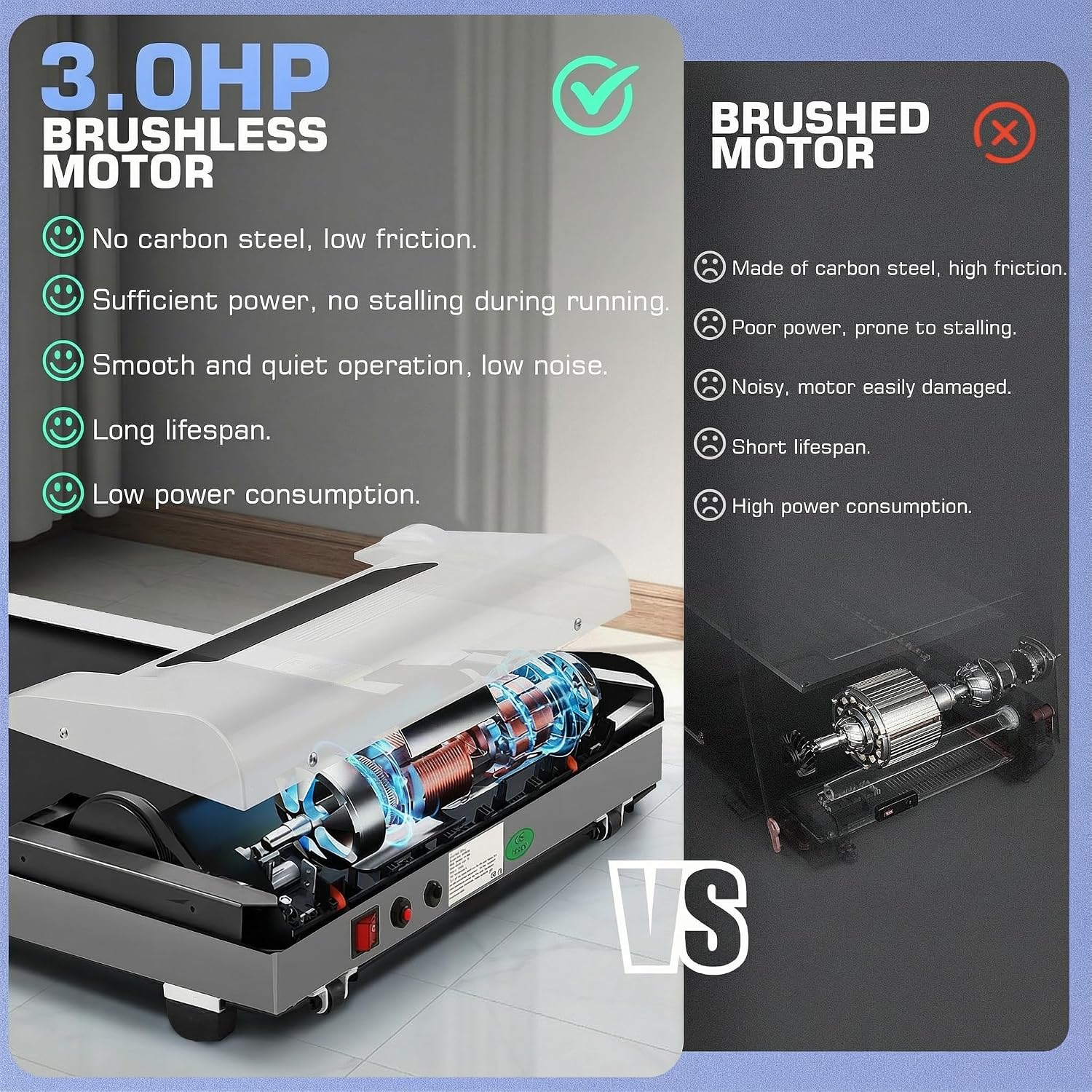
The 3.0HP brushless motor offers superior performance, quiet operation, and longer service life compared to traditional brushed motors.
9. Warranty and Support
ANCHEER provides a 1-year manufacturer's warranty covering the motor, frame, and all treadmill parts. This ensures a worry-free purchase experience.
If you have any questions, require assistance, or need to claim warranty service, please do not hesitate to contact ANCHEER customer support. Refer to the contact information provided with your purchase or visit the official ANCHEER website for support details.