This manual provides comprehensive instructions for the assembly, safe operation, and proper maintenance of your HOSTACK 71"H Kitchen Pantry Storage Cabinet. Please read all instructions carefully before beginning assembly and retain this manual for future reference.
The HOSTACK 71"H Kitchen Pantry Storage Cabinet is designed to offer extensive storage and functional utility in various home settings. It features a farmhouse hutch design with barn doors, adjustable shelving, two drawers, and an integrated charging station.
Safety Information
Important Safety Precautions:
Always unplug the charging station before cleaning or making adjustments to the cabinet.
Keep the cabinet away from direct heat sources to prevent damage to the material.
Do not overload the shelves. Refer to the specifications for maximum weight capacity.
Use caution when adjusting the shelves to avoid pinch points.
Always follow the assembly instructions carefully to ensure the cabinet's stability and prevent tipping.
Ensure the cabinet is placed on a level surface.
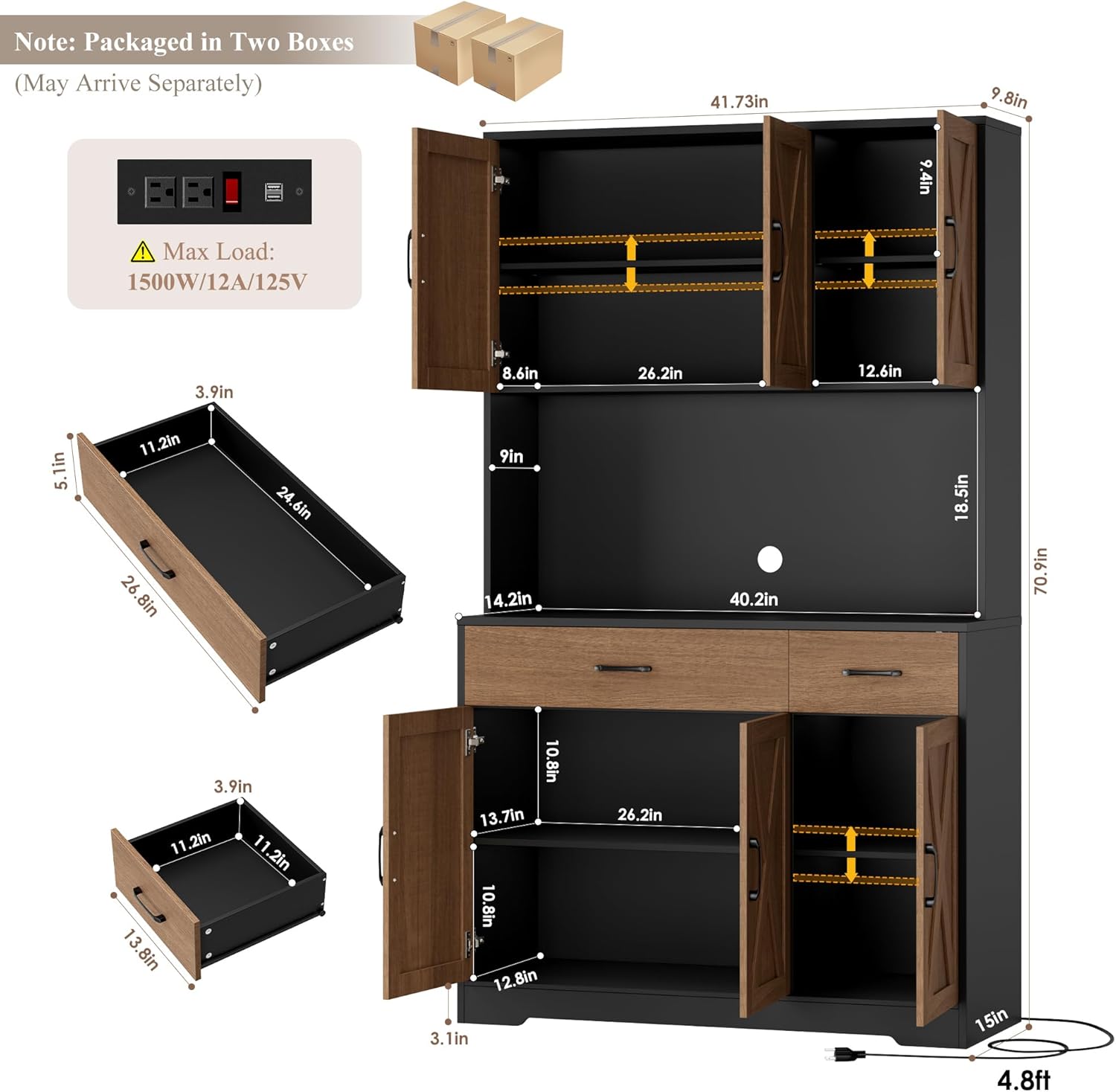
The charging station has a maximum load of 1500W/12A/125V. Do not exceed these limits.
Package Contents
Your HOSTACK Kitchen Pantry Storage Cabinet is shipped in two separate packages (Box 1 and Box 2). All parts and accessories required for assembly are distributed across these two packages. Please ensure you have received both boxes before beginning assembly.
Included Components:
Cabinet panels (engineered wood)
2 Doors with barn door style
2 Drawers
3 Adjustable shelves
Charging station (2 AC outlets, 2 USB ports, On-Off switch)
Black metal handles
Assembly hardware (screws, dowels, hinges, etc.)
Anti-tipping device
Detailed instruction manual
Image: Fully assembled HOSTACK 71"H Kitchen Pantry Storage Cabinet in Brown/Black, showcasing its design and storage capabilities.Image: Diagram illustrating that the product ships in two separate packages (Box 1 and Box 2) which may arrive 1-3 business days apart.
Setup and Assembly
Assembly of the HOSTACK Kitchen Pantry Storage Cabinet requires careful attention to detail. Detailed instructions and labeled parts are included to facilitate the process. Two adults are recommended for assembly due to the product's size and weight.
Unpack and Identify Parts: Carefully unpack all components from both boxes. Lay out all parts and hardware, comparing them against the included parts list in the manual to ensure everything is present.
Prepare the Assembly Area: Choose a clear, spacious, and level area for assembly. Protect your floor with a blanket or cardboard.
Follow Step-by-Step Instructions: Refer to the detailed graphical instructions provided in your product manual. Each step is illustrated, and parts are labeled for easy identification.
Secure Connections: Ensure all screws, dowels, and fasteners are tightened securely, but do not overtighten to avoid damaging the engineered wood.
Install Anti-Tipping Device: For safety, it is crucial to install the anti-tipping device to secure the cabinet to a wall. Follow the specific instructions for this step.
Door and Drawer Installation: Install the barn doors and drawers according to the instructions. Adjust hinges as needed for proper door alignment.
Image: Technical drawing showing the dimensions of the cabinet, individual components like drawers, shelves, and the integrated power outlet with its specifications (Max Load: 1500W/12A/125V).
Operating Instructions
This section details how to utilize the various features of your HOSTACK Kitchen Pantry Storage Cabinet.
Adjustable Shelves
The cabinet features three adjustable shelves, allowing you to customize storage space for items of various heights. To adjust a shelf:
Empty the shelf of all contents.
Carefully lift the shelf and remove the shelf pins from their current holes.
Reinsert the shelf pins into the desired new holes, ensuring they are level.
Place the shelf back onto the pins, ensuring it is securely seated.
Drawers
The two smooth-gliding drawers are designed for easy access and storage of smaller items, utensils, or cutlery. Pull the handles gently to open and push to close.
Image: View of the cabinet with drawers and lower doors open, demonstrating the ample storage space for various kitchen items.
Charging Station
The integrated charging station provides convenient power access for your appliances. It includes two AC outlets and two USB ports, controlled by an on-off switch.
To Use: Plug the cabinet's power cord into a wall outlet. Press the red on-off switch on the charging station to activate power.
Power Specifications: Max Load: 1500W/12A/125V. Do not exceed these limits to prevent electrical hazards.
Safety Switch: The switch protects your devices and ensures a safe, reliable charging environment. Always turn off the switch when not in use or before cleaning.
Image: Close-up view of the charging station, detailing the two AC outlets, two USB ports, and the red on-off switch.
Maintenance
Proper care and maintenance will extend the life and appearance of your HOSTACK Kitchen Pantry Storage Cabinet.
Cleaning: Wipe surfaces with a soft, damp cloth. Avoid harsh chemicals or abrasive cleaners, which can damage the finish. Dry immediately with a clean cloth.
Spills: Clean up spills immediately to prevent moisture damage to the engineered wood.
Hardware: Periodically check all screws and fasteners to ensure they remain tight. Retighten if necessary.
Charging Station: Ensure the charging station area remains dry. Do not allow liquids to spill into the outlets.
Avoid Overloading: Do not exceed the maximum weight capacity for shelves and drawers to prevent structural damage.
Troubleshooting
This section addresses common issues you might encounter with your cabinet.
Problem
Possible Cause
Solution
Doors are misaligned or have gaps.
Hinges may need adjustment.
Refer to the hinge adjustment guide in your manual. Typically, loosening screws A and B adjusts height, screw C adjusts side-to-side, and screw D adjusts depth.
Charging station is not working.
Power switch is off, cabinet not plugged in, or circuit overloaded.
Ensure the cabinet's power cord is securely plugged into a working wall outlet. Press the red on-off switch on the charging station. Check if the circuit breaker on the charging station has tripped (if applicable). Do not exceed the maximum load of 1500W/12A/125V.
Drawers do not slide smoothly.
Drawer slides may be misaligned or obstructed.
Check for any obstructions in the drawer slides. Ensure the drawer slides are correctly installed and aligned according to assembly instructions.
Cabinet feels unstable or wobbly.
Not on a level surface, fasteners loose, or anti-tipping device not installed.
Ensure the cabinet is placed on a completely level surface. Retighten all assembly fasteners. Verify that the anti-tipping device is correctly installed and secured to the wall.
Image: Guide for adjusting cabinet door hinges to fix alignment issues such as gaps, overlapping, or protruding doors.
Specifications
Brand: HOSTACK
Model: 71H Kitchen Pantry Storage Cabinet
Color: Brown/Black
Material: Engineered Wood
Product Dimensions (D x W x H): 14.96"D x 41.73"W x 70.86"H
Weight Capacity (Maximum): 450 pounds
Number of Doors: 2 (Barn door style)
Number of Drawers: 2
Number of Adjustable Shelves: 3
Number of Compartments: 8
Charging Station: 2 AC Outlets (125V/12A), 2 USB Ports (5V/2A), On-Off Switch
Power Cable Length: 4.8 ft
Installation Type: Freestanding
Assembly: Requires assembly, detailed instructions and labeled parts included. Two adults recommended.
Warranty and Support
For warranty information or technical assistance, please refer to the documentation included with your purchase or contact HOSTACK customer service directly. Keep your purchase receipt for warranty claims.
Contact Information: Please visit the official HOSTACK website or refer to the contact details provided in your product packaging for support.
Ask a question about this manual
Ask about setup, troubleshooting, compatibility, parts, safety, or missing instructions. Manuals+ will review the question and use this page’s manual context to help answer it.