
Introduction
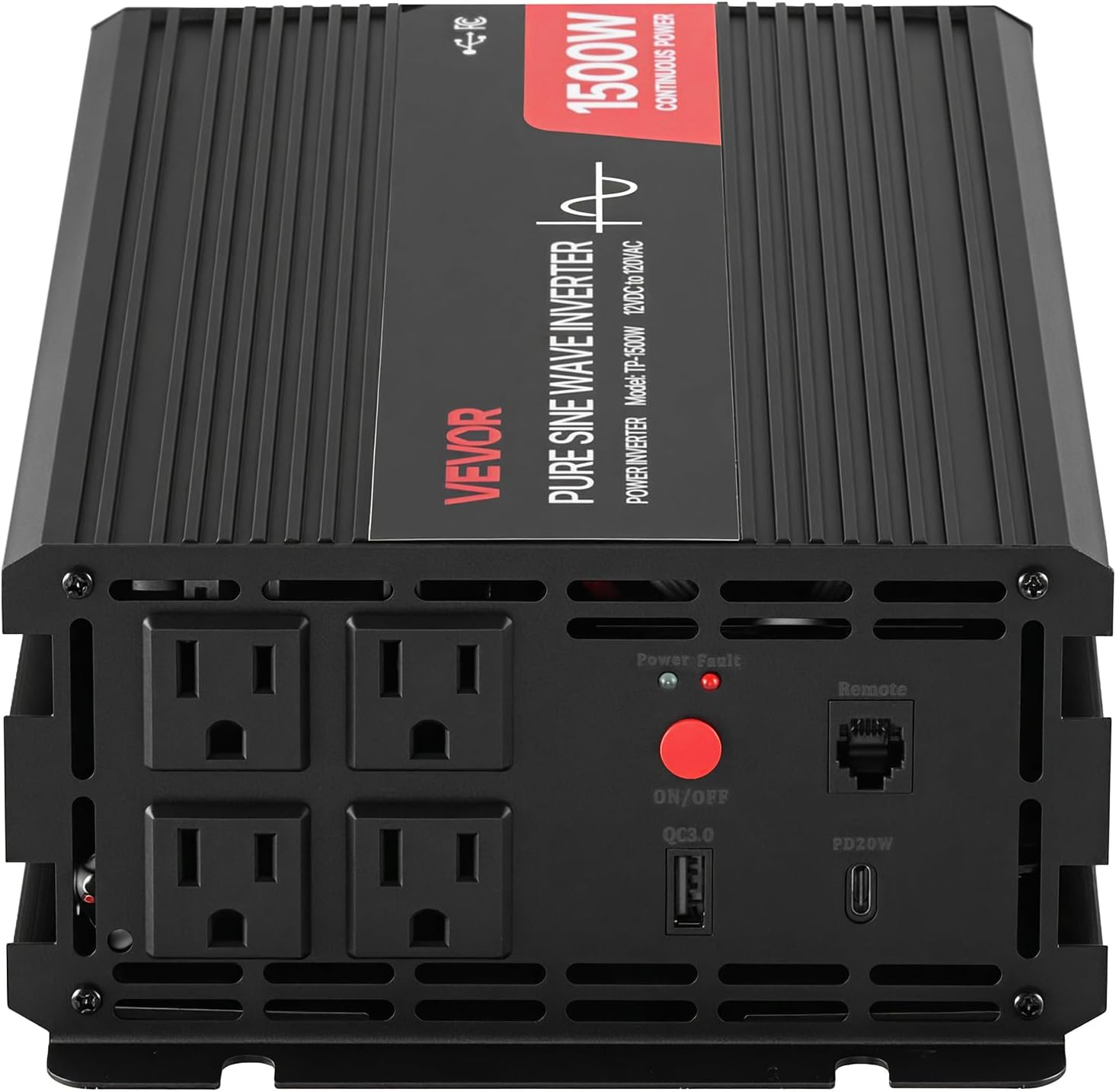
The VEVOR 1500W Pure Sine Wave Power Inverter (Model TP-1500W) is designed to convert 12V DC power from your battery to 120V AC power, suitable for a wide range of applications including RV camping, mobile offices, car power supply, and home backup. This inverter provides a true pure sine wave output, ensuring stable and clean power for sensitive electronics and high-power appliances. It features multiple output ports, a remote control, and comprehensive protection mechanisms for reliable operation.
Product Features
- Six Ports: Includes USB, AC, and Type-C ports with fast-charging capabilities for powering multiple devices simultaneously.
- Pure Sine Wave Output: Provides stable and clean power, ideal for sensitive electronics and high-power appliances like refrigerators and computers, ensuring quiet operation.
- Flexible Remote Control: Equipped with a 9.8 ft (3 m) cable remote for convenient on/off control and flexible placement.
- Multiple Protections: Features over-voltage, under-voltage, overload, over-temperature, short circuit, and reverse polarity protections.
- Intelligent Cooling Fan: Automatically activates above 113°F (45°C) to prevent overheating and extend the inverter's lifespan.
- Wide Compatibility: Compatible with various battery types including GEL, SLA, LI, FLD, AGM, CLA, and USER batteries.
- Durable Construction: Aluminum alloy housing ensures lightweight design, corrosion resistance, and rust-proof durability.
Setup
Before setting up your VEVOR 1500W Power Inverter, ensure you have a compatible 12V DC battery system. Always connect the inverter to the battery before connecting any AC loads.
Connecting to a Battery
- Ensure the inverter's power switch is in the 'OFF' position.
- Connect the red battery cable to the positive (+) terminal of the inverter and the positive (+) terminal of your 12V DC battery.
- Connect the black battery cable to the negative (-) terminal of the inverter and the negative (-) terminal of your 12V DC battery.
- Ensure all connections are secure and tight to prevent loose contacts and potential hazards.
Remote Control Connection
The remote control allows for convenient operation from a distance.
- Locate the remote control port on the front panel of the inverter.
- Plug the remote control cable into this port. The remote control features an on/off switch and a display for monitoring input voltage and battery status.

Operating Instructions
Once the inverter is securely connected to the battery, you can begin operating it.
Powering On/Off
- To power on the inverter, switch the main power switch on the inverter's front panel to the 'ON' position. Alternatively, use the 'ON/OFF' button on the remote control.
- The LCD display on the inverter and remote control will illuminate, showing operational status.
- To power off, switch the main power switch to 'OFF' or use the remote control's 'ON/OFF' button.
Connecting AC and USB Devices
The inverter provides multiple outlets for various devices:
- AC Outlets: The inverter features four 120V AC outlets. Plug your AC-powered appliances directly into these outlets.
- USB & Type-C Ports: The inverter includes USB and Type-C fast-charging ports. Connect your compatible USB devices for charging.

Understanding the LCD Display
The multifunction LCD display provides real-time feedback on the inverter's status:
- Input Voltage: Shows the current DC voltage from your battery.
- Output Voltage: Displays the AC output voltage.
- Output Frequency: Indicates the AC output frequency (60 Hz).
- Output Power (Wattage): Shows the current power consumption of connected devices.
- Battery Power: Visual representation of the battery charge level.
- Product Waveform: Confirms pure sine wave output.
- Working Status: Indicates if the inverter is operating normally or if there's a fault.

Maintenance
Proper maintenance ensures the longevity and optimal performance of your inverter.
- Keep Vents Clear: Ensure the cooling fans and ventilation openings are free from dust and debris. Blocked vents can lead to overheating.
- Intelligent Cooling: The built-in intelligent cooling fan will automatically activate when the internal temperature exceeds 113°F (45°C). This is normal operation.
- Clean Regularly: Periodically clean the exterior of the inverter with a dry cloth. Do not use liquids or abrasive cleaners.
- Check Connections: Regularly inspect all cable connections to ensure they remain tight and free from corrosion.

Troubleshooting
The inverter is equipped with multiple protection features. If an issue occurs, the inverter may shut down or indicate a fault.
- Overload Protection: An alarm will sound if the load exceeds 125% of the rated output. The inverter will shut down if the overload persists. Reduce the load and restart the inverter.
- Over-voltage/Under-voltage Shutdown: The inverter will automatically shut down if the input DC voltage is too high or too low. Check your battery voltage and charging system.
- Over-temperature Protection: If the internal temperature exceeds safe limits, the inverter will shut down. Allow it to cool down and ensure proper ventilation.
- Short Circuit Protection: In case of a short circuit in the output, the inverter will shut down to prevent damage. Remove the short circuit and restart.
- Reverse Polarity Protection: If battery connections are reversed, the inverter will be protected from damage. Correct the polarity and reconnect.
- Fault Indicator: The LCD display and remote control will show a 'FAULT' indicator if any protection mechanism is triggered. Refer to the specific error code or symbol on the display for more details.
Specifications
Below are the technical specifications for the VEVOR 1500W Pure Sine Wave Power Inverter (Model TP-1500W):
| Specification | Value |
|---|---|
| Model Name | 1500W Power Inverter |
| Model Number | TP-1500W |
| Brand | VEVOR |
| Wattage | 1500 watts |
| Output Power | 1500 Watts |
| Peak Output Power | 3000 Watts |
| Input Voltage | 12 Volts (DC) |
| Output Voltage | 120 Volts (AC) |
| Electrical Output Waveform | Pure Sine Wave |
| Frequency | 60 Hz |
| Number of Ports | 4 AC Outlets, 1 USB, 1 Type-C |
| Recommended Uses | Camping, Car, Home, Office, Recreational Vehicle |
| Main Material | Aluminum Alloy |
| Dimensions (Approx.) | 13 in (330mm) L x 7.09 in (180mm) W x 3.54 in (90mm) H |
| Net Weight (Approx.) | 8.33 lbs (3.78 kg) |

Warranty & Support
VEVOR is dedicated to providing quality equipment and tools. For warranty information, technical support, or any inquiries regarding your VEVOR 1500W Pure Sine Wave Power Inverter, please refer to the contact information provided in your product packaging or visit the official VEVOR website. Ensure to have your model number (TP-1500W) and UPC (197988915119) available for faster service.