
1. Product Overview
The Easyfone T200 is a 4G unlocked feature phone designed for straightforward communication. It focuses on essential functions like calls and texts, offering a clear sound experience and a user-friendly interface without internet access or a camera. This device is ideal for users seeking simplicity and reliability.
What's in the Box
- T200 feature phone
- Charger
- User Manual
- SpeedTalk SIM card (may be included depending on package)
2. Getting Started (Setup)
SIM Card and Battery Installation
- Remove the Back Cover: Gently slide the back cover downwards or use the designated notch to pry it open.
- Insert SIM Card: Locate the SIM card slot(s). Insert your Nano SIM card into the designated slot, ensuring the gold contacts face downwards and the cut corner aligns correctly.
- Insert MicroSD Card (Optional): If you wish to expand memory, insert a MicroSD card into its dedicated slot.
- Insert Battery: Align the battery's gold contacts with the phone's terminals and gently press it into place.
- Replace Back Cover: Align the back cover and press firmly until it clicks into place.

Image: Rear view of the Easyfone T200, showing the battery compartment and slots for SIM and MicroSD cards.
Charging the Device
Before first use, fully charge the phone's battery. Connect the USB Type-C charger cable to the phone's charging port and plug the other end into a power adapter. The charging indicator will appear on the screen.

Image: The Easyfone T200 connected to its USB Type-C charger, indicating the charging process.
3. Basic Operation
Power On/Off
- To Power On: Press and hold the Red (End Call/Power) button until the screen lights up.
- To Power Off: Press and hold the Red (End Call/Power) button until the power-off options appear, then select 'Power Off'.
Making and Receiving Calls
- To Make a Call: Enter the phone number using the keypad and press the Green (Call) button.
- To Answer a Call: When the phone rings, press the Green (Call) button.
- To End a Call: Press the Red (End Call/Power) button.

Image: A person holding the Easyfone T200 to their ear, demonstrating its use for making calls.
Sending and Receiving Text Messages
- Navigate to the 'Messages' menu.
- Select 'Write Message' to compose a new text.
- Enter the recipient's number or select from contacts.
- Type your message using the alphanumeric keypad.
- Press 'Send'.
Keypad Lock/Unlock
To prevent accidental key presses, use the keypad lock feature. The Easyfone T200 features a physical keypad lock switch on the side of the device.
- To Lock: Slide the physical switch downwards.
- To Unlock: Slide the physical switch upwards.

Image: Close-up of the Easyfone T200 illustrating the physical keypad lock/unlock switch on the side.
Speed Dial Setup
Assign frequently called numbers to speed dial keys (2-9) for quick access.
- Go to 'Settings' > 'Speed Dial'.
- Select a number key (2-9) you wish to assign.
- Choose a contact from your phonebook or enter a new number.
- Save the setting. To use, simply long-press the assigned number key.

Image: The Easyfone T200 keypad, showing how numbers 2-9 can be assigned for speed dial contacts.
Emergency SOS Function
The dedicated SOS button allows you to quickly contact pre-set emergency numbers in critical situations.
- Set SOS Numbers: Go to 'SOS Settings' in the menu. Add up to 5 emergency contacts.
- Activate SOS: In an emergency, press and hold the SOS button on the back of the phone for a few seconds.
- The phone will automatically call and send an emergency text message to the pre-set contacts in sequence until one answers.
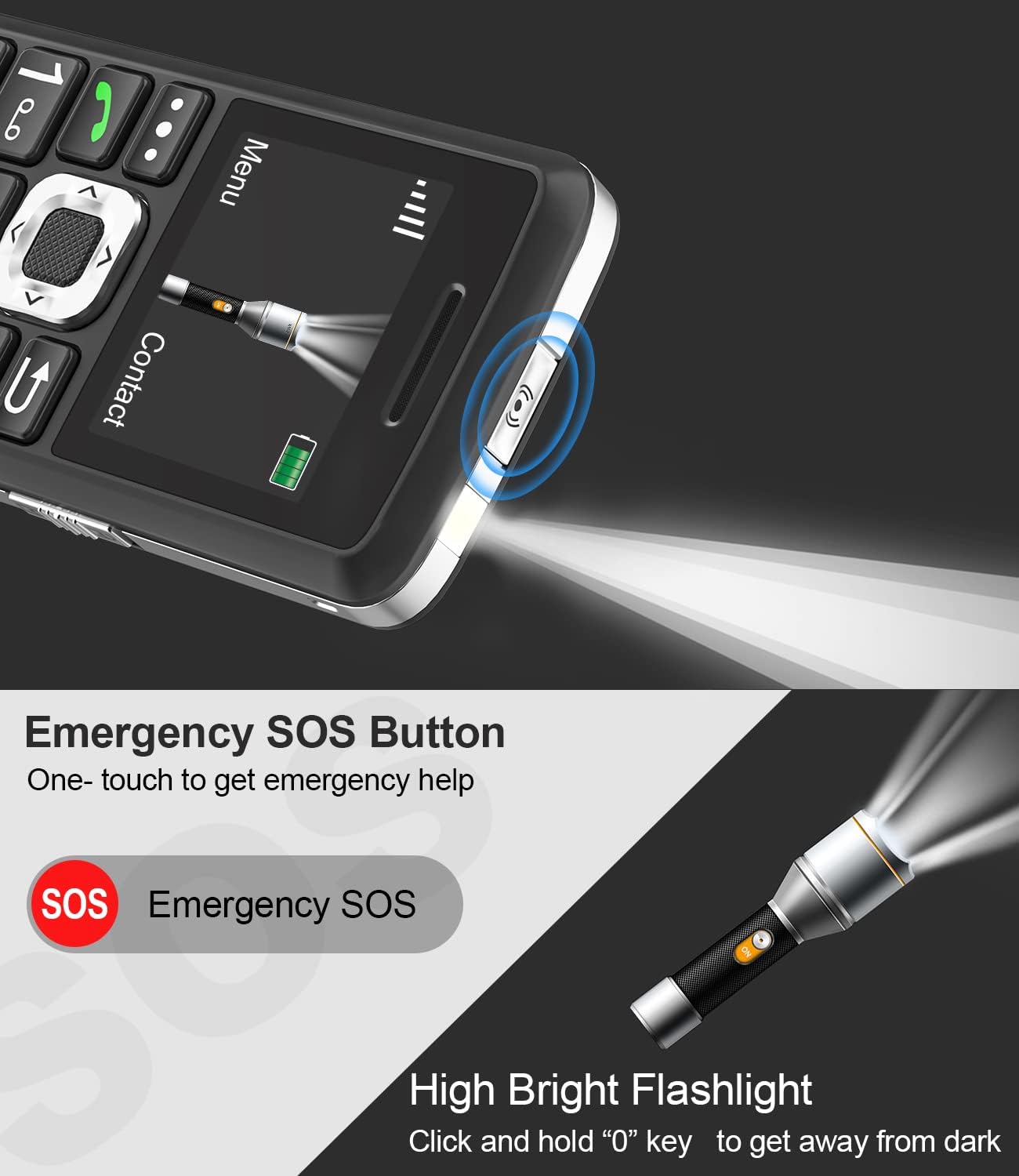
Image: The Easyfone T200 highlighting the emergency SOS button on the back and the integrated flashlight.
4. Features
FM Radio
Enjoy your favorite radio stations on the go. Access the FM Radio application from the main menu. Headphones may be required to act as an antenna for optimal reception.
Flashlight
The phone includes a built-in flashlight for convenience. To activate, long-press the '0' key on the keypad.
Mini-Games
The Easyfone T200 comes with pre-installed mini-games for entertainment. Navigate to the 'Games' menu to select and play.
Bluetooth Connectivity
Connect your phone to Bluetooth-enabled accessories like headsets for hands-free communication. Access Bluetooth settings from the 'Tools' or 'Settings' menu to pair devices.
Other Tools
The phone includes several useful tools:
- Calculator: For basic arithmetic.
- Calendar: To keep track of dates and events.
- MP3 Player: Play audio files stored on a MicroSD card.
- Voice Recorder: Record voice memos.
- Tasks: Manage simple to-do lists.

Image: A visual representation of the Easyfone T200's various features, including FM Radio, Alarm Clock, MP3 Player, Calendar, SMS, Flashlight, Calculator, Bluetooth, Memo, Mini-Games, and Voice Recorder.
5. Maintenance and Care
General Care
- Keep the phone dry. Moisture can damage electronic circuits.
- Avoid extreme temperatures. High temperatures can shorten the life of electronic devices and warp or melt certain plastics.
- Do not use harsh chemicals, cleaning solvents, or strong detergents to clean the phone. Wipe it with a soft, damp cloth.
- Handle the phone gently. Do not drop, knock, or shake it.
Battery Information
- Use only approved batteries and chargers.
- Do not short-circuit the battery or dispose of it in fire.
- Recycle used batteries according to local regulations.
6. Troubleshooting
Common Issues and Solutions
| Issue | Possible Solution |
|---|---|
| Phone does not power on | Ensure the battery is correctly inserted and charged. Connect the charger and try again. |
| No network signal | Check if your SIM card is properly inserted. Verify that your carrier (T-Mobile, SpeedTalk, Tello Mobile) is compatible with the device and that you have network coverage in your area. |
| SIM card not detected | Remove and reinsert the SIM card. Ensure it is a Nano SIM and correctly positioned in the slot. |
| Cannot make/receive calls | Check network signal strength. Ensure your SIM card is active and has sufficient balance/plan. |
| Keypad unresponsive | Check if the keypad lock switch is engaged. Slide it to the unlock position. |
7. Specifications
Technical Specifications
| Feature | Detail |
|---|---|
| Brand | Easyfone |
| Model Name | Easyfone T200 |
| Operating System | Nucleus OS |
| Cellular Technology | 4G |
| Wireless Carrier Compatibility | T-Mobile, SpeedTalk, Tello Mobile |
| Connectivity Technology | 4G, Bluetooth |
| Color | Black |
| SIM Card Slot Count | Single SIM |
| SIM Card Size | Nano |
| Connector Type | USB Type C |
| Human-Interface Input | Buttons |
| Headphones Jack | 3.5 mm |
| Battery Capacity | 1050 Milliamp Hours |
| Battery Average Life (Standby) | 120 Hours |
| Additional Features | Basic Phone, Compact, Easy to use, Fast Charging Support, Long Time Standby, FM Radio, Alarms, MP3 Player, Mini-games, Notes, Calculator, Calendar, Bluetooth, Flashlight, SOS button |
8. Warranty Information
The Easyfone T200 comes with a 1-year warranty from the date of purchase. This warranty covers manufacturing defects and malfunctions under normal use. Please retain your proof of purchase for warranty claims. For detailed terms and conditions, refer to the warranty card included in your product packaging or contact Easyfone customer support.
9. Support
If you encounter any issues not covered in this manual or require further assistance, please contact Easyfone customer support. Contact information can typically be found on the Easyfone official website or on the product packaging.


