
Important Safety Instructions
Please read all instructions carefully before using this appliance and retain for future reference. Failure to follow these instructions may result in fire, electric shock, injury, or property damage.
- Always plug the heater directly into a wall outlet. Never use with an extension cord or relocatable power tap.
- Do not operate any heater with a damaged cord or plug, or after the heater malfunctions or has been dropped or damaged in any manner.
- Keep combustible materials, such as furniture, pillows, bedding, papers, clothes, and curtains at least 3 feet (0.9 m) from the front of the heater and keep them away from the sides and rear.
- This heater is equipped with a 45° tip-over protection switch that automatically shuts off the unit if it is accidentally knocked over.
- The heater also features overheat protection, which will turn off the unit if it reaches an unsafe temperature.
- The V0 flame-retardant material ensures enhanced safety.
- After turning off, the heater will continue running for 30 seconds to ensure complete cool-down before fully powering down.
- Do not use the heater in bathrooms, laundry areas, or similar indoor locations where water may be present.
- Unplug the heater when not in use.
Product Overview
The Auertech Model KF011 is a versatile 3-in-1 electric space heater designed for indoor use, offering heating, humidification, and ambient lighting. Its tower design is space-saving and complements modern home decor.
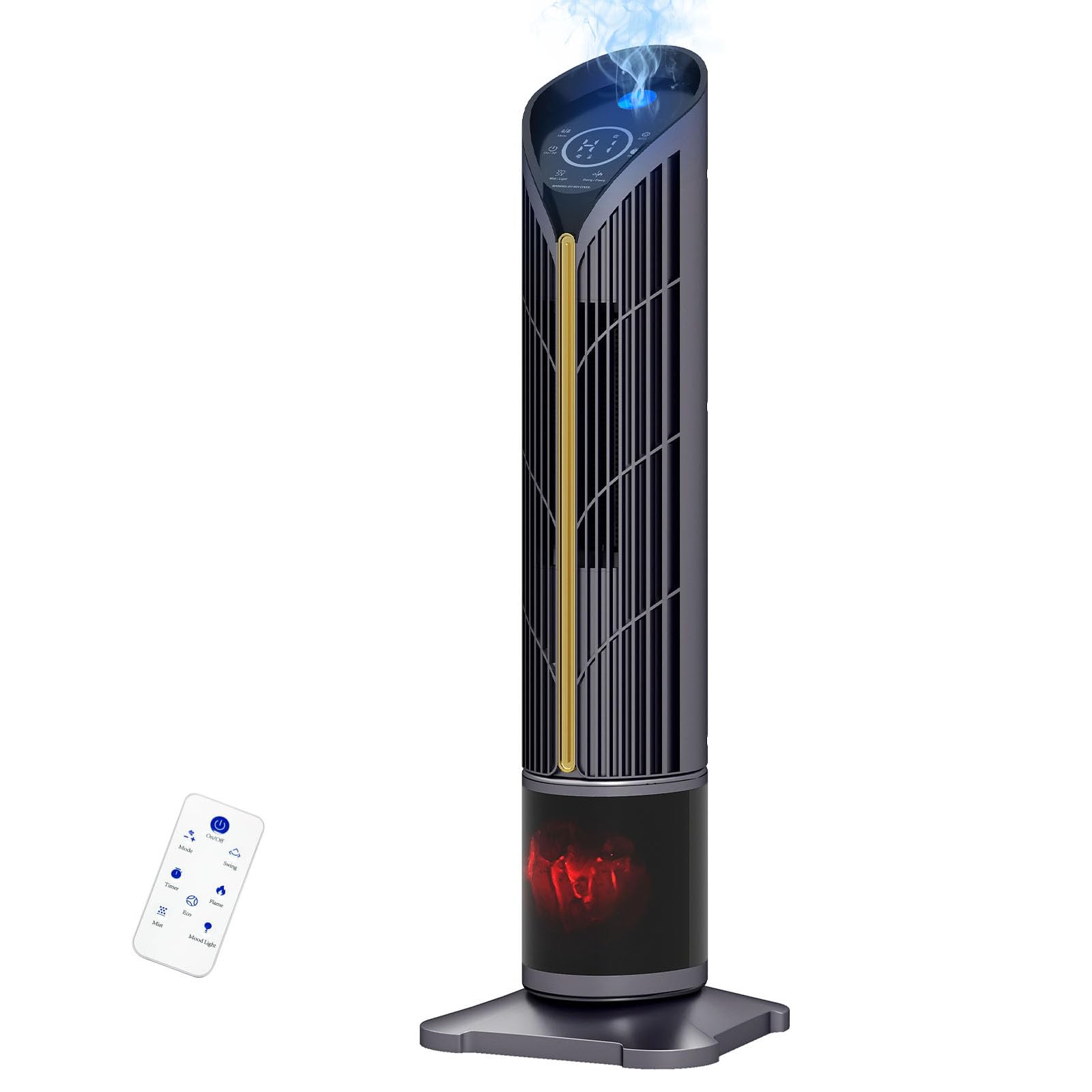
Figure 1: Auertech 28-inch Space Heater, Model KF011.
Key Features:
- 3-in-1 Functionality: Provides fast heating, humidification, and ambient LED lighting.
- Fast Heating: Equipped with a 1500W PTC system, warming spaces up to 350 sq ft in approximately 3 seconds.
- Humidifier: Features a built-in 14 oz water tank for up to 3 hours of continuous humidification, helping to prevent dry air.
- Adjustable LED Mist Light: Customizable LED lighting at the mist outlet, offering soft night light or warm ambient glow options.
- Elegant 3D Flame Ambiance: A realistic 3D flame effect adds a cozy and stylish glow.
- 120° Oscillation: Distributes heat evenly across the room.
- Multiple Modes: High (1500W), Low (750W), and Fan-Only modes for year-round comfort, plus an Eco Mode.
- Advanced Safety: Includes 45° tip-over protection, overheat protection, and V0 flame-retardant material.
- Convenient Control: Features an intuitive LED display and a remote control for easy operation.
- 12-Hour Timer: Allows for personalized automatic shut-off.
Product Components:
- Main Heater Unit
- Base
- Remote Control
- User Manual (this document)
Setup
The Auertech KF011 heater requires minimal assembly.
Assembly:
- Carefully remove all packaging materials from the heater.
- Attach the base to the main heater unit. Ensure it is securely fastened according to the instructions provided in the packaging.
Placement:
- Place the heater on a firm, level surface.
- Ensure there is at least 3 feet (0.9 m) of clear space around the heater to allow for proper airflow and prevent fire hazards.
- Do not block air intakes or outlets.
- Plug the heater directly into a 120V AC, 60Hz wall outlet.
Operating Instructions
The heater can be operated using the touch panel on the unit or the included remote control.

Figure 2: Remote Control and Touch Panel Overview.
Power On/Off:
- Press the On/Off button on the touch panel or remote control to turn the unit on or off.
- When turning off, the fan will continue to run for 30 seconds to cool down the heating element.
Heat Modes:

Figure 3: Available Heat Modes.
- Press the Mode button to cycle through the following settings:
- High Heat (H2): 1500W for maximum warmth.
- Low Heat (H1): 750W for moderate warmth.
- Fan Only (L3): Circulates air without heat.
Oscillation:

Figure 4: 120° Widespread Oscillation.
- Press the Swing button to activate or deactivate the 120° oscillation function, distributing heat evenly.
Humidifier Function:

Figure 5: Humidifier Function.
- To use the humidifier, fill the 14 oz water tank located at the bottom of the unit with clean water.
- Press the Mist button to activate the humidification. The unit can provide up to 3 hours of continuous mist.
LED Mist Light:
- Press the Mist Light button to cycle through various LED light colors at the mist outlet.
3D Flame Effect:
- Press the Flame button to turn the realistic 3D flame effect on or off.
Eco Mode:
- Press the Eco button to activate Eco Mode, which optimizes energy consumption while maintaining a comfortable temperature.
Timer:
- Press the Timer button to set the automatic shut-off timer from 1 to 12 hours. Each press increases the timer by one hour.
LED Display:
- The LED display shows the current heat setting, humidity levels, and timer status.
Video 1: Official product video demonstrating the Auertech Space Heater's features and operation.
Maintenance
Cleaning:
- Always unplug the heater before cleaning.
- Use a soft, damp cloth to wipe the exterior surfaces of the heater. Do not use abrasive cleaners or solvents.
- Regularly clean the humidifier water tank to prevent mineral buildup and ensure hygienic operation. Rinse with clean water and dry thoroughly.
- Use a vacuum cleaner with a brush attachment to clean dust from the air intake and outlet grilles.
Storage:
- Store the heater in a cool, dry place when not in use.
- It is recommended to store the heater in its original packaging to protect it from dust and damage.
Troubleshooting
If your heater is not operating correctly, please refer to the following common issues and solutions:
| Problem | Possible Cause | Solution |
|---|---|---|
| Heater does not turn on. | No power, tip-over switch activated, overheat protection activated. | Ensure the unit is plugged into a working outlet. Check if the heater is on a stable, level surface. Allow the unit to cool down if overheat protection was triggered. |
| No heat output. | Incorrect mode selected. | Ensure High Heat (H2) or Low Heat (H1) mode is selected, not Fan Only (L3). |
| No mist from humidifier. | Water tank empty, mist outlet blocked. | Refill the water tank. Clean the mist outlet to ensure it is not obstructed. |
| Remote control not working. | Dead batteries, obstruction. | Replace the batteries in the remote control. Ensure there is no obstruction between the remote and the heater. |
| Unusual noise or smell. | Dust buildup, internal malfunction. | Unplug the unit and clean thoroughly. If the issue persists, discontinue use and contact customer support. |
If you encounter a problem not listed here, or if the issue persists after attempting the solutions, please contact Auertech customer support.
Specifications
| Feature | Detail |
|---|---|
| Brand | Auertech |
| Model Number | KF011 |
| Product Dimensions | 6.5"D x 9.5"W x 28.5"H |
| Color | Grey |
| Form Factor | Tower |
| Indoor/Outdoor Usage | Indoor |
| Mounting Type | Floor Mount |
| Room Type | Bedroom, Dorm Room, Home Office, Living Room, Study Room |
| Heating Coverage | Up to 350 sq ft |
| Heat Output | 1500 Watts (High), 750 Watts (Low) |
| Fuel Type | Electric |
| Number of Speeds | 3 (High, Low, Fan Only) |
| Humidifier Tank Capacity | 14 oz (approx. 0.4 L) |
| Special Features | 1500W Fast Heating, Humidifier with Ambient Light, Oscillating, Remote Control, 3D Flame, Eco Mode, 12H Timer, Tip-Over Protection, Overheat Protection |
Warranty and Support
This product comes with a standard return policy of 30 days from the date of purchase. For specific warranty details, please refer to the documentation included with your product or contact Auertech customer support.
For technical assistance, troubleshooting, or warranty claims, please contact Auertech customer service. Contact information can typically be found on the product packaging or the official Auertech website.