
Introduction
The Sony WF-1000XM6 earbuds offer next-generation noise cancellation and studio-level sound. Co-created with mastering audio engineers, these earbuds provide exceptional call quality, a secure and comfortable fit, and extended battery life. Powered by advanced QN3e and V2 processors, they ensure pure, uninterrupted listening and crystal-clear conversations.
What's in the Box
- Wireless Earbuds
- Charging Case
- USB-C Charging Cable
- Four sizes of earbud tips
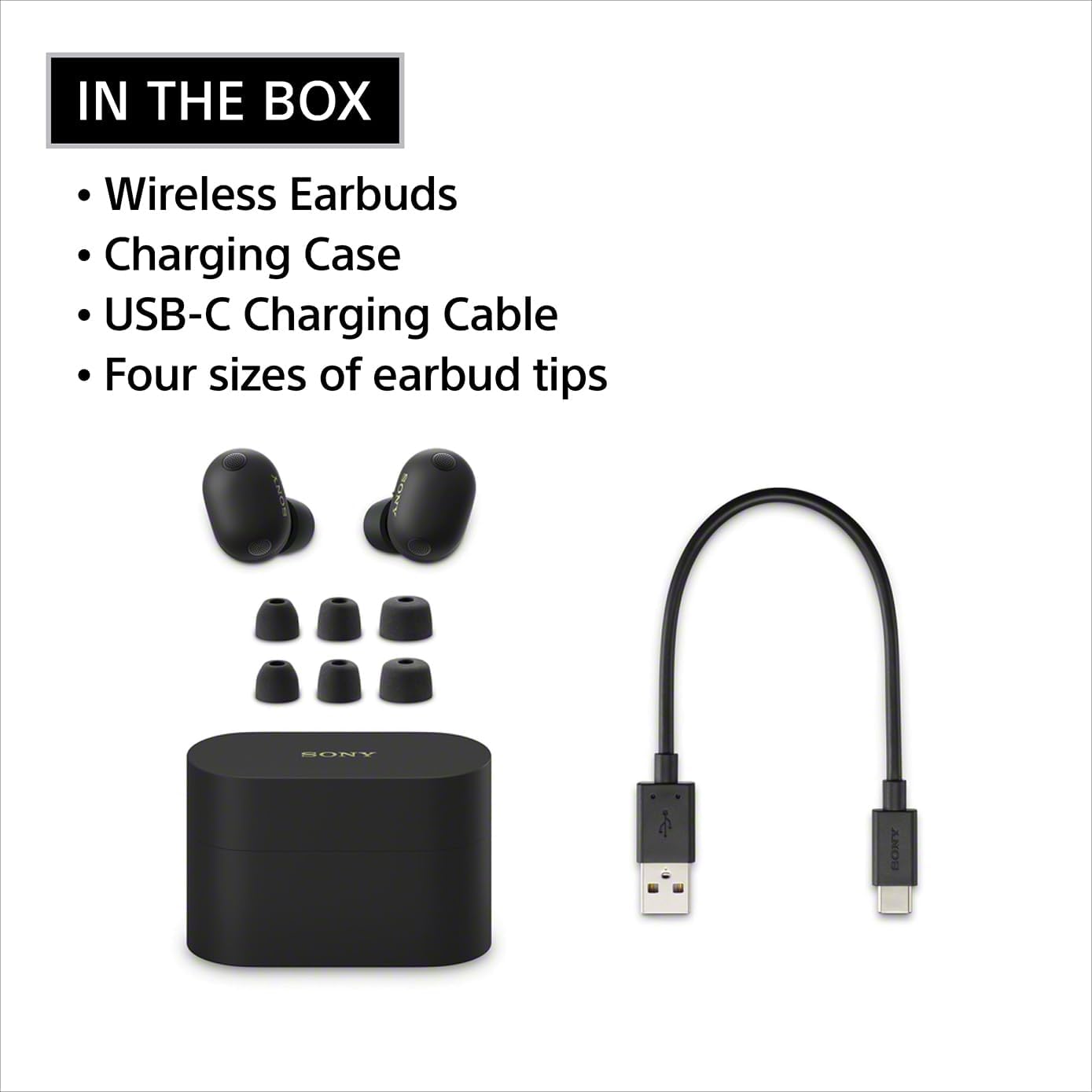
Image: The contents of the Sony WF-1000XM6 retail package, showing the black earbuds, matching charging case, a USB-C charging cable, and four different sizes of foam ear tips.
Setup and First Use
Charging the Earbuds and Case
Before first use, fully charge the earbuds and charging case. Connect the supplied USB-C cable to the charging case and a USB power source. The indicator light on the case will show charging status.

Image: The black Sony WF-1000XM6 charging case is open, revealing the earbuds inside. Text overlays indicate up to 8 hours of playback with a single charge and up to 24 hours total with the case, along with a 5-minute quick charge for 1 hour of playback.
Pairing with a Device
The WF-1000XM6 earbuds utilize Bluetooth 5.3 for stable connectivity. They support multipoint pairing, allowing connection to two devices simultaneously (e.g., a smartphone and a laptop).
- Open the charging case with the earbuds inside.
- The earbuds will automatically enter pairing mode.
- On your device, go to Bluetooth settings and select "WF-1000XM6" from the list of available devices.
- Follow any on-screen prompts to complete the pairing process.
Key Features
Noise Cancellation
Experience powerful, adaptive noise cancelling that keeps distractions out and your music front and center. Powered by dual processors and eight adaptive microphones, the WF-1000XM6 earbuds adapt in real time to keep your world quiet and your music pure.

Image: A man wearing black Sony WF-1000XM6 earbuds in an airport lounge, with text emphasizing "THE BEST NOISE CANCELLATION" powered by dual processors and eight adaptive microphones.
The HD Noise Cancelling Processor QN3e is 3x faster than the QN2e (found in our WF-1000XM5 earbuds), paired with an improved DAC and amplifier, precisely manages microphones to block out everyday sounds and deliver cleaner, richer audio.

Image: Black Sony WF-1000XM6 earbuds and their charging case are displayed alongside a graphic of the Sony HD Noise Cancelling Processor QN3e, emphasizing its advanced capabilities.
Adaptive NC Optimizer
Adaptive NC Optimizer uses eight adaptive microphones to track ambient sound while the processor automatically adjusts the noise cancelling profile in real time, keeping performance strong in any environment or wearing condition.

Image: A man wearing black Sony WF-1000XM6 earbuds is seated in a modern, glass-filled office environment, with text highlighting the Adaptive NC Optimizer's real-time adjustments.
Auto Ambient Sound Mode
Choose from three Auto Ambient Sound modes that adapt in real time, balancing your music and the world around you. Multiple microphones filter noise or let in what matters, like announcements or conversations, with manual or automatic adjustments via the Sony | Sound Connect app.

Image: A woman wearing white Sony WF-1000XM6 earbuds is relaxing in a home environment, with text describing the Auto Ambient Sound mode's ability to balance music and surroundings.
Sound Quality
Developed in collaboration with mastering audio engineers, the WF-1000XM6 earbuds deliver studio-level clarity and emotion to every track—revealing subtle details and authentic sound, all in a compact earbud. The original custom driver and advanced 32-bit audio processing reveal rich textures and spacious sound, while precise tuning keeps everything balanced.

Image: Black and white Sony WF-1000XM6 earbuds and their respective charging cases are placed on an audio mixing board, illustrating the studio-level sound quality.
Ultra Clear Call Quality
Dual beamforming microphones, a bone conduction sensor, and AI-powered noise reduction technology, isolate your voice and block background and wind noise for ultra-clear calls anywhere. Intelligent algorithms ensure every word is heard clearly—even in noisy settings.

Image: A woman wearing black Sony WF-1000XM6 earbuds is talking on her phone in a busy outdoor environment, with text emphasizing "Our best call quality ever" through advanced microphone technology.
Ergonomic Design and Secure Fit
Ergonomic earbuds contour naturally for a secure, balanced fit. Premium matte texture and smart airflow ensure all-day comfort and an elevated look, while pressure points are minimized for long listening sessions.

Image: A man wearing white Sony WF-1000XM6 earbuds is looking out a window, with text highlighting the "Refined shape. Naturally comfortable." ergonomic design.
Long Battery Life and Convenient Charging
Stay powered up with up to 24 hours of total playback (8 hours with the earbuds and 16 hours with the case), plus a five-minute quick charge for up to 1 hour of playback when you need it. Enable Battery Care in the Sony | Sound Connect app to help reduce battery wear, and enjoy long-lasting power for daily routines.

Image: Black Sony WF-1000XM6 earbuds and their charging case are placed on a metallic surface, with text detailing "Long Battery Life and Convenient Charging" including 24 hours total playback and quick charge.
Intuitive Controls
On-ear controls make it simple to switch your microphone on and off, adjust volume, and manage playback. Built-in voice control and gesture commands offer seamless operation for everyday convenience.

Image: A woman is shown adjusting her white Sony WF-1000XM6 earbud with a touch gesture, illustrating the "Intuitive Controls" feature.
Water Resistant (IPX4)
The earbuds have an IPX4 rating and matte finish that repels sweat and splashes. This means they are suitable for workouts and outdoor activities, offering protection against light rain and sweat.

Image: A woman is running outdoors while wearing white Sony WF-1000XM6 earbuds, with an IPX4 rating icon and text indicating "Sweat and splash-resistant."
Operating Your Earbuds
Using the Sony | Sound Connect App
The Sony | Sound Connect app lets you personalize your sound, compare settings, and fine-tune your experience. It also enables advanced features like EQ Adjustment, Adaptive Sound Control, Quick Access for Amazon Music, and Battery Care. Download the app from the App Store (iOS) or Google Play Store (Android).

Image: A smartphone displays the Sony | Sound Connect app interface, showing various settings and controls for the WF-1000XM6 earbuds, with logos for Android and Apple app stores.
Touch Controls
The earbuds feature intuitive touch controls for managing playback, calls, and noise control modes. Refer to the app for customizable touch assignments.
- Play/Pause: Single tap on either earbud.
- Next Track: Double tap on the right earbud.
- Previous Track: Triple tap on the left earbud.
- Answer/End Call: Single tap on either earbud.
- Switch Noise Cancelling/Ambient Sound: Tap and hold on the left earbud.
- Volume Control: Continuously tap on the right earbud to increase volume, or on the left earbud to decrease volume.
Maintenance
Battery Care
To prolong the lifespan of your earbuds' battery, enable the Battery Care feature in the Sony | Sound Connect app. This feature helps reduce battery wear by limiting the charge level to approximately 90% when fully charged, preventing overcharging.
Video: This official Sony Electronics video demonstrates how to enable and utilize the Battery Care feature within the Sony | Sound Connect app to optimize battery longevity for the WF-1000XM6 earbuds.
Cleaning
Regularly clean the earbuds and charging case with a soft, dry cloth. Ensure the charging contacts on both the earbuds and the case are free from dust and debris. If using foam ear tips, gently clean them to maintain hygiene and optimal sound performance.
Troubleshooting
Sound Quality Issues with ANC/Transparency
Some users may experience slight distortion in upper mids and lower treble when Active Noise Cancellation (ANC) or Transparency mode is enabled. To potentially resolve this, go to Device Settings in the Sony | Sound Connect app, then to the Wearing option, and select "Determine Optimal Earbud Tips." Run the "Test the wearing condition" to calibrate ANC to your ears and ensure a good seal. This process can significantly reduce or eliminate distortion.
Limited Call Controls
If you find call controls limited (e.g., unable to adjust volume during a call, or losing hang-up functionality when enabling mic mute), check the customization options within the Sony | Sound Connect app. Some functions may be mutually exclusive or require specific configurations.
Earbuds Not Charging
Ensure the charging contacts on both the earbuds and inside the case are clean and free from obstruction. Verify the USB-C cable is securely connected to both the case and the power source. Check the charging indicator light on the case for status.
Specifications
| Feature | Detail |
|---|---|
| Brand | Sony |
| Model Number | WF1000XM6B.UC |
| Ear Placement | In Ear |
| Noise Control | Active Noise Cancellation |
| Connectivity Technology | Wireless (Bluetooth 5.3) |
| Bluetooth Range | 10 Meters |
| Audio Driver Type | Dynamic Driver |
| Audio Driver Size | 8.4 Millimeters |
| Frequency Range | 20Hz - 20,000Hz |
| Battery Average Life (Earbuds) | 8 Hours (with ANC on) |
| Total Playback Time (with Case) | Up to 24 Hours |
| Battery Charge Time | 1.5 Hours |
| Water Resistance Level | IPX4 (Water Resistant) |
| Control Type | Touch Control, Voice |
| Item Weight | 0.46 Ounces |
| Carrying Case Weight | 47 Grams |
Warranty and Support
The Sony WF-1000XM6 earbuds come with a 1-year manufacturer's warranty. For support, please visit the official Sony website or contact customer service.