
Introduction
Thank you for choosing the DAREU COOL68 60% Wired Gaming Keyboard. This manual provides detailed instructions for setup, operation, maintenance, and troubleshooting to ensure optimal performance and longevity of your device. The DAREU COOL68 is designed for high-performance gaming, featuring advanced magnetic switches and customizable settings for a superior user experience.
What's in the Box
- DAREU COOL68 60% Wired Gaming Keyboard
- Keycap Puller
- USB Cable (Type-C)
- User Manual

Image: DAREU COOL68 Keyboard and included accessories in its packaging.
Setup
The DAREU COOL68 keyboard is a wired-only device, ensuring minimal latency and stable performance.
Connecting the Keyboard
- Locate the USB Type-C port on the top-left side of the keyboard.
- Connect the provided USB Type-C cable to the keyboard.
- Connect the other end of the USB cable to an available USB port on your computer (PC, Laptop, Mac, Gaming Console, Tablet).
- The keyboard will automatically be recognized by your operating system, and the RGB lighting will illuminate.

Image: Side view of the DAREU COOL68 keyboard highlighting the USB-C port for connection.
Operating Instructions
Key Layout and Basic Functions
The DAREU COOL68 features a compact 65% layout with 68 keys, optimizing desk space while retaining essential keys like dedicated arrow keys. Standard QWERTY layout is used.
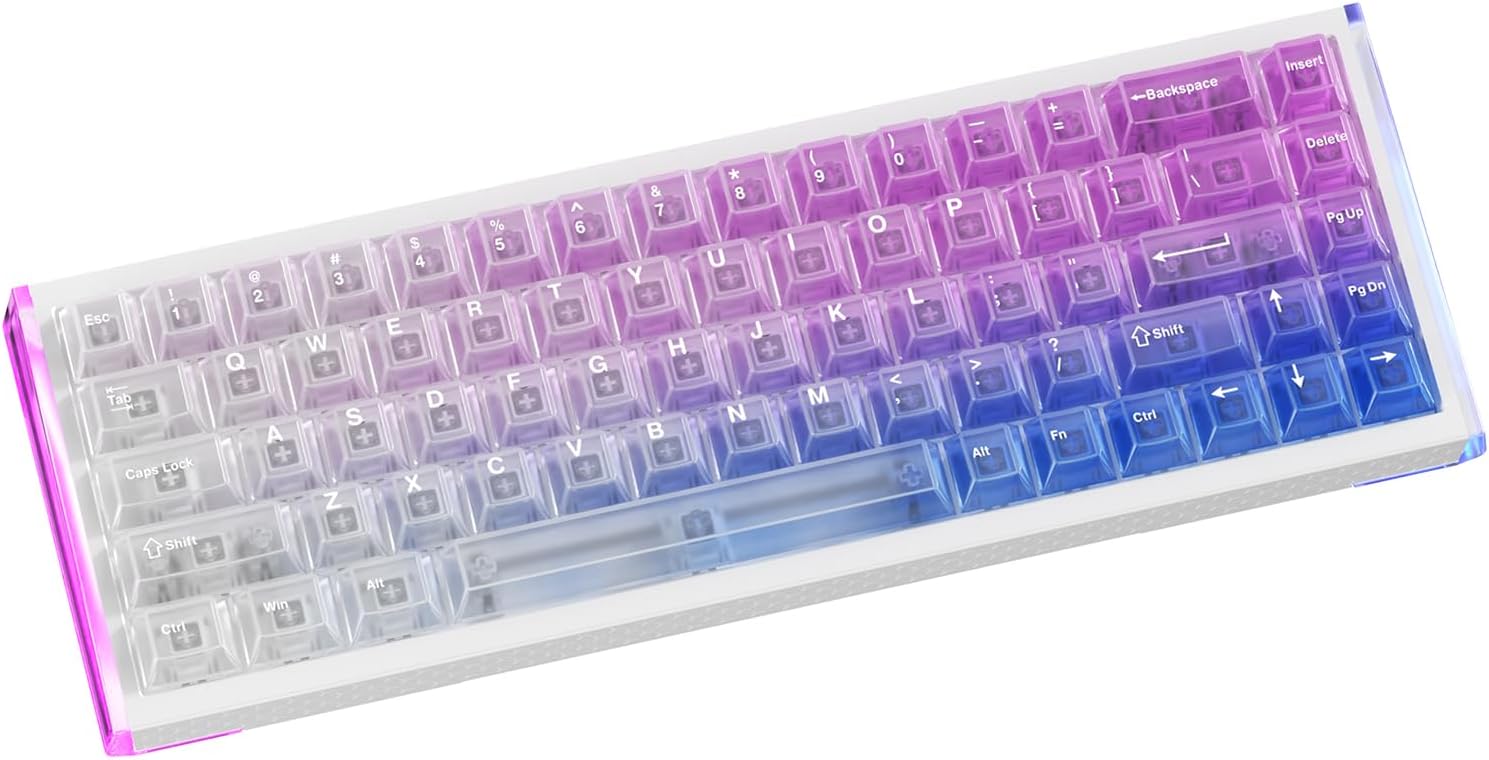
Image: Top-down view of the DAREU COOL68 keyboard, showcasing its compact 65% layout.
RGB Lighting Control
The keyboard features immersive dual RGB lighting with south-facing LEDs and unique "Light Wing" side light bars. Crystal-clear PC keycaps enhance light transmission.
- Change Backlight Mode (20+ types): Press Fn + [{
- Change Backlight Color: Press Fn + ]}
- Adjust Backlight Brightness (100%-Off-25%-50%-75%): Press Fn + Space key
- Change Side Light Modes (Solid/Off/Neon): Press Fn + Right Alt
- Change Side Light Color (Default white light): Press Fn + Right Ctrl
- Adjust Side Light Brightness (100%-Off-25%-50%-75%): Press Fn + Up/Down Arrow keys

Image: DAREU COOL68 keyboard illustrating various Fn key combinations for controlling lighting effects and brightness.
Video: Demonstrates the various RGB lighting effects and the unique "Light Wing" side lighting of the DAREU COOL68 keyboard.
Rapid Trigger and Adjustable Actuation
The DAREU COOL68 features Hall Effect magnetic switches, enabling precise control over actuation points and rapid trigger functionality. This is crucial for competitive gaming, allowing for faster key presses and resets.
- Adjustable Actuation: Fine-tune the actuation point from 0.2mm to 3.5mm in 0.01mm steps via the software.
- Rapid Trigger (RT) Mode: Allows keys to reset instantly upon release, eliminating dead zones and enabling quicker repeated inputs.
- D.H.A. Filter Algorithm: A self-developed algorithm that enhances signal stability and optimizes actuation feel for smooth, rapid command execution.

Image: Diagram illustrating the 0.01mm Rapid Trigger (RT) accuracy of the DAREU COOL68 keyboard.
Video: Shows how the magnetic key switches work and how they can be removed and reinserted.
Hot-Swappable Magnetic Switches
The DAREU COOL68 features hot-swappable magnetic sockets, allowing users to easily mix and match compatible magnetic switches without soldering. This provides extensive customization options for typing feel and performance.

Image: Close-up view of the hot-swappable magnetic switches on the DAREU COOL68 keyboard, showing switches being inserted and removed.
Gasket Mount Design
The keyboard incorporates a premium gasket-mounted structure with triple-layer sound absorption (sandwich silicone, IXPE under-switch padding, and bottom silicone). This design provides a solid, cushioned keystroke feel with a deep, satisfying sound, reducing hollow noises.

Image: Exploded view diagram illustrating the multiple layers of the gasket mount structure in the DAREU COOL68 keyboard.
Customization & Software
The DAREU COOL68 offers extensive customization through its intuitive Web+APP Dual Driver. This allows for instant configuration without requiring driver installation on most systems (macOS supported via web driver).
Software Features:
- Configure Modes: Adjust SOCD (Simultaneous Opposite Cardinal Directions), DKS (Dynamic Keystroke), MT (Mod-Tap), and TGL (Toggle) modes.
- Set Travel Trigger: Precisely set the actuation and reset points for each key.
- Remap Keys: Customize key assignments to suit your workflow or gaming style.
- Create Macro Commands: Program complex sequences of actions to a single key.
- Adjust Backlighting: Fine-tune RGB effects, colors, and brightness beyond the on-board controls.
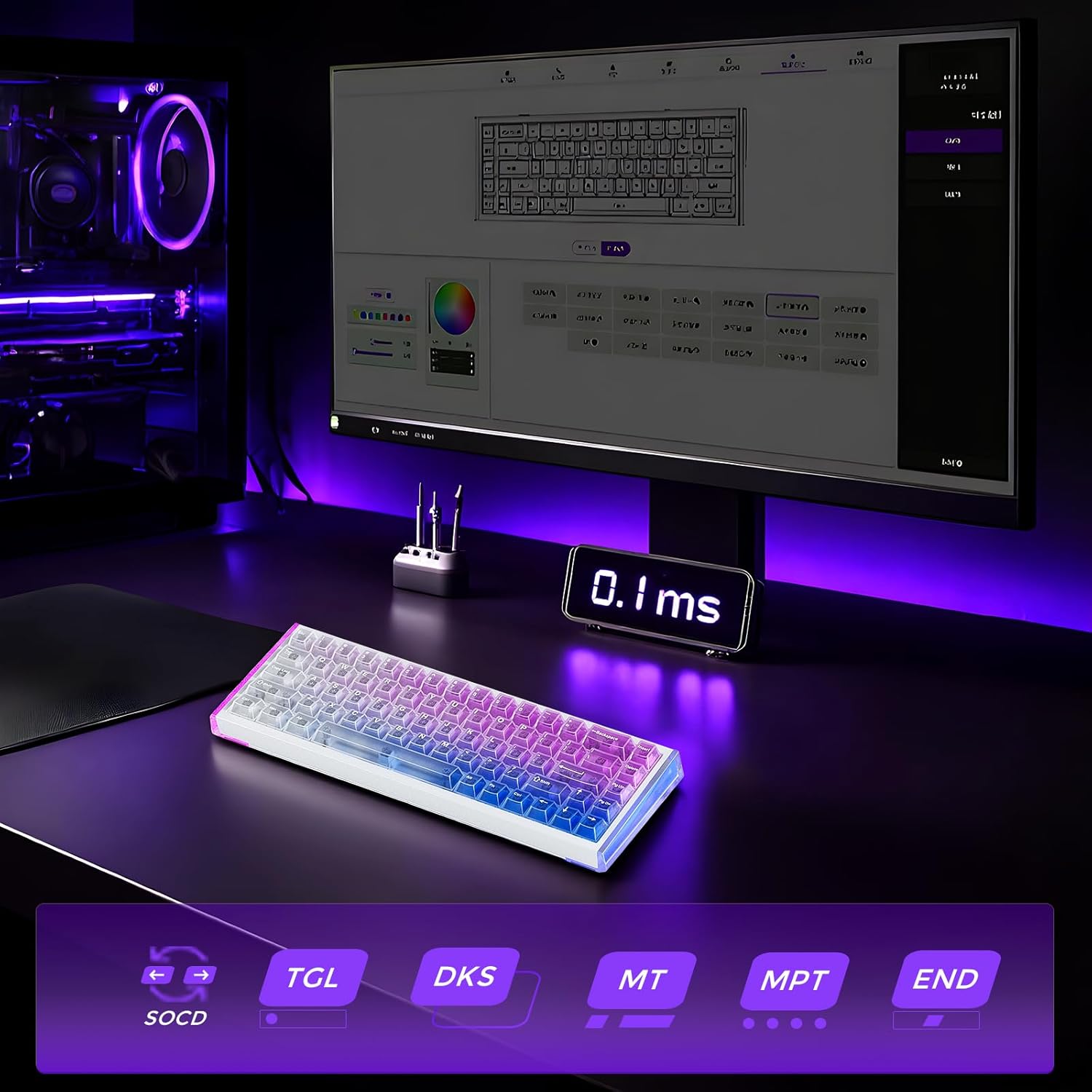
Image: The DAREU COOL68 keyboard connected to a computer displaying its software interface for customization.
Video: Demonstrates how to access and utilize the DAREU COOL68 keyboard's software settings for advanced customization.
Video: Explains the hidden function keys and their usage on the DAREU COOL68 keyboard.
Maintenance
Proper maintenance ensures the longevity and performance of your DAREU COOL68 keyboard.
Cleaning:
- General Cleaning: Use a soft, lint-free cloth to wipe down the keyboard surface regularly. For dust between keycaps, use compressed air.
- Keycap Cleaning: Remove keycaps using the provided keycap puller. Clean them with a mild soap solution and a soft brush, then rinse thoroughly and ensure they are completely dry before reattaching.
- Avoid Liquids: Do not immerse the keyboard in water or spray cleaning solutions directly onto it. If spills occur, immediately disconnect the keyboard and allow it to dry completely before reconnecting.
Switch Care:
While the magnetic switches are durable, avoid excessive force when removing or inserting them to prevent damage to the sockets.
Troubleshooting
If you encounter issues with your DAREU COOL68 keyboard, try the following solutions:
- Keyboard Not Responding:
- Ensure the USB cable is securely connected to both the keyboard and your computer.
- Try connecting the keyboard to a different USB port on your computer.
- Test the keyboard on another computer to rule out system-specific issues.
- RGB Lighting Not Working/Incorrect:
- Check the lighting modes and brightness settings using the Fn key combinations (refer to the Operating Instructions section).
- Ensure the keyboard's software is up-to-date and settings are correctly applied.
- Perform a factory reset via the software if custom settings are causing issues.
- Keys Not Registering/Double-Typing:
- This may indicate an issue with the magnetic switch. Try hot-swapping the problematic switch with a spare or another key to diagnose.
- Adjust the actuation point and dead zone settings in the software to optimize key registration.
- Software Not Recognizing Keyboard:
- Ensure your internet connection is stable if using the web driver.
- Try a different browser or clear your browser's cache.
- Ensure the keyboard firmware is up-to-date.
Specifications
| Feature | Detail |
|---|---|
| Brand | DAREU |
| Model Name | COOL68 |
| Model Number | COOL68-AU |
| Connectivity Technology | USB (Wired) |
| Key Layout | 68 keys (65% Compact) QWERTY |
| Switch Type | Ice Blade Magnetic Switches (Hall Effect) |
| Actuation Range | 0.2mm - 3.5mm (0.01mm adjustment) |
| Polling Rate | 8000Hz |
| Key Latency | 0.1ms |
| Mounting Structure | Gasket Mount |
| Keycap Material | PC (Crystal-Clear) |
| Backlighting | Dual RGB (South-facing LEDs, Light Wing side bars) |
| Material | Aluminum (Enclosure) |
| Item Weight | 730 Grams |
| Compatible Devices | Gaming Console, Laptop, Mac, PC, Tablet |
Warranty and Support
Warranty Information:
The DAREU COOL68 keyboard comes with a 1 Year Warranty from the date of purchase. This warranty covers manufacturing defects and issues arising from normal use. Please retain your proof of purchase for warranty claims.
Customer Support:
For further assistance, technical support, or warranty claims, please visit the official DAREU website or contact their customer service department. Detailed contact information can typically be found on the product packaging or the official DAREU brand store online.