
1. Introduction
Thank you for choosing the Hupoaf M18 Magnetic Bluetooth Speaker. This manual provides essential information for the proper setup, operation, and maintenance of your speaker. Please read it thoroughly before use to ensure optimal performance and longevity of the device.
The Hupoaf M18 is a portable, waterproof Bluetooth speaker designed for various outdoor and indoor activities. It features a strong magnetic mount, IPX7 water resistance, long battery life, and True Wireless Stereo (TWS) pairing capability for an enhanced audio experience.
2. Package Contents
Verify that all items listed below are included in your package:
- Portable Bluetooth Speaker (M18) x 1
- Type-C Charging Cable x 1
- Quick Start Guide x 1
3. Setup
3.1 Charging the Speaker
Before first use, fully charge the speaker. Connect the provided Type-C charging cable to the speaker's charging port and the other end to a USB power adapter (not included). The LED indicator will show charging status and turn off when fully charged.
3.2 Power On/Off
- To Power On: Press and hold the Power button for approximately 3 seconds until the LED indicators light up.
- To Power Off: Press and hold the Power button for approximately 3 seconds until the LED indicators turn off.
4. Operating Instructions
4.1 Bluetooth Pairing
Follow these steps to pair your Hupoaf M18 speaker with a Bluetooth-enabled device:
- Ensure the speaker is powered on and in Bluetooth pairing mode. The Bluetooth indicator light will flash.
- On your device (smartphone, tablet, etc.), enable Bluetooth and search for available devices.
- Select "M18" from the list of devices.
- Once connected, the Bluetooth indicator light on the speaker will become solid, and you will hear an audible confirmation.
The speaker utilizes Bluetooth 5.4 for a stable wireless connection up to 30 meters (100 feet).

Image: Bluetooth 5.4 Pairing process shown on a smartphone screen next to the speaker.
4.2 True Wireless Stereo (TWS) Pairing
To achieve immersive stereo sound, you can pair two Hupoaf M18 speakers together:
- Ensure both M18 speakers are powered on and not connected to any other Bluetooth device.
- On one speaker (this will be the primary speaker), press the TWS button (often indicated by a chain link icon) for 3 seconds. The speaker will enter TWS pairing mode.
- The two speakers will automatically connect to each other. Once connected, the TWS indicator light on both speakers will become solid.
- Now, connect your device to the primary speaker via Bluetooth as described in Section 4.1. Both speakers will play audio in stereo.

Image: Two Hupoaf M18 speakers paired for True Wireless Stereo, with a couple enjoying music outdoors.
4.3 Controls and Functions
The speaker features intuitive button controls for various functions:
- Power Button: Press and hold to power on/off. Short press to play/pause music.
- Volume Up (+): Short press to increase volume. Long press for next track.
- Volume Down (-): Short press to decrease volume. Long press for previous track.
- EQ Button: Short press to cycle through EQ modes.
- Light Button: Short press to change RGB lighting modes.
- Call Button: Short press to answer/end calls. Long press to reject calls.

Image: Hupoaf M18 speaker with music notes floating around, indicating music playback.
4.4 EQ Modes
The speaker offers three Equalizer (EQ) modes to optimize your listening experience:
- Bass Boost: Enhances low frequencies for a richer bass sound. (Indicated by Green Light)
- Soft EQ: Provides a balanced sound profile suitable for various music genres. (Indicated by White Light)
- Outdoor Vocal Clarity: Optimizes sound for outdoor environments, emphasizing vocal clarity. (Indicated by Green/White Lights)

Image: Speaker with a phone call icon, illustrating its hands-free calling capability.
4.5 AUX and TF Card Input
In addition to Bluetooth, the speaker supports audio playback via AUX cable and TF (MicroSD) card:
- AUX Input: Connect a 3.5mm audio cable from your device to the speaker's AUX port. The speaker will automatically switch to AUX mode.
- TF Card: Insert a TF card (up to 32GB, FAT32 format) into the TF card slot. The speaker will automatically play audio files from the card.
Image: Close-up of the speaker's ports, showing AUX and TF card slots.
4.6 RGB Colorful Lighting
The speaker features dynamic RGB lighting with multiple modes. Press the Light button to cycle through different lighting effects, including colorful mode, solid color mode, and rhythm mode that syncs with your music.

Image: Two Hupoaf M18 speakers displaying RGB colorful lighting in a party setting.
5. Maintenance
5.1 Cleaning
To clean the speaker, use a soft, damp cloth. Do not use abrasive cleaners, alcohol, or chemical solvents, as these may damage the surface or internal components. Ensure the charging port cover is securely closed before cleaning to maintain water resistance.
5.2 Storage
When not in use for extended periods, store the speaker in a cool, dry place away from direct sunlight and extreme temperatures. It is recommended to charge the speaker at least once every three months to preserve battery health.
6. Troubleshooting
| Problem | Possible Cause | Solution |
|---|---|---|
| Speaker does not power on. | Low battery. | Charge the speaker using the provided Type-C cable. |
| Cannot pair via Bluetooth. | Speaker is not in pairing mode or already connected to another device. Device Bluetooth is off. | Ensure the speaker is in pairing mode (flashing Bluetooth light). Disconnect from other devices. Enable Bluetooth on your device. |
| No sound. | Volume too low. Device not connected. Incorrect input mode. | Increase speaker and device volume. Re-pair Bluetooth. Check if AUX or TF card is inserted and playing. |
| TWS pairing fails. | Speakers are too far apart. One speaker is already paired to a device. | Ensure speakers are within close proximity. Disconnect both speakers from any Bluetooth devices before initiating TWS pairing. |
7. Specifications
| Brand | Hupoaf |
| Model Number | M18 |
| Speaker Maximum Output Power | 20 Watts |
| Connectivity Technology | Bluetooth |
| Bluetooth Version | 5.4 |
| Bluetooth Range | Up to 30 Meters (100 feet) |
| Audio Output Mode | Stereo |
| Mounting Type | Magnetic Mount |
| Speaker Type | Portable Speaker |
| Water Resistance Level | IPX7 (Immersion in 1 meter of water for 30 minutes) |
| Control Method | Touch Buttons |
| Power Source | Battery Powered |
| Battery Life | Up to 24 hours (at 50% volume with lights off) |
| Item Dimensions (D x W x H) | 3"D x 2"W x 1"H (Approximate) |
| Built-in Microphone | Yes, for hands-free calling |
| Additional Features | RGB Lighting, TWS Pairing, AUX Input, TF Card Slot |
8. Warranty and Support
8.1 Warranty Information
The Hupoaf M18 Magnetic Bluetooth Speaker comes with a 1-year limited warranty from the date of purchase. This warranty covers manufacturing defects and workmanship. It does not cover damage caused by misuse, accidents, unauthorized modifications, or normal wear and tear.
8.2 Customer Support
For technical assistance, warranty claims, or any questions regarding your Hupoaf M18 speaker, please contact Hupoaf customer support. Refer to the contact information provided in your Quick Start Guide or on the official Hupoaf website.
9. Additional Information
9.1 Product Overview Video
Video: An overview of the Hupoaf Bluetooth Speaker, highlighting its features such as deep bass, stereo sound, Bluetooth 5.4 TWS pairing, IPX7 waterproof rating, RGB lighting, and various input options. It also shows the speaker being used in different environments like golf courses, beaches, and parties.
9.2 Usage Scenarios

Image: The Hupoaf M18 speaker magnetically attached to a golf cart, with a golfer in the background.

Image: The Hupoaf M18 speaker placed near a swimming pool, demonstrating its IPX7 water resistance.

Image: The Hupoaf M18 speaker at a beach campfire, highlighting its long 24-hour playtime.
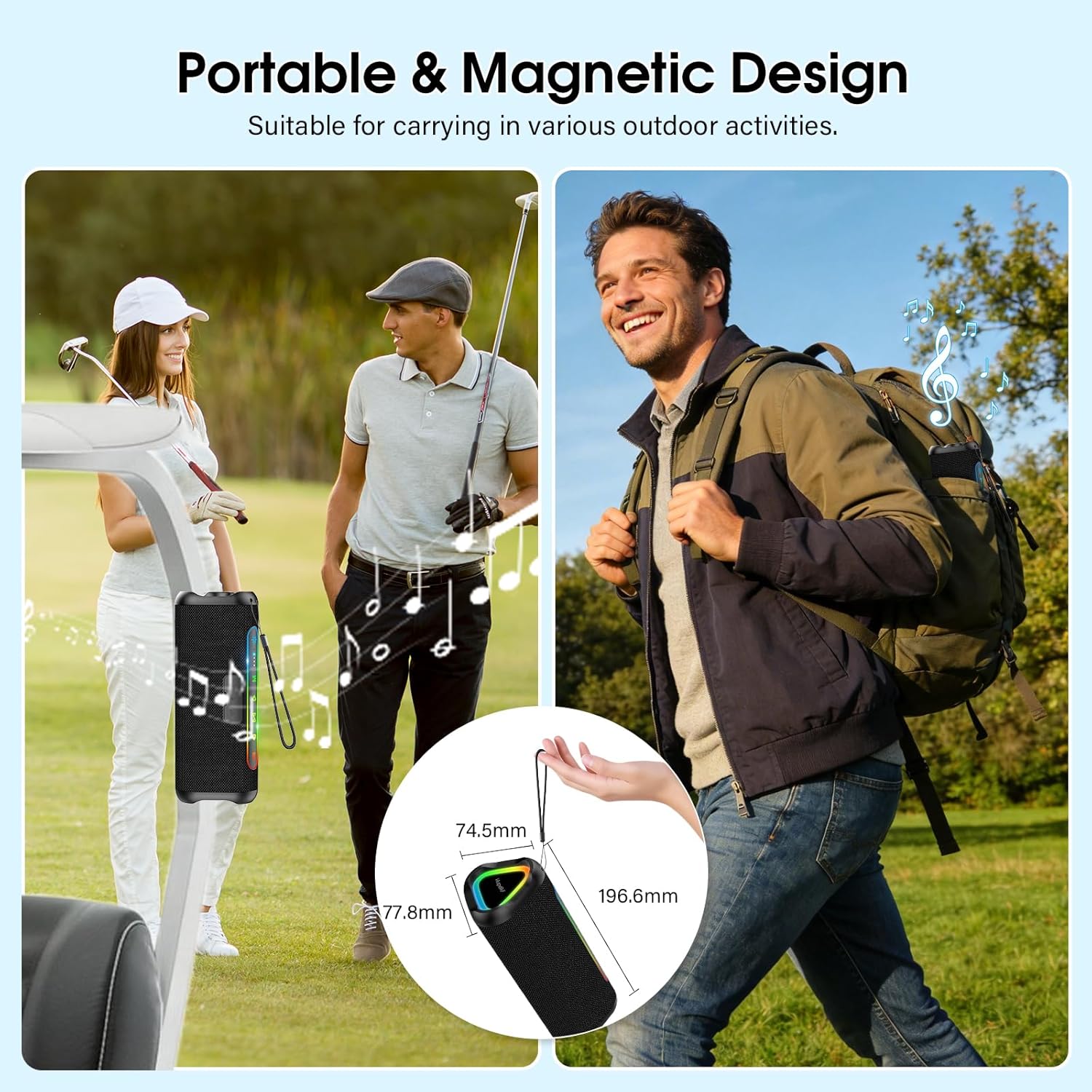
Image: The Hupoaf M18 speaker being carried in a backpack and attached to a golf cart, illustrating its portable and magnetic design.