
Introduction
Welcome to your new WIWB Gaming PC. This system is designed for high-performance gaming and productivity, featuring an AMD Ryzen 5 5500 processor and NVIDIA GeForce RTX 3050 graphics. This manual will guide you through the setup, operation, maintenance, and troubleshooting of your new computer, ensuring you get the most out of your investment.
1. Setup Guide
1.1 Unboxing
Carefully remove the PC and all accessories from the packaging. Ensure all components listed in the "What's in the Box" section are present: Desktop, Power Cable, User Manual.
1.2 Connecting Peripherals
Connect your monitor, keyboard, mouse, and other peripherals to the appropriate ports on the rear and top of the PC.
Rear Panel Connections
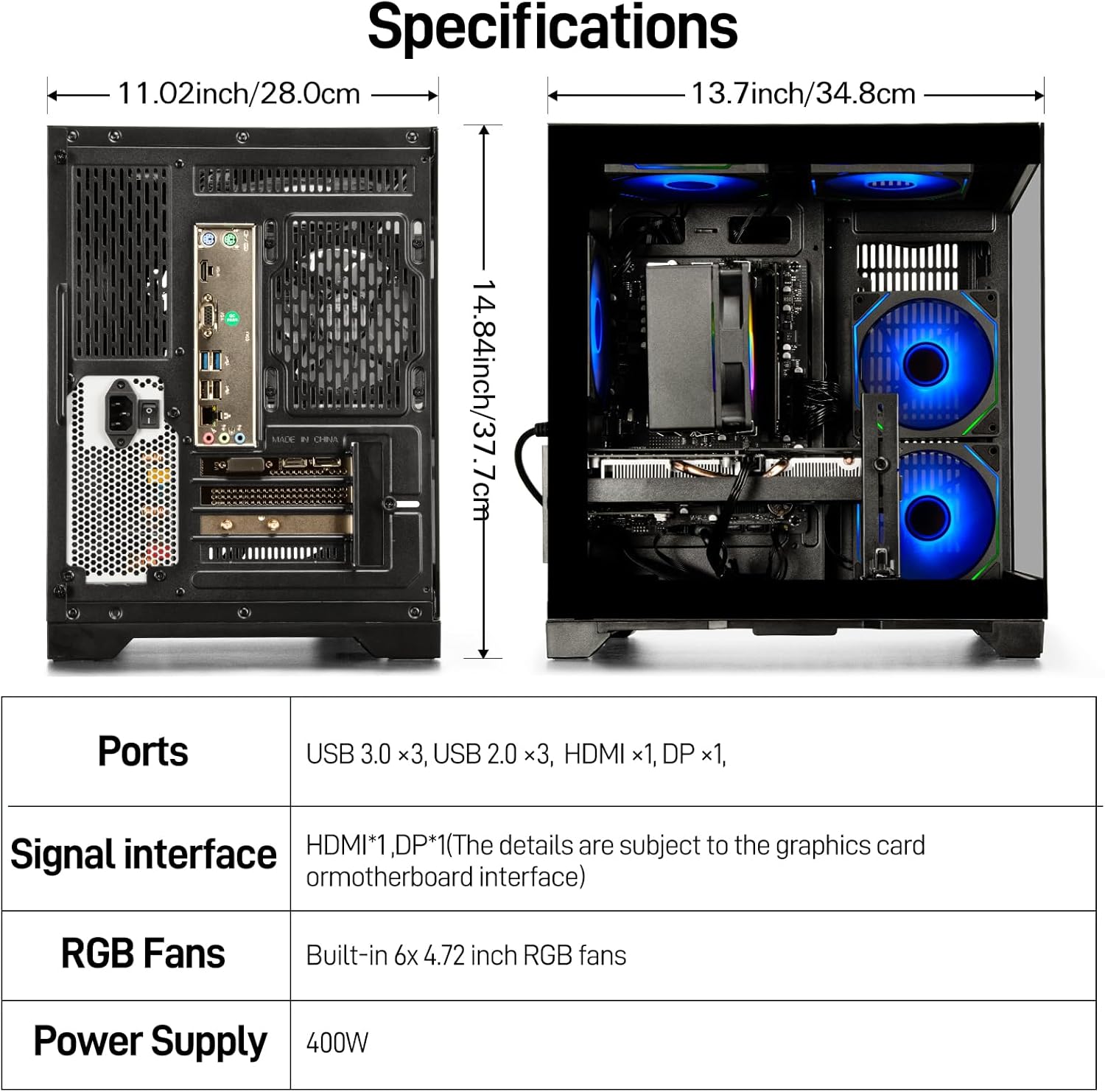
The rear panel provides various ports for connecting your display, audio devices, and USB peripherals. Note that the motherboard's integrated video ports (VGA, HDMI) are automatically disabled when a dedicated graphics card is present. Always connect your monitor to the dedicated graphics card outputs.

Top Panel Connections
The top panel offers convenient access to frequently used ports and control buttons.
1.3 Power On
Connect the provided power cable to the PC's power supply unit and then to a wall outlet. Press the Power button located on the top panel to turn on the computer.
2. Operating Instructions
2.1 Initial Boot-up
Upon first power-on, the system will boot into Windows. Follow the on-screen prompts to complete the initial Windows setup, including language, region, and user account creation.
2.2 General Usage
Your WIWB Gaming PC is pre-configured for immediate use. It runs on Windows and is optimized for both gaming and productivity tasks. The powerful Ryzen 5 5500 processor and RTX 3050 graphics card ensure smooth performance across various applications.
2.3 RGB Fan Control
Use the RGB fans button on the top panel to cycle through different lighting modes and colors for the internal RGB fans.

3. Maintenance
3.1 Dust Management
Regularly clean the exterior of your PC and ensure proper airflow. The chassis is designed with dust filters to minimize dust accumulation. Periodically clean these filters to maintain optimal cooling performance.

3.2 Software Updates
Keep your operating system, drivers (especially graphics drivers), and applications updated to ensure optimal performance and security. Windows Update can be accessed through the Settings menu.
3.3 General Cleaning
Use a soft, dry cloth to clean the exterior surfaces. Avoid using liquid cleaners directly on the components. For internal cleaning, use compressed air to remove dust from fans and heatsinks, ensuring the PC is powered off and unplugged first.
4. Troubleshooting
This section addresses common issues you might encounter.
4.1 No Display Output
- Ensure your monitor is powered on and correctly connected to the graphics card's HDMI or DisplayPort output, not the motherboard's video ports.
- Check that the graphics card is securely seated in its slot.
- Try a different display cable or monitor if available.
4.2 PC Not Powering On
- Verify the power cable is securely connected to both the PC and the wall outlet.
- Check the power switch on the back of the power supply unit (if present) is in the 'On' position.
- Ensure the wall outlet is functional.
4.3 System Performance Issues
- Close unnecessary background applications.
- Ensure drivers, especially for the graphics card, are up to date.
- Check for sufficient free space on your SSD.
- Monitor system temperatures to ensure components are not overheating.
4.4 Contacting Support
If you encounter issues not covered here, please refer to the support information provided in the Warranty and Support section.
5. Specifications
The following table details the key specifications of your WIWB Gaming PC.
| Component | Detail |
|---|---|
| Brand | WIWB |
| Model Number | wWR5GO (R5-5500+RTX 3050) |
| Processor | AMD Ryzen 5 5500 (6 Cores, 12 Threads, 3.6 GHz base, up to 4.2 GHz boost) |
| Graphics Card | NVIDIA GeForce RTX 3050 8GB Dedicated |
| RAM | 16GB DDR4 3200MHz |
| Storage | 512GB NVMe M.2 SSD |
| Operating System | Windows |
| USB 3.0 Ports | 2 |
| USB 2.0 Ports | 2 |
| Display Outputs | 1x HDMI, 1x DisplayPort (on Graphics Card) |
| Dimensions (LxWxH) | 17.91 x 14.57 x 17.91 inches |
| Item Weight | 22 pounds |
| Power Supply | 400W |
| RGB Fans | Built-in 6x 4.72 inch RGB fans |
6. Warranty and Support
6.1 Warranty Information
Your WIWB Gaming PC comes with a standard manufacturer's warranty. Please retain your proof of purchase for warranty claims. Specific warranty terms and duration may vary; refer to the documentation included with your purchase or contact WIWB customer service for details.
6.2 Customer Support
For technical assistance, troubleshooting, or warranty inquiries, please contact WIWB customer support. You can typically find contact information on the WIWB official website or through your purchase platform. When contacting support, please have your product model number (R5-5500+RTX 3050) and purchase details ready.
Seller: WIWB Direct
Amazon Return Policy: This product is subject to Amazon's standard 30-day return policy.