
Introduction
The Tapo C645D KIT is a dual-lens outdoor security camera system designed to provide comprehensive surveillance with ease. It features two independent 2K lenses, offering both an ultra-wide panoramic view and precise zoomed-in details simultaneously. Powered by an included solar panel and a 10,000mAh rechargeable battery, this camera ensures continuous operation. Advanced AI-powered detection for people, vehicles, and pets, along with smart tracking and one-tap focus, enhances monitoring capabilities without requiring subscription fees. Built for durability, it boasts IP65 weatherproof protection and versatile night vision modes, making it suitable for various outdoor conditions.
What's in the Box
- Tapo C645D Camera × 1
- Tapo A201 Solar Panel × 1
- Solar Panel Bracket × 1
- Base Cover × 1
- 20-inch USB Adapter Cable × 1
- 13-ft Extension Wire × 1
- Cable Zip Tie × 1
- Mounting Screws and Anchors
- Mounting Template Stickers
- Quick Start Guide
Product Overview
The Tapo C645D KIT features a unique dual-lens design for comprehensive surveillance. The upper lens is a fixed wide-angle lens, while the lower lens is a pan/tilt telephoto lens. The solar panel connects to the camera via a cable for flexible installation.
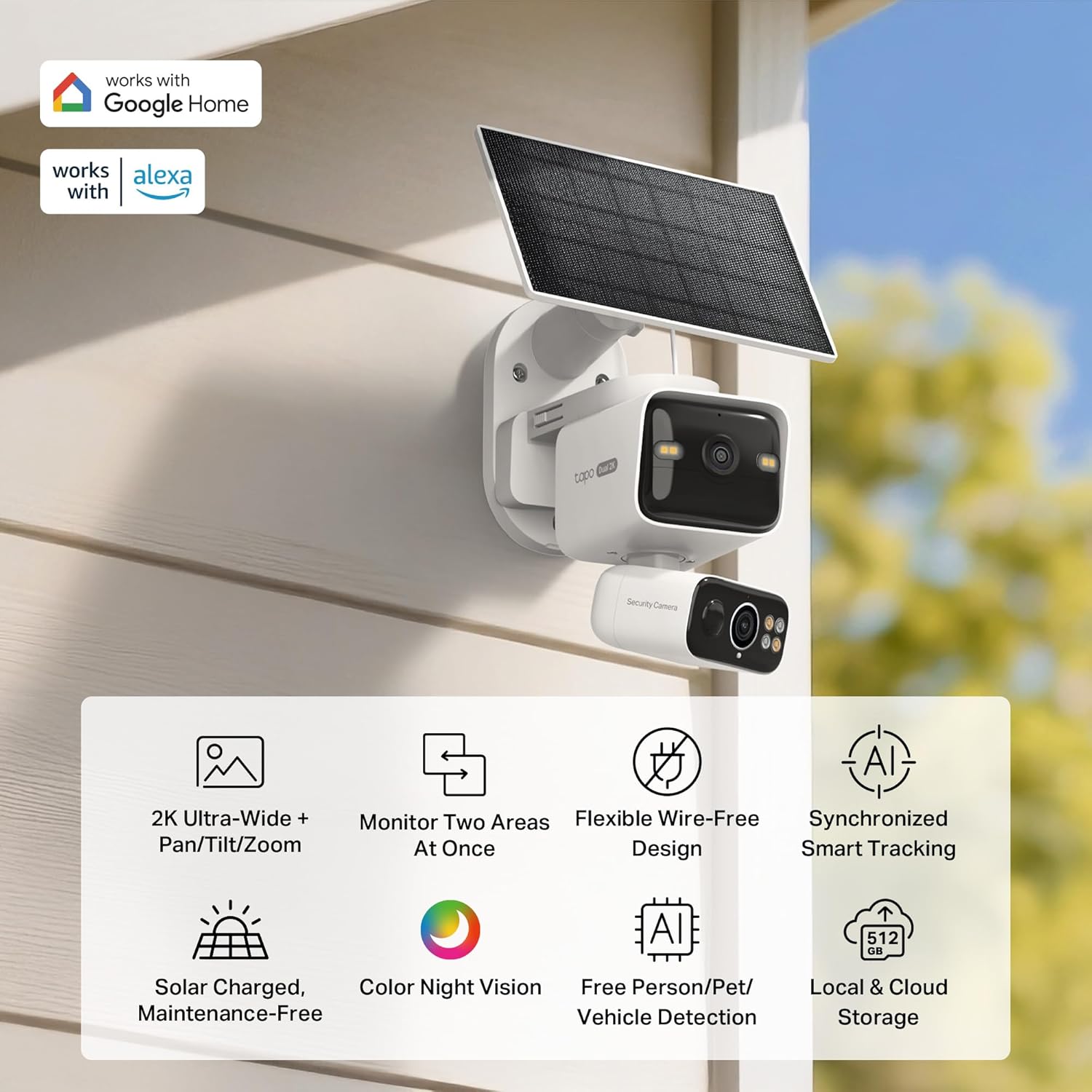
Image: Tapo C645D KIT camera with solar panel mounted on a wall, illustrating its main features and capabilities.
Dual-Lens System
- Fixed Wide-Angle Lens: Provides a 165° ultra-wide view, continuously monitoring one area.
- Pan/Tilt Telephoto Lens: Offers a 360° horizontal and 120° vertical view, capturing zoomed-in details and tracking motion.

Image: Diagram showing the dual-lens functionality, with a wide-angle lens for broad coverage and a telephoto pan/tilt lens for detailed tracking.
Solar Panel
The included solar panel charges the camera's 10,000mAh battery, providing continuous power with just one hour of direct sunlight per day under standard conditions. The solar panel can be installed separately from the camera for optimal sun exposure.

Image: Illustration of the solar charging mechanism, emphasizing eco-friendly and maintenance-free power.
Setup
1. Download the Tapo App
Download the Tapo app from the App Store (iOS 11.0 or higher) or Google Play (Android 5.0 or higher) and create an account.
2. Power Up the Camera
Connect the camera to the solar panel and ensure the battery is charged. The camera will enter setup mode.
3. Add Camera to Tapo App
Follow the in-app instructions to add your Tapo C645D KIT camera to your account. Ensure your mobile device is connected to a 2.4GHz or 5GHz Wi-Fi network.
4. Physical Installation
The camera can be wall-mounted or ceiling-mounted. Pole-mounted setup is also available (pole-mounting loops not included).
- Use the provided mounting template to mark drill holes.
- Drill holes and insert anchors.
- Affix the camera bracket and solar panel bracket using the mounting screws.
- Attach the camera and solar panel to their respective brackets.
- Adjust the solar panel's angle for optimal sunlight exposure.

Image: Flexible solar installation options, demonstrating how the solar panel can be mounted separately from the camera using the extended cable.
Operating the Camera
Live View and Pan/Tilt Control
Access the live feed through the Tapo app. Use the on-screen controls to pan and tilt the telephoto lens for a 360° horizontal view. The fixed wide-angle lens provides a constant overview.

Image: Panoramic coverage of two areas simultaneously, showing both fixed wide-angle and pan/tilt telephoto views on a single screen.
One-Tap Smart Focus
Tap any area on the wide-angle live view in the Tapo app, and the pan/tilt camera will automatically center and zoom in on that specific point for instant detail.

Image: One-Tap Smart Focus in action, allowing users to quickly zoom into specific areas of interest.
AI-Powered Detection & Smart Tracking
The camera features built-in AI for detecting people, vehicles, and pets without a subscription. When motion is detected by the fixed camera, the pan/tilt lens can automatically track the movement.

Image: AI-Powered Detection capabilities, showing how the camera identifies and tracks people, vehicles, and pets.
Night Vision Modes
Choose between vivid full-color night vision with spotlights for detailed clarity or infrared for discreet, power-efficient monitoring in complete darkness.

Image: Comparison of Color Night Vision and Infrared Night Vision modes.
Storage Options
The camera supports local storage via a microSD card (up to 512GB, purchased separately) or cloud storage through a Tapo Care subscription.

Image: Icon representing local and cloud storage options.
Smart Assistant Integration
The Tapo C645D KIT works with Amazon Alexa and Google Assistant for hands-free control and live view projection on compatible smart displays like the Amazon Echo Show.

Image: Icon representing smart assistant integration.
Two-Way Audio
Communicate directly through the camera using the built-in microphone and speaker via the Tapo app.
Privacy Zones & Activity Zones
Customize privacy zones to block recording in designated areas and define activity zones to receive notifications only for relevant events.

Image: Customizable Privacy Zones feature.

Image: Customizable Activity Zones feature.
Maintenance
Solar Charging
The solar panel provides eco-friendly, maintenance-free charging. Ensure the solar panel is positioned to receive at least one hour of direct sunlight daily for optimal performance. The 10,000 mAh rechargeable battery can last up to 4 months per charge during extended cloudy periods.
Weather Resilience
The camera is built with an IP65 weather resistance rating, ensuring reliable operation in temperatures from -4°F to 113°F (with 10% to 90% non-condensing humidity). Regularly check the camera and solar panel for any debris or obstructions that might affect performance.

Image: The camera's weather resilience in various outdoor conditions.
Firmware Updates
Keep the camera's firmware updated by checking the Tapo App regularly for the latest versions. Firmware updates often include performance improvements and security enhancements.
Troubleshooting
Connectivity Issues
- Ensure your Wi-Fi network (2.4GHz or 5GHz) is stable and within range of the camera.
- Check the camera's status LED for connection indicators (refer to the Quick Start Guide for LED indications).
- Restart your router and the camera.
Battery Not Charging
- Verify the solar panel is receiving direct sunlight for at least one hour daily.
- Ensure the solar panel cable is securely connected to the camera.
- Clean the surface of the solar panel to remove any dirt or debris.
Playback Issues / SD Card Errors
- Ensure a compatible microSD card (up to 512GB) is properly inserted.
- Format the microSD card through the Tapo app (Settings > Storage & Recording > Local Storage > Format microSD Card).
- If issues persist, try a different microSD card.
Specifications
| Feature | Detail |
|---|---|
| Brand | Tapo |
| Model Name | Tapo C645D KIT |
| Recommended Uses | Outdoor Security |
| Connectivity Technology | 2.4GHz Wi-Fi, Wireless |
| Special Features | Motion Sensor, Night Vision, PTZ Technology |
| Indoor/Outdoor Usage | Outdoor |
| Compatible Devices | Smartphone, Tablet |
| Controller Type | Amazon Alexa, Google Assistant |
| Mount Type | Wall Mount |
| Color | White |
| Power Source | Battery Powered |
| Video Capture Resolution | 2K 3MP |
| Night Vision Range | 30 Feet |
| Night Vision Type | Night Color |
| Item Dimensions | 3.63 x 3.23 x 4.76 inches (Camera) |
| Solar Panel Dimensions | 6.82 x 4.74 x 0.61 inches |
| Item Weight | 1.5 Kilograms |
| UPC | 810142824330 |
Warranty and Support
For warranty information, technical support, and additional resources, please visit the official Tapo website or contact their customer service. The Quick Start Guide included in your package also contains contact details and support links.
Official Product Video
Video: Official product video for the Tapo C645D KIT, showcasing its features and benefits.


