
1. Introduction
Thank you for choosing the GALAXHERO Large 8 Drawer TV Stand. This manual provides essential information for the safe assembly, operation, and maintenance of your new TV stand. Please read these instructions carefully before use and retain them for future reference.

Image 1.1: Overview of the GALAXHERO Large 8 Drawer TV Stand in a living room setting.
This TV stand is designed to accommodate TVs up to 55 inches and features eight spacious fabric drawers for organized storage. It includes a built-in charging station with AC outlets and USB ports, as well as smart RGB LED lighting to enhance your living space.
2. Safety Information
WARNING: Failure to follow these safety instructions may result in injury or damage to the product.
- Always secure the TV stand to the wall using the provided anti-tipping device to prevent accidental tipping, especially in households with children or pets.
- Be careful around sharp edges during assembly and use.
- Do not overload the TV stand or its drawers. Refer to the specifications for weight limits.
- Ensure all connections for the charging station and LED lights are properly secured and not damaged.
- Keep liquids away from electrical components to prevent electric shock.
- Assemble the unit on a soft, clean surface to prevent scratches.

Image 2.1: Anti-tilt device installation for enhanced safety.
3. Setup and Assembly
This TV stand is designed for easy assembly. Please follow the detailed installation instructions provided in the packaging. All parts and accessories are coded for accurate and faster installation.
3.1. Before You Begin
- Unpack all components and verify that all parts listed in the instruction manual are present and undamaged.
- Gather the necessary tools (usually a screwdriver, not always included).
- Clear a spacious area for assembly, preferably on a soft surface like a carpet to prevent scratching the furniture.
3.2. Assembly Steps
- Assemble the steel frame according to the diagrams in the instruction manual. Ensure all screws are tightened securely.
- Attach the wood top panel to the assembled frame.
- Install the adjustable feet at the bottom of the stand. Adjust them to ensure stability on uneven floors.
- Insert the fabric drawers into their respective slots.
- Install the anti-tipping device to a wall stud as per the safety instructions.
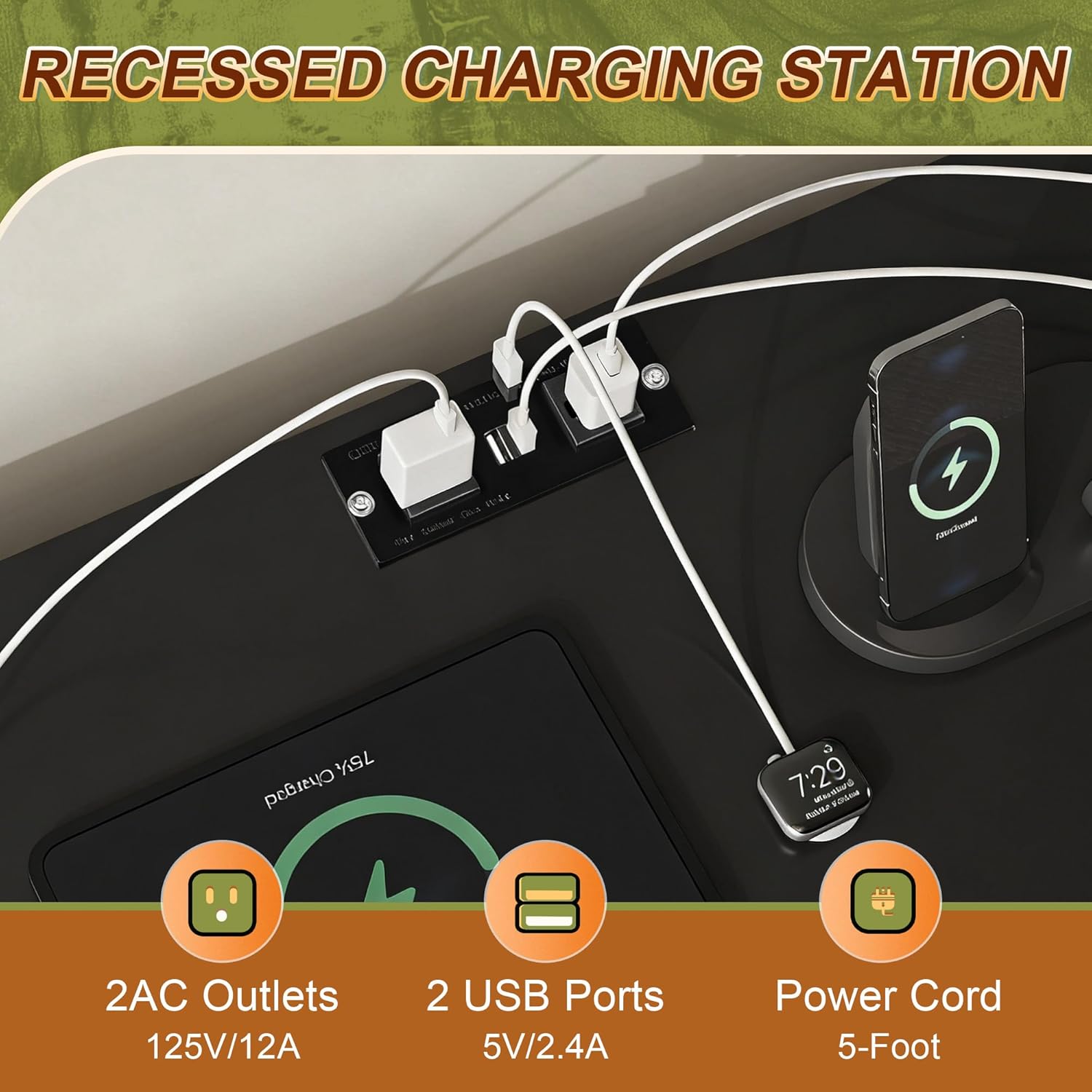
Image 3.1: Illustration of the sturdy steel frame and anti-tilt device.

Image 3.2: Detail of the fabric drawer construction.
4. Operating Instructions
4.1. Charging Station
The TV stand features a built-in power strip for convenient device charging and powering media equipment.
- AC Outlets: Two 125V/12A AC outlets are available for powering your TV, sound system, or other electronics.
- USB Ports: Two 5V/2.4A USB ports are provided for charging smartphones, tablets, and other USB-powered devices.
- Power Cord: The integrated power strip comes with a 5-foot power cord for easy connection to a wall outlet.

Image 4.1: Detail of the recessed charging station.
4.2. Smart RGB LED Lights
The media console tables are equipped with smart RGB LED lights to create various ambient lighting effects.
- Color Options: Choose from multiple colors to match your mood or room decor.
- Control: The LED lights can be controlled via a key control unit or a dedicated mobile application.
- Modes: Explore various modes including Mic Mode (lights react to sound), Music Mode (lights sync with music), and Timing Mode (set schedules for lights).

Image 4.2: Smart RGB LED light features and control options.
4.3. Storage Drawers
The TV stand features eight separate foldable fabric drawers, including two different sizes, to meet your classified storage needs. The wood top is suitable for placing a TV up to 55 inches and frequently used items.
5. Maintenance
Proper care and maintenance will extend the life of your GALAXHERO TV Stand.
- Cleaning the Wood Top: The eco-friendly wood panel is scratch-resistant and has a smooth surface that is easy to clean. Use a soft, damp cloth to wipe away dust and spills. Avoid harsh chemicals or abrasive cleaners.
- Cleaning Fabric Drawers: For the fabric drawers, spot clean with a mild detergent and a damp cloth. Allow to air dry completely. Do not machine wash.
- Electrical Components: Ensure the charging station and LED lights are unplugged before cleaning. Wipe with a dry cloth only.
- Regular Checks: Periodically check all screws and connections to ensure they remain tight. Re-tighten if necessary.

Image 5.1: The waterproof wood top is easy to clean.
6. Troubleshooting
If you encounter any issues with your TV stand, refer to the following common problems and solutions:
- LED Lights Not Working:
- Check if the power cord for the LED lights is securely plugged into an outlet.
- Ensure the LED controller is properly connected.
- Verify that the remote control (if applicable) has working batteries.
- Charging Station Not Providing Power:
- Confirm the main power cord of the TV stand is plugged into a functional wall outlet.
- Test the wall outlet with another device to ensure it has power.
- Check if the devices you are trying to charge are properly connected to the AC outlets or USB ports.
- Stand is Unstable/Wobbly:
- Ensure all assembly screws are tightened.
- Adjust the leveling feet at the bottom of the stand to compensate for uneven flooring.
- Verify the anti-tipping device is correctly installed and secured to the wall.
If the problem persists, please contact customer support.
7. Specifications
| Feature | Detail |
|---|---|
| Brand | GALAXHERO |
| Model | Large 8 Drawer with Electric |
| Color | Black |
| Material | Wood & Fabric & Metal |
| Item Weight | 32.12 Pounds |
| Dimensions (Approx.) | 47.1" (W) x 11.7" (D) x 31" (H) |
| TV Size Compatibility | Up to 55 inches |
| Charging Station | 2 AC Outlets (125V/12A), 2 USB Ports (5V/2.4A) |
| LED Lights | RGB, Multiple Modes (Mic, Music, Timing), Key/App Control |
| Drawers | 8 Foldable Fabric Drawers (various sizes) |
| Assembly Required | Yes |

Image 7.1: Product dimensions and drawer capacities.
8. Warranty and Support
For warranty information or if you have any questions, concerns, or require assistance with assembly or operation, please contact GALAXHERO customer support directly. You can often find contact information on the product packaging or through the seller's page.
Visit the official GALAXHERO Store for more information: GALAXHERO Store