
1. Introduction
Thank you for choosing the GALAXHERO 15-Drawer TV Stand. This manual provides essential information for the safe assembly, operation, and maintenance of your new entertainment center. Please read these instructions carefully before assembly and retain them for future reference.
This TV stand is designed to accommodate TVs up to 65 inches and features 15 fabric drawers for organized storage, a built-in charging station, and integrated LED lighting for enhanced ambiance.
2. Safety Information
WARNING: Careful around sharp edges. Ensure the furniture is properly assembled and secured to the wall to prevent tip-over accidents. Always use the anti-tipping device provided.
- Do not exceed the maximum weight capacity of the top surface (55 lbs) or individual drawers (5.5 lbs for small, 11 lbs for large).
- Keep small parts and packaging materials away from children during assembly.
- Ensure all connections for the charging station and LED lights are secure and correctly plugged into a suitable power source.
- Do not expose the unit to excessive moisture or direct sunlight.
- Periodically check all fasteners to ensure they remain tight.
3. Package Contents
Before beginning assembly, verify that all parts listed below are present and undamaged. If any parts are missing or damaged, please contact customer support.
- Metal Frame Components
- Wooden Top Panel
- Wooden Shelves
- 15 Fabric Drawers (various sizes)
- Built-in Charging Station (Power Strip with 2 AC outlets, 2 USB ports)
- LED Light Strip with Controller
- Adjustable Feet
- Anti-Tipping Device
- Assembly Hardware (screws, bolts, Allen wrench)
- Assembly Instructions Manual
4. Assembly and Setup
Assembly is required for this product. Please follow the detailed instructions provided in the separate assembly guide included in your package. All parts and accessories are coded for accurate and faster installation.
Key Assembly Steps:
- Unpack all components and lay them out on a clean, soft surface to prevent scratches.
- Assemble the metal frame according to the diagrams in the assembly guide.
- Attach the wooden top panel and shelves. Ensure shelves are placed in desired positions for adjustable storage.
- Install the fabric drawers into their respective slots.
- Mount the built-in charging station and connect the LED light strip.
- Attach the adjustable feet to the bottom of the frame.
- Secure the anti-tipping device to the back of the unit and to a wall stud.
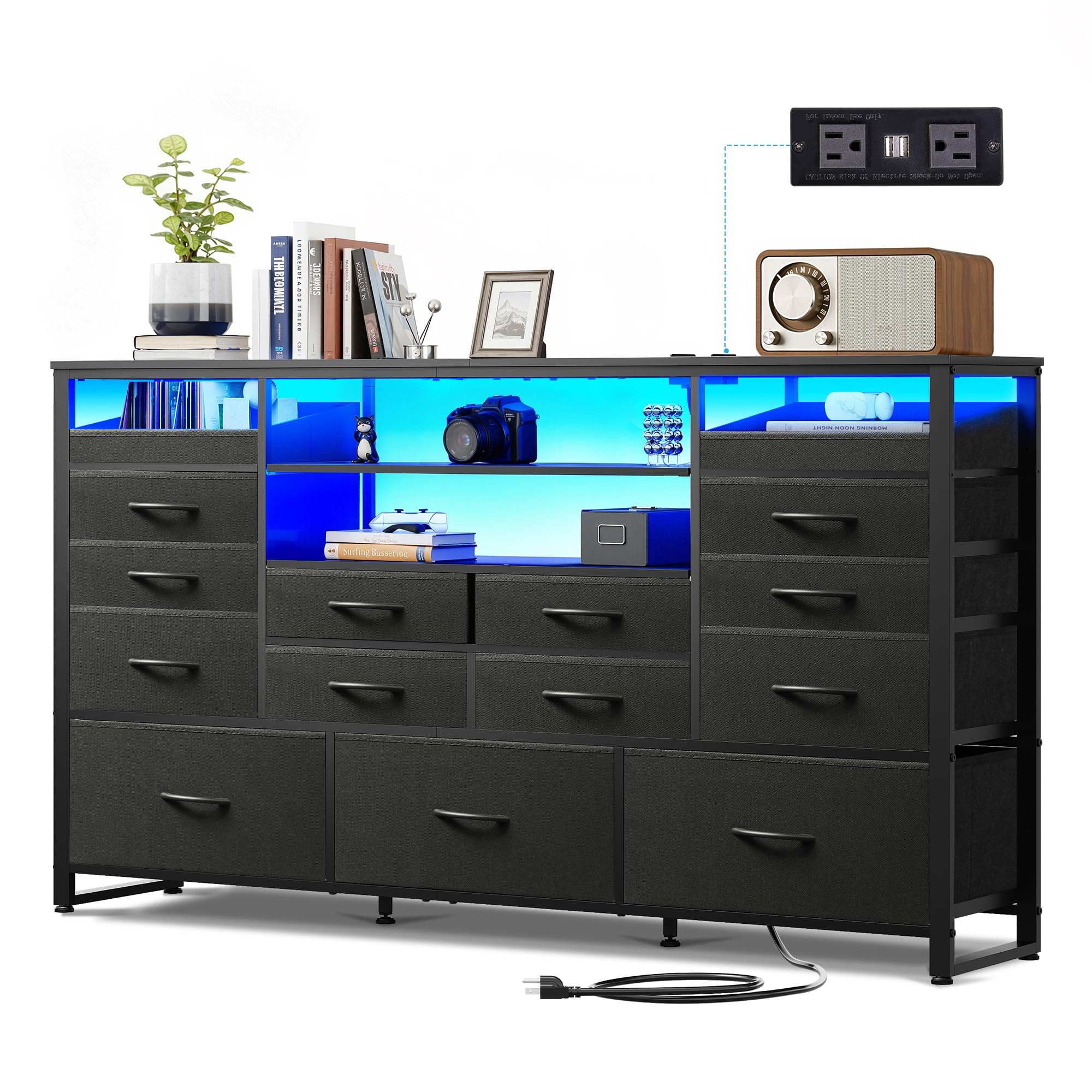
Figure 4.1: Fully assembled TV stand with a television and illuminated LED lights.

Figure 4.2: Details of the sturdy steel frame construction, anti-tilt device, solid drawer slides, and 360-degree adjustable feet.

Figure 4.3: Examples of adjustable shelf and drawer configurations to suit various storage needs.
5. Operating Instructions
5.1. LED Lighting System
The integrated LED lights offer multiple modes and colors to customize your ambiance. The lights can be controlled via a key control unit or a dedicated mobile application.
- Key Control: Use the inline remote control to cycle through colors, adjust brightness, and select different modes.
- App Control: Download the specified mobile application (refer to the LED light instruction sheet for QR code or app name) to access advanced features like Mic Mode, Music Mode, Timing Mode, and over 6000 RGB color options.

Figure 5.1: Overview of LED light control options and available modes.
5.2. Built-in Charging Station
The TV stand includes a convenient power strip to charge your devices and power electronics.
- AC Outlets: Features 2 standard AC outlets (125V/12A) for powering your TV, sound system, or other appliances.
- USB Ports: Includes 2 USB ports (5V/2A) for charging smartphones, tablets, and other USB-powered devices.
- Power Cord: The integrated power cord is 5 feet long. Ensure it is plugged into a grounded wall outlet.

Figure 5.2: Detail of the built-in charging station with AC outlets and USB ports.
5.3. Fabric Drawers
The 15 fabric drawers provide versatile storage. They are designed with a 3-tier structure for durability and feature easy-to-pull arc handles.
- To open, gently pull the arc handle.
- To close, push the drawer back into its slot until it is flush with the frame.
- Drawers can be rearranged or removed to customize storage compartments.

Figure 5.3: Construction details of the durable fabric drawers.
6. Maintenance
6.1. Cleaning
- Wooden Surfaces: Wipe clean with a soft, damp cloth. Avoid harsh chemicals or abrasive cleaners.
- Fabric Drawers: Spot clean with a mild detergent and a damp cloth. Allow to air dry completely. Do not machine wash.
- Metal Frame: Wipe with a soft, dry cloth.
6.2. General Care
- Periodically check all screws and bolts to ensure they are tight.
- Avoid placing hot items directly on the wooden top surface. Use coasters or protective pads.
- Do not drag the unit; lift it when moving to prevent damage to the frame or floor.
7. Troubleshooting
| Problem | Possible Cause | Solution |
|---|---|---|
| LED lights not working | Power connection loose; Controller malfunction; Light strip damage | Check all power connections. Ensure the power adapter is plugged into a working outlet. Try resetting the controller. If issues persist, contact customer support. |
| Charging station not providing power | Power cord not plugged in; Outlet not working; Overload | Ensure the main power cord is securely plugged into a functional wall outlet. Test the outlet with another device. Reduce the number of devices plugged into the station. |
| Drawers are stiff or do not slide smoothly | Drawer not inserted correctly; Obstruction; Frame misalignment | Remove the drawer and reinsert it, ensuring it is properly aligned. Check for any objects obstructing the drawer path. Verify that the frame is assembled squarely. |
| Unit feels unstable or wobbly | Uneven floor; Loose fasteners; Anti-tipping device not installed | Adjust the leveling feet on the bottom of the unit to stabilize it. Tighten all assembly screws. Ensure the anti-tipping device is securely installed to the wall. |
8. Specifications
- Brand: GALAXHERO
- Model: 15 Drawer with Electric
- Color: Black
- Material Type: Wood, Fabric, & Metal
- Item Weight: 56.2 Pounds
- Number of Drawers: 15
- Dimensions (Approximate): 59.06 inches (Width) x 11.73 inches (Depth) x 32.87 inches (Height)
- Top Surface Weight Capacity: 55 lbs
- Small Drawer Weight Capacity: 5.5 lbs
- Large Drawer Weight Capacity: 11 lbs
- Additional Features: Adjustable Feet, Safety Stop (Anti-Tipping Device), Space Saving Design, Built-in Charging Station (2 AC Outlets, 2 USB Ports), RGB LED Lights
- Required Assembly: Yes (Instructions Included)

Figure 8.1: Product dimensions and weight capacities.
9. Warranty and Support
For any questions, concerns, or assistance with assembly, missing parts, or product functionality, please contact GALAXHERO customer support. Refer to your purchase documentation or the GALAXHERO website for specific warranty details and contact information.
We are committed to providing quality products and support.