
1. Introduction
Thank you for choosing the Kappesberg TV Stand, Model R265. This elegant and functional media console features a white and cinnamon finish, three doors, and is designed to accommodate TVs up to 75 inches. Its versatile style and balanced proportions enhance any living space, providing both organization and aesthetic appeal. This manual provides essential information for safe assembly, proper use, and maintenance of your new TV stand.

Figure 1: Front view of the Kappesberg TV Stand R265, showcasing its white top and cinnamon-colored doors and legs.
2. Safety Information
Please read and understand all safety instructions before assembly and use. Failure to follow these instructions may result in injury or damage to the product.
- Weight Capacity: Do not place objects on the top surface that exceed the recommended weight of 50 kg (110 lbs). Overloading can cause instability and damage.
- Sharp Edges: Exercise caution during assembly and handling to avoid injury from sharp edges.
- Assembly: Always follow the assembly instructions provided in the included manual carefully. Ensure all parts are correctly installed and tightened before use.
- Stability: Place the TV stand on a flat, level surface to prevent tipping. Consider using wall anchor kits (not included) for added stability, especially in homes with children or pets.
- Children and Pets: Keep children and pets away from the assembly area. Do not allow children to climb on or play with the TV stand.
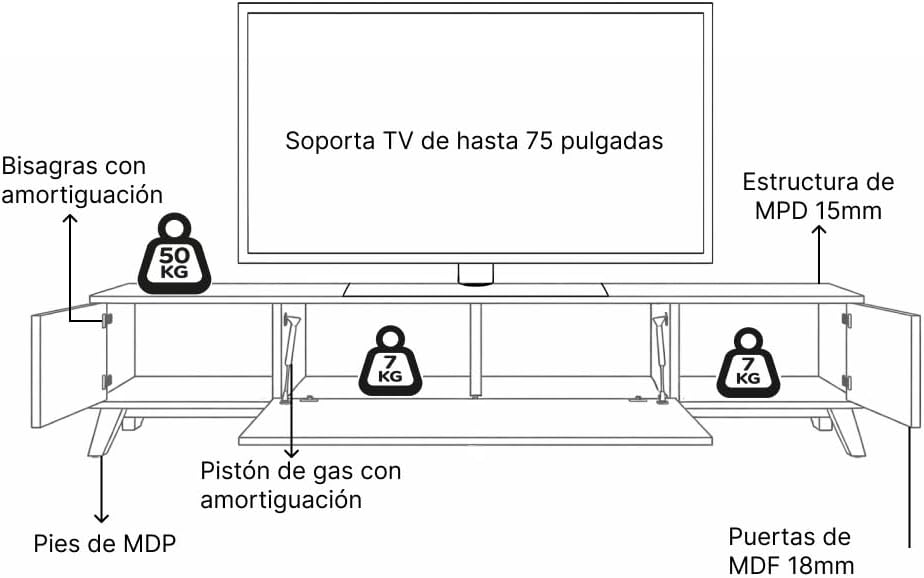
Figure 2: Diagram illustrating the maximum weight capacity for the top surface (50 kg) and internal shelves (7 kg each), along with material specifications (15mm MDP structure, 18mm MDF doors, MDP feet).
3. Package Contents
Before beginning assembly, verify that all parts listed in the included assembly manual are present and undamaged. If any parts are missing or damaged, do not proceed with assembly. Contact Kappesberg customer support for assistance.
The package typically includes:
- Main structural panels (MDP)
- Three door panels (MDF)
- Legs (MDP)
- Hardware kit (screws, dowels, hinges, gas pistons)
- Assembly Instruction Manual
4. Assembly Instructions (Setup)
Assembly of the Kappesberg TV Stand R265 requires basic tools (e.g., screwdriver, hammer) and typically two people. Follow the detailed step-by-step instructions provided in the separate assembly manual included in your package.
General Assembly Steps:
- Prepare the Area: Clear a spacious, clean, and well-lit area for assembly. Lay down a blanket or cardboard to protect the furniture pieces and your floor.
- Identify Parts: Unpack all components and hardware. Refer to the parts list in your assembly manual to identify each piece.
- Assemble the Frame: Begin by connecting the main structural panels according to the diagrams in the manual. Ensure all connections are secure.
- Attach Legs: Securely fasten the MDP legs to the base of the TV stand.
- Install Doors and Hinges: Attach the hinges to the door panels and then to the main frame. The side doors feature soft-close hinges, and the central door uses gas pistons for smooth opening.
- Final Checks: Once assembled, gently move the stand to its desired location. Check for stability and ensure all doors open and close smoothly.

Figure 3: View of the TV stand with the doors open, revealing the internal storage compartments and the soft-close hinge mechanism on the side door.

Figure 4: Detailed view of the gas piston mechanism, which provides smooth and controlled opening for the central door.
5. Operating Instructions
The Kappesberg TV Stand R265 is designed for straightforward use.
- Placing Your TV: Position your television centrally on the top surface. Ensure the TV base fits within the stand's dimensions and does not exceed the 50 kg weight limit.
- Using the Doors:
- The two outer doors open outwards on soft-close hinges, providing access to internal storage compartments.
- The central door opens downwards, supported by gas pistons for a smooth and controlled motion. This compartment is ideal for media devices or frequently accessed items.
- Storage: Utilize the internal shelves behind the doors to store electronic devices, media, books, or decorative items. Each internal shelf has a weight capacity of 7 kg.

Figure 5: All three doors of the TV stand are open, displaying the spacious internal compartments suitable for various media and decorative items.
6. Maintenance
Proper care will ensure the longevity and appearance of your Kappesberg TV Stand.
- Cleaning: Wipe surfaces with a soft, damp cloth. Avoid abrasive cleaners, harsh chemicals, or excessive moisture, as these can damage the finish.
- Spills: Clean up spills immediately to prevent staining or damage to the engineered wood.
- Sunlight: Avoid prolonged exposure to direct sunlight, which can cause fading or discoloration over time.
- Heat and Moisture: Keep the TV stand away from direct heat sources and areas of high humidity.
- Hardware: Periodically check all screws and fasteners to ensure they remain tight. Retighten if necessary, but do not overtighten.
7. Troubleshooting
If you encounter any issues with your TV stand, refer to the following common solutions:
- Wobbly Stand:
- Ensure the stand is placed on a completely level surface.
- Check that all assembly screws and fasteners are securely tightened.
- Verify that the legs are properly attached and not damaged.
- Doors Not Closing Properly:
- Inspect hinges for proper alignment and tightness. Adjust if necessary (refer to your assembly manual for hinge adjustment details).
- Ensure no objects inside the compartments are obstructing the door's path.
- For the central door, check the gas pistons for any signs of damage or misalignment.
- Scratches or Minor Damage:
- For minor scratches, touch-up pens or furniture repair kits matching the white or cinnamon finish may be used.
8. Specifications
| Feature | Detail |
|---|---|
| Model | R265 |
| Brand | Kappesberg |
| Color | White / Cinnamon |
| Dimensions (W x H x D) | 180 cm x 52.5 cm x 42 cm (70.9 in x 20.7 in x 16.5 in) |
| Item Weight | 33 kg (72.7 lbs) |
| Material Type | Engineered Wood (MDP structure, MDF doors) |
| Number of Doors | 3 |
| Door Mechanism | Soft-close hinges (outer doors), Gas pistons (central door) |
| Max TV Size Supported | Up to 75 inches |
| Max Top Surface Weight Capacity | 50 kg (110 lbs) |
| Max Internal Shelf Weight Capacity | 7 kg (15.4 lbs) per shelf |
| Assembly Required | Yes |
| Country of Origin | Brazil |

Figure 6: Detailed dimensional diagram of the TV stand, showing overall width (180 cm), height (52.5 cm), and depth (42 cm), along with internal compartment measurements.

Figure 7: The TV stand shown next to a person (165 cm tall) to provide a visual reference for its size and proportions.
9. Warranty Information
Kappesberg products are manufactured to high-quality standards. For specific warranty terms and conditions, please refer to the warranty documentation included with your purchase or visit the official Kappesberg website. The warranty typically covers manufacturing defects under normal use. Keep your proof of purchase for any warranty claims.
10. Customer Support
If you have any questions, require assistance with assembly, or need to report missing/damaged parts, please contact Kappesberg customer support.
- Online: Visit the official Kappesberg website for support resources and contact information.
- Retailer: Contact the retailer from whom you purchased the product.


