
1. Introduction
Thank you for choosing the Oklar Wrist Blood Pressure Monitor. This device is designed for convenient and accurate measurement of blood pressure and pulse rate at home. Please read this manual thoroughly before use to ensure proper operation and to obtain the most accurate results.
Important Safety Information
- Keep out of reach of children.
- This monitor is not intended to be a diagnostic device. Operate the device only as intended. Do not use this device for any other purpose.
- Do not adjust medication based on readings from this blood pressure monitor. Take medication as prescribed by your physician.
- Do not use this monitor on an injured wrist or a wrist under medical treatment.
- Do not use this device in oxygen-rich environments or near flammable gas.
- This device is intended for use in measuring blood pressure and pulse rate in the adult population.
2. What's in the Box
Upon opening your Oklar Wrist Blood Pressure Monitor package, you should find the following items:
- Blood Pressure Monitor
- Carrying Box
- Instruction Manual
- Power Cord (Type-C cable)
- Quick Guide

Image: All components included in the Oklar Wrist Blood Pressure Monitor package.
3. Product Overview
The Oklar Wrist Blood Pressure Monitor is a compact and user-friendly device designed for accurate blood pressure and pulse rate measurements. It features a large LED backlit display for easy readability, a voice broadcast function, and memory storage for two users.
Key Features:
- Fast and Accurate Measurements: Provides precise results in approximately 35 seconds.
- Large LED Backlit Display: Clear numbers for easy reading, even in low-light conditions.
- Voice Broadcast Design: Announces readings, ideal for users with visual impairments. Volume is adjustable.
- Convenient Dual User Mode: Stores up to 240 readings (120 per user) for tracking and comparison.
- Portable & Rechargeable: Built-in rechargeable battery with Type-C charging for on-the-go monitoring.
- Adjustable Wrist Cuff: Fits wrist circumferences from 4.92 to 8.46 inches (12.5 cm to 21.5 cm).
- Automatic Power Off: Device turns off after 60 seconds of inactivity to conserve battery.

Image: Overview of key features including one-button operation, voice broadcast, large LED display, and two-user memory.
4. Charging the Device
The Oklar Wrist Blood Pressure Monitor is equipped with a built-in rechargeable battery. To charge the device:
- Locate the Type-C charging port on the side of the monitor.
- Connect the provided Type-C cable to the monitor and the other end to a compatible USB charging adapter (not included).
- The battery indicator on the display will show charging status.
- Once fully charged, disconnect the cable.
A full charge ensures extended use without the need for frequent battery replacements.

Image: The blood pressure monitor being charged via its Type-C USB port.
5. Setup
Before taking your first measurement, you may want to configure user settings and voice volume.
Setting User ID:
- With the device off, long press the SET button for approximately 3 seconds to enter set mode.
- The user ID icon (person icon) will start flashing.
- Press the MEM button to switch between User 1 and User 2.
- Press the SET button to confirm your selection.
Adjusting Voice Volume:
- After setting the User ID, the display will show 'SP' followed by a number (e.g., SP 2) indicating the current volume level.
- Press the MEM button to cycle through volume levels (e.g., Level 1, Level 2, Level 3, OFF).
- Press the SET button to confirm your desired volume.
6. Operating Instructions
For accurate blood pressure measurement, proper positioning and technique are crucial.
Preparation for Measurement:
- Sit comfortably in a chair with your back and arm supported. Keep your feet flat on the floor and uncrossed.
- Avoid talking or moving during the measurement.
- Ensure the device is charged.
Applying the Wrist Cuff:
- Place the monitor on your left wrist with the display facing you.
- Ensure there is approximately 0.5 inches (1 cm) space between the cuff and the bottom of your palm.
- Wrap the cuff firmly around your wrist. It should be snug but not too tight.
- Position your wrist at the same level as your heart. You can rest your elbow on a table for support.
Taking a Measurement:
- Press the START/STOP button. The cuff will begin to inflate.
- Remain still and quiet until the measurement is complete.
- The device will display your systolic pressure (SYS), diastolic pressure (DIA), and pulse rate (PUL). If voice broadcast is enabled, it will announce the readings.
- The device will automatically turn off after 60 seconds of inactivity.

Image: Step-by-step guide on how to properly wear and use the blood pressure monitor.
Video: An official product video demonstrating the unboxing, charging, and usage of the Oklar Wrist Blood Pressure Monitor.
7. Memory Function
The monitor can store up to 240 readings, divided between two users (120 readings per user). This allows for easy tracking of blood pressure trends over time.
Accessing Memory Records:
- With the device off, press the MEM button.
- The display will show the average of your last three readings.
- Press the MEM button repeatedly to scroll through individual past readings.
- To switch between User 1 and User 2 memory, ensure the correct user ID is selected in the setup mode (see Section 5).

Image: The monitor supports two users with 120 memory spaces each, allowing for long-term tracking of blood pressure data.
8. Voice Broadcast Feature
The Oklar Blood Pressure Monitor includes a voice broadcast function that announces your blood pressure and pulse rate readings. This feature is particularly beneficial for users with visual impairments.
Adjusting Voice Volume:
As detailed in the Setup section (Section 5), you can adjust the voice volume or turn the feature off completely by pressing the MEM button in set mode until 'SP' appears, then cycle through the volume options and confirm with SET.

Image: The monitor features an irregular heartbeat indicator and a voice broadcast function for clear communication of results.
9. Understanding Your Readings
The monitor provides systolic (SYS) and diastolic (DIA) blood pressure readings, along with your pulse rate. The device also includes a color-coded indicator based on WHO (World Health Organization) guidelines to help you interpret your results.
| LED Indicator | Classification | SYS (mmHg) | DIA (mmHg) |
|---|---|---|---|
| Green | Best | ≤119 | ≤79 |
| Light Green | Normal | 120-129 | 80-84 |
| Yellow | High-Normal | 130-139 | 85-89 |
| Orange | Mild Hypertension | 140-159 | 90-99 |
| Dark Orange | Moderate Hypertension | 160-179 | 100-109 |
| Red | Serious Hypertension | ≥180 | ≥110 |
Consult your physician for interpretation of your blood pressure readings and for any health concerns.

Image: The monitor's display showing blood pressure readings and the color-coded WHO classification bar.
10. Maintenance
To ensure the longevity and accuracy of your blood pressure monitor, follow these maintenance guidelines:
- Cleaning: Wipe the device and cuff with a soft, dry cloth. Do not use abrasive cleaners or immerse the device in water.
- Storage: Store the monitor in its provided carrying case in a cool, dry place, away from direct sunlight, extreme temperatures, and humidity.
- Battery Care: Recharge the device regularly to maintain battery health. Avoid completely draining the battery for extended periods.
- Avoid Impact: Handle the device with care to prevent damage from drops or impacts.
11. Troubleshooting
If you encounter any issues with your blood pressure monitor, refer to the table below for common problems and solutions:
| Problem | Possible Cause | Solution |
|---|---|---|
| No display/Device won't turn on | Low battery or device off | Charge the device fully. Ensure the power switch is in the ON position. |
| Inaccurate readings | Improper cuff placement, movement during measurement, or incorrect arm position. | Re-apply the cuff correctly, remain still and quiet, and ensure wrist is at heart level. |
| Cuff does not inflate | Cuff not properly attached or air leakage. | Check cuff connection and ensure it is securely wrapped around the wrist. |
| Voice broadcast not working | Voice function is off or volume is too low. | Adjust voice volume in setup mode (see Section 5). |
If the problem persists after trying these solutions, please contact customer support.
12. Specifications
Below are the technical specifications for the Oklar Wrist Blood Pressure Monitor (Model W1101L):
- Model Number: W1101L
- Measurement Method: Oscillometric Method
- Blood Pressure Range: 20-280 mmHg
- Pulse Rate Range: 40-165 beats/min
- Blood Pressure Accuracy: ±3 mmHg or ±2%
- Pulse Rate Value Accuracy: ±5% of measured data
- Display Type: LED
- Power Source: Built-in Lithium Ion battery (included)
- Charging: Type-C USB cable (included)
- Automatic Power Off: 60 seconds of inactivity
- Memory Storage: 99 sets for 2 users (total 198 readings)
- Wrist Circumference: 4.92 to 8.46 inches (12.5 cm to 21.5 cm)
- Product Dimensions: 3.03"L x 2.55"W x 2.63"Th (7.7 cm x 6.5 cm x 6.7 cm)
- Item Weight: 3.59 Ounces (101.7 grams)
- Operating Temperature and Humidity: +5°C ~ +40°C, 15%RH ~ 80%RH
- Storage Temperature and Humidity: -20°C ~ +55°C, 10%RH ~ 93%RH
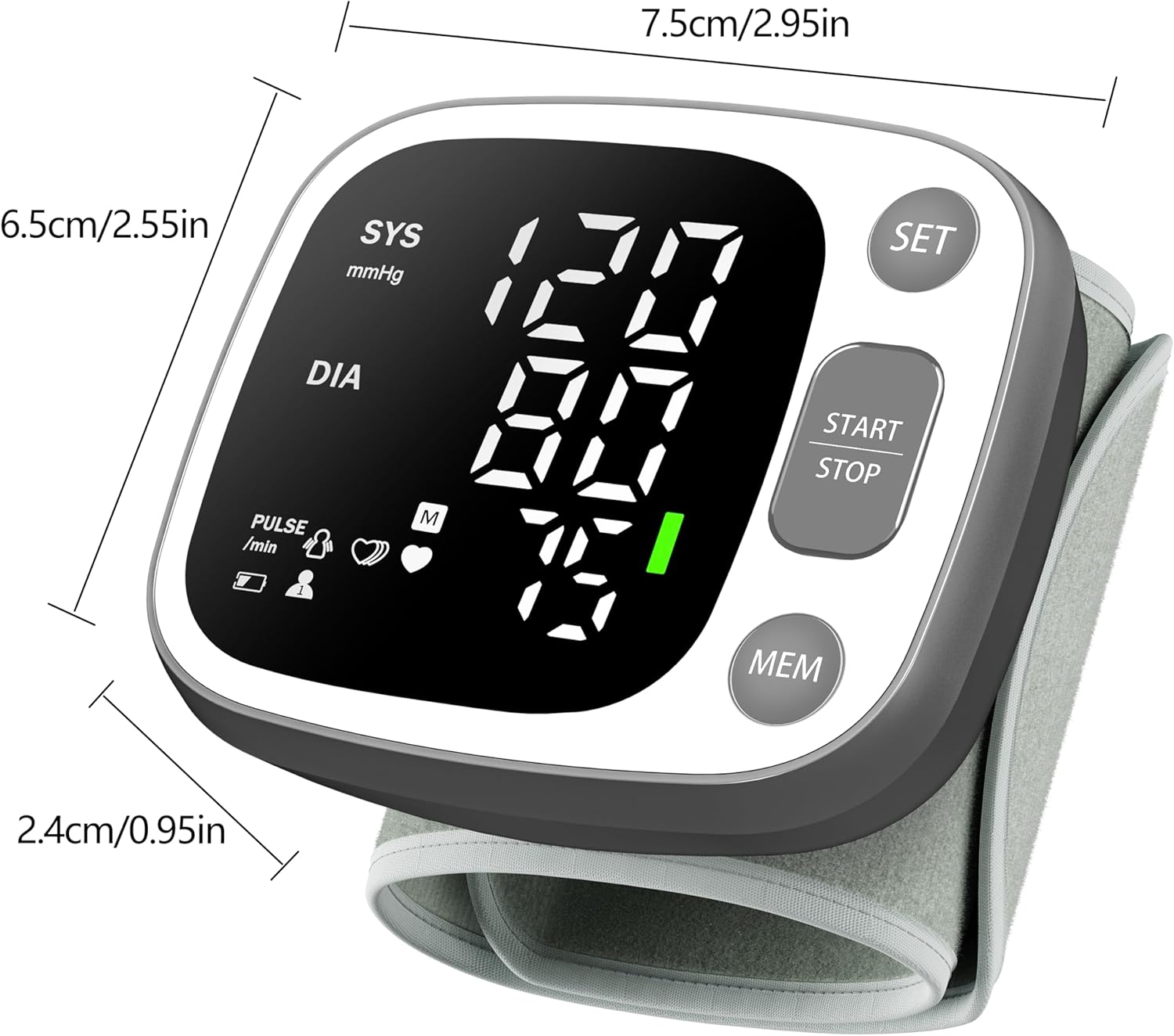
Image: Detailed dimensions of the Oklar Wrist Blood Pressure Monitor.
13. Warranty and Support
For any inquiries, warranty claims, or technical support, please contact us via email. We aim to respond within 24 hours.
- Support Email: update.warranty.service@gmail.com
To ensure transportation safety, batteries are not attached. Apologies for the inconvenience, we will extend 6 months warranty. Please Order ID and To activate warranty service.


