
1. Introduction
The Langsdom AirWave Max headphones are designed for sports and active lifestyles, featuring an open-ear design for situational awareness and IP67 waterproofing. This manual provides instructions for the proper use, maintenance, and troubleshooting of your device.
Key Features:
- Open-Ear Design: Allows you to hear your surroundings while listening to audio.
- IP67 Waterproof: Resistant to sweat, rain, and dust.
- 17-Hour Playtime: Extended battery life for long usage.
- Custom App Control: Manage settings, EQ, and AI Assistant via a dedicated application.
- Ultralight & Secure Fit: Weighs 27g with an ergonomic, skin-friendly silicone design.
- Dual Mode: Supports both Bluetooth and built-in MP3 player functionality.
2. Package Contents
Please check the package for the following items:
- Langsdom AirWave Max Open-Ear Sports Headphones
- Magnetic Charging Cable
- User Manual (this document)
- Storage Bag

Image: A collage showing the Langsdom AirWave Max headphones, a magnetic charging cable, and a storage bag, highlighting features like open-ear comfort, 17-hour battery life, clear calls, IP67 waterproof rating, upgraded embedded memory, and dual Bluetooth/MP3 mode.
3. Product Overview
Familiarize yourself with the components and controls of your AirWave Max headphones.
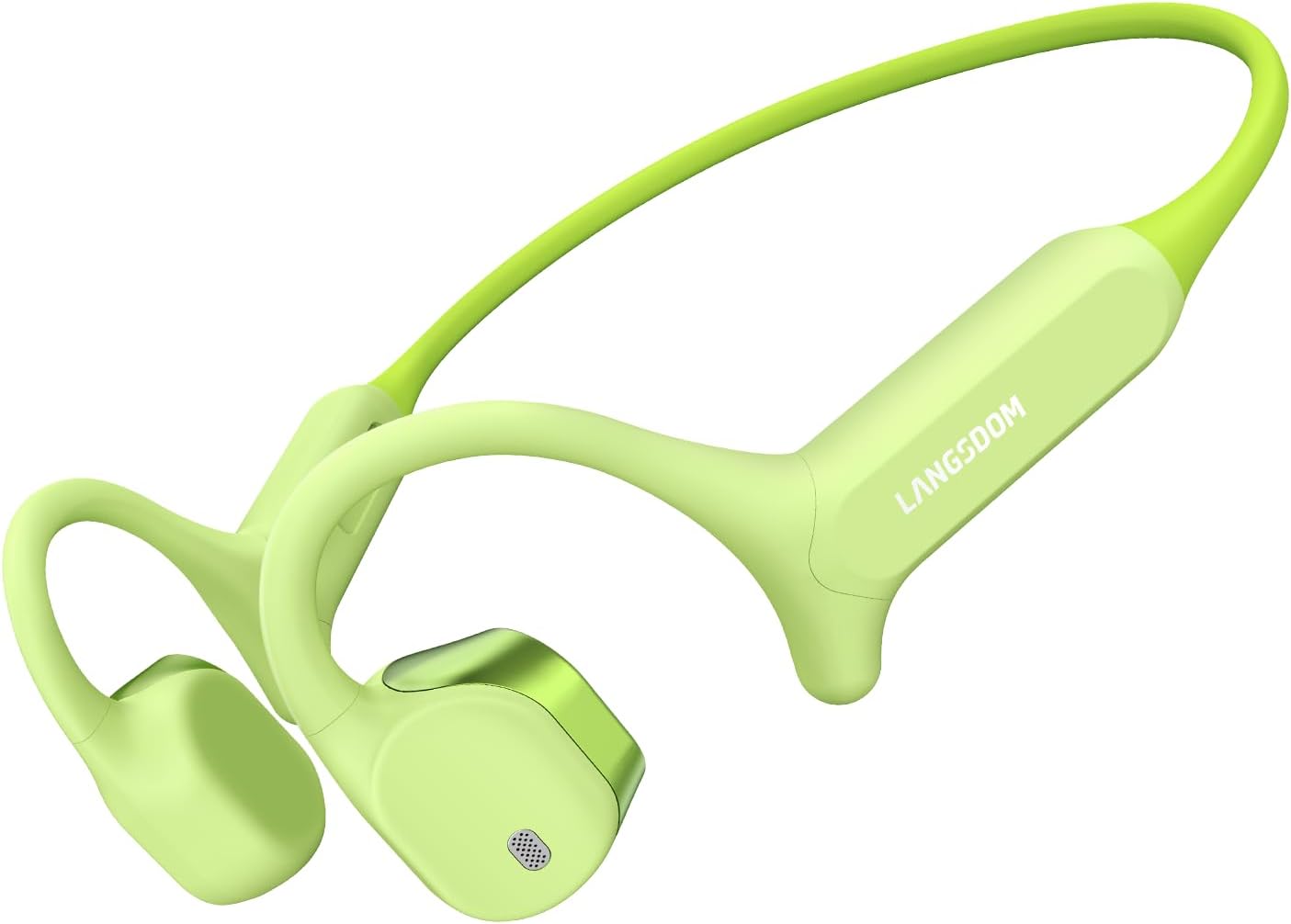
Image: A front-facing view of the Langsdom AirWave Max open-ear sports headphones in avocado green, showcasing their ergonomic design and the Langsdom logo on the side.
Components:
- Speaker Units: Deliver audio without covering the ear canal.
- Control Buttons: Located on the side for power, volume, and playback.
- Microphone: For calls and voice commands.
- Magnetic Charging Port: For connecting the charging cable.
- Flexible Neckband: Connects the two speaker units and rests behind the head.

Image: Two pairs of Langsdom AirWave Max headphones, illustrating the "STD" (17.4 cm) and "XL" (19.3 cm) band sizes for different head sizes, emphasizing a perfect fit.
4. Setup
4.1 Charging the Headphones
Before first use, fully charge your headphones. Use the provided magnetic charging cable.
- Connect the magnetic end of the charging cable to the charging port on the headphones.
- Connect the USB end of the cable to a USB power adapter (not included) or a computer's USB port.
- The LED indicator will show charging status (refer to LED indicator section for details).
- A full charge typically takes approximately 1 hour.
4.2 Power On/Off
- To Power On: Press and hold the Power button until the LED indicator flashes and you hear a power-on prompt.
- To Power Off: Press and hold the Power button until the LED indicator turns off and you hear a power-off prompt.
4.3 Bluetooth Pairing
Pair your headphones with your smartphone or other Bluetooth-enabled devices.
- Ensure the headphones are powered off.
- Press and hold the Power button for approximately 5-7 seconds until the LED indicator flashes red and blue alternately, indicating pairing mode.
- On your device, enable Bluetooth and search for available devices.
- Select "Langsdom AirWave Max" from the list.
- Once connected, the LED indicator will flash blue slowly, and you will hear a confirmation prompt.
Multipoint Pairing: The AirWave Max supports connecting to two devices simultaneously. After pairing with the first device, disable Bluetooth on the first device, then pair with the second device. Re-enable Bluetooth on the first device, and the headphones should connect to both.

Image: The Langsdom AirWave Max headphones shown connected wirelessly to a smartphone displaying the Langsdom app and a smartwatch, demonstrating multipoint pairing capability.
4.4 App Installation and Connection
Download the dedicated Langsdom app for enhanced control and customization.
- Scan the QR code in the product packaging or search for "Langsdom" in your device's app store.
- Install the app.
- Ensure your headphones are powered on and connected via Bluetooth to your device.
- Open the Langsdom app; it should automatically detect and connect to your headphones.
5. Operating Instructions
5.1 Wearing the Headphones
Place the headphones with the speaker units resting gently on your cheekbones, just in front of your ears. The neckband should rest comfortably behind your head.

Image: A person wearing the Langsdom AirWave Max headphones, demonstrating the correct placement with the speaker units resting in front of the ears and the neckband behind the head.
5.2 Basic Controls (Button Control)
The headphones feature tactile buttons for easy control:
- Power Button:
- Press and hold: Power On/Off
- Short press: Play/Pause (in music mode), Answer/End Call (in call mode)
- Double press: Activate Voice Assistant (AI Assistant)
- Volume Up (+) Button:
- Short press: Increase volume
- Press and hold: Next track
- Volume Down (-) Button:
- Short press: Decrease volume
- Press and hold: Previous track
5.3 MP3 Mode (Built-in Memory)
The AirWave Max includes built-in memory for storing up to 400 songs, allowing use without a connected device.
- Switching Modes: Refer to the app or specific button combination (usually a long press on a specific button, check product packaging for exact details if not in app).
- Uploading Music: Connect the headphones to a computer using the magnetic charging cable. The headphones will appear as a removable drive. Drag and drop your audio files into the designated folder.

Image: An illustration showing the battery performance of Langsdom AirWave Max in both Bluetooth mode (17h at 50% volume, 10h at 100% volume) and MP3 mode (12h at 50% volume, 8h at 100% volume).
5.4 App Features
The Langsdom app provides additional functionalities:
- Battery Monitoring: View real-time battery level.
- EQ Equalizer: Customize sound profiles (e.g., bass, treble) to your preference.
- AI Assistant: Manage and activate the integrated AI assistant feature.
- Firmware Updates: Receive and install updates for improved performance.
6. Maintenance
6.1 Cleaning
To maintain hygiene and performance:
- Wipe the headphones with a soft, damp cloth.
- Do not use abrasive cleaners or solvents.
- Ensure the charging port is dry before charging.
6.2 Storage
Store your headphones in a cool, dry place away from direct sunlight and extreme temperatures. Use the provided storage bag for protection.
6.3 Water Resistance (IP67 Rating)
The AirWave Max headphones are IP67 rated, meaning they are protected against dust ingress and can withstand immersion in water up to 1 meter for 30 minutes. This makes them suitable for heavy sweat, rain, and splashes. However, they are not designed for swimming or prolonged submersion.

Image: A person running outdoors, wearing the Langsdom AirWave Max headphones, with water droplets visible, illustrating the IP67 waterproof feature for active use in various weather conditions.
7. Troubleshooting
Common Issues and Solutions:
- Headphones will not power on:
- Ensure the headphones are fully charged.
- Press and hold the Power button for the required duration.
- Cannot pair with device:
- Ensure Bluetooth is enabled on your device.
- Make sure the headphones are in pairing mode (LED flashing red/blue).
- Move the headphones closer to your device.
- Try restarting both the headphones and your device.
- No sound or low volume:
- Check the volume level on both the headphones and your connected device.
- Ensure the headphones are properly connected via Bluetooth.
- If using MP3 mode, ensure music files are correctly loaded.
- Poor call quality (muffled sound for caller):
- Ensure the microphone is not obstructed.
- Test in a quieter environment.
- Ensure a stable Bluetooth connection.
- Headphones change language unexpectedly:
- This can sometimes occur due to accidental button combinations. Refer to the app settings or the official Langsdom support website for specific instructions on how to reset the language.
8. Specifications
| Model Name | AirWave Max |
| Model Number | BE18 |
| Brand | Langsdom |
| Ear Placement | Open Ear |
| Connectivity Technology | Bluetooth 6.0 |
| Water Resistance Level | IP67 (Waterproof) |
| Battery Life (Average) | Up to 17 Hours |
| Battery Charge Time | 1 Hour |
| Item Weight | 27 Grams |
| Enclosure Material | Silicone |
| Control Type | Button Control, App Control |
| Additional Features | App Support, Multipoint Pairing, Personalized EQ Adjustments, Spatial Sound Effects |

Image: A diagram illustrating the "Directional Sound Technology 5.0" and "360° Immersive Soundstage" of the Langsdom AirWave Max headphones, showing the internal speaker components and sound projection.
9. Safety Information
- Hearing Protection: Avoid listening at high volume levels for extended periods to prevent hearing damage.
- Situational Awareness: While open-ear design enhances awareness, always be mindful of your surroundings, especially in traffic or hazardous environments.
- Charging Safety: Use only the provided charging cable. Do not attempt to charge with wet hands or in wet conditions.
- Disassembly: Do not attempt to disassemble or modify the headphones, as this may void the warranty and cause damage.
- Children: Keep out of reach of small children to prevent choking hazards from small parts.
10. Warranty and Support
Langsdom products come with a limited warranty. Please refer to the warranty card included in your product packaging or visit the official Langsdom website for detailed warranty terms and conditions.
For technical support, troubleshooting assistance, or warranty claims, please contact Langsdom customer service through their official website or the contact information provided with your purchase documentation.
