
1. Introduction
The Airiton AI-K28 is a 4G LTE Push-to-Talk Over Cellular (POC) two-way radio designed for long-distance communication. It utilizes cellular networks to provide extensive coverage, enabling communication across vast distances without traditional radio range limitations. This manual provides essential information for the proper setup, operation, and maintenance of your AI-K28 radio.
2. Package Contents
Upon unpacking, please verify that all items listed below are present and in good condition:
- Airiton AI-K28 Two-Way Radio (x2)
- Type-C USB Charger (x2)
- Belt Clip (x2)
- Hand Strap (x2)
- User Manual (x1)
- Pre-installed SIM Card (x2)

Figure 2.1: Included package contents for the Airiton AI-K28 radio.
3. Product Features
3.1. Nationwide Coverage
The AI-K28 radio utilizes 4G Push-to-Talk Over Cellular (POC) technology, providing communication coverage across vast distances, up to 5000 miles. This allows for seamless communication across national borders, including the US, Canada, and Mexico, where 4G cellular service is available. The device is FCC Certified (FCC ID: 2BNNE-BQ-K28).

Figure 3.1: Illustration of the AI-K28's nationwide communication capability.
3.2. Integrated SIM Card
Each radio includes a pre-installed SIM card providing 365 days of high-speed data services. No additional platform fees are required for the first year. After the initial year, users can renew the service or install a new compatible SIM card to maintain connectivity.

Figure 3.2: SIM card installation in the AI-K28 radio.
3.3. Secure Communication
The AI-K28 supports both one-on-one private calls and group encrypted call modes. Advanced built-in encryption chips are integrated to protect voice and data transmission security.
3.4. Durable Design
Constructed with high-quality materials, the radio body is designed to be shockproof and drop-resistant, ensuring durability in various environments.
3.5. Clear Audio
Equipped with noise-cancelling microphones, the AI-K28 provides clear sound quality for effective communication. It also features a group rental call function for both group and private communication.
3.6. Additional Features Overview
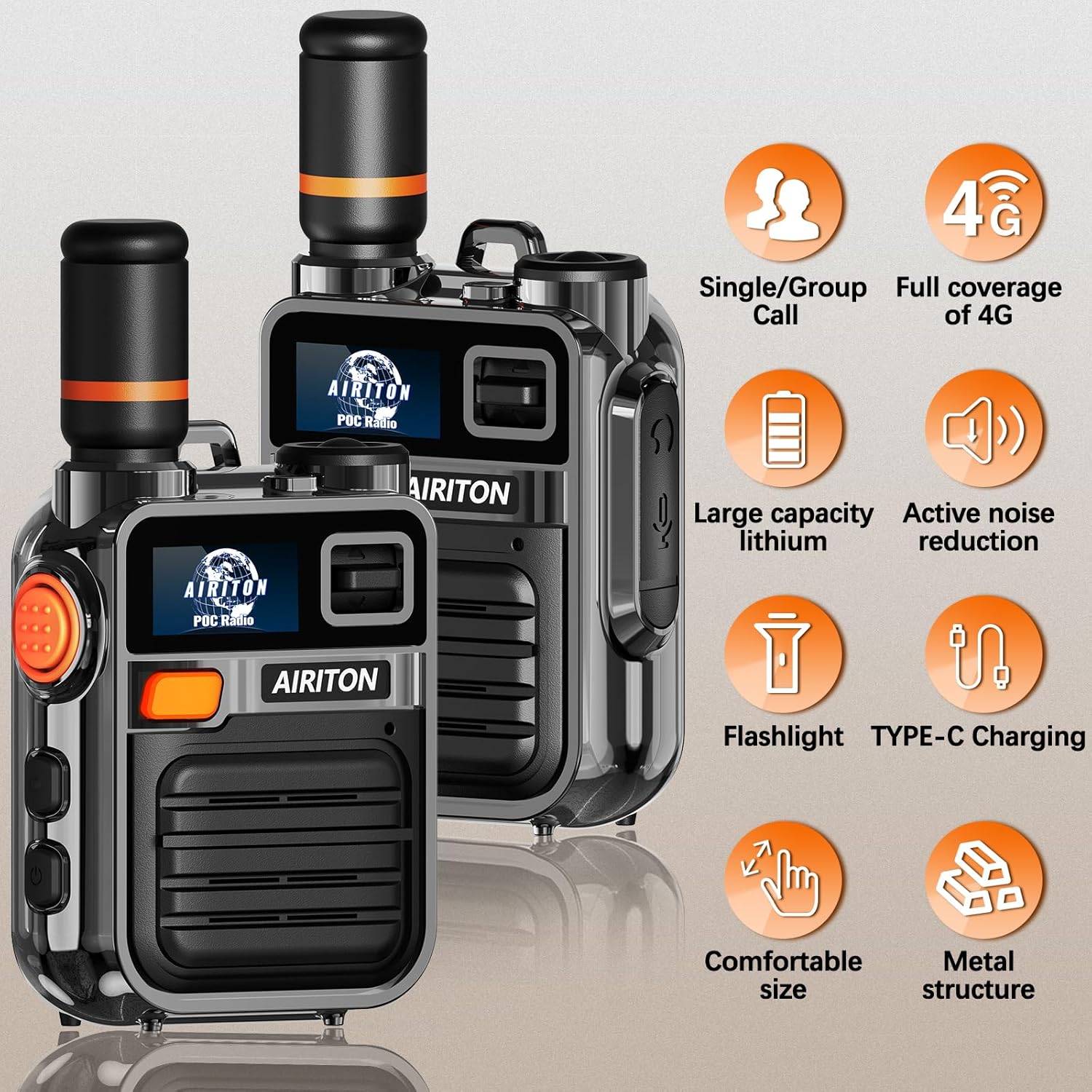
Figure 3.3: Overview of AI-K28 key features.

Figure 3.4: AI-K28 flashlight and Type-C charging.
Video 3.1: An overview of the Airiton AI-K28 radio's features and ease of use, demonstrating its quick setup and unlimited range capabilities.
Video 3.2: A detailed demonstration of the Airiton AI-K28 4G Fast Radio, showcasing its zero latency call, unlimited distance, pre-installed SIM card, USB-C charging, detachable back clip, and flashlight function.
4. Getting Started
4.1. Charging the Radio
Before first use, fully charge your AI-K28 radio. Connect the provided Type-C USB charger to the radio's charging port and plug it into a power source. The charging indicator light will typically show red while charging and change to green or turn off when fully charged.
Figure 4.1: Charging the AI-K28 radio via Type-C USB.
4.2. SIM Card Activation
The SIM card is pre-installed and activated. No complex activation steps are required. Simply power on the device to begin use.
4.3. Powering On/Off
Locate the On/Off button on the side of the radio. Press and hold the button to power the device on or off. The display will illuminate upon power-on.

Figure 4.2: Labeled parts of the AI-K28 radio, including the On/Off button.
4.4. Initial Pairing (Multiple Radios)
If you purchased two radios, they are typically pre-set for communication before shipping. If you acquire additional radios and require them to be paired with your existing units, please contact customer service with the serial numbers of all radios for assistance with configuration.
5. Operating Instructions
5.1. Basic Communication (Push-to-Talk)
To transmit, press and hold the Push-to-Talk (PTT) button located on the side of the radio. Speak clearly into the microphone. Release the PTT button to listen for a response.
5.2. Volume Adjustment
Use the Volume Up/Down buttons (refer to Figure 4.2) to adjust the speaker volume to a comfortable level.
5.3. Call Options
The AI-K28 supports various communication modes:
- Single Call (One-on-One): For private conversations with a specific individual.
- Group Call: For communicating with a pre-defined group of radios.
- Mass Call: For broadcasting messages to all members within the network.
Refer to the device's menu (accessed via Menu keys) for selecting and managing call types and groups.
Figure 5.1: AI-K28 call options.
5.4. Flashlight Function
The radio is equipped with a built-in flashlight. Consult the device's menu or dedicated button (if available, refer to Figure 4.2) for activation and deactivation.
5.5. Attaching the Belt Clip and Hand Strap
Secure the belt clip to the back of the radio using the provided screws. Attach the hand strap to the designated loop for convenient carrying.
6. Maintenance
- Cleaning: Use a soft, damp cloth to clean the radio's exterior. Avoid harsh chemicals or abrasive cleaners.
- Storage: Store the radio in a cool, dry place away from direct sunlight and extreme temperatures.
- Battery Care: To prolong battery life, avoid fully discharging the battery frequently. Charge the radio regularly, even if not in active use.
- Water Resistance: The radio is water-resistant. Avoid submerging it in water or exposing it to heavy rain for extended periods.
7. Troubleshooting
7.1. No Power
- Ensure the battery is charged. Connect the radio to the charger and verify the charging indicator.
- Confirm the On/Off button is pressed and held sufficiently to power on.
7.2. No Communication / Limited Range
- Verify that the radio has a 4G cellular signal. Check the signal strength indicator on the display.
- Ensure the SIM card is properly inserted and active.
- Confirm that both radios are powered on and set to the correct call group or individual contact.
- Obstructions or weak cellular coverage areas can affect performance.
7.3. Poor Audio Quality
- Adjust the volume level.
- Ensure the microphone and speaker are not obstructed.
- Move to an area with better cellular signal if experiencing static or dropouts.
7.4. Radios Not Paired (for multiple units)
- If you purchased more than two radios and they are not communicating, contact customer service with the serial numbers for configuration assistance.
8. Specifications
| Feature | Detail |
|---|---|
| Brand | Airiton |
| Model Number | AI-K28 |
| Color | Black |
| Connectivity Protocol | LTE (4G POC) |
| Talking Range Maximum | 5000 Miles (Network Dependent) |
| Number of Channels | 16 |
| Water Resistance Level | Water Resistant |
| Noise Level | 30 Decibels |
| Number of Batteries | 2 9V batteries required (included) |
| Compatible Devices | AI-K28 walkie talkies connected to the cellular network |
| Unit Count | 2.0 Count |
| FCC ID | 2BNNE-BQ-K28 |
9. Warranty and Support
Airiton provides technical guidance and customer service for the AI-K28 radio. For any questions, technical assistance, or support needs, please contact Airiton customer service. Details for contacting support are typically found on the product packaging or the official Airiton website.


