
1. Introduction
The Betife Automatic Pill Dispenser is designed to assist with precise and timely medication management. This smart device features a 31-day capacity, an alarm system, and app support for convenient scheduling and tracking. It incorporates dual security measures, including fingerprint and key locks, and offers flexible power options with both plug-in and battery backup capabilities. The design prioritizes ease of use, particularly for individuals with arthritis, ensuring a reliable and secure medication routine.
2. Package Contents
Verify that all items are present in the package:
- Automatic Pill Dispenser x 1
- Dose rings x 6
- Instruction book x 1
- Key x 3
- Quick guide x 1
3. Product Overview
The Betife Automatic Pill Dispenser is a circular device with multiple compartments for medication storage. It features a central control panel and a pop-out drawer for dispensing pills.
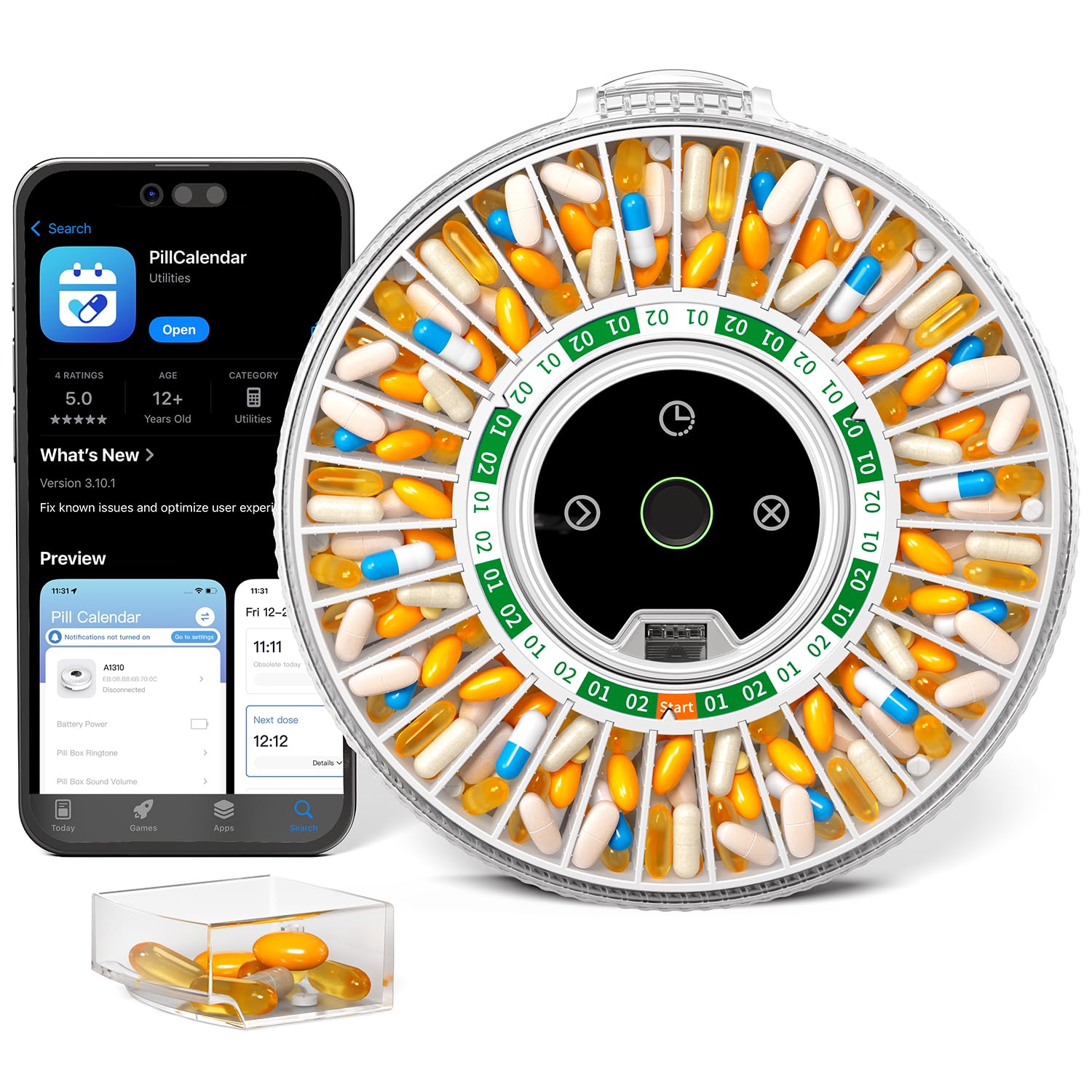
Image: Top-down view of the Betife Automatic Pill Dispenser, showing the circular design and multiple compartments.
4. Setup
4.1 Powering the Device
The dispenser operates using a dual-power system. For daily use, connect the device to a power outlet using the provided adapter. A built-in 1200 mAh battery provides backup power for up to 30 days in standby mode during power outages, ensuring continuous operation.

Image: The Betife Automatic Pill Dispenser plugged into a wall outlet, illustrating its primary power source.
4.2 App Installation and Bluetooth Connection
Download the free Betife app from your device's app store. Once installed, open the app and follow the on-screen instructions to connect the dispenser via Bluetooth. The app facilitates setting up medication schedules, custom reminders, and tracking.

Image: The Betife Automatic Pill Dispenser displayed alongside a smartphone and tablet, showcasing the companion app's interface and Bluetooth connectivity.
4.3 Filling the Dispenser
The dispenser features 31 compartments for monthly medication regimens. Use the provided dose rings to configure the dispenser for daily, twice-daily, or other frequencies. Carefully place the prescribed medication into the appropriate compartments. Ensure not to overfill compartments, as this may cause jamming.
4.4 Setting Alarms and Reminders
Utilize the Betife app to set up personalized medication schedules and alarms. The dispenser supports custom voice recordings for reminders, allowing for familiar voices instead of standard tones. This feature enhances the personalization of medication reminders.

Image: A man interacting with the Betife Automatic Pill Dispenser, which is emitting a personalized voice reminder, indicating it's time for medication.
4.5 Security Features
The dispenser is equipped with a dual-lock system for security. The primary lock uses advanced fingerprint recognition technology, while a mechanical key lock serves as a backup. This system helps prevent unauthorized access, particularly by children, and reduces the risk of accidental overdosing.

Image: A hand interacting with the fingerprint scanner on the Betife Automatic Pill Dispenser, demonstrating the security feature.
5. Operating Instructions
5.1 Dispensing Medication
When it is time for a dose, the dispenser will activate its alarm and illuminate. To access your medication, simply press the designated area on the dispenser. The press-to-open design allows the medication drawer to pop out, providing easy access to the pills. This design is particularly beneficial for users with arthritis or limited dexterity, as it eliminates the need to lift or manipulate the entire unit.
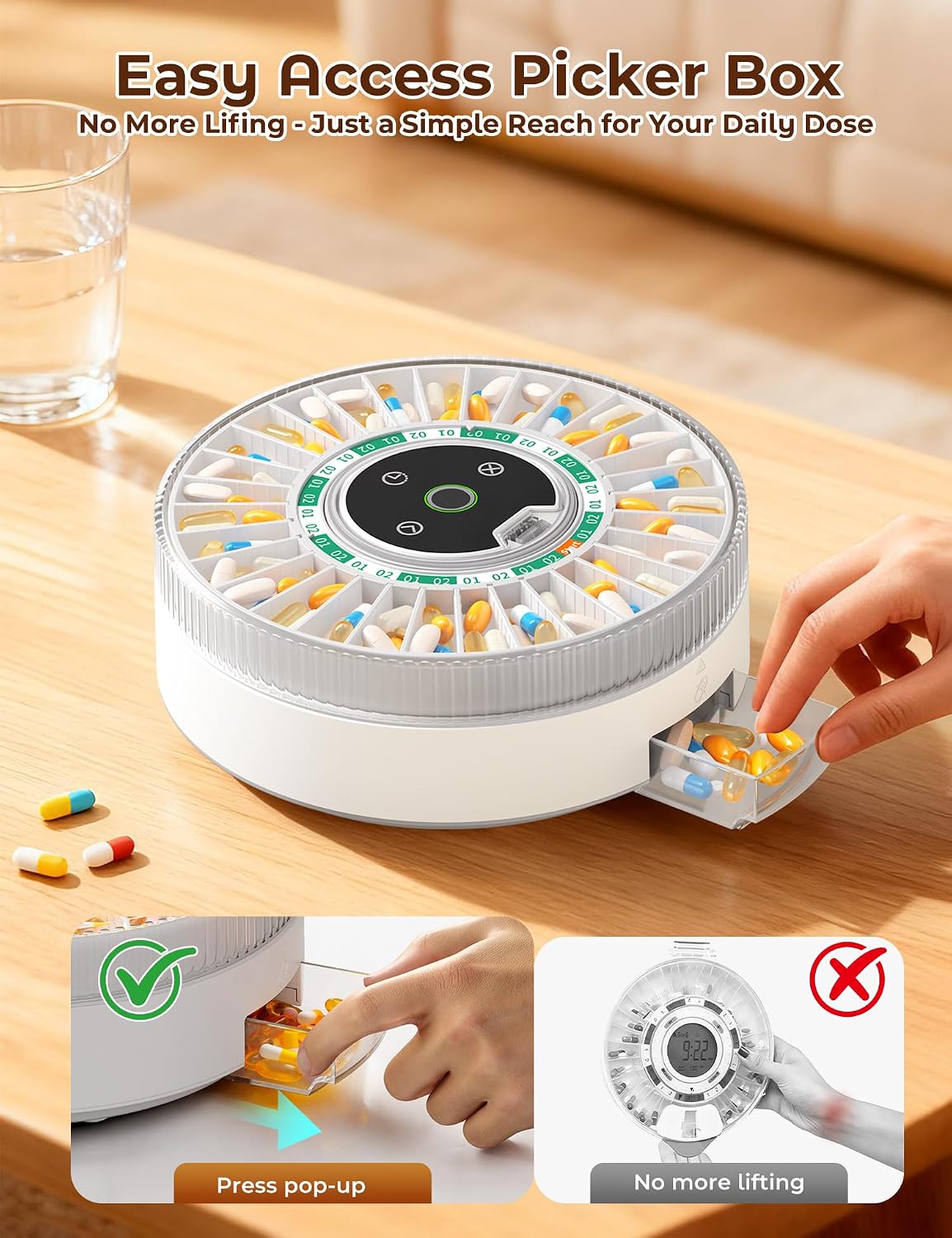
Image: A hand pressing the side of the Betife Automatic Pill Dispenser, causing the medication drawer to pop out for easy access.
5.2 Manual Dispensing (Advance Button)
The dispenser includes an 'advance' button for manual dispensing. Pressing this button will dispense the next scheduled dose. Note that this function typically works once per scheduled interval. After a manual dispense, the button may be temporarily disabled until the next scheduled alarm time.
5.3 Tracking Medication Records
The Betife app automatically logs every pill dispensed, providing a comprehensive record of medication adherence. Users can view monthly and weekly reports directly through the app, which helps in monitoring compliance and sharing information with healthcare providers if needed.

Image: A woman reviewing medication tracking data and reports on the Betife app displayed on both a smartphone and a tablet.
6. Maintenance
6.1 Cleaning
To clean the dispenser, wipe the exterior with a soft, damp cloth. Ensure the device is unplugged before cleaning. Do not immerse the dispenser in water or use harsh chemical cleaners. Allow all parts to dry completely before reassembling or plugging in.
6.2 Battery Replacement
The device uses 1 9V battery for backup power. If the backup battery indicator shows low power, replace the battery according to the instructions in the quick guide. Ensure the device is connected to main power during battery replacement to maintain settings.
7. Troubleshooting
7.1 Pills Jamming
If pills become jammed in the carousel, gently tap the top of the dispenser to dislodge them. If the issue persists, press and hold the cancel button for three seconds to re-dispense. Ensure that compartments are not overfilled and that pills are appropriately sized for the dispenser.
7.2 Alarm Volume
The alarm volume can be adjusted or muted through the Betife app settings. If the alarm is excessively loud, refer to the app's sound settings to customize it to your preference. Custom reminder ringtones can also be set via the app.
7.3 Connectivity Issues
If the dispenser fails to connect to the app via Bluetooth, ensure Bluetooth is enabled on your smartphone or tablet and that the dispenser is within range. Restarting both the app and the dispenser may resolve minor connectivity problems.
8. Specifications
| Feature | Detail |
|---|---|
| Model Number | Betife Automatic Pill Dispenser 01 |
| Product Dimensions | 9.2 x 9.2 x 3.5 inches |
| Weight | 3.06 Pounds |
| Number of Compartments | 28 (Note: Product description mentions 31, but specifications state 28. User should verify.) |
| Power Source | Plug-in (AC adapter), 1200 mAh Battery Backup |
| Backup Battery Type | 1 x 9V battery (included) |
| Connectivity | Bluetooth |
| Security | Fingerprint Lock, Mechanical Key Lock |
| Material | High Strength ABS Plastic |
9. Warranty and Support
9.1 Return Policy
A free return option is available within 30 days of purchase if the device is found challenging to use.
9.2 Customer Support
Betife provides comprehensive customer support, including step-by-step setup guides, illustrated manuals, and video tutorials. Multilingual support is available, with a reported 98% of issues resolved within 4 hours. For assistance, refer to the contact information provided in the quick guide or visit the official Betife website.
10. Official Product Videos
No official product videos from the seller are available for embedding at this time.