
1. Introduction
This manual provides essential instructions for the safe and efficient operation, maintenance, and troubleshooting of your FOSSiBOT F7200 Portable Power Station. Please read this manual thoroughly before using the device and retain it for future reference.
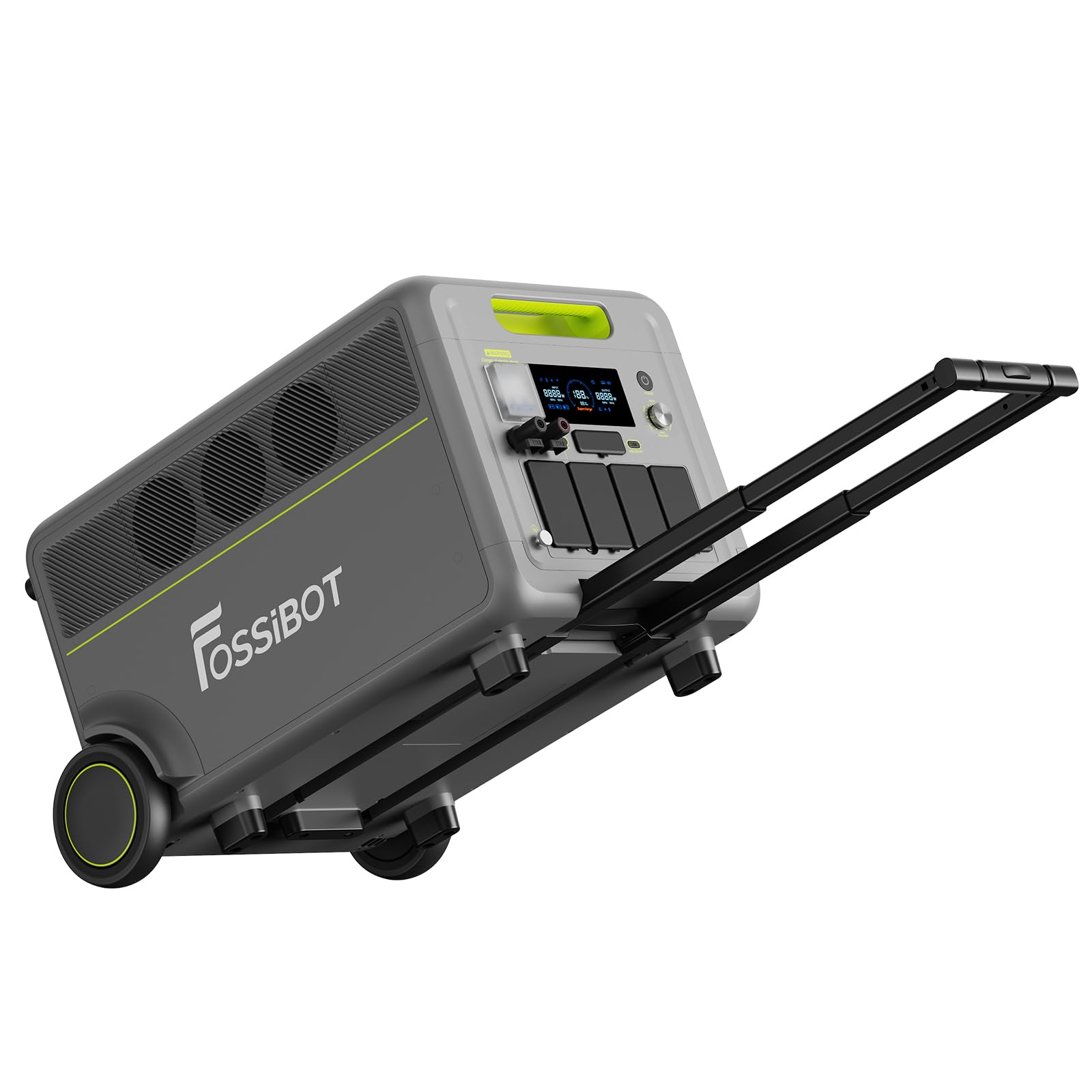
Image: The FOSSiBOT F7200 Portable Power Station, a grey unit with green accents and wheels, shown from the front-left angle.
2. Safety Instructions
Always follow basic safety precautions when using electrical appliances to reduce the risk of fire, electric shock, and personal injury.
- Do not disassemble, repair, or modify the unit.
- Keep the unit away from heat sources, direct sunlight, and flammable materials.
- Do not expose the unit to water or other liquids.
- Ensure proper ventilation during use to prevent overheating.
- Use only original or certified accessories.
- Keep out of reach of children and pets.
- In case of fire, use a dry powder fire extinguisher.
3. Product Overview
The FOSSiBOT F7200 is a high-capacity portable power station designed for various applications, from home backup to outdoor adventures. It features multiple output ports, flexible charging options, and smart control capabilities.
3.1. Components and Ports

Image: Front and rear views of the F7200, highlighting its various ports and controls, labeled 1 through 17.
- LCD Display
- Main Switch
- Power Adjustment Button
- USB Switch
- AC Switch
- Circuit Breaker
- Phase Terminal
- Neutral Terminal
- Grounding Socket
- AC Output
- High Voltage PV Input
- High Voltage PV Switch
- AC Input
- Microinverter Interface
- Battery Interface
- Charger Input
- Low Voltage PV Input
3.2. LCD Display Icons

Image: Detailed view of the LCD screen, explaining each icon and its function, labeled 1 through 17.
- 1. AC Charge
- 2. Solar/Vehicle Input
- 3. Bluetooth
- 4. WiFi
- 5. Battery Progress Bar
- 6. Output
- 7. USB Output
- 8. PD Output
- 9. Main Unit Indicator
- 10. Secondary Unit Indicator
- 11. Battery Percentage
- 12. Remaining Time
- 13. Temperature Protection
- 14. Fan Status
- 15. Microinverter Interface
- 16. Total Input Power
- 17. Total Output Power
4. Setup
4.1. Unpacking and Initial Inspection
Carefully remove the FOSSiBOT F7200 from its packaging. Inspect the unit for any signs of damage. If any damage is found, do not use the product and contact customer support.

Image: Contents of the standard package, including the F7200 unit, various charging cables (AC, MC4 to XT90, Anderson to MC4, XT60 vehicle), user manual, wrenches, fork terminals, and banana connectors.
Standard Package Contents:
- FOSSiBOT F7200 Power Station (70kg, 670 x 450 x 410 mm)
- AC Charging Cable (1.5m)
- MC4 to XT90 Cable (1m)
- Anderson to MC4 Cable (1.5m)
- XT60 Vehicle Power Cable (1.5m)
- User Manual
- Wrench (x2)
- Fork Terminal (x2)
- Banana Connector (x2)
4.2. Initial Charging
Before first use, fully charge the FOSSiBOT F7200. Connect the AC charging cable to a wall outlet and to the AC input port on the power station. The LCD display will show the charging status.
5. Operating Instructions
5.1. Turning On/Off
Press and hold the Main Switch button for a few seconds to turn the unit on or off. The LCD display will illuminate upon activation.
5.2. Connecting Devices
The F7200 offers various output options:
- AC Outlets: Connect your AC-powered devices to the 4 AC output sockets. Ensure the AC switch is turned on. The total maximum output is 7200W.
- USB Ports: Connect USB-A and USB-C devices to the respective ports. Turn on the USB switch.
- Other DC Outputs: Utilize the specific DC outputs for compatible devices.
For whole-home power, the F7200 can provide a maximum output of 7200W. This can be achieved by using two groups of 3600W AC outlets or by connecting the F7200 to your home's electrical panel via wiring terminals.

Image: Illustration of connecting the F7200 to a home's electrical system via terminals or using its AC outlets for whole-house power. Note: Terminal connection requires professional installation by certified electricians to ensure safety and system stability.
5.3. Charging the F7200
The F7200 supports multiple charging methods:
- AC Charging: Connect the AC charging cable to the AC input port and a wall outlet.
- Solar Charging: Connect solar panels to the High Voltage PV Input or Low Voltage PV Input using the appropriate cables (e.g., MC4 to XT90). The F7200 intelligently adjusts photovoltaic-AC input for optimal charging.

Image: Fast charging methods, showing combined AC and PV input for maximum efficiency. Example charging times: AC+PV high voltage+PV low voltage (5200W ≈ 1.5h), AC+PV high voltage (4000W ≈ 1.7h), AC+PV low voltage (4200W ≈ 1.9h). Note: Combined high voltage solar and AC charging input power is limited to 2000W when the battery exceeds 85%.

Image: Visual representation of solar charging (2500W, 20-450V, ~2h 25min; 1200W, 20-55V, ~4h 21min) and AC charging (3000W, ~2h 15min). Note: Input power is limited to 2000W when the battery exceeds 88%.
5.4. Uninterruptible Power Supply (UPS) Function
The F7200 features a 3000W UPS function with a switching time of less than 10 milliseconds. This ensures that connected sensitive devices like computers continue to receive power without interruption during a power outage.

Image: The F7200 acting as a UPS, providing continuous power with a transfer time under 10ms, shown in a garage environment with an aquarium.
5.5. App Control
Manage your F7200 remotely using the dedicated mobile application. The app allows you to monitor battery status, schedule charging cycles, and control outputs.

Image: Smartphone displaying the F7200 app interface, showing options for energy distribution, status monitoring, output customization, power off, and timer management. The app is available on Google Play and the App Store.
5.6. Adjusting Input Power
The F7200 features a rotary knob to adjust the input power from 600W to 3000W, allowing for customized fast or slow charging.

Image: A rotary input regulator knob with settings from 600W to 3000W, and a table showing corresponding full recharge times (e.g., 600W = 10 hours, 3000W = 2.2 hours).
5.7. Portability
The F7200 is designed for easy transport with industrial wheels and a retractable handle, making it convenient to move the unit wherever power is needed.

Image: A worker pulling the F7200 power station across a construction site using its retractable handle and wheels, highlighting its portability. The unit weighs 70 kg and is equipped with wheels and a retractable handle.
6. Maintenance
6.1. Battery Care
The FOSSiBOT F7200 uses EVE LiFePO4 batteries, known for their safety and long lifespan.

Image: Visual representation of the EVE LiFePO4 battery, emphasizing its 17-year lifespan and 5-year official service warranty, with over 6500 cycles. It also mentions "Green-E" for being cobalt-free and ecological.
- To maximize battery life, avoid fully discharging the unit frequently.
- Store the unit in a cool, dry place, partially charged (e.g., 50-80%) if not used for extended periods.
- Recharge the unit every 3-6 months to prevent deep discharge.
6.2. Cleaning and Storage
- Clean the exterior with a dry, soft cloth. Do not use abrasive cleaners or solvents.
- Ensure all ports are free of dust and debris.
- Store the unit in a well-ventilated area, away from extreme temperatures and humidity.
7. Troubleshooting
If you encounter issues with your FOSSiBOT F7200, refer to the following common problems and solutions:
| Problem | Possible Cause | Solution |
|---|---|---|
| Unit does not turn on | Battery is fully discharged; Main switch is off. | Charge the unit; Press and hold the Main Switch. |
| AC output not working | AC switch is off; Overload protection activated. | Turn on AC switch; Reduce connected load, restart unit. |
| Slow charging | Low input power setting; Inefficient solar panel angle. | Adjust input power knob; Optimize solar panel position. |
| App not connecting | Bluetooth/WiFi off; App not updated. | Ensure Bluetooth/WiFi is on; Update app to latest version. |
| Overload warning | Connected devices exceed the unit's output capacity. | Disconnect some devices; Reduce total power draw. |
| Overheating warning | Insufficient ventilation; High ambient temperature. | Ensure clear airflow around the unit; Move to a cooler environment. |
If the problem persists, please contact FOSSiBOT customer support.
8. Specifications
| Feature | Specification |
|---|---|
| Model Number | FOSSiBOT F7200 |
| Brand | FOSSiBOT |
| AC Output Power | 7200W (Max) |
| Battery Capacity | 5222Wh (Expandable up to 15.6 kWh with additional batteries) |
| Battery Type | EVE LiFePO4 |
| Battery Lifespan | 6500+ cycles, 17 years estimated life |
| UPS Function | 3000W, <10ms switching time |
| Max Input Power | 5200W (Combined AC + Solar) |
| AC Input Power | Adjustable 600W-3000W |
| Solar Input (High Voltage) | 2500W (20-450V) |
| Solar Input (Low Voltage) | 1200W (20-55V) |
| Connectivity | App Control (Bluetooth, WiFi) |
| Dimensions (L x W x H) | 67 cm x 45 cm x 41 cm |
| Weight | 70 kg |
| Recommended Uses | Camping, Commercial, Residential |
| Total AC Outlets | 4 |
| Included Components | Data cable, AC charging cable, MC4 to XT90 cable, Anderson to MC4 cable, XT60 vehicle power cable, user manual, wrench, fork terminal, banana connector |
9. Warranty and Support
9.1. Warranty Information
The FOSSiBOT F7200 Portable Power Station comes with a five-year warranty. This warranty covers defects in materials and workmanship under normal use. Please retain your proof of purchase for warranty claims.
The intelligent Battery Management System (BMS) provides multiple protections to ensure reliable operation and battery longevity.

Image: BMS shield logo with icons representing various protections: Overload Protection, Low/High Temperature Protection, Low/High Voltage Protection, Short-Circuit/Overcurrent Protection, Over-discharge/Overcharge Protection.
9.2. Customer Support
For technical assistance, warranty claims, or any questions regarding your FOSSiBOT F7200, please contact FOSSiBOT customer support through the official website or your retailer.
You can also visit the FOSSiBOT store on Amazon for more information: FOSSiBOT Amazon Store


